Master Addons
  • Widgets
    • Changelogs
      Source Code NEW PRO
      Caldera Forms
      Logo Slider
      Table of Contents
      Gravity Forms
      Transforms PRO
      Restrict Content PRO
      Pricing Table
      Ninja Form
      Mailchimp
      Tooltip
      Popup Trigger NEW PRO
      Which Element NEW
      Creative Button
      Creative Links NEW
      Domain Search HOT PRO
      Dual Heading HOT
      Flipbox
      Animated Gradient BG HOT PRO
      Image Hotspot PRO
      Infobox
      News Ticker PRO
      Particles
      Progress Bar
      Off-Canvas Content NEW PRO
      Reading Progress Bar HOT
      Custom JS
      Blockquote
      Counter Up
      Image Hover Effects
      Reveal NEW PRO
      Rellax PRO
      Positioning
      Image Comparison
      Tabs
      Toggle Content HOT PRO
      Post/Page Duplicator FREE
      Icons Extended
      Floating Effects PRO
      Mega Menu HOT
      Custom CSS HOT
      Gradient Headline
      Advanced Image
      Nav Menu
      Tooltips
      Comparison Table PRO
      Glassmorphism
      Featured Product PRO
      Image Carouse
      Gallery Slider NEW PRO
      Dynamic Tags NEW
      Countdown Timer
      Current Time
      Patterns
      Wrapper Link
      Timeline
      Team Member
      Contact Form 7
      Advanced Accordion
      Animated Headlines
      Blog
      Business Hours
      Call To Action
      Progress Bars
      Background Slider
      Team Slider
      Dynamic Table
      Grid Line PRO
      WP Forms
      Search
      We Form
      Entrance Animation NEW PRO
      Display Conditions PRO
      Filterable Image Gallery
      WP Forms
      Custom Breakpoints NEW
  • Features
    • Theme Builder

      Design site-wide templates for a consistent look across every page of your website.

      Popup Builder

      Create engaging popups, modals, and announcement bars - to capture leads.

      Widget Builder

      Expand Elementor with advanced custom widgets to build more dynamic layouts.

      Mega Menu Builder

      Create multi-column menus with icons and images for superior navigation.

      Custom Css

      Apply your own CSS for pixel-perfect styling beyond default design options.

      Dynamic Tags

      Insert dynamic content like post titles and custom fields directly into designs.

      Display Conditions

      Control element visibility based on user role, device, time, and other rules.

      Icons Library

      Choose from thousands of built-in icons to enhance visuals and consistency.

      Animation

      Add scroll, hover, entrance, and much more animations to bring designs to life.
  • Template Kits
    • Template Kits

      Professionally designed full-page template Kit. Import and customize in seconds.

      Ready Sections

      Pre-built content sections and rows. Drag, drop, and customize instantly.

      Ready Popups

      Different types of High-converting popup designs. Import and launch quickly.

      Ready Pages

      Complete page layouts for any purpose. Start editing immediately.

      Ready Header

      Multiple modern header designs. Import and adapt to your brand.

      Ready Footer

      Fully designed footers for different websites. Add functionality and style in clicks.
  • Brands
    • WP Adminify

      Take control of your WordPress dashboard. Customize the admin experience.

      Admin Bar Editor

      Customize the WordPress admin bar for a cleaner, more personalized workspace.

      Loginfy

      Customize your WordPress login page with branding, styles, and security enhancements.

      Rolemaster Suite

      Manage user roles and permissions with precision for better security and workflow.

      Master Blocks

      Expand the Gutenberg editor with advanced custom blocks for more creative layouts.

      WP Spotlight

      Instantly search and access admin features, posts, and settings from anywhere.
  • Themes
  • Help
    • Get Support
    • Documentation
    • Facebook Community
    • Changelogs
  • Blog
  • Widgets
    • Changelogs
      Source Code NEW PRO
      Caldera Forms
      Logo Slider
      Table of Contents
      Gravity Forms
      Transforms PRO
      Restrict Content PRO
      Pricing Table
      Ninja Form
      Mailchimp
      Tooltip
      Popup Trigger NEW PRO
      Which Element NEW
      Creative Button
      Creative Links NEW
      Domain Search HOT PRO
      Dual Heading HOT
      Flipbox
      Animated Gradient BG HOT PRO
      Image Hotspot PRO
      Infobox
      News Ticker PRO
      Particles
      Progress Bar
      Off-Canvas Content NEW PRO
      Reading Progress Bar HOT
      Custom JS
      Blockquote
      Counter Up
      Image Hover Effects
      Reveal NEW PRO
      Rellax PRO
      Positioning
      Image Comparison
      Tabs
      Toggle Content HOT PRO
      Post/Page Duplicator FREE
      Icons Extended
      Floating Effects PRO
      Mega Menu HOT
      Custom CSS HOT
      Gradient Headline
      Advanced Image
      Nav Menu
      Tooltips
      Comparison Table PRO
      Glassmorphism
      Featured Product PRO
      Image Carouse
      Gallery Slider NEW PRO
      Dynamic Tags NEW
      Countdown Timer
      Current Time
      Patterns
      Wrapper Link
      Timeline
      Team Member
      Contact Form 7
      Advanced Accordion
      Animated Headlines
      Blog
      Business Hours
      Call To Action
      Progress Bars
      Background Slider
      Team Slider
      Dynamic Table
      Grid Line PRO
      WP Forms
      Search
      We Form
      Entrance Animation NEW PRO
      Display Conditions PRO
      Filterable Image Gallery
      WP Forms
      Custom Breakpoints NEW
  • Features
    • Theme Builder

      Design site-wide templates for a consistent look across every page of your website.

      Popup Builder

      Create engaging popups, modals, and announcement bars - to capture leads.

      Widget Builder

      Expand Elementor with advanced custom widgets to build more dynamic layouts.

      Mega Menu Builder

      Create multi-column menus with icons and images for superior navigation.

      Custom Css

      Apply your own CSS for pixel-perfect styling beyond default design options.

      Dynamic Tags

      Insert dynamic content like post titles and custom fields directly into designs.

      Display Conditions

      Control element visibility based on user role, device, time, and other rules.

      Icons Library

      Choose from thousands of built-in icons to enhance visuals and consistency.

      Animation

      Add scroll, hover, entrance, and much more animations to bring designs to life.
  • Template Kits
    • Template Kits

      Professionally designed full-page template Kit. Import and customize in seconds.

      Ready Sections

      Pre-built content sections and rows. Drag, drop, and customize instantly.

      Ready Popups

      Different types of High-converting popup designs. Import and launch quickly.

      Ready Pages

      Complete page layouts for any purpose. Start editing immediately.

      Ready Header

      Multiple modern header designs. Import and adapt to your brand.

      Ready Footer

      Fully designed footers for different websites. Add functionality and style in clicks.
  • Brands
    • WP Adminify

      Take control of your WordPress dashboard. Customize the admin experience.

      Admin Bar Editor

      Customize the WordPress admin bar for a cleaner, more personalized workspace.

      Loginfy

      Customize your WordPress login page with branding, styles, and security enhancements.

      Rolemaster Suite

      Manage user roles and permissions with precision for better security and workflow.

      Master Blocks

      Expand the Gutenberg editor with advanced custom blocks for more creative layouts.

      WP Spotlight

      Instantly search and access admin features, posts, and settings from anywhere.
  • Themes
  • Help
    • Get Support
    • Documentation
    • Facebook Community
    • Changelogs
  • Blog
Purchase Now

Getting Started

  • Can’t see the Master Addon Element inside Elementor Page editor?
  • How To Apply For an Affiliate Account?
  • Active Pro version
  • Installing Plugin

Addons

  • Progress Bars
  • Image Carousel
  • Featured Product Element
  • Elementor Comparison table For Products & Services
  • Source Code Element
  • Advanced Image Element
  • How to Add Gradient Text in Elementor
  • Gallery Slider
  • Toggle Content
  • Infobox Element
  • Timeline Element
  • Dynamic Table Element
  • Instagram Feed
  • Mailchimp Element
  • BlockQuote Element
  • Changelog Element
  • Countdown timer
  • Current Time
  • Search Element
  • Filterable Image Gallery
  • Team Members Carousel
  • Counter Up For Elementor
  • Restrict Content For Elementor
  • MA Table of Contents
  • Image Hotspot
  • Image Comparison Element
  • News Ticker Element
  • Image Hover Effects Element
  • Advanced Tabs Element
  • Pricing Table Elementor Free Widget or Element Customization
  • Navigation Menu + Mega Menu
  • Navigation Menu Element
  • How Domain Search Works
  • How to configure FlipBox Element
  • Adding Tooltip in Elementor Editor
  • How to add Creative Links?
  • How to Add Business Hours Elementor Page Builder?
  • How To Edit Contact Form 7
  • How to add Creative Buttons
  • Animated Headline Elementor Page Builder
  • Elementor Accordion Widget
  • Elementor Call To Action Widget Tutorial
  • How To Create and Customize Progressbar In Elementor
  • Blog Element Customization
  • Adding Team Members in Elementor Page Builder
  • How to Use the Dual Heading Widget in Elementor

Extensions

  • Which Element
  • Post & Page Duplicator
  • Grid Line
  • Elementor Glassmorphism Effects Extension
  • Tooltip Extension for Elementor by Master Addons
  • Wrapper Link
  • Floating Effects
  • Dynamic Tags
  • Elementor Display Conditions For Browser, User, Time, Many More
  • Entrance Animation
  • Header, Footer, & Comment Builder
  • Custom Elementor Breakpoints Setup & Configuration
  • Animated Gradient Background: Give Elementor Sections a Moving Gradient
  • Reveal Extension
  • Particles Extension: Add an Animated Particle Background to Any Elementor Section
  • Background Slider Extension: Turn Any Elementor Section Background into a Slideshow
  • Transforms Extension: Rotate, Scale, Skew, and Flip Any Elementor Element
  • Rellax Extension
  • Positioning Extension: Place Any Elementor Element Exactly Where You Want
  • Custom CSS Extension: Write Custom CSS in Elementor Without Pro

Widget Builder

  • Widget Builder Settings Panel Introduction
  • Divider
  • Text Shadow
  • Select2
  • Border
  • Heading
  • Tabs
  • Repeater
  • Visual Choice
  • Background
  • Dimensions
  • Box Shadow
  • Slider
  • Icons
  • Gallery
  • Media
  • Popover Toggle
  • Widget Builder URL Field
  • Date Time
  • Typography
  • Font
  • Widget Builder Color Field
  • Choose
  • Select
  • Switcher
  • Hidden
  • Code
  • WYSIWYG
  • Widget Builder Textarea Field
  • Number
  • Widget Builder Text Field

Theme Builder

  • Comment Form
  • 404
  • Search
  • Archive
  • Single
  • Footer
  • Header

Popup Builder

  • How to Open a Popup After Inactivity in Elementor
  • How to Show an Exit Intent Popup in Elementor
  • How to Open a Popup on Scroll to a Specific Element in Elementor
  • How to Open a Popup on Scroll in Elementor
  • How to Open a Popup on Click in Elementor
  • How to open a popup on page load?
  • Popup Settings & Options

Template Kit

  • How to Import Template Kits in Master Addons
  • How to Disable Elementor Default Fonts and Colors
  • Import Elementor Template Kits
View Categories
  • Home
  • Docs
  • Popup Builder
  • How to Open a Popup on Scroll in Elementor

How to Open a Popup on Scroll in Elementor

Roy
Updated on June 11, 2026

4 min read

A popup that loads the second a page opens feels pushy, and most visitors close it before they’ve read a word. A scroll-triggered popup waits until someone is actually reading, then shows your offer once they’ve scrolled far enough to be interested. The Master Addons Popup Builder handles this with the On Scroll trigger and one Scroll Progress setting. No code.

Here’s how to set a popup to open after a visitor scrolls a chosen percentage of the page, using the Popup Builder that comes free with Master Addons for Elementor.

Before You Start #

  • A popup already built in the Master Addons Popup Builder (see the popup settings guide to create one)
  • Elementor installed and active
  • Master Addons for Elementor installed and active (installation guide)

Step 1: Open Your Popup in Elementor #

Go to Master Addons → Popup Builder. Find the popup you want to trigger on scroll, hover over its name, and click Edit with Elementor. The popup opens in the Elementor editor with the MA Popup Settings panel on the left.
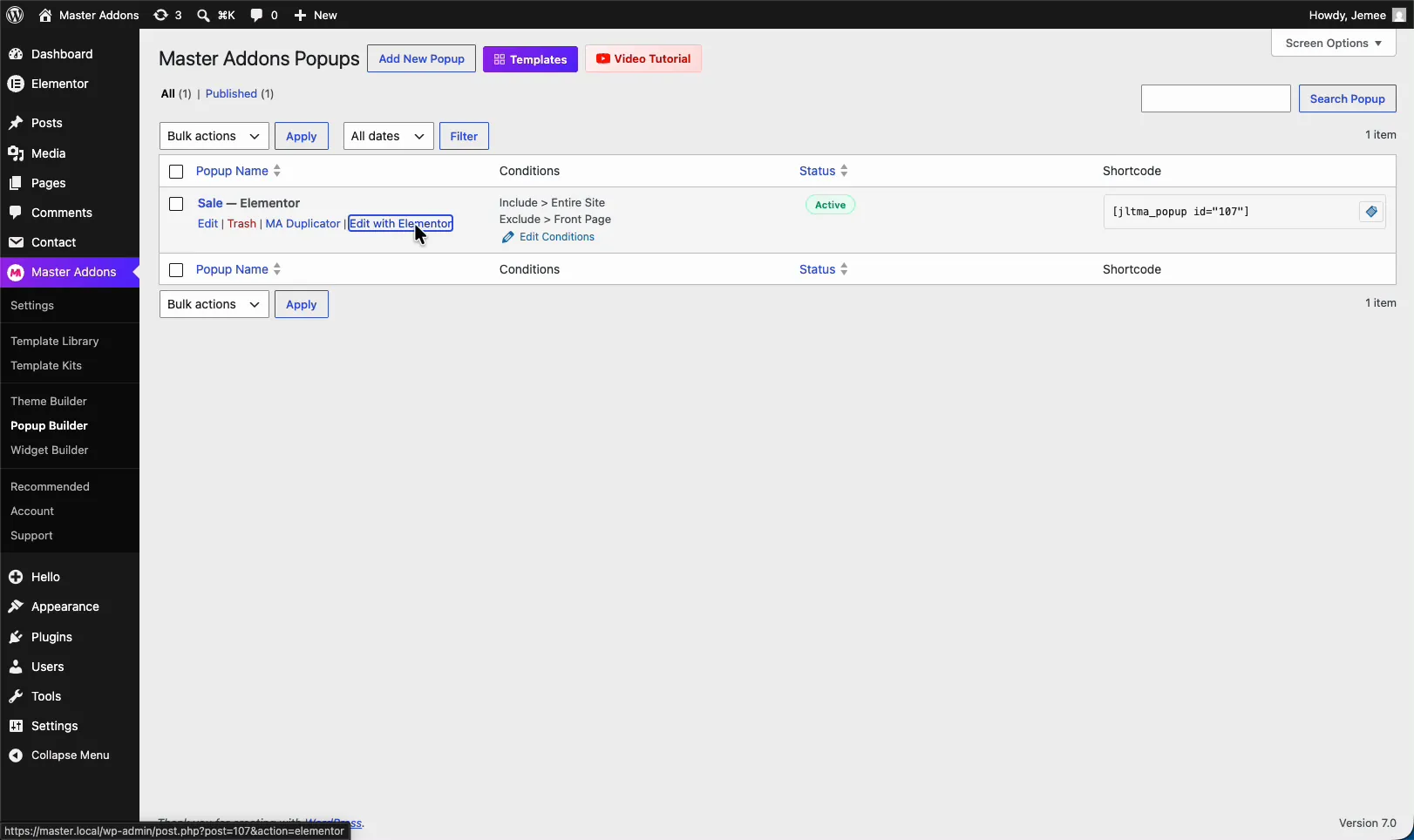
Master Addons Popups list with the Edit with Elementor link for the Sale popup

Step 2: Set the Popup to Open On Scroll #

In the MA Popup Settings panel, open the Settings section and find the Open Popup dropdown. It’s set to On Page Load by default. Switch it to On Scroll.

The same dropdown holds the other triggers too, On Click, On Scroll to Element, On Exit Intent, After Inactivity, and Custom, so you can change the behaviour later without rebuilding the popup.
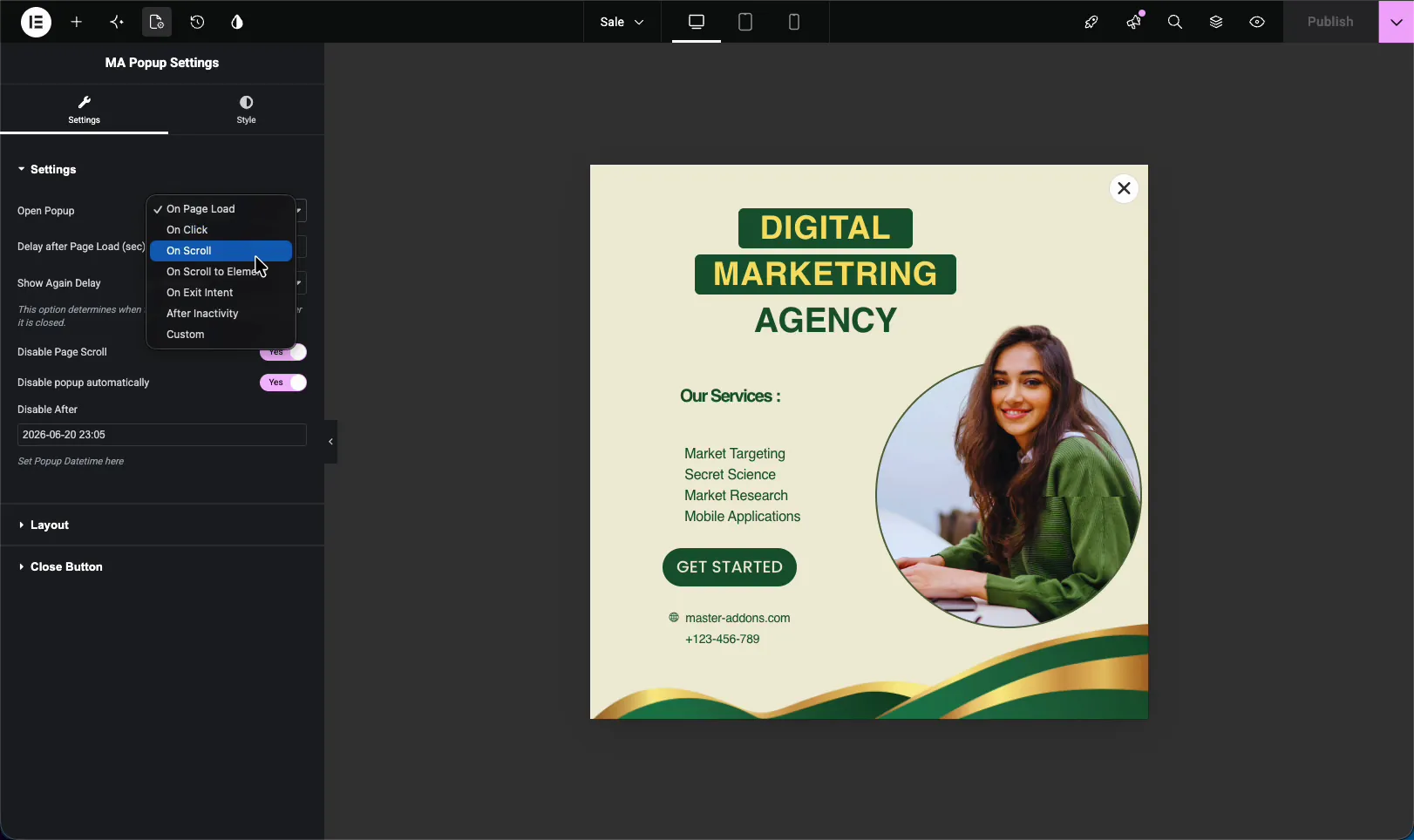
Open Popup dropdown in MA Popup Settings with the On Scroll trigger selected

Step 3: Set the Scroll Progress Percentage #

The moment you pick On Scroll, a new field shows up: Scroll Progress (%). This is how far down the page a visitor has to scroll before the popup fires. Drag the slider, or type a number straight into the box.

A low value like 20% shows the popup early, near the top. A higher value like 50% waits until the visitor is halfway down. I usually start around 40%, far enough that the reader is engaged, not so far that they’ve already left.
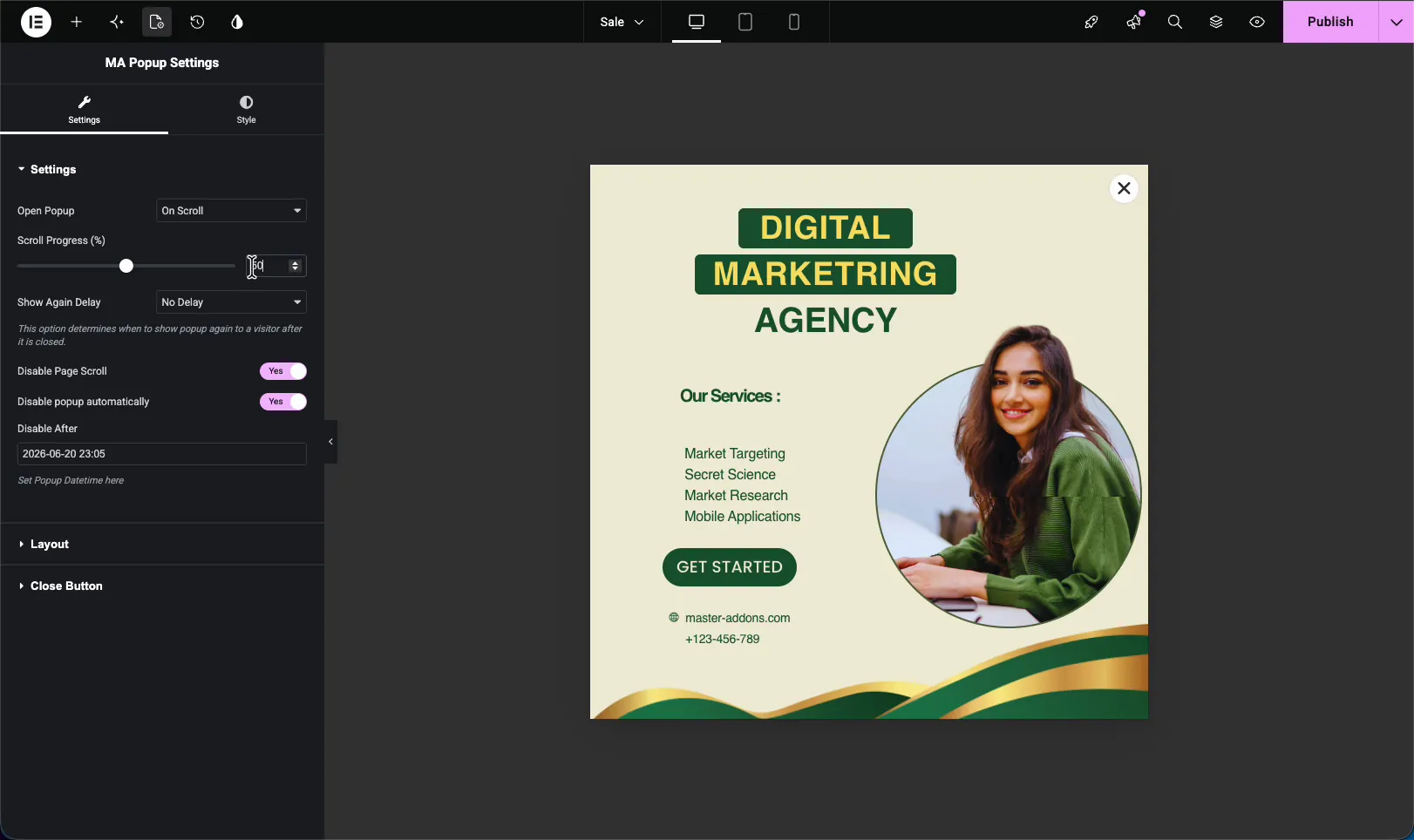
Scroll Progress percentage slider shown after choosing the On Scroll trigger in Master Addons

A few related options sit right under the slider:

  • Show Again Delay sets how long before the popup can come back after a visitor closes it.
  • Disable Page Scroll locks the background page while the popup is open.
  • Disable popup automatically and Disable After let you pick an end date so the popup stops showing on its own.

When you’re done, hit Publish (or Update) to save the popup.

Step 4: Preview and Scroll #

Open the page where the popup is set to display and view it on the front end. At the top there’s no popup, the visitor sees your normal content first.
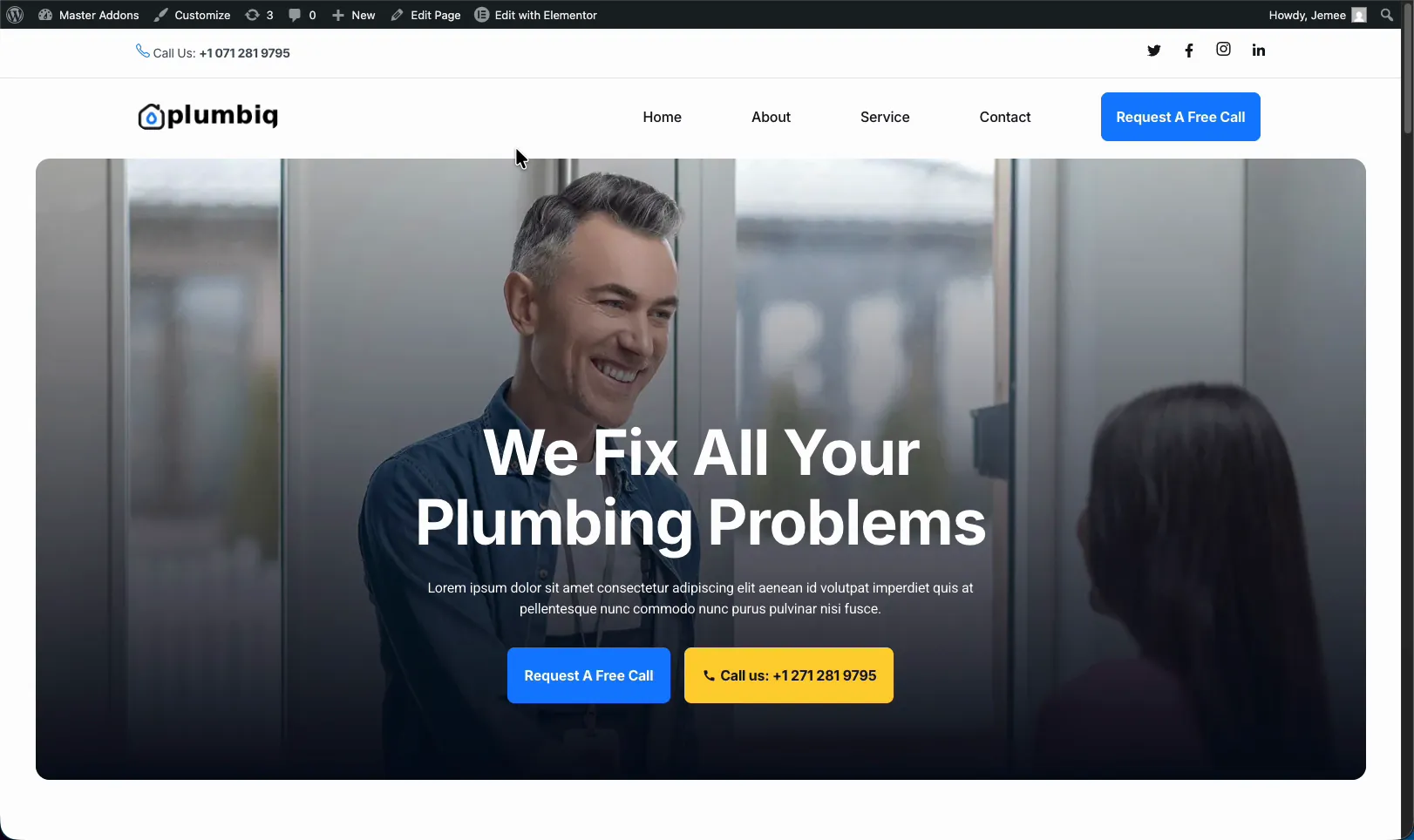
Live page hero section with no popup visible at the top before scrolling

Now scroll down. Once you pass the Scroll Progress percentage you set, the popup slides in over the page. It works the same way on every page included in the popup’s display conditions.

Master Addons popup appearing over the page content after the visitor scrolls past the set percentage

Troubleshooting #

  • Popup never appears? Lower the Scroll Progress percentage. On a short page, a high value like 80% can sit below the bottom of the content, so the visitor never reaches it.
  • Fires too early? Raise the percentage so the visitor reads more before it shows.
  • Not showing on the page at all? Check that the popup’s Activation is on and its display conditions include the page you’re testing.
  • Shows every time you reload? Set a Show Again Delay so it doesn’t reopen on every visit once a user has closed it.

Frequently Asked Questions #

How do I open a Master Addons popup on scroll?

Edit the popup in Elementor, open the MA Popup Settings panel, and set Open Popup to On Scroll. Then set the Scroll Progress percentage, which is how far down the page a visitor scrolls before the popup appears.

What does Scroll Progress percentage mean?

It’s the share of the page a visitor scrolls through before the popup fires. At 40%, the popup opens once someone has scrolled 40% of the way down. Lower values show it sooner, higher values wait longer.

What is a good scroll percentage for a popup?

Around 30 to 50 percent works for most pages. It’s far enough that the visitor is engaged with your content but not so far that they’ve finished reading or already left.

Can I stop the popup from showing every time?

Yes. Use the Show Again Delay option below the Scroll Progress slider to set how long before the popup can come back after a visitor closes it.

Do I need Elementor Pro for a scroll popup?

No. The Master Addons Popup Builder works with the free version of Elementor, so the On Scroll trigger and Scroll Progress setting work without Elementor Pro.

Related Reading #

  • Master Addons Popup Builder Settings
  • Popup Trigger Options Explained
  • How to Add a Popup in Elementor for Free
What are your Feelings

Share This Article :

  • Facebook
  • X
  • LinkedIn
  • Pinterest
Still stuck? How can we help?

How can we help?

Updated on June 11, 2026
How to Open a Popup on Scroll to a Specific Element in ElementorHow to Open a Popup on Click in Elementor
Table of Contents
  • Before You Start
  • Step 1: Open Your Popup in Elementor
  • Step 2: Set the Popup to Open On Scroll
  • Step 3: Set the Scroll Progress Percentage
  • Step 4: Preview and Scroll
  • Troubleshooting
  • Frequently Asked Questions
    • How do I open a Master Addons popup on scroll?
    • What does Scroll Progress percentage mean?
    • What is a good scroll percentage for a popup?
    • Can I stop the popup from showing every time?
    • Do I need Elementor Pro for a scroll popup?
  • Related Reading

Join 40,000+ Web Creators Who Trust Master Addons

Get all the premium widgets and templates you desire, built with clean code that keeps your site fast. Ditch the bloat, not the features.

Try Live Demo
Join The Community
Master Addons for Elementor
Master Addons Logo

110+ Premium Widgets & Lifetime Updates – Build Beyond Limits. An Exclusive Creation by Pixar Labs

Facebook-f Twitter Youtube Wordpress
Features
  • Template kits
  • Template Library
  • Widget Builder
  • Theme Builder
  • Mega Menu Builder
  • Template kits
  • Template Library
  • Widget Builder
  • Theme Builder
  • Mega Menu Builder
Support
  • Support Forum
  • Contact US
  • Join Community
  • Blog
  • Support Forum
  • Contact US
  • Join Community
  • Blog
Resources
  • Apply For Affiliate
  • Documentation
  • Video Tutorials
  • My Account
  • Change Log
  • Apply For Affiliate
  • Documentation
  • Video Tutorials
  • My Account
  • Change Log
Navigate
  • Terms of Use
  • Refund Policy
  • Privacy Policy
  • Terms of Use
  • Refund Policy
  • Privacy Policy