

Grid Line

Ever finish a design and feel like something’s just… a little off? Getting perfect alignment by eye is tough. The Grid Line extension gives you a visual guide right inside the Elementor editor. Turn on customizable grid lines to see columns, gutters, and margins as you build. Snap your sections, columns, and widgets into place for a clean, balanced, and professional layout every single time. It’s like having graph paper behind your design – making it easier for beginners and faster for experts to create crisp, structured landing pages.

Grid Line extension
Customizable Visual Grid

Customizable Visual Grid

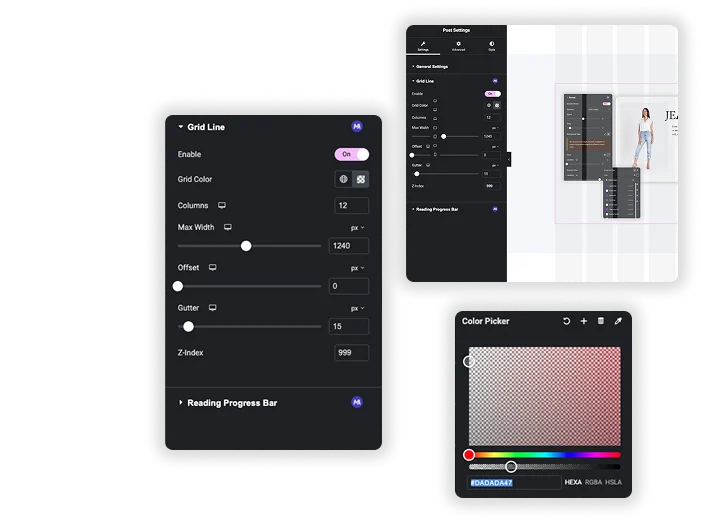
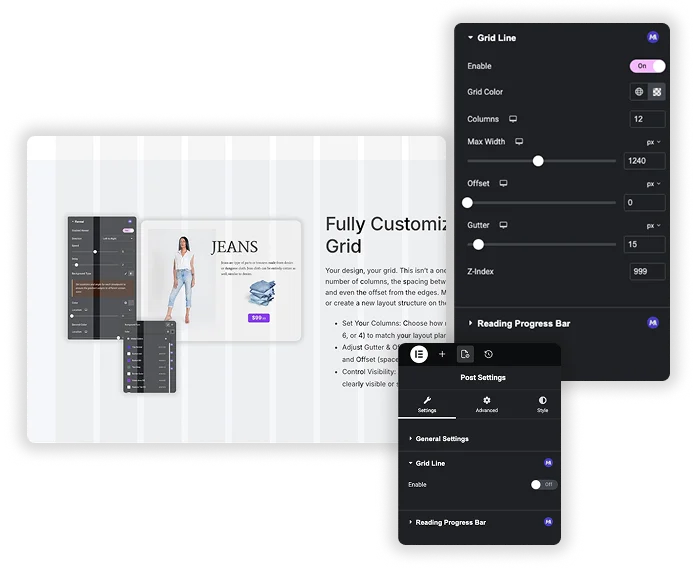
Your design, your grid. This isn’t a one-size-fits-all overlay. You control the number of columns, the spacing between them (gutter), the overall max width, and even the offset from the edges. Match your grid to your theme’s container or create a new layout structure on the fly.

  • Set Your Columns: Choose how many vertical columns to display (like 12, 6, or 4) to match your layout plan.
  • Adjust Gutter & Offset: Fine-tune the Gutter (space between columns) and Offset (space from the screen edges) for perfect padding.
  • Control Visibility: Change the Grid Color and Z-index to make the lines clearly visible or subtle behind your content.

Frequently Asked Questions For Grid Line

Learn the most asked queries users have about Grid Line and find answers in one place.
Does the grid affect how my site looks on the front end?

Not at all! The grid lines are purely a visual guide in your editor. They’re like training wheels or a ruler you lay over your design. Once you publish the page, the grid disappears completely. Only your perfectly aligned content remains.

Think of it like this: The Gutter is the space between your columns. The Offset is the space from the left and right edges of the screen to where the grid starts. Adjusting both lets you perfectly mimic your theme’s container padding and column spacing.

Can I use this with Elementor’s own Flexbox Container system?

Yes, absolutely! The grid lines are a visual overlay. They can help you align items within a Flexbox container or structure traditional sections. It’s a separate guide that works alongside any Elementor layout method.

Nope, it’s a very lightweight feature. It just draws simple lines on the screen based on your settings. You shouldn’t notice any lag or slower performance while editing.

Trending Elementor Widgets & Extensions

Build sophisticated websites in less time.

Glassmorphism element for Elementor by Master Addons

Glassmorphism

Home Glassmorphism is the design trend that gives your website a soft, translucent, modern look...
View Details
Extend Beyond the Max Width

Container Extras

Home Tired of your stunning designs being confined to rigid container limits? Container Extras by...
View Details
Pattern extension

Patterns

Home Transform flat, static containers into visually engaging design elements with the Master Addons Patterns...
View Details
Exact Replicas in a Single Action

Post/Page Duplicator

Home Streamline your workflow and eliminate repetitive setup with the Master Addons Post/Page Duplicator. This...
View Details
Reading progress bar extension

Reading Progress Bar

Home Ever start reading a long article and wonder how much is left? So do...
View Details


