
Elementor Wrapper Link: Make Any Container, Section or Widget Clickable

A wrapper link in Elementor makes a whole element clickable. You give a container, section, column or widget one URL, and a click anywhere inside it opens that page. Master Addons adds this as a free Wrapper Link option on every element, with Dynamic Tags, new tab and nofollow settings.

Link Any Container, Column, or Widget

Link Any Container, Column, or Widget

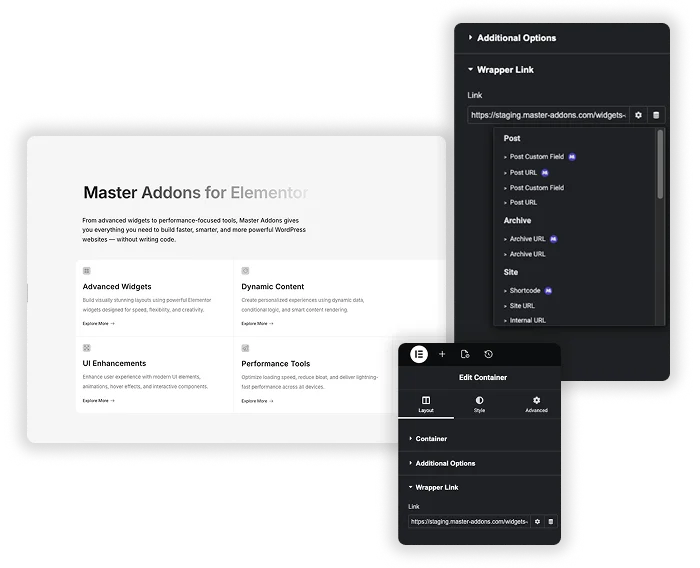
Wrapper Link adds a Link field to every Elementor container, section and column (in the Layout tab) and to every widget (in the Content tab). Paste a URL, such as a page on your site, an external service or a file download, and the whole element becomes the clickable area. A pointer cursor appears on hover, so visitors can tell the card is a link.

  • Works on Elementor containers, sections, columns and widgets, including widgets from other addons.
  • No CSS or HTML. Paste the URL into the Link field.
  • Good for clickable cards, service boxes, team profiles, full-width banners and logo blocks, for example when you build a footer template in Elementor.

Link options and dynamic links

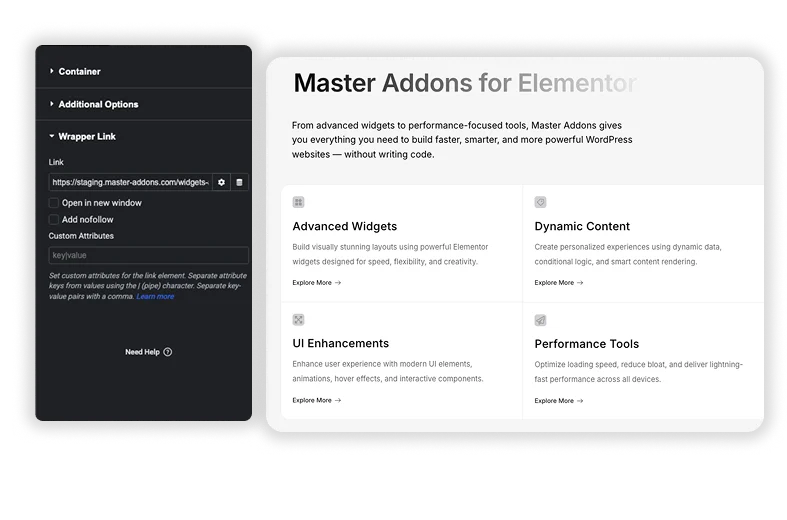
The Link field has the usual Elementor options. You can open the link in a new tab, mark it nofollow, or pick a Dynamic Tag so the URL comes from your site’s data, such as a post link.

  • Open in new window and Add nofollow sit right under the URL.
  • Dynamic Tags work in the Link field, so one template can link each card to its own post. The Dynamic Tags extension adds more sources to pick from.
  • Want a linked banner to show only to some visitors? Combine it with Display Conditions (Pro).
  • The click is handled by a small script that loads only on pages using Wrapper Link. Search engines don’t read it as a normal link, so keep a real text link inside the card if the target page needs to be crawled.
Wrapper Link options in the Elementor editor

Elementor's container link vs Wrapper Link

Elementor can already turn a container into a link. Set the container’s HTML Tag to a (link) in the Layout tab and add a URL. That covers a simple card. Wrapper Link handles the cases the built-in option does not.

Elementor container linkMaster Addons Wrapper Link
Works onContainersContainers, sections, columns and widgets
How the link worksReal <a> tag in the HTMLClick handled by a script
Dynamic Tags in the URLYesYes
Links inside the elementInvalid HTML (a link inside a link)A click anywhere, including on an inner button, opens the wrapper URL
Seen as a link by search enginesYesNo

Pick Elementor’s option when you want search engines to follow the link. Pick Wrapper Link for sections, columns and widgets, or when you want a block clickable without changing its HTML tag.

How to make a whole container clickable in Elementor

  1. In your WordPress dashboard, go to Master Addons, open the Extensions tab and make sure Wrapper Link is switched on.
  2. Edit the page with Elementor and select the container, section, column or widget you want to link.
  3. Open the Layout tab for a container, section or column, or the Content tab for a widget, and expand the Wrapper Link panel.
  4. Paste the URL or choose a Dynamic Tag, then turn on Open in new window or Add nofollow if you need them.
  5. Update the page and click anywhere on the element to test it.
Template Viewer
Facebook
Twitter
WhatsApp
Copy Link
Buy Now
Wrapper Link
Wrapper Link

Frequently Asked Questions For Wrapper Link

Learn the most asked queries users have about Wrapper Link and find answers in one place.
What is a wrapper link in Elementor?

It is a link applied to a whole element instead of a single piece of text. With Master Addons Wrapper Link, a click anywhere inside a container, section, column or widget opens the URL you set.

Elementor’s own option turns a container into an <a> tag, so it only works on containers, and links placed inside it make the HTML invalid. Wrapper Link also works on sections, columns and widgets, and it handles the click with a script without changing the element’s tag.

Is Wrapper Link good for SEO?

Wrapper Link is for visitors. The click is handled by a script, so search engines don’t see a link there and the nofollow option has no SEO effect. If the target page needs to be crawled, also put a normal text link to it inside the card.

It can, but a click on those inner buttons also opens the wrapper URL. If a card needs two different destinations, link the widgets one by one instead of the whole container.

Trending Elementor Widgets & Extensions

Build sophisticated websites in less time.

Master Addons Glassmorphism extension for Elementor: frosted glass cards with the Blur Value control set to 20px

Glassmorphism

Home Free Elementor Glassmorphism Extension: Frosted Glass Effect in One Toggle Glassmorphism is the frosted...
View Details

Master Addons Container Extras extension for Elementor: container capped at a 1400px Max Width, with Max Width, Max Height, Min Width and Min Height controls

Container Extras

Home Elementor Container Max Width and Max Height Controls Container Extras is a free Master...
View Details

Master Addons Patterns extension for Elementor: hero with the Purple Gradient Grid Left style, three more pattern styles and the Enable Pattern panel

Patterns

Home 70+ Free Elementor Background Patterns Patterns is a free Master Addons extension that adds...
View Details
Master Addons Post/Page Duplicator extension for Elementor: MA Duplicator row link in the WordPress Pages list creating a Landing Page - [Duplicated #128] draft

Post/Page Duplicator

Home Duplicate Elementor Pages and Posts in One Click Post/Page Duplicator is a free Master...
View Details

Master Addons Reading Progress Bar extension for Elementor: blue bar 42% filled across the top of a privacy policy page, with enable, position, height and fill color settings

Reading Progress Bar

Home Add a Reading Progress Bar in WordPress (Elementor) Reading Progress Bar is a free...
View Details