

Elementor Floating Effects (Pro): Translate, Rotate and Scale Motion

Floating Effects is a Master Addons Pro extension that gives any Elementor widget a looping motion. Turn on Translate, Rotate or Scale, set a From and a To value, and the widget moves between them and back again for as long as the page is open. It suits floating hero images, drifting icons and pulsing badges, with no keyframes to write.

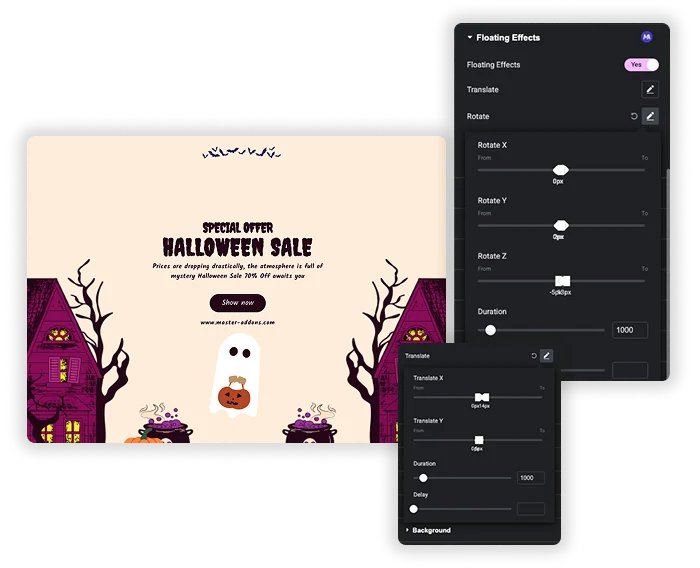
Floating Effects Rotate and Translate sliders beside a Halloween sale section with a floating ghost

Translate: Float Up, Down or Sideways

Translate X and Translate Y each take a From and a To value between -100 and 100 px. The widget moves from the first value to the second and back, with a smooth ease in and out. The default is 0 to 5 px, a very small drift.

  • Vertical float: Translate Y from 0 to 15 px gives an icon or badge a gentle bob.
  • Sideways drift: Translate X moves the widget slowly left and right.
  • Both axes: X and Y together move the widget along a diagonal line, because they share the same timing.

Rotate, Scale and Timing

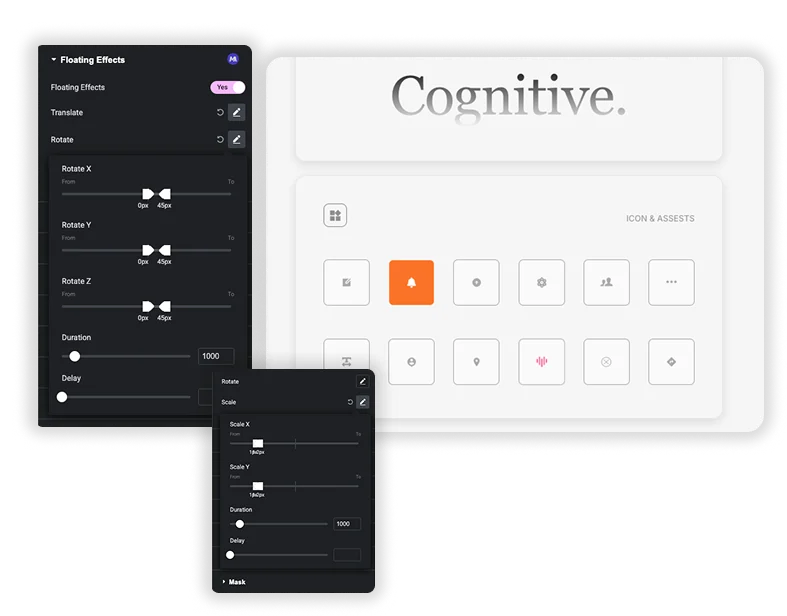
Rotate has X, Y and Z sliders from -180 to 180 degrees, and Scale has X and Y from 0 to 5, with 1 to 1.2 as the default. Like Translate, both swing from From to To and back, so rotation is a sway rather than a full spin. Each transform has a Duration of up to 10000 ms (1000 when left empty) and a Delay of up to 5000 ms.

  • Pulse: Scale X and Y from 1 to 1.05 makes a button grow and shrink gently.
  • Sway: Rotate Z from -5 to 5 degrees suits a hanging tag or badge.
  • One timeline: combined transforms share one timing. Translate’s Duration and Delay are used first, then Rotate’s, then Scale’s.
Floating Effects Rotate and Scale sliders beside an app design board with icon cards

Elementor Motion Effects vs Master Addons Floating Effects

Elementor has two kinds of motion (checked on Elementor 4.2.4 with Pro). Entrance Animation, in free Elementor, plays once when a widget appears. Motion Effects, in Elementor Pro, move a widget as the visitor scrolls or moves the mouse. Neither loops on its own, and that is the gap Floating Effects fills.

FeatureElementor Entrance AnimationElementor Pro Motion EffectsMaster Addons Floating Effects
PriceFreeElementor ProMaster Addons Pro
What starts itThe widget appearing, oncePage scroll or mouse movementNothing, it loops on its own
MovementPreset fades, slides, zooms and bouncesVertical and horizontal scroll, transparency, blur, rotate, scale, mouse track, 3D tiltTranslate X and Y, rotate X, Y and Z, scale X and Y
Your valuesDuration and delaySpeed, direction and viewport rangeFrom and To values, duration and delay
Works onWidgets and containersWidgets and containersWidgets only

If you want motion tied to scrolling or the cursor, Elementor Pro Motion Effects is the better fit. Floating Effects is for a gentle movement that keeps going without any visitor input.

Other motion extensions in Pro: Transforms, Entrance Animation and Reveal.

Template Viewer
Facebook
Twitter
WhatsApp
Copy Link
Buy Now
Floating Effect
Floating Effect
Halloween Deals
Halloween Deals
Block Chain
Block Chain

How to Add Floating Effects in Elementor

Once the extension is on, the Floating Effects panel sits in the Advanced tab of every widget.

  1. With Master Addons Pro active, go to Master Addons > Extensions and switch on Floating Effects.
  2. Edit your page with Elementor and select the widget you want to move, such as an image or icon.
  3. Open the Advanced tab, expand Floating Effects and set it to Yes.
  4. Turn on Translate, Rotate or Scale and set the From and To values.
  5. Set Duration and Delay, then check the motion in the editor preview.
  6. Update the page. For a longer walkthrough with images, read our floating effect tutorial.

Frequently Asked Questions For Floating Effects

Learn the most asked queries users have about Floating Effects and find answers in one place.
Is Floating Effects free?

No. Floating Effects is part of Master Addons Pro. Free Elementor has entrance animations that play once, but no looping float.

No. The Floating Effects panel is only in the Advanced tab of widgets. To float a group of elements, apply it to each widget, or combine them into one image before adding the effect.

Can the rotation spin all the way around?

Not as a continuous spin. Rotate goes from the From value to the To value and back, within -180 to 180 degrees, so it works best as a sway or tilt.

A few floating widgets are fine. The motion uses the small anime.js library and only changes CSS transforms, which browsers handle well. Keep it to a handful of widgets per screen so the page stays calm and runs smoothly on slower phones.

Trending Elementor Widgets & Extensions

Build sophisticated websites in less time.

Master Addons Glassmorphism extension for Elementor: frosted glass cards with the Blur Value control set to 20px

Glassmorphism

Home Free Elementor Glassmorphism Extension: Frosted Glass Effect in One Toggle Glassmorphism is the frosted...
View Details

Master Addons Container Extras extension for Elementor: container capped at a 1400px Max Width, with Max Width, Max Height, Min Width and Min Height controls

Container Extras

Home Elementor Container Max Width and Max Height Controls Container Extras is a free Master...
View Details

Master Addons Patterns extension for Elementor: hero with the Purple Gradient Grid Left style, three more pattern styles and the Enable Pattern panel

Patterns

Home 70+ Free Elementor Background Patterns Patterns is a free Master Addons extension that adds...
View Details
Master Addons Post/Page Duplicator extension for Elementor: MA Duplicator row link in the WordPress Pages list creating a Landing Page - [Duplicated #128] draft

Post/Page Duplicator

Home Duplicate Elementor Pages and Posts in One Click Post/Page Duplicator is a free Master...
View Details

Master Addons Reading Progress Bar extension for Elementor: blue bar 42% filled across the top of a privacy policy page, with enable, position, height and fill color settings

Reading Progress Bar

Home Add a Reading Progress Bar in WordPress (Elementor) Reading Progress Bar is a free...
View Details