






Animated Gradient BG
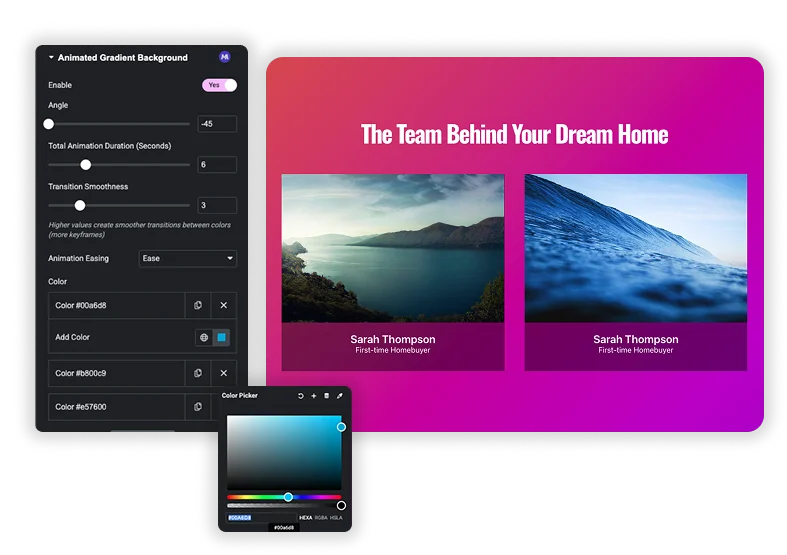
Make your website stand out in seconds. Ditch static colors and boring images. The Animated Gradient Background extension lets you fill any section, container, or column with beautiful, smoothly shifting gradients. Choose your colors, set the angle and speed, and watch as the background comes to life with a gentle, endless flow. Perfect for hero sections, call-to-action areas, or as a modern backdrop for your content. No video files, no heavy code – just lightweight, eye-catching motion that captures attention and makes your design feel premium.
Live Gradient Builder with Real Colors
Start with a simple two-color gradient or build a complex multi-color blend. Use the color pickers to choose any hue, and adjust their position on the gradient slider to control the blend. See your choices update live. The magic happens when these colors start to move and flow into each other, creating a dynamic, living backdrop.
- Unlimited Colors: Add as many color stops as you want to create rich, vibrant gradients.
- Live Preview: See your gradient build in real-time as you adjust colors and stops.
- Professional Palettes: Easily create gradients that match your brand’s exact color scheme.
Full Control Over the Animation
An animation that’s too fast is distracting, too slow is boring. You get full control to make it feel just right. Set the Angle to change the direction of the flow. Adjust the Total Animation Duration to make it slow and calm or quick and energetic. Choose an Animation Easing (like “Smooth”) to make the movement feel natural, not robotic.
- Control the Flow: Change the Angle (e.g., 90° for horizontal, 180° for vertical) to direct the animation.
- Set the Pace: A longer Duration (like 10 seconds) creates a subtle, slow shift. A shorter one (3 seconds) is more noticeable and energetic.
- Smooth Transitions: Use Easing options to avoid abrupt color jumps, making the loop seamless.


Frequently Asked Questions For Animated Gradient BG
Will this work on any part of my page?
Yes! You can apply it to almost any Elementor container: full sections, individual columns, or even special containers like hero boxes. Just find the background settings for that element and look for the “Animated Gradient” background type.
Can I use this over a background image or video?
Typically, you choose one background type per element. You can’t layer an animated gradient over a video or image using the same settings. But you could put your image or video in a column inside a section that has the animated gradient background, creating a layered look.
How many colors can I use in one animation?
Technically, as many as you want by clicking “Add Color”. But for the cleanest, most performant effect, we recommend 2 to 4 colors. Too many colors can make the animation look muddy or chaotic.
Does the animation play all the time, or can I make it play on hover?
The extension is designed for continuous, looping animations that play automatically as soon as the page loads. For hover-controlled animations, you would likely need to use a different method or custom CSS. This tool is for creating an always-on, atmospheric background effect.
Trending Elementor Widgets & Extensions
Build sophisticated websites in less time.

Glassmorphism

Container Extras

Patterns

Post/Page Duplicator




