
Free Elementor Dynamic Tags: No Elementor Pro Needed
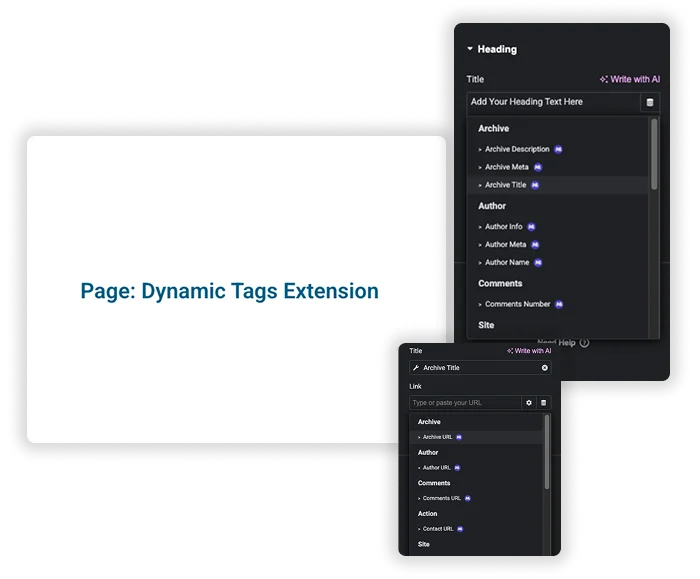
Elementor keeps its dynamic tags in Pro. The Dynamic Tags extension in Master Addons adds 35 of them to the free Elementor editor, so a heading can show the post title, an image can show the featured image, and a footer can print the current year without anyone editing it. Click the dynamic icon on a text, link or image control and choose where the value comes from.

Site-Wide Dynamic Content
Keep site-wide information consistent and current. Pull in your Site Title, Site Tagline, or the Current Date & Time anywhere. Display personalized User Info for logged-in visitors, like their display name. You can even pull data from the URL using Request Parameter or execute custom Shortcode. It’s perfect for headers, footers, and global templates that need to reflect real-time information.
- Always Current: Automatically display the current date and time in announcements or posts.
- Personalized Greetings: Show the logged-in user’s name in a welcome message.
- URL-Based Content: Change what’s displayed based on URL parameters for targeted campaigns.
- Footer Copyright: Drop the Current Date & Time tag into a footer template and the year updates itself every January. Here is how to edit a WordPress footer in Elementor.
Advanced Post & Author Details
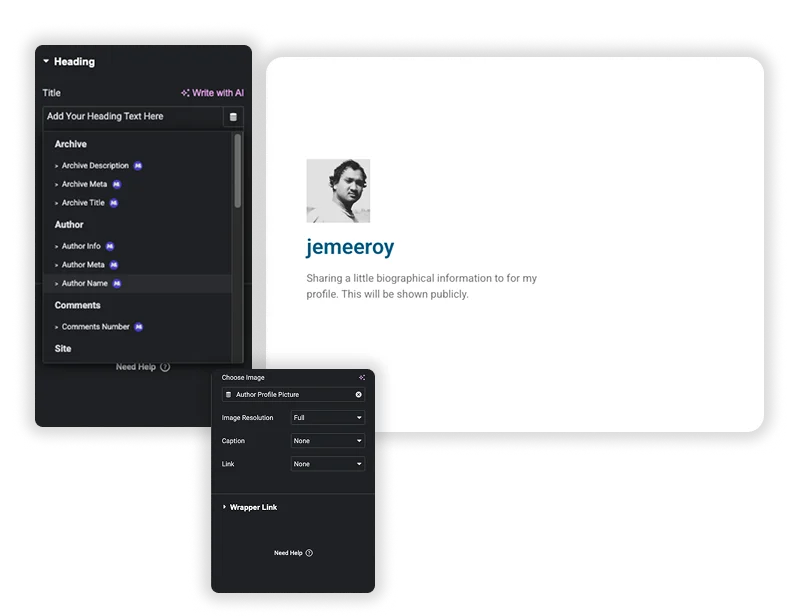
Go beyond the basic title. Dynamically display the Post Excerpt, Post Date, Post Terms (categories/tags), and even the Post Content itself. On archive pages, show the Archive Title and Description. Highlight authors by pulling their Author Name, Bio, and Meta information. Build truly connected blog templates and author pages that populate themselves.
- Auto-Populated Blog Layouts: Create a post grid where the title, excerpt, date, and categories fill in automatically for every post. If you only need a ready-made grid, the Blog widget does it without a template.
- Smart Author Boxes: Build a custom author bio section that changes for each writer, pulling their name, profile picture, and description.
- Archive Awareness: Dynamically show the category or tag name as the page title on archive pages.
- Clickable cards: put a Post URL tag in Wrapper Link so a whole card opens its own post.
All 35 free Elementor dynamic tags
Every tag below comes with the free extension. Text tags work in headings and text fields, URL tags in link fields, and image tags in image controls.
| Group | Tags |
|---|---|
| Post | Post Title, Post Content, Post Excerpt, Post Date, Post Time, Post Terms, Post ID, Post URL, Post Custom Field, Featured Image, Post Image Attachments |
| Media | Featured Image Data |
| Author | Author Name, Author Info, Author Meta, Author Profile Picture, Author URL |
| Archive | Archive Title, Archive Description, Archive Meta, Archive URL |
| Comments | Comments Number, Comments URL |
| Site | Site Title, Site Tagline, Site Logo, Site URL, Page Title, Current Date Time, User Info, Request Parameter, Shortcode |
| Action and other links | Contact URL, Pages URL, Taxonomies URL |
How to show the post modified date in Elementor
A “last updated” line tells readers the content is current, and the Post Date tag handles it for you.
- Edit your single post template or page with Elementor and add a Heading or Text Editor widget.
- Click the dynamic icon on the text field and choose Post Date.
- Set Type to Post Modified. Keep Post Published if you want the original date instead.
- Pick a Format: Default, a preset such as F j, Y or Y-m-d, Human Readable (for example “3 days ago”), or Custom.
- Open Advanced in the tag settings and type “Last updated:” in the Before field, then update the page.
Frequently Asked Questions For Dynamic Tags
Can I use dynamic tags in Elementor without Pro?
Yes. Elementor’s own dynamic tags need Elementor Pro, but this free extension adds 35 tags to the free editor. Turn it on under Master Addons, Extensions, and the dynamic icon shows up on supported text, link and image controls. No code is involved: you pick a tag from a list and set its options.
Does this work with any Elementor widget?
It works with any widget that has a text, URL or image input with the dynamic icon, like Heading, Text Editor, Button or Image. Master Addons also adds dynamic support to its own widgets. To show or hide those widgets based on who is visiting, pair it with Display Conditions (Pro).
How do I show the last updated date on a post?
Add a Heading or Text Editor widget, click the dynamic icon and choose Post Date. Set Type to Post Modified, pick a format, and type “Last updated:” in the Before field under Advanced. The date changes on its own whenever you update the post.
What’s a common use case for the "Post Custom Field" tag?
Imagine you run a movie review site. You create a custom field for “Rotten Tomatoes Score.” When writing a review, you enter the score (like “92%”). In your Elementor post template, you use the Dynamic Tag to pull that “Rotten Tomatoes Score” custom field and display it next to your review. Every review automatically shows its own correct score.
Trending Elementor Widgets & Extensions
Build sophisticated websites in less time.

Glassmorphism

Container Extras

Patterns
![Master Addons Post/Page Duplicator extension for Elementor: MA Duplicator row link in the WordPress Pages list creating a Landing Page - [Duplicated #128] draft](https://d1asvmc6qcowgk.cloudfront.net/wp-content/uploads/2026/09/15102930/post-page-duplicator-768x403.webp)
Post/Page Duplicator
