
Elementor Mailchimp Widget: Free Signup Form for WordPress
The Mailchimp widget in Master Addons is free and places a Mailchimp signup form anywhere in an Elementor layout. It works together with the free MC4WP: Mailchimp for WordPress plugin by ibericode. MC4WP connects to your Mailchimp account and runs the form, the audience and double opt-in, and the widget shows that form inside your design. You can display the saved MC4WP form or type your own field markup in the widget. Blog footers, coming soon pages and lead magnet sections are the usual places for it.

How to Add a Mailchimp Signup Form in Elementor
You need two free plugins, Master Addons and MC4WP, plus a Mailchimp account. Most of the setup happens in MC4WP.
- Install and activate MC4WP: Mailchimp for WordPress from WordPress.org.
- Copy an API key from Mailchimp (Profile > Extras > API keys), paste it under MC4WP > Mailchimp and save. The status should change to Connected.
- Open MC4WP > Form, tick the Mailchimp audience that should receive subscribers, adjust the fields and messages, and save.
- Edit your page with Elementor, search the panel for Mailchimp and drag the Master Addons widget into place.
- Leave Form Type on Defaults and choose your form in MailChimp Sign-Up Form, or pick Custom to type the field markup in the widget.
- Update the page and send a test signup to check that the address reaches your audience.
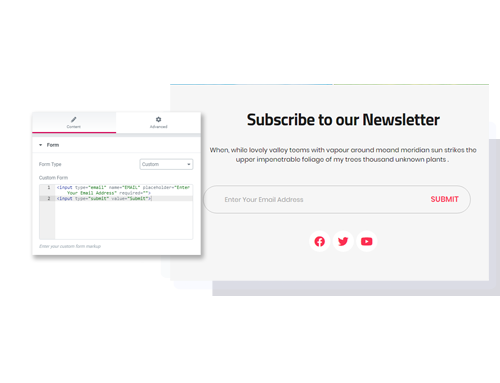
Two Form Types: Defaults or Custom
The widget has one Content section, Form, with three settings. Form Type switches between Defaults and Custom. With Defaults, the MailChimp Sign-Up Form dropdown lists the forms saved in MC4WP. With Custom, a Custom Form code box takes HTML that replaces the form fields, and MC4WP still processes the submission.
- Defaults: shows the form exactly as you built it under MC4WP > Form. The free version of MC4WP includes one form, and MC4WP Premium adds more.
- Custom: the email input has to use
name="EMAIL". Extra fields use your audience merge tags, such asFNAMEfor first name. - Mailchimp embed code: don’t paste it here. It carries its own form tag and would end up nested inside the MC4WP form.
API Key, Audience, Double Opt-In and GDPR
The widget has no Mailchimp settings of its own. The connection lives in MC4WP, so you set it up once and every Mailchimp widget on the site uses it.
- API key and audience: saved in MC4WP. Each form sends subscribers to the audiences ticked in its settings, and you can add subscriber tags there too.
- Double opt-in: on by default, so Mailchimp emails a confirmation link before the contact is added. You can switch it off per form.
- GDPR consent: the MC4WP field helper can add an “agree to terms” checkbox with a link to your terms page. Mark it required if consent is mandatory.
- Messages and redirect: the success and error messages and an optional redirect URL are edited in the Messages and Settings tabs of the MC4WP form.
- Spam: MC4WP adds a hidden honeypot field and a timestamp check to every form.
How Styling Works Without a Style Tab
Master Addons loads a small stylesheet for the widget. It gives the email field and button a 50px height, a dark #303030 button and colored boxes for success, error and warning messages. In MC4WP, the Appearance tab can inherit your theme styles or apply Basic styles or a Light, Dark, Red, Green or Blue theme.
- Advanced tab: the normal Elementor margin, padding, background and border settings apply to the widget wrapper.
- Custom CSS: for field and button colors, write CSS with the free Custom CSS extension and target
.jltma-mailchimp input[type=email]and.jltma-mailchimp input[type=submit].
Elementor Pro Form + Mailchimp vs Master Addons Mailchimp Widget
Free Elementor has no form widget. The Form widget in Elementor Pro has a built-in MailChimp action after submit, with API Key, Audience, Groups, Tags, Double Opt-In and Field Mapping settings. Here is how it compares with the free route.
| Feature | Elementor Pro Form | Master Addons Mailchimp + MC4WP |
|---|---|---|
| Price | Elementor Pro license | Free |
| Plugins needed | Elementor Pro | Master Addons and MC4WP |
| API key | Elementor integration settings or a custom key per form | MC4WP settings |
| Audience, groups, tags | Yes, in the form | Yes, in the MC4WP form settings |
| Double opt-in | Switch in the form | On by default, per form |
| Building fields | Visual builder with 20 field types, including acceptance, date, upload and steps | HTML fields in MC4WP or the Custom box |
| Field mapping | Field Mapping control | Input names match merge tags |
| Styling | Style tab for Form, Field, Buttons, Messages, Steps | No Style tab; default stylesheet, MC4WP themes, CSS |
| Spam protection | reCAPTCHA, reCAPTCHA v3, Honeypot | Honeypot and timestamp check |
| Other actions | Email, Collect Submissions, Redirect, Webhook, Popup, other email services | Redirect after signup |
| Number of forms | As many as you like | One on MC4WP free |
Elementor Pro is the better tool for building forms. It has visual fields, a full Style tab, multi-step forms and several actions per submission. If you only need an email box that feeds a Mailchimp audience and you don’t have Elementor Pro, the free widget with MC4WP covers that at no cost.
Other form widgets in Master Addons: Contact Form 7 (free) and WPForms (free). To show a signup form in a popup, see the Popup Builder.
Frequently Asked Questions For Mailchimp
Is the Mailchimp widget free?
Yes. It is part of the free Master Addons plugin. It also needs MC4WP: Mailchimp for WordPress, which is free on WordPress.org, and a Mailchimp account.
Where do I enter my Mailchimp API key?
In MC4WP, under MC4WP > Mailchimp. Master Addons has no API key field of its own. Once MC4WP shows Connected, your form appears in the widget’s MailChimp Sign-Up Form dropdown.
Can I style the Mailchimp form in Elementor?
Partly. The widget has no Style tab. You get the Master Addons default look, the MC4WP Appearance themes, and the Advanced tab for spacing, background and border. Field and button colors or fonts need CSS, which you can add with the free Custom CSS extension.
Can I paste the embedded form code from Mailchimp?
No. The Mailchimp embed code includes its own form tag, which breaks inside the MC4WP form. Switch Form Type to Custom and use plain inputs instead, for example an email input named EMAIL and a submit button.
Trending Elementor Widgets & Extensions
Build sophisticated websites in less time.

Glassmorphism

Container Extras

Patterns
![Master Addons Post/Page Duplicator extension for Elementor: MA Duplicator row link in the WordPress Pages list creating a Landing Page - [Duplicated #128] draft](https://d1asvmc6qcowgk.cloudfront.net/wp-content/uploads/2026/09/15102930/post-page-duplicator-768x403.webp)
Post/Page Duplicator
