

Which Element
Ever hover over a container in Elementor and forget exactly which elements or addon you used? It happens to everyone. The Element Finder extension fixes that. It’s a simple, smart tool that shows the name of any element right when you hover your mouse over it in the editing view. No more clicking around to find out. It works with all Master Addons elements and supports widgets from other popular Elementor addons too. Saves you time and cuts out the guesswork, making your editing workflow smoother and faster.

Instant Hover-to-Identify
Just move your mouse. That’s it. Hover over any part of your page in the Elementor editor – a button, a testimonial slider, a complex section – and a clean, clear label will pop up showing you its exact name. It’s the fastest way to navigate a complex layout and remember what you’re working with.
- Zero-Click Identification: Get the info you need without interrupting your flow. Don’t click, just hover.
- Clear Visual Labels: The name appears in a neat box that’s easy to read but doesn’t get in your way.
- Total Time Saver: Skip the steps of clicking an element and hunting through the sidebar panel to see its type.
Universal Addon Support
This isn’t just for Master Addons. The Element Finder is built to recognize and display the names of elements from many popular third-party Elementor addons as well. Whether you’re using Essential Addons, Premium Addons, or any other major toolkit, you’ll likely see their widget names pop up too.
- Plugin-Agnostic: Designed to work across a wide range of Elementor extensions, not just our own.
- Better Project Management: Perfect for developers or designers who jump between different sites with different sets of plugins.
- No More Confusion: Clearly tells you if that fancy slider is from “Master Addons” or “Essential Addons” in a second.

Frequently Asked Questions For Which Element
Does this work on the front end of my live website?
Nope, not at all. It’s purely an editor-only tool. It only activates when you’re logged into WordPress and editing a page with Elementor. Your website visitors will never see these hover labels.
Will it slow down my Elementor editor?
It shouldn’t, no. It’s a very lightweight feature that only springs into action when you’re actively moving your mouse around in the editor. It doesn’t run heavy processes in the background, so you won’t feel the editor getting sluggish.
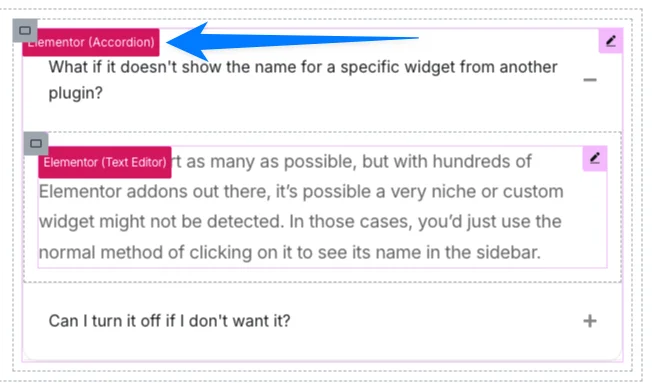
What if it doesn't show the name for a specific widget from another plugin?
We try to support as many as possible, but with hundreds of Elementor addons out there, it’s possible a very niche or custom widget might not be detected. In those cases, you’d just use the normal method of clicking on it to see its name in the sidebar.
Can I turn it off if I don't want it?
Yes, of course! You can disable the Element Finder extension from the Master Addons settings panel if you find you don’t need it. It’s there to help when you want it, and out of the way when you don’t.
Trending Elementor Widgets & Extensions
Build sophisticated websites in less time.

Glassmorphism

Container Extras

Patterns

Post/Page Duplicator

Reading Progress Bar
Choose a pricing plan best suited for you
Basic Plan
- Email with quick response time
- Access to knowledge base and FAQS
- Chat support during business hours
- Basic ticketing system issue tracking
- Monthly performance reports
- 14/7 live chat support
Medium Plan
- Email with quick response time
- Access to knowledge base and FAQS
- Chat support during business hours
- Basic ticketing system issue tracking
- Monthly performance reports
- 14/7 live chat support
Premium Plan
- Email with quick response time
- Access to knowledge base and FAQS
- Chat support during business hours
- Basic ticketing system issue tracking
- Monthly performance reports
- 14/7 live chat support



