

Elementor Parallax Effect with Rellax.js (Pro)
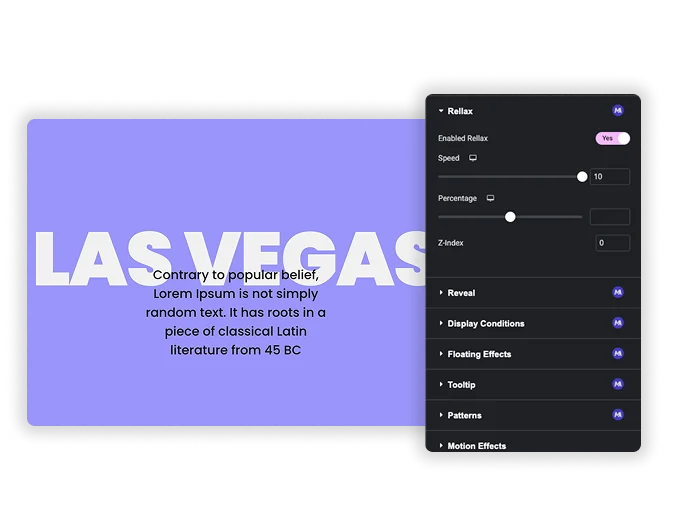
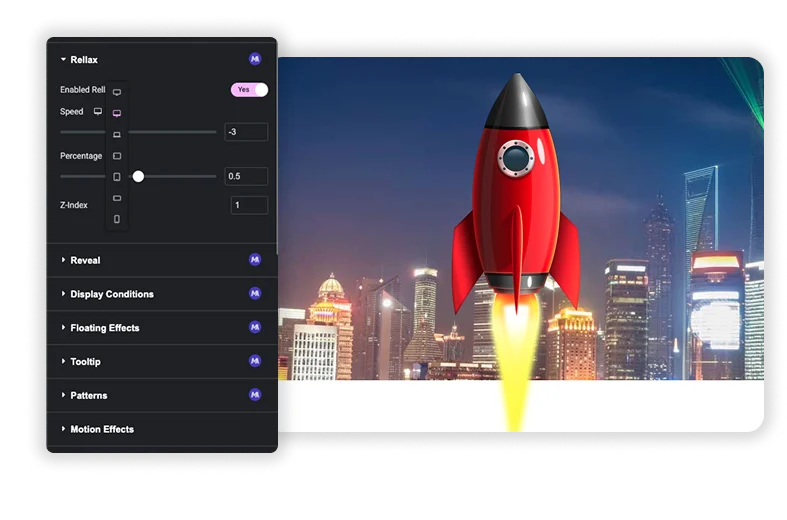
Rellax is a Master Addons Pro extension that brings the Rellax.js parallax library into Elementor. Turn it on for an element, set a Speed from -10 to 10, and that element scrolls faster or slower than the rest of the page, which creates a sense of depth. You can set a different speed for tablet and mobile, choose the vertical or horizontal direction, and use Z-Index to keep moving layers behind or in front of your content. No code or script loading is needed.
How to Add a Parallax Scrolling Effect in Elementor
You need Elementor and an active Master Addons Pro license.
- Go to Master Addons, Extensions, switch on Rellax and save.
- Edit your page with Elementor and select the widget you want to move, such as an image, icon or shape.
- Open the Rellax settings for that element and turn on Enabled Rellax.
- Set a Speed, for example -2 for a slow drift, and adjust it for tablet and mobile.
- Choose Vertical or Horizontal and set Z-Index so the layer does not cover your text.
- Preview the page and scroll to check the motion.
More detail is in the Rellax extension settings.

Speed, Percentage and Direction
Speed runs from -10 to 10 in steps of 0.1 and can be set per device. Negative values make the element move slower than the page, so it feels further away, and positive values move it faster, so it feels closer. Percentage (0 to 1) sets where the element sits when its movement starts, and the Vertical and Horizontal options choose the direction.
- A slow drift of -1 to -2 for decorative shapes behind a hero.
- A small positive speed for floating icons in front of content.
- A lower speed or 0 on mobile if the motion feels too strong on small screens.
Layering with Z-Index
Parallax layers can slide over text and buttons. Rellax adds a Z-Index setting from -1 to 50, so you can keep a moving background layer below your content and a foreground shape above it. Rellax moves the whole element, not its background image, so place the image you want to move in its own Image widget.
- Use -1 for layers that should sit behind content.
- Keep headlines and buttons out of the path of moving layers.
- Test the scroll on a real phone before publishing.

Elementor Motion Effects vs Master Addons Rellax
Elementor Pro already has Motion Effects with scrolling effects. Here is how the two compare.
| Feature | Elementor Pro Motion Effects | Master Addons Rellax |
|---|---|---|
| Price | Needs Elementor Pro | Needs Master Addons Pro |
| Scroll movement | Vertical and horizontal scroll with speed and viewport range | Rellax.js speed from -10 to 10, vertical or horizontal |
| Other scroll effects | Transparency, blur, rotate and scale | None, movement only |
| Mouse effects | Mouse track and 3D tilt | No |
| Background parallax | Background motion effects on sections and containers | Moves the whole element |
| Per-device settings | Choose devices where effects run | Speed per device |
If you already have Elementor Pro, Motion Effects covers more effect types. Rellax suits simple speed-based layers when you use Master Addons Pro. For looping motion that does not depend on scroll, see Floating Effects (Pro).
What Is Rellax.js?
Rellax.js is a small, open source JavaScript library by Dixon and Moe that makes elements move at a different speed while a page scrolls. On a hand-coded site you add the script, give elements a rellax class and set options such as speed, percentage, z-index and direction in code.
This extension bundles Rellax.js inside Master Addons Pro and maps those options to Elementor controls, so you set Speed, Percentage, Z-Index and direction from the panel. The script only loads on pages where an element uses Rellax. If you are not on Elementor, use the Rellax.js library directly.

Frequently Asked Questions For Rellax
Will the parallax effect work on mobile?
Yes. Speed can be set separately for tablet and mobile, so you can use a smaller value or 0 on phones if the motion feels too strong. Always test on a real device.
Can I make a section background image move?
Rellax moves the whole element, not a background image. Put the image in its own Image widget behind your content and add Rellax to that widget, or use Elementor Pro’s background motion effects for a moving section background.
Is the Rellax extension free?
No. Rellax is part of Master Addons Pro. The Rellax.js library itself is free and open source if you add it with your own code.
Can too many parallax effects slow down my site?
They can. Every moving element makes the browser do more work while scrolling. Use parallax on a few key elements per page and keep speeds modest.
Trending Elementor Widgets & Extensions
Build sophisticated websites in less time.

Glassmorphism

Container Extras

Patterns
![Master Addons Post/Page Duplicator extension for Elementor: MA Duplicator row link in the WordPress Pages list creating a Landing Page - [Duplicated #128] draft](https://d1asvmc6qcowgk.cloudfront.net/wp-content/uploads/2026/09/15102930/post-page-duplicator-768x403.webp)
Post/Page Duplicator



