Master Addons
  • Widgets
    • Changelogs
      Source Code NEW PRO
      Caldera Forms
      Logo Slider
      Table of Contents
      Gravity Forms
      Transforms PRO
      Restrict Content PRO
      Pricing Table
      Ninja Form
      Mailchimp
      Tooltip
      Popup Trigger NEW PRO
      Which Element NEW
      Creative Button
      Creative Links NEW
      Domain Search HOT PRO
      Dual Heading HOT
      Flipbox
      Animated Gradient BG HOT PRO
      Image Hotspot PRO
      Infobox
      News Ticker PRO
      Particles
      Progress Bar
      Off-Canvas Content NEW PRO
      Reading Progress Bar HOT
      Custom JS
      Blockquote
      Counter Up
      Image Hover Effects
      Reveal NEW PRO
      Rellax PRO
      Positioning
      Image Comparison
      Tabs
      Toggle Content HOT PRO
      Post/Page Duplicator FREE
      Floating Effects PRO
      Mega Menu HOT
      Custom CSS HOT
      Gradient Headline
      Advanced Image
      Nav Menu
      Tooltips
      Comparison Table PRO
      Glassmorphism
      Featured Product PRO
      Image Carouse
      Gallery Slider NEW PRO
      Dynamic Tags NEW
      Countdown Timer
      Current Time
      Patterns
      Wrapper Link
      Timeline
      Team Member
      Contact Form 7
      Advanced Accordion
      Animated Headlines
      Blog
      Business Hours
      Call To Action
      Progress Bars
      Background Slider
      Team Slider
      Dynamic Table
      Grid Line PRO
      WP Forms
      Search
      We Form
      Entrance Animation NEW PRO
      Display Conditions PRO
      Filterable Image Gallery
      WP Forms
      Custom Breakpoints NEW
  • Features
    • Theme Builder

      Design site-wide templates for a consistent look across every page of your website.

      Popup Builder

      Create engaging popups, modals, and announcement bars - to capture leads.

      Widget Builder

      Expand Elementor with advanced custom widgets to build more dynamic layouts.

      Mega Menu Builder

      Create multi-column menus with icons and images for superior navigation.

      Custom Css

      Apply your own CSS for pixel-perfect styling beyond default design options.

      Dynamic Tags

      Insert dynamic content like post titles and custom fields directly into designs.

      Display Conditions

      Control element visibility based on user role, device, time, and other rules.

      Icons Library

      Choose from thousands of built-in icons to enhance visuals and consistency.

      Animation

      Add scroll, hover, entrance, and much more animations to bring designs to life.
  • Template Kits
    • Template Kits

      Professionally designed full-page template Kit. Import and customize in seconds.

      Ready Sections

      Pre-built content sections and rows. Drag, drop, and customize instantly.

      Ready Popups

      Different types of High-converting popup designs. Import and launch quickly.

      Ready Pages

      Complete page layouts for any purpose. Start editing immediately.

      Ready Header

      Multiple modern header designs. Import and adapt to your brand.

      Ready Footer

      Fully designed footers for different websites. Add functionality and style in clicks.
  • Brands
    • WP Adminify

      Take control of your WordPress dashboard. Customize the admin experience.

      Admin Bar Editor

      Customize the WordPress admin bar for a cleaner, more personalized workspace.

      Loginfy

      Customize your WordPress login page with branding, styles, and security enhancements.

      Rolemaster Suite

      Manage user roles and permissions with precision for better security and workflow.

      Master Blocks

      Expand the Gutenberg editor with advanced custom blocks for more creative layouts.

      WP Spotlight

      Instantly search and access admin features, posts, and settings from anywhere.
  • Themes
  • Help
    • Get Support
    • Documentation
    • Facebook Community
    • Changelogs
  • Blog
  • Widgets
    • Changelogs
      Source Code NEW PRO
      Caldera Forms
      Logo Slider
      Table of Contents
      Gravity Forms
      Transforms PRO
      Restrict Content PRO
      Pricing Table
      Ninja Form
      Mailchimp
      Tooltip
      Popup Trigger NEW PRO
      Which Element NEW
      Creative Button
      Creative Links NEW
      Domain Search HOT PRO
      Dual Heading HOT
      Flipbox
      Animated Gradient BG HOT PRO
      Image Hotspot PRO
      Infobox
      News Ticker PRO
      Particles
      Progress Bar
      Off-Canvas Content NEW PRO
      Reading Progress Bar HOT
      Custom JS
      Blockquote
      Counter Up
      Image Hover Effects
      Reveal NEW PRO
      Rellax PRO
      Positioning
      Image Comparison
      Tabs
      Toggle Content HOT PRO
      Post/Page Duplicator FREE
      Floating Effects PRO
      Mega Menu HOT
      Custom CSS HOT
      Gradient Headline
      Advanced Image
      Nav Menu
      Tooltips
      Comparison Table PRO
      Glassmorphism
      Featured Product PRO
      Image Carouse
      Gallery Slider NEW PRO
      Dynamic Tags NEW
      Countdown Timer
      Current Time
      Patterns
      Wrapper Link
      Timeline
      Team Member
      Contact Form 7
      Advanced Accordion
      Animated Headlines
      Blog
      Business Hours
      Call To Action
      Progress Bars
      Background Slider
      Team Slider
      Dynamic Table
      Grid Line PRO
      WP Forms
      Search
      We Form
      Entrance Animation NEW PRO
      Display Conditions PRO
      Filterable Image Gallery
      WP Forms
      Custom Breakpoints NEW
  • Features
    • Theme Builder

      Design site-wide templates for a consistent look across every page of your website.

      Popup Builder

      Create engaging popups, modals, and announcement bars - to capture leads.

      Widget Builder

      Expand Elementor with advanced custom widgets to build more dynamic layouts.

      Mega Menu Builder

      Create multi-column menus with icons and images for superior navigation.

      Custom Css

      Apply your own CSS for pixel-perfect styling beyond default design options.

      Dynamic Tags

      Insert dynamic content like post titles and custom fields directly into designs.

      Display Conditions

      Control element visibility based on user role, device, time, and other rules.

      Icons Library

      Choose from thousands of built-in icons to enhance visuals and consistency.

      Animation

      Add scroll, hover, entrance, and much more animations to bring designs to life.
  • Template Kits
    • Template Kits

      Professionally designed full-page template Kit. Import and customize in seconds.

      Ready Sections

      Pre-built content sections and rows. Drag, drop, and customize instantly.

      Ready Popups

      Different types of High-converting popup designs. Import and launch quickly.

      Ready Pages

      Complete page layouts for any purpose. Start editing immediately.

      Ready Header

      Multiple modern header designs. Import and adapt to your brand.

      Ready Footer

      Fully designed footers for different websites. Add functionality and style in clicks.
  • Brands
    • WP Adminify

      Take control of your WordPress dashboard. Customize the admin experience.

      Admin Bar Editor

      Customize the WordPress admin bar for a cleaner, more personalized workspace.

      Loginfy

      Customize your WordPress login page with branding, styles, and security enhancements.

      Rolemaster Suite

      Manage user roles and permissions with precision for better security and workflow.

      Master Blocks

      Expand the Gutenberg editor with advanced custom blocks for more creative layouts.

      WP Spotlight

      Instantly search and access admin features, posts, and settings from anywhere.
  • Themes
  • Help
    • Get Support
    • Documentation
    • Facebook Community
    • Changelogs
  • Blog
Purchase Now

Getting Started

  • Can’t see the Master Addon Element inside Elementor Page editor?
  • How To Apply For an Affiliate Account?
  • Active Pro version
  • Installing Plugin

Addons

  • Off-Canvas Content
  • Logo Slider
  • Progress Bars
  • Image Carousel
  • Featured Product
  • Comparison Table
  • Source Code
  • Advanced Image
  • Gradient Headline
  • Gallery Slider
  • Toggle Content
  • Infobox
  • Timeline
  • Dynamic Table
  • Mailchimp
  • Blockquote
  • Changelogs
  • Countdown Timer
  • Current Time
  • Search
  • Filterable Image Gallery
  • Team Slider
  • Counter Up
  • Restrict Content
  • Table of Contents
  • Image Hotspot
  • Image Comparison
  • News Ticker
  • Image Hover Effects
  • Tabs
  • Pricing Table
  • Navigation Menu
  • Domain Search
  • Flipbox
  • Tooltip
  • Creative Links
  • Business Hours
  • Contact Form 7
  • Creative Button
  • Animated Headlines
  • Advanced Accordion
  • Call to Action
  • Progress Bar
  • Blog
  • Team Member
  • Dual Heading

Extensions

  • Which Element
  • Post Duplicator
  • Grid Line
  • Glassmorphism
  • Tooltip
  • Wrapper Link
  • Floating Effects
  • Dynamic Tags
  • Display Conditions
  • Entrance Animation
  • Custom Breakpoints
  • Animated Gradient Background
  • Reveal
  • Particles
  • Background Slider
  • Transforms
  • Rellax
  • Positioning
  • Custom CSS

Widget Builder

  • Widget Builder Settings Panel Introduction
  • Divider
  • Text Shadow
  • Select2
  • Border
  • Heading
  • Tabs
  • Repeater
  • Visual Choice
  • Background
  • Dimensions
  • Box Shadow
  • Slider
  • Icons
  • Gallery
  • Media
  • Popover Toggle
  • Widget Builder URL Field
  • Date Time
  • Typography
  • Font
  • Widget Builder Color Field
  • Choose
  • Select
  • Switcher
  • Hidden
  • Code
  • WYSIWYG
  • Widget Builder Textarea Field
  • Number
  • Widget Builder Text Field

Theme Builder

  • Comment Form
  • 404
  • Search
  • Archive
  • Single
  • Footer
  • Header

Popup Builder

  • How to Open a Popup After Inactivity in Elementor
  • How to Show an Exit Intent Popup in Elementor
  • How to Open a Popup on Scroll to a Specific Element in Elementor
  • How to Open a Popup on Scroll in Elementor
  • How to Open a Popup on Click in Elementor
  • How to open a popup on page load?
  • Popup Settings & Options

Template Kit

  • How to Import Template Kits in Master Addons
  • How to Disable Elementor Default Fonts and Colors
  • Import Elementor Template Kits
View Categories
  • Home
  • Docs
  • Extensions
  • Dynamic Tags

Dynamic Tags

Roy
Updated on July 2, 2026

4 min read

Dynamic tags are how a template stops being one page and starts being every page: the heading pulls the post title, the image pulls the featured image, and so on down the page, all automatically. Elementor locks dynamic tags behind Pro. The Dynamic Tags extension in Master Addons for Elementor unlocks a full set of them in the free editor.

Enable the extension, click the dynamic icon on almost any text, link, or image control, and pick what the field should pull from WordPress. This guide walks through the tag groups and builds a small single post template with them.

What the Dynamic Tags extension does #

The extension adds Master Addons tags to Elementor’s dynamic tag picker, the small database icon that sits on supported controls. Instead of typing fixed text, you bind the control to a data source, and WordPress fills in the value per post, per archive, or per site.

The tags come in groups, each marked with the purple MA badge:

  • Post: Post Title, Post Content, Post Excerpt, Post Date, Post Time, Post Terms, Post ID, and Post Custom Field.
  • Media: Featured Image Data, for binding image widgets to the post thumbnail.
  • Author: Author Name, Author Info, and Author Meta.
  • Archive: Archive Title, Archive Description, and Archive Meta for category and tag pages.
  • Comments: Comments Number.
  • Site and User: site details and logged-in user info.

Before you start #

  • WordPress with Elementor installed and active. The free version is enough; that is the point.
  • Master Addons for Elementor installed and active. New to the plugin? Follow the installation guide first.
  • Dynamic Tags is a free extension, so no Pro license is required.

How to enable the Dynamic Tags extension #

From your WordPress dashboard, go to Master Addons and open the Extensions tab. Dynamic Tags leads the Dynamic Widgets group with a Featured badge, next to Tooltips and Wrapper Link. Click its toggle so it turns purple, then hit Save Changes and wait for the green “Settings saved successfully” notice.
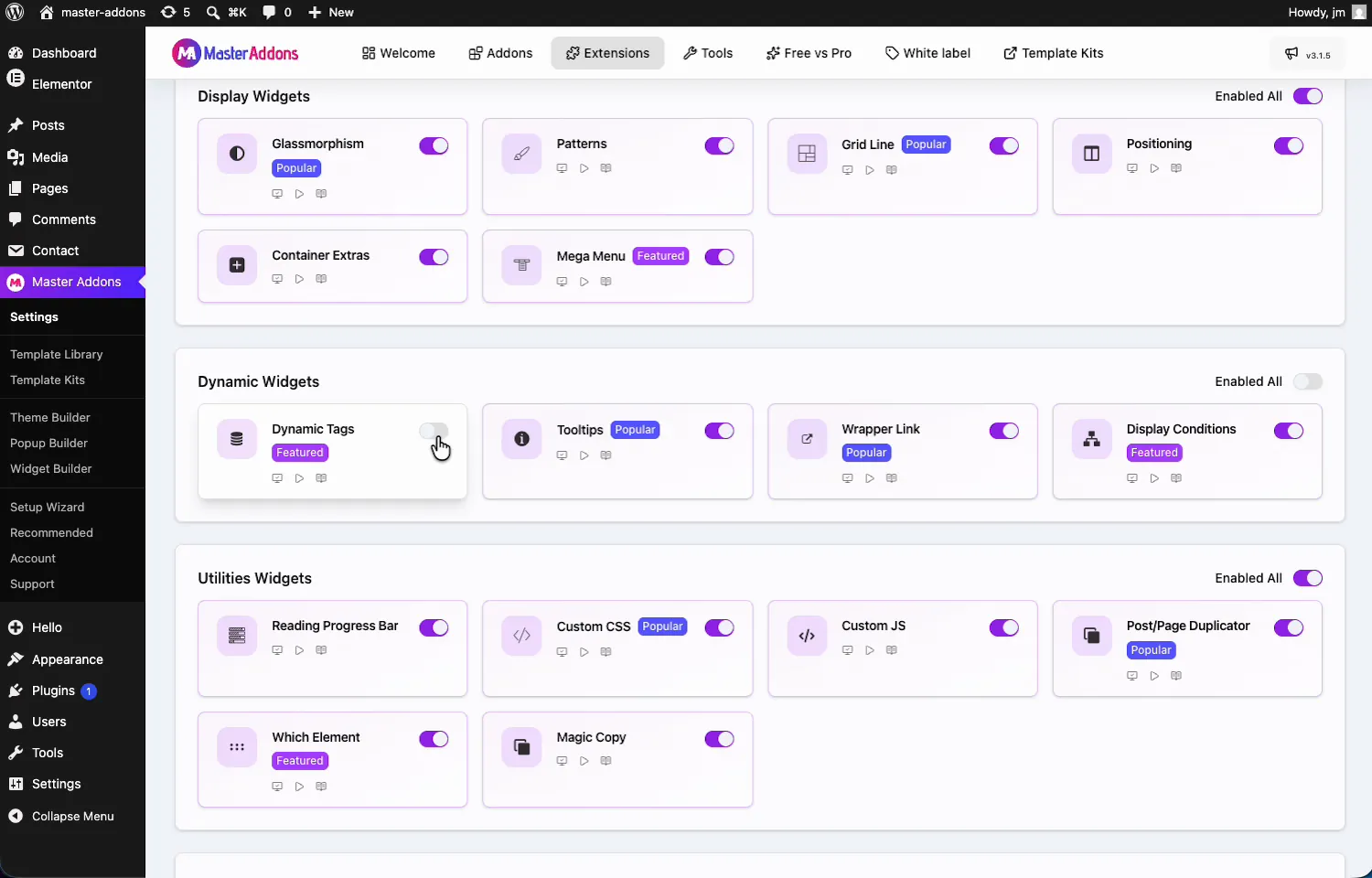
Dynamic Tags extension toggle in the Dynamic Widgets section of the Master Addons Extensions tab

Bind a control to a dynamic tag #

Open a template or page with Elementor and select a widget. In the video the canvas is a single post template with a Heading widget. Click the dynamic tags icon on the Title control (the small database symbol) and the tag list opens, grouped by source: Archive, Author, Comments, Site, and more, each entry carrying the MA badge.
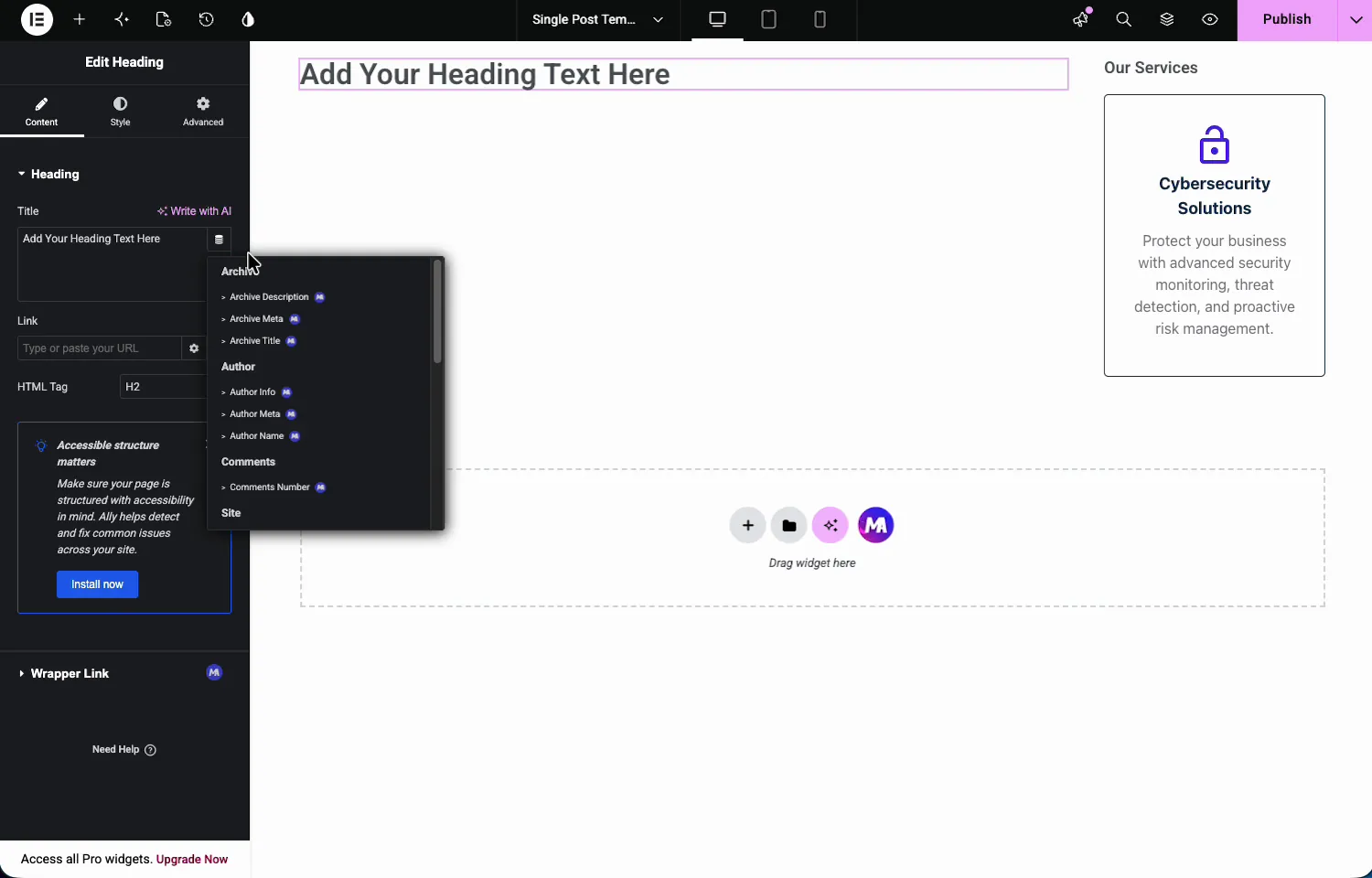
Dynamic tags list open on an Elementor Heading widget showing Archive, Author, and Comments tag groups with MA badges

Scroll down for the Post group: Post Content, Post Custom Field, Post Date, Post Excerpt, Post ID, Post Terms, Post Time, and Post Title, plus Featured Image Data under Media.
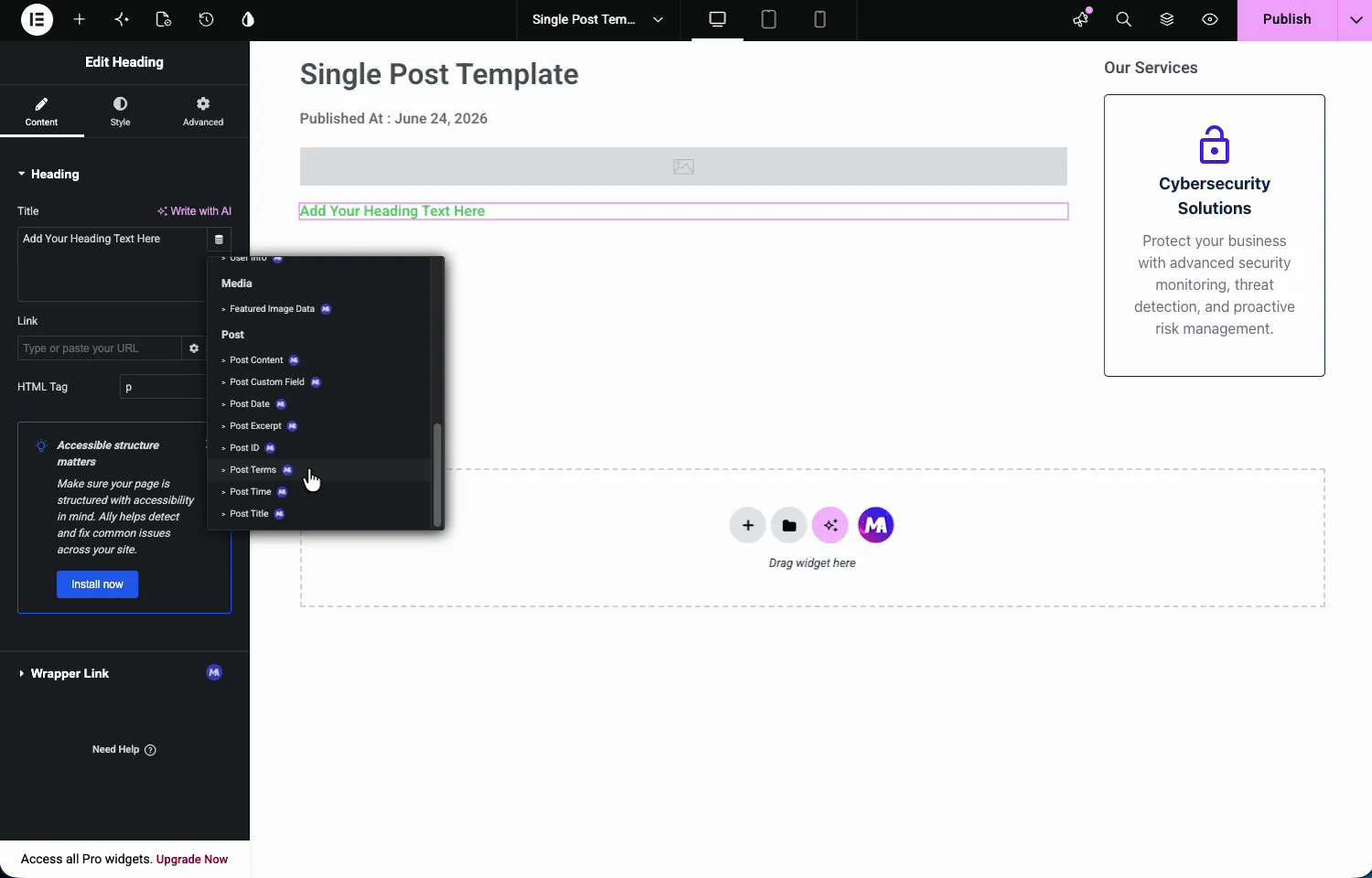
Post dynamic tags in Elementor including Post Content, Post Date, Post Excerpt, Post Terms, and Post Title from Master Addons

Build a single post template with the tags #

Pick Post Date for the heading, and it renders the real date instead of placeholder text. Most tags accept extra settings: a label like “Published At : ” in front, or a date format. The widget stays a normal Heading, so the Style tab still controls typography and color.
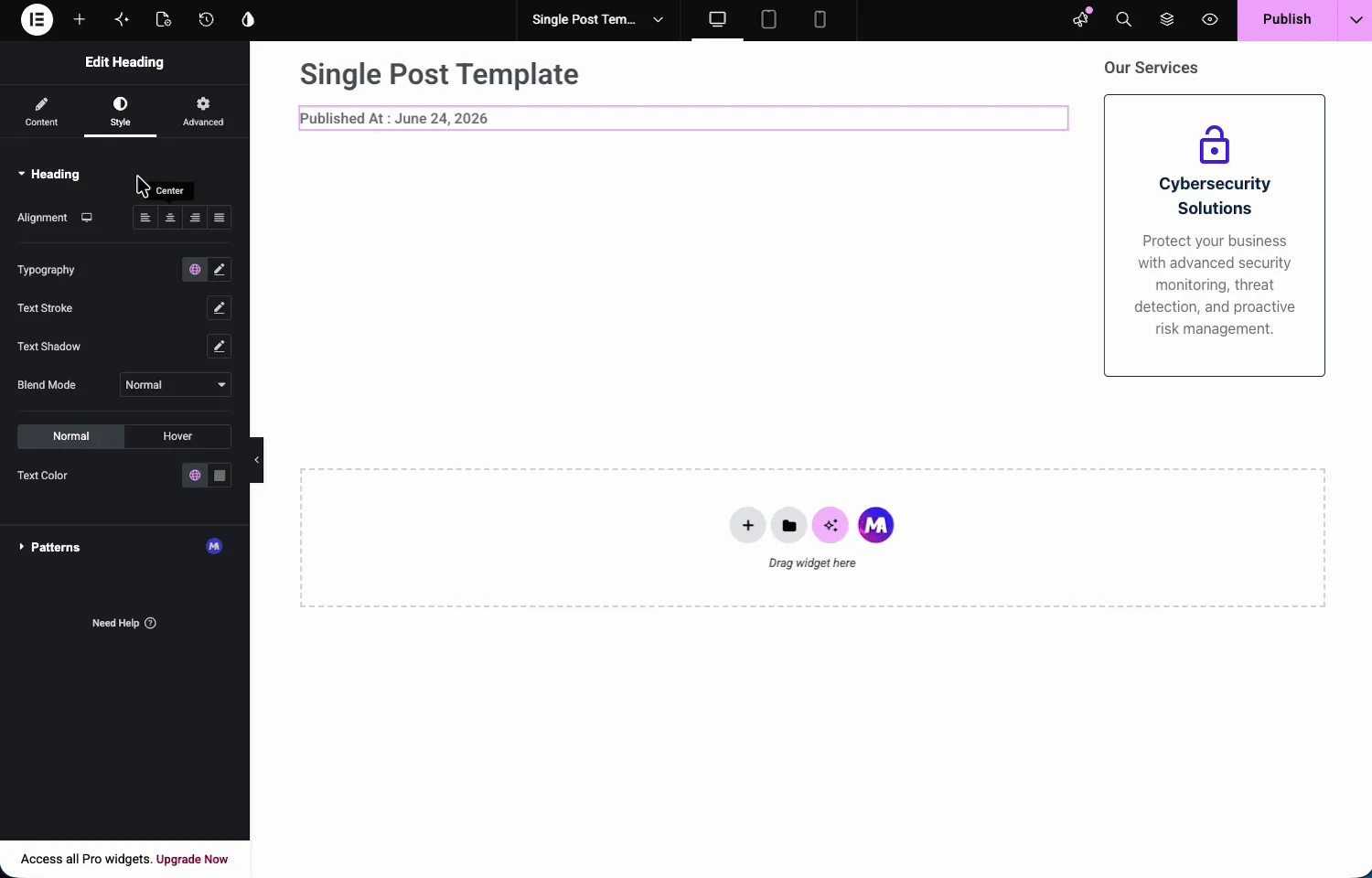
Elementor Heading widget bound to the Post Date dynamic tag showing Published At with a real date

Add an Image widget and set Choose Image to the Featured Image dynamic tag the same way. In the editor it shows a gray placeholder, since the template does not know which post it renders yet. Repeat with Post Title for the main heading and Post Content for the body, and the template is complete.
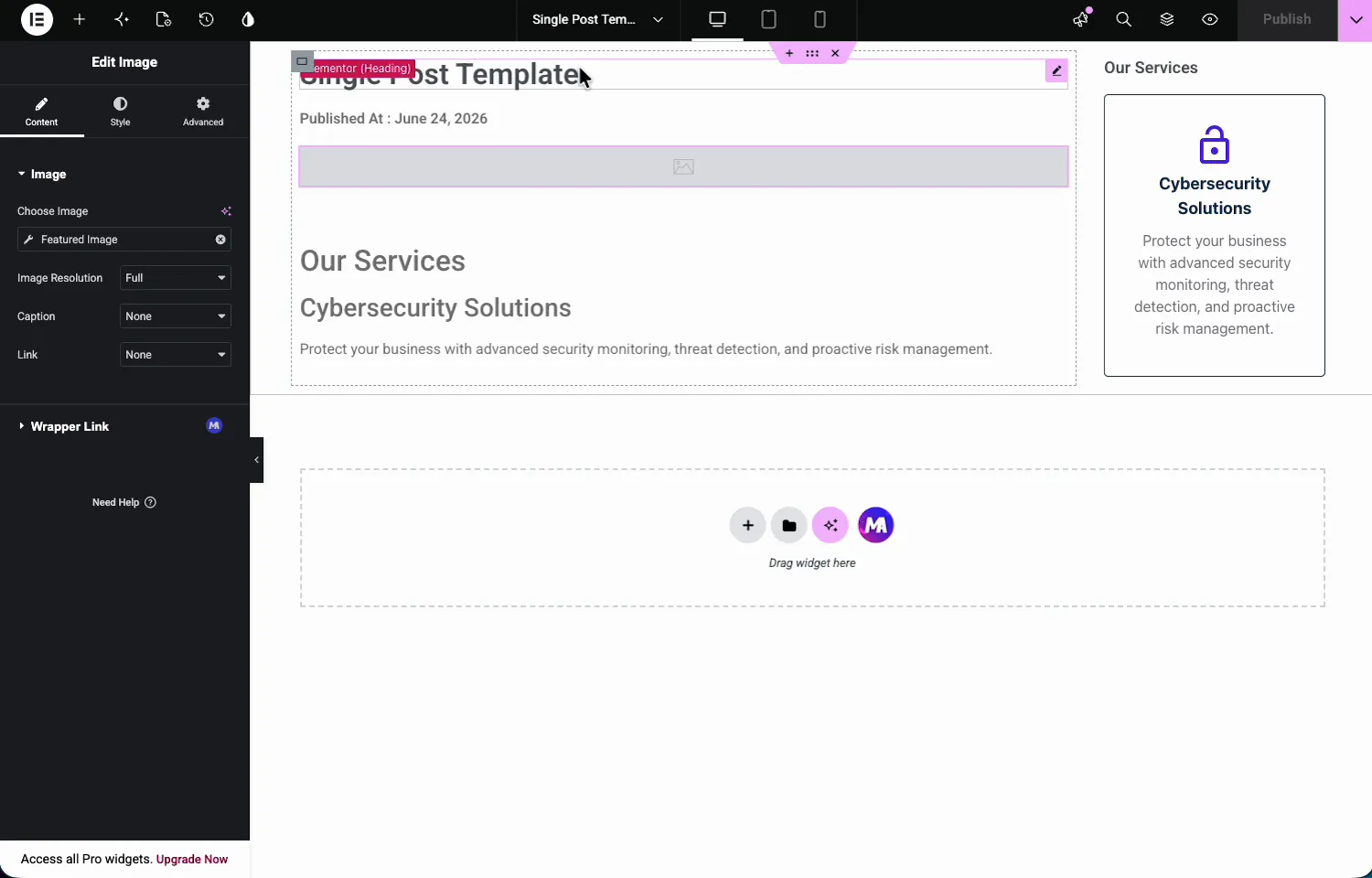
Elementor Image widget bound to the Featured Image dynamic tag inside a single post template

The result on a real post #

Load an actual post and every tag resolves: the real title, the published time, the featured image, the category from Post Terms, and the full article body from Post Content.
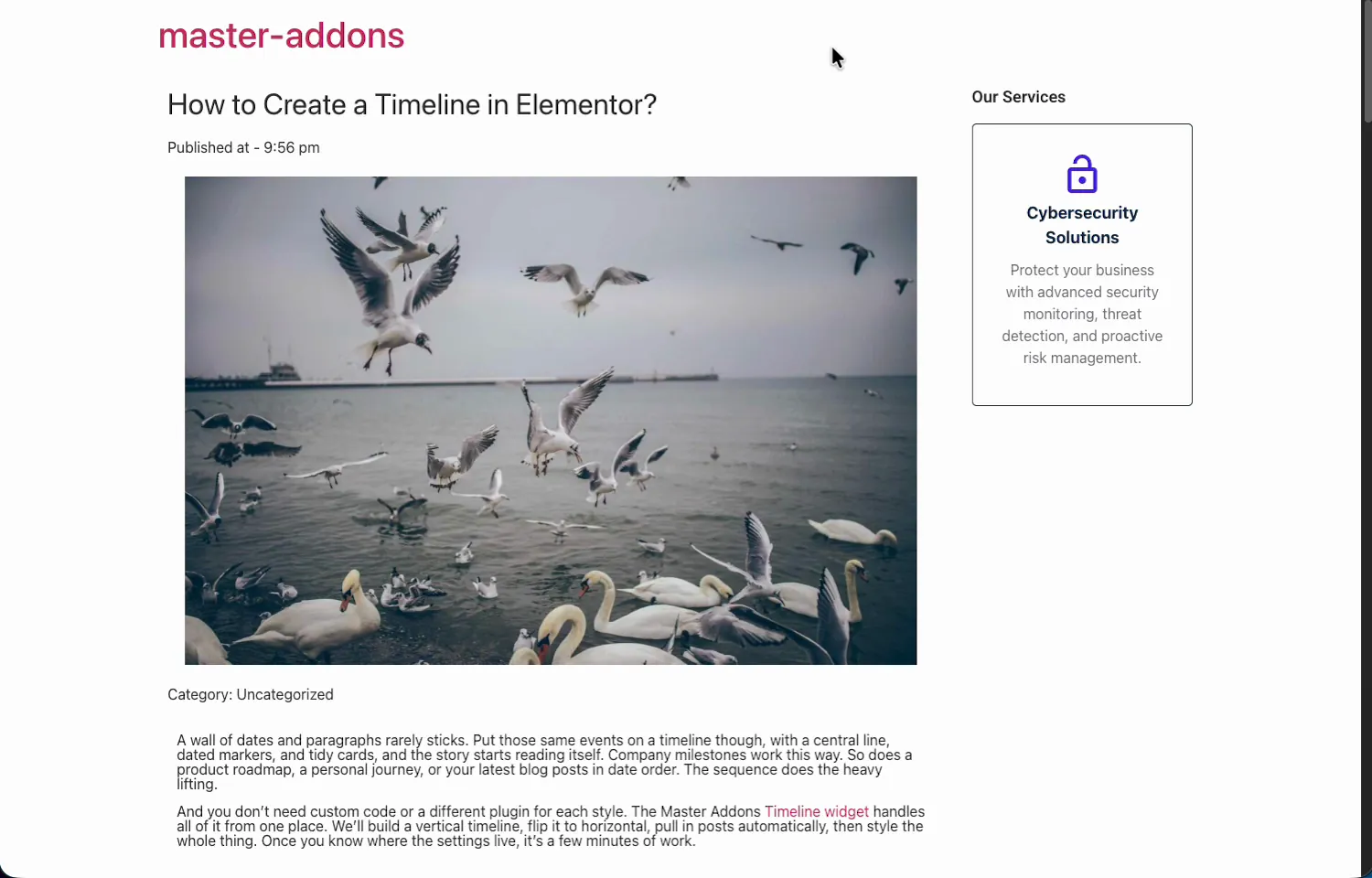
Single post template on the front end with real post title, published time, featured image, category, and post content filled by dynamic tags

One template, and every post on the site renders through it with its own content. Edit the design once, and all posts update together.

Where dynamic tags pay off #

  • Single post templates. Title, date, author, image, and content bound once, reused on every post.
  • Archive pages. Archive Title and Description make one template serve every category and tag.
  • Author boxes. Author Name, Info, and Meta build a bio block that follows the writer.
  • Custom fields. Post Custom Field surfaces ACF or meta values anywhere text goes.
  • Combined with Wrapper Link. The Wrapper Link extension accepts these tags too, so a whole card can link to its own post.

Video Tutorial #

Watch the tags in action, from enabling the extension to a finished dynamic post template.

Frequently Asked Questions #

Can I use dynamic tags in Elementor without Pro?

Yes. The Master Addons Dynamic Tags extension adds post, author, archive, media, site, and user tags to the free Elementor editor. Enable it in the Extensions tab and the dynamic icon on supported controls offers the full tag list.

Which dynamic tags does the extension include?

Post Title, Post Content, Post Excerpt, Post Date, Post Time, Post Terms, Post ID, Post Custom Field, Featured Image Data, Author Name, Author Info, Author Meta, Archive Title, Archive Description, Archive Meta, Comments Number, plus site and user tags. Each shows an MA badge in the picker.

Why does my dynamic tag show a placeholder in the editor?

A template does not know which post it will render until it loads on a real one, so image tags show a gray placeholder and text tags may show sample values in the editor. View an actual post on the front end and every tag resolves with real content.

Can dynamic tags show custom field values?

Yes. The Post Custom Field tag outputs any post meta value by key, including fields created with plugins like ACF. Bind a text control to it, enter the field key, and the stored value renders per post.

Is the Dynamic Tags extension free?

Yes. Dynamic Tags ships with the free version of Master Addons for Elementor, in the Dynamic Widgets group of the Extensions tab. The pricing page covers what the Pro plans add.

Wrapping up #

The Dynamic Tags extension gives free Elementor the feature that makes templates worth building: content that fills itself in. Enable it once, bind headings, images, and links to their sources, and one design serves the whole site. It pairs naturally with the Wrapper Link extension for clickable dynamic cards, and the rest of the Master Addons widgets and extensions are one page away.

What are your Feelings

Share This Article :

  • Facebook
  • X
  • LinkedIn
  • Pinterest
Still stuck? How can we help?

How can we help?

Updated on July 2, 2026
Floating EffectsDisplay Conditions
Table of Contents
  • What the Dynamic Tags extension does
  • Before you start
  • How to enable the Dynamic Tags extension
  • Bind a control to a dynamic tag
  • Build a single post template with the tags
  • The result on a real post
  • Where dynamic tags pay off
  • Video Tutorial
  • Frequently Asked Questions
    • Can I use dynamic tags in Elementor without Pro?
    • Which dynamic tags does the extension include?
    • Why does my dynamic tag show a placeholder in the editor?
    • Can dynamic tags show custom field values?
    • Is the Dynamic Tags extension free?
  • Wrapping up

Join 40,000+ Web Creators Who Trust Master Addons

Get all the premium widgets and templates you desire, built with clean code that keeps your site fast. Ditch the bloat, not the features.

Try Live Demo
Join The Community
Master Addons for Elementor
Master Addons Logo

110+ Premium Widgets & Lifetime Updates – Build Beyond Limits. An Exclusive Creation by Pixar Labs

Facebook-f Twitter Youtube Wordpress
Features
  • Template kits
  • Template Library
  • Widget Builder
  • Theme Builder
  • Mega Menu Builder
  • Template kits
  • Template Library
  • Widget Builder
  • Theme Builder
  • Mega Menu Builder
Support
  • Support Forum
  • Contact US
  • Join Community
  • Blog
  • Support Forum
  • Contact US
  • Join Community
  • Blog
Resources
  • Apply For Affiliate
  • Documentation
  • Video Tutorials
  • My Account
  • Change Log
  • Apply For Affiliate
  • Documentation
  • Video Tutorials
  • My Account
  • Change Log
Navigate
  • Terms of Use
  • Refund Policy
  • Privacy Policy
  • Terms of Use
  • Refund Policy
  • Privacy Policy