
Free Elementor Background Slider (Section Slideshow with Ken Burns)
Background Slider is a free Master Addons extension that turns the background of an Elementor container, section or column into a rotating image slideshow. Your headings and buttons stay in place while the photos change behind them. It comes with 24 transitions plus a Random option, Ken Burns motion in nine directions, nine pattern overlays or your own color and gradient overlay, and an optional progress bar. People mostly use it for hero sections on service, restaurant, travel and portfolio sites.


24 Transitions and Ken Burns Motion
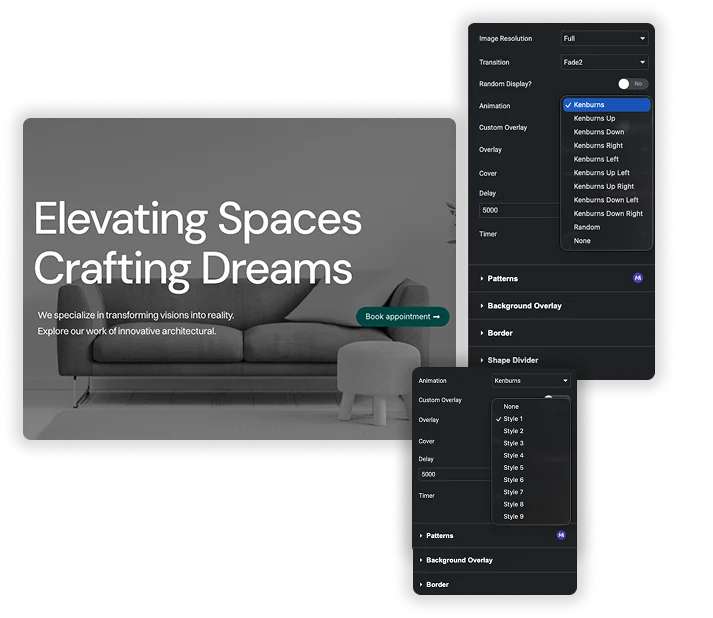
The Transition list decides how one slide hands over to the next: Fade, Slide Left, Slide Right, Slide Up, Slide Down, Zoom In, Zoom Out, Swirl Left, Swirl Right, Burn, Blur and Flash. Each one has a second variant, which makes 24, and Random picks a different effect for every change. The Animation setting then adds a slow Ken Burns zoom and pan inside each slide.
- Transition: 24 effects plus Random. Fade is the default.
- Animation: Kenburns, Kenburns Up, Down, Left, Right, the four diagonal directions, Random or None.
- Random Display: shuffles the image order when the page is generated. On a cached page the order stays the same until the cache clears.
Overlays That Keep Text Readable
White text over a busy photo is hard to read. With Custom Overlay off, the Overlay menu lays one of nine tiled dot and line patterns (Style 1 to Style 9) over the slides, and Style 1 is on by default. Switch Custom Overlay to Show and you can use a solid color, an image, or a linear or radial gradient instead.
- Overlay: None or Style 1 to Style 9, small repeating patterns from the Vegas slideshow library.
- Custom Overlay: color, image, or a gradient with two color stops, angle and position.
- Tint strength: there is no separate opacity slider, so pick a color with transparency, for example rgba(0,0,0,0.5).

Timing, Cover and Image Size
Delay is a text field in milliseconds. It defaults to 5000, and 3000 gives a quicker pace. Cover set to True fills the whole area and crops the edges, while False fits each image inside it. Timer shows a thin progress bar for the current slide. It is on by default, and the slides keep rotating when you turn it off.
- Delay: how long each slide stays on screen, in milliseconds.
- Image Resolution: load Large or Medium instead of Full to keep file sizes down.
- Where it works: containers, sections and columns, so one column can run its own slideshow next to a static one.
Elementor Background Slideshow vs Background Slider Extension
The free Elementor core plugin already includes a Slideshow background type (checked on Elementor 4.2.4). Set a container’s Background Type to Slideshow and you get a basic rotating background with no addon at all. Here is how it compares with the extension.
| Feature | Elementor Slideshow background | Master Addons Background Slider |
|---|---|---|
| Price | Free (Elementor core) | Free (Master Addons) |
| Works on | Containers, sections, columns | Containers, sections, columns |
| Transitions | 5: Fade and Slide in four directions | 24 plus Random |
| Transition duration | Yes, in ms (500 default) | No setting |
| Slide duration | Yes, 5000 ms default | Delay, 5000 ms default |
| Ken Burns | Zoom in or out | 9 directions, Random or None |
| Overlay | Separate Background Overlay section | 9 pattern overlays or custom color, image, gradient |
| Random order | No | Yes |
| Progress bar | No | Yes (Timer) |
| Infinite loop toggle | Yes | Always loops |
| Lazyload | Yes | No |
| Size and position per device | Yes | Cover on or off only |
If five transitions and a simple zoom cover what you need, the Elementor slideshow is the lighter option, and it has lazyload and per-device positioning that the extension lacks. The extension is worth adding when you want more transition styles, directional Ken Burns movement, pattern overlays, a random order or a visible timer bar.
More section background effects: Particles (free), Animated Gradient Background (Pro) and Glassmorphism (free).

How to Add a Background Slider in Elementor
The extension ships with the free plugin, and setup takes a couple of minutes.
- Install Master Addons for Elementor from WordPress.org, go to Master Addons > Extensions and check that Background Slider is switched on.
- Edit a page with Elementor and select the container, section or column you want to change.
- Open the Style tab, expand Background Slider and set Enable Background Slider to Yes.
- Click Add Images, pick two or more photos and choose an Image Resolution that suits the section width.
- Choose a Transition and an Animation, then enter the Delay in milliseconds (5000 by default).
- Click Apply to refresh the preview, then update the page.
For other ways to style a section, see our Elementor page background guide.
Frequently Asked Questions For Background Slider
Is the Background Slider extension free?
Yes. It is part of the free Master Addons plugin on WordPress.org, and every setting described on this page works without a Pro license. Turn it on under Master Addons > Extensions if it is switched off.
Can visitors pause or click through the slides?
No. There are no arrows, dots or pause button. The slides rotate on their own at the Delay you set, and the optional Timer bar only shows progress. If visitors need to click through images, use a carousel such as the Image Carousel widget instead.
How is it different from the Elementor background slideshow?
Free Elementor already has a Slideshow background type with 5 transitions, a Ken Burns zoom in or out, a transition duration setting, lazyload and per-device positioning. Background Slider gives you 24 transitions, Ken Burns in nine directions, pattern and custom overlays, random order and a progress bar. It has no lazyload or transition duration setting, so pick Elementor if those matter more.
Will several large images slow down my page?
They can. The extension has no lazyload setting, so compress your photos before uploading and set Image Resolution to Large or Medium when the section is narrower than the original file. Three to five images is plenty for most hero sections.
Trending Elementor Widgets & Extensions
Build sophisticated websites in less time.

Glassmorphism

Container Extras

Patterns
![Master Addons Post/Page Duplicator extension for Elementor: MA Duplicator row link in the WordPress Pages list creating a Landing Page - [Duplicated #128] draft](https://d1asvmc6qcowgk.cloudfront.net/wp-content/uploads/2026/09/15102930/post-page-duplicator-768x403.webp)
Post/Page Duplicator
