
Elementor Display Conditions: Show or Hide by Role, Date and Browser (Pro)
Display Conditions is a Master Addons Pro extension that adds rules to the Advanced tab of Elementor widgets and legacy sections. Each rule checks something about the visitor or the page, such as login status, user role, browser, operating system, date, time of day, day of week, or the page, post type or archive being viewed. If the rules pass, the element shows. If not, it is hidden. Use it for member-only buttons, scheduled promo banners, admin notes and category-specific offers. It is a display tool, not access control, so protect private content with Restrict Content (Pro) or a membership plugin.

How to Add Display Conditions in Elementor
Display Conditions needs Elementor and an active Master Addons Pro license.
- Go to Master Addons, Settings, Extensions, switch on Display Conditions and save.
- Edit your page with Elementor and select a widget or legacy section. Containers do not get the panel, so select the widgets inside a container.
- Open Advanced, expand Display Conditions and turn it on.
- Choose Display on: All conditions met (AND) or Any condition met (OR).
- Add a condition, pick the type, set Is or Is not and choose the value. Add more rules if needed.
- Leave Output HTML off unless a script needs the markup, then test the page in a logged-out private window.
For a full walkthrough with examples, read Elementor display conditions: free vs Pro and how to set them up, or see the Display Conditions settings guide.
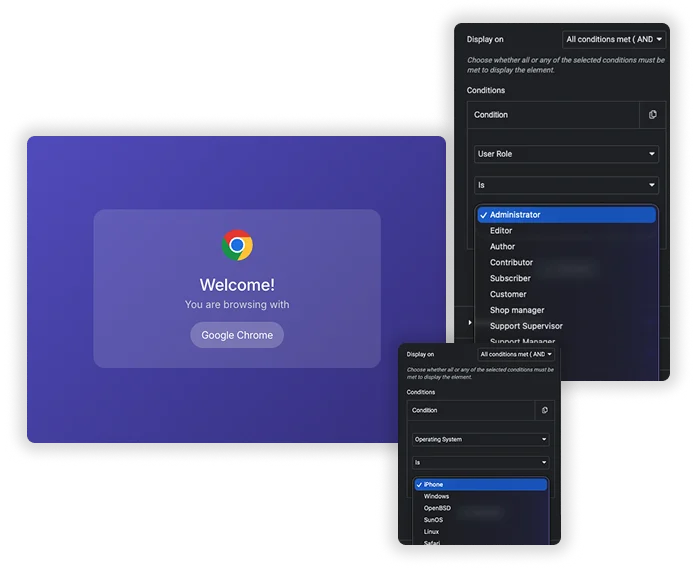
Visitor Conditions: Login, Role, Browser and OS
Login Status shows an element to logged-in visitors or guests. User Role targets any WordPress role, including roles added by WooCommerce or membership plugins. Browser and Operating System let you show a Mac download button to Mac visitors or a notice to Safari users. Every rule uses Is or Is not, so one rule can include or exclude.
- A user role only exists for logged-in visitors, so use Login Status to catch guests.
- Operating System is the platform, not the screen size. For phone versus desktop, use Elementor’s responsive visibility settings.
- Test rules in a private window, since you are logged in as an admin while editing.
Date, Time and Page Conditions
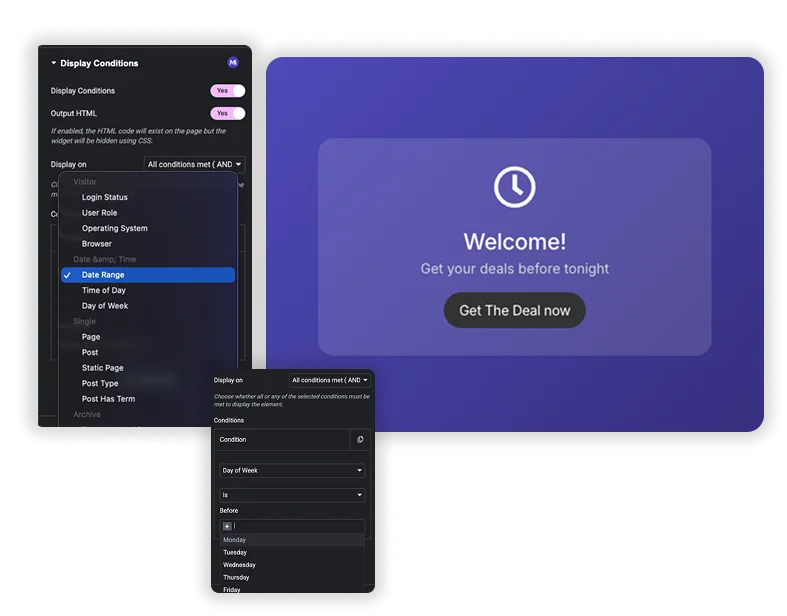
Date Range shows an element between two dates, Time of Day within a time window and Day of Week on the days you pick. Single rules target a Page, Post, Static Page (home or blog page), Post Type or Post Has Term. Archive rules target taxonomy, term, post type, date and author archives or search results. Set Display on to All conditions met (AND) or Any condition met (OR) to combine several rules.
- Time rules use your WordPress site timezone, not the visitor’s.
- Combine Day of Week and Time of Day with AND to describe opening hours.
- On widgets, Output HTML off (the default) keeps hidden content out of the page. Sections are always hidden with CSS, so their content stays in the source.
Elementor Pro Display Conditions vs Master Addons Display Conditions
Elementor Pro now has its own element display conditions, so if you already use Elementor Pro, check it first. Here is how the two compare.
| Feature | Elementor Pro | Master Addons Pro |
|---|---|---|
| Price | Needs Elementor Pro | Needs Master Addons Pro |
| Works on | Containers and widgets | Widgets and legacy sections, not containers |
| Visitor rules | Login status, user role and more | Login Status, User Role, Browser, Operating System |
| Browser and OS | Not offered | Yes |
| Referrer URL | Yes | No |
| Date and time | Date and day rules | Date Range, Time of Day, Day of Week |
| Page and archive rules | Yes | Page, Post, Static Page, Post Type, Post Has Term, six archive types |
Elementor Pro is the better fit for container layouts and referrer rules. Master Addons adds browser and operating system targeting and works well on widget-level rules. For content that must stay private, use Restrict Content (Pro) in User Based mode rather than a display rule.
Every Condition You Can Use
Conditions are grouped in four sets. Every one takes an Is or Is not operator.
| Group | Conditions | Typical use |
|---|---|---|
| Visitor | Login Status, User Role, Operating System, Browser | Member buttons, admin notes, platform-specific downloads |
| Date & Time | Date Range, Time of Day, Day of Week | Sales that end on their own, opening hours, weekend offers |
| Single | Page, Post, Static Page, Post Type, Post Has Term | A header call to action that changes on certain pages |
| Archive | Taxonomy Archive, Term Archive Page, Post Type Archive, Date Archive, Author Archive, Search Results | Category banners, a note on search results |
There is no referrer URL, device or WooCommerce cart condition. An Easy Digital Downloads Cart condition appears only when that plugin is active.
Frequently Asked Questions For Display Conditions
Is Display Conditions free?
No. Display Conditions is part of Master Addons Pro. Enabling it in the free plugin does nothing, because the code ships only with Pro.
How is this different from Elementor Pro display conditions?
Elementor Pro’s display conditions work on containers and widgets and include a referrer URL rule. Master Addons works on widgets and legacy sections, not containers, and adds Browser and Operating System rules. If your layouts use containers, put Master Addons rules on the widgets inside them.
Is hidden content really hidden from visitors?
Only partly. On a widget with Output HTML off, the default, hidden content is not rendered into the page. With Output HTML on, and on sections, the content stays in the page source and is hidden with CSS. For private material use Restrict Content (Pro) in User Based mode or a membership plugin.
What happens if I set several conditions on one element?
The Display on setting decides. All conditions met (AND) shows the element only if every rule passes. Any condition met (OR) shows it if at least one rule passes, which is a much bigger audience.
Trending Elementor Widgets & Extensions
Build sophisticated websites in less time.

Glassmorphism

Container Extras

Patterns
![Master Addons Post/Page Duplicator extension for Elementor: MA Duplicator row link in the WordPress Pages list creating a Landing Page - [Duplicated #128] draft](https://d1asvmc6qcowgk.cloudfront.net/wp-content/uploads/2026/09/15102930/post-page-duplicator-768x403.webp)
Post/Page Duplicator
