
Elementor Popup Close Button Widget (Popup Trigger)
The X in the corner of a popup is the one piece you cannot restyle. Popup Trigger is a free widget that adds your own close button inside a popup built with the Master Addons Popup Builder. Write the button text, pick an icon, and choose what the click does: close the popup, close it for good, or send the visitor back to the previous page. It closes popups. It does not open them.
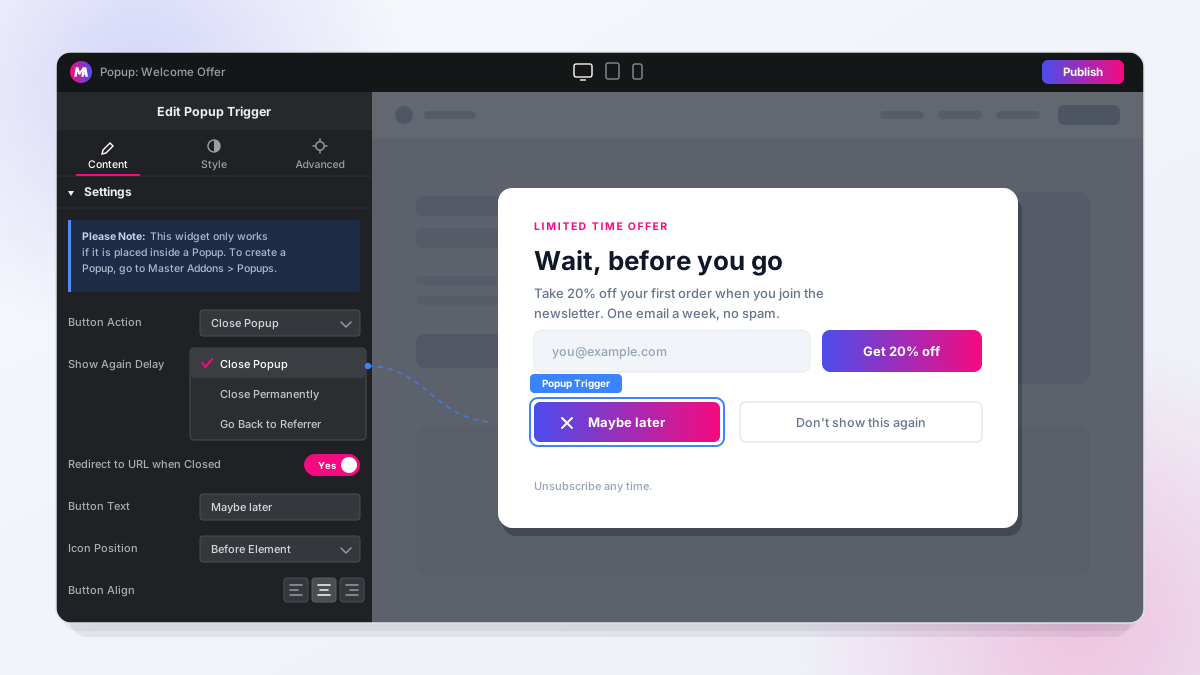
How to Add a Close Button to an Elementor Popup
You need Elementor and the free Master Addons plugin. If you have not built a popup yet, start with how to add a popup in Elementor for free.
- Go to Master Addons, Popups and open your popup in Elementor.
- Search for Popup Trigger and drag it into the popup content.
- Choose the Button Action: Close Popup, Close Permanently or Go Back to Referrer.
- For Close Popup, set Show Again Delay. Turn on Redirect to URL when Closed if the click should take the visitor to another page.
- Set the Button Text, icon and alignment, then style it in the Style tab.
- Publish the popup and test the button on the front end.
Decide When the Popup Is Allowed Back
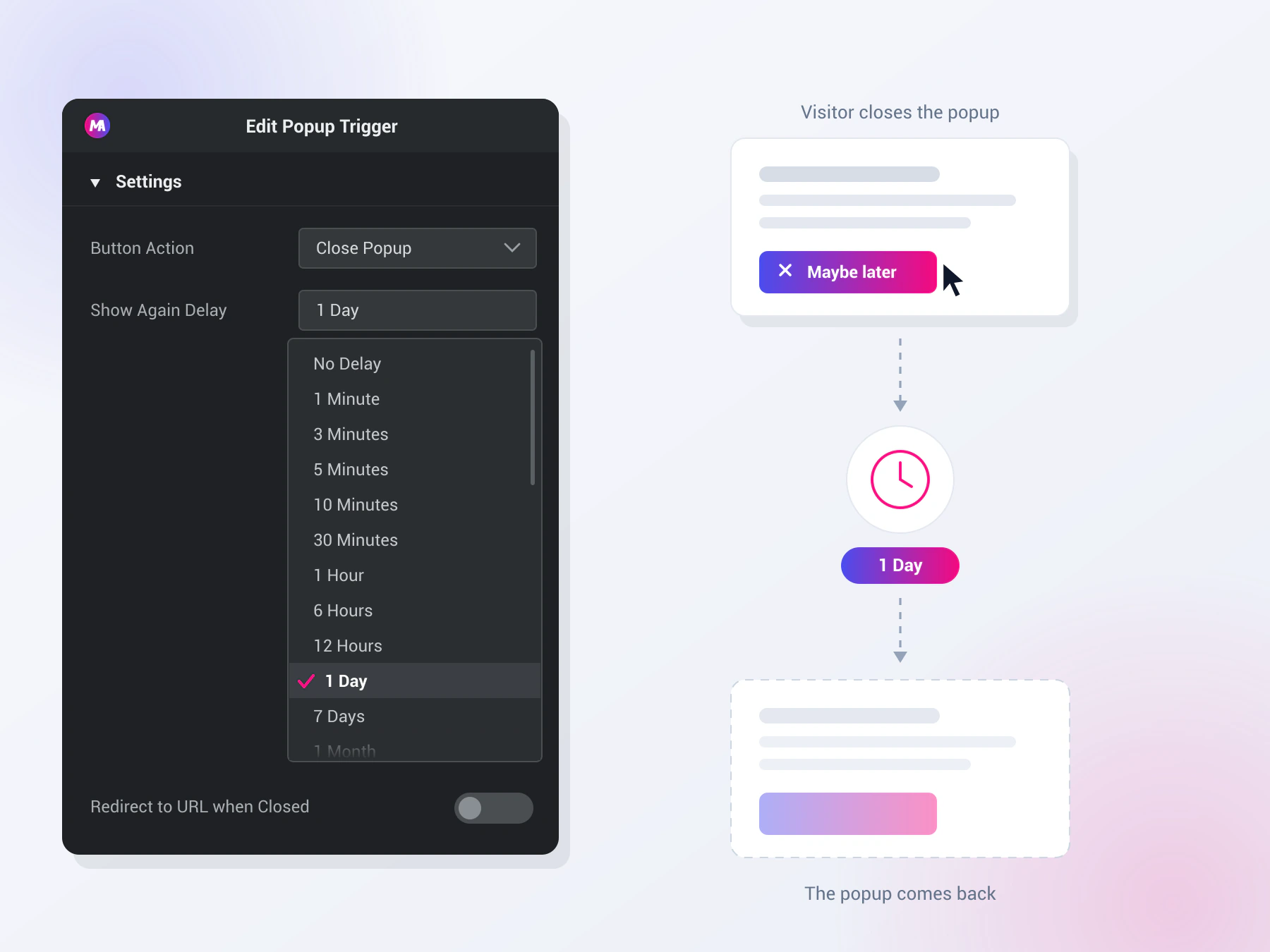
Showing the same popup on every page view is how a good offer turns into an annoyance. The Show Again Delay setting sits on the close button itself, so a visitor who dismisses the popup gets a break before it is allowed back.
- Seventeen Delay Presets: The dropdown runs from one minute up to one month: minutes at 1, 3, 5, 10 and 30, hours at 1, 3, 6 and 12, then days at 1, 3, 5, 7, 10, 15 and 20. Leave it on No Delay and the popup is free to appear again on the next page load.
- Remembered in the Browser: The close time goes into the visitor’s own browser storage, tied to that popup’s ID. Nobody has to log in for it to work, and every other popup on the site keeps its own separate timing.
- Different Buttons, Different Rules: Because the delay lives on the button rather than on the popup, two close buttons in the same popup can behave differently. A “Remind me later” button sets a one day pause while a “No thanks” button next to it closes the popup permanently.
Send People Somewhere Instead of Nowhere
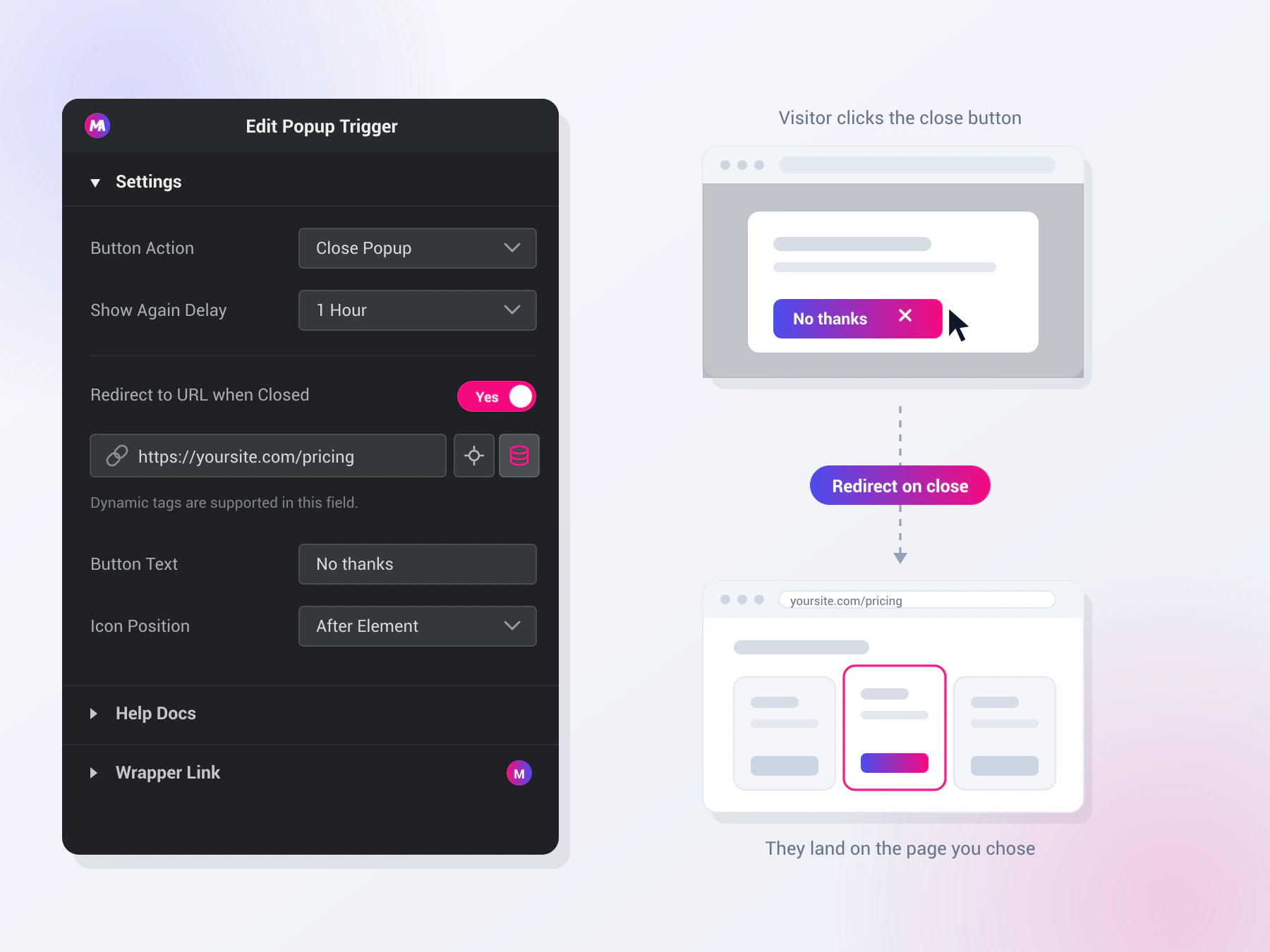
Closing a popup normally drops a visitor back on the page they were already ignoring. Switch on Redirect to URL when Closed and the same click can take them somewhere more useful.
- Any URL You Want: Point the close button at a pricing page, a support article, a cheaper plan, or straight to checkout. Turn the switch on, paste the link, and the redirect fires once the popup has closed.
- Dynamic Tag Support: The URL field takes Elementor dynamic tags, so the destination can come from the post or from a custom field instead of being hard coded. One popup template can then send visitors somewhere different on every page it appears.
- Same Tab Only: The redirect runs in the same browser tab right after the popup closes. New tab and nofollow options on the link field have no effect here.
Style It Like Any Other Button on Your Site
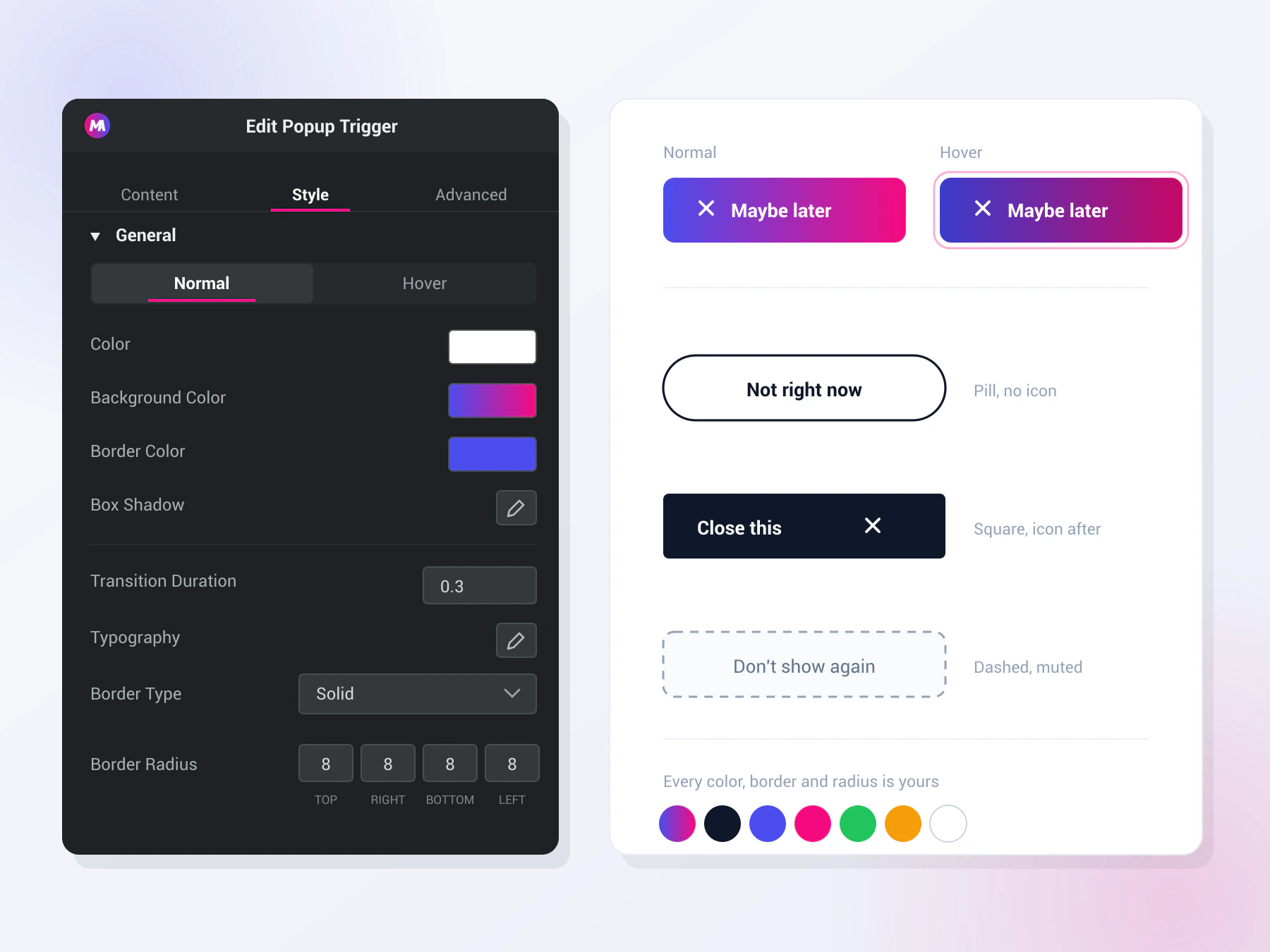
The trigger is a normal Elementor element, which means it comes with a full Style tab. Everything about it answers to your design rather than to the popup’s built in markup.
- Your Words, Not “Close”: The button text is a plain text field, and it takes dynamic tags as well. “Maybe later” or “Continue to the site” tells a visitor what the click will do, which is more than a corner symbol manages.
- Icon Before or After: Add a Font Awesome or custom SVG icon and put it before or after the label, or set Icon Position to None and skip it. Separate sliders control the SVG size and the gap between the icon and the text.
- Normal and Hover States: Text color, background color, border color and box shadow each get their own Normal and Hover values. Transition duration is a number field, so the hover can snap or ease depending on how the rest of your buttons behave.
Elementor Pro Close Popup Action vs Popup Trigger
Elementor Pro popups close from any button link set to the Popup action. Popup Trigger does the same job for popups made with the Master Addons Popup Builder.
| Feature | Elementor Pro popup close action | Master Addons Popup Trigger |
|---|---|---|
| Works with | Elementor Pro popups | Master Addons popups |
| Setup | Dynamic link on a Button widget | A dedicated widget with its own style controls |
| Stop showing again | “Don’t Show Again” toggle | Close Permanently, or a Show Again Delay from 1 minute to 1 month |
| Redirect after closing | No, unless you add custom code | Yes, Redirect to URL when Closed |
| Go back to the previous page | No | Yes, Go Back to Referrer |
| Open a popup on click | Yes, Popup Open action | No. In Master Addons that is the On Click trigger, which needs Pro |
| Cost | Elementor Pro | Free |
Related: the Master Addons Popup Builder, Display Conditions (Pro) and Call to Action for the popup content.
Frequently Asked Questions
Answers to common questions about the Master Addons Popup Trigger widget.
What does the Popup Trigger widget do?
It adds a styled button inside a Master Addons popup. A click closes the popup, closes it permanently or sends the visitor back to the page they came from. You can also redirect to a URL after the popup closes.
Can Popup Trigger open a popup when a button is clicked?
No. Popup Trigger only closes popups. To open a Master Addons popup when someone clicks a button, set the popup’s Open Popup setting to On Click and enter a CSS selector. On Click is a Master Addons Pro trigger. The free plugin opens popups on page load.
Where can I place the Popup Trigger widget?
Inside a popup built with the Master Addons Popup Builder. The panel shows a note that the widget only works there. On a normal page the button does nothing. The guide to adding a popup in Elementor for free covers building the popup first.
What is the difference between Close Popup and Close Permanently?
Close Popup hides the popup and keeps it away for the Show Again Delay you pick, from no delay up to one month. Close Permanently stores a very long delay in the visitor’s browser, so the popup stays hidden for that visitor unless they clear their browser storage.
Is Popup Trigger free?
Yes. Popup Trigger and the Popup Builder are in the free Master Addons plugin. Pro adds popup triggers such as On Click, On Scroll and Exit Intent, plus page targeting.
Where is the full documentation?
See the Popup Trigger documentation for every setting with screenshots.
Trending Elementor Widgets & Extensions
Build sophisticated websites in less time.

Glassmorphism

Container Extras

Patterns
![Master Addons Post/Page Duplicator extension for Elementor: MA Duplicator row link in the WordPress Pages list creating a Landing Page - [Duplicated #128] draft](https://d1asvmc6qcowgk.cloudfront.net/wp-content/uploads/2026/09/15102930/post-page-duplicator-768x403.webp)
Post/Page Duplicator
