
Add Custom JavaScript in Elementor: Page and Element Level JS
The Custom JS extension, part of Master Addons Pro, gives you a JavaScript field inside Elementor. Add code to a whole page from Page Settings, or attach it to a single widget, section or container from its Advanced tab. Use it for small interactions, form tweaks or tracking events without editing theme files or stuffing scripts into an HTML widget.

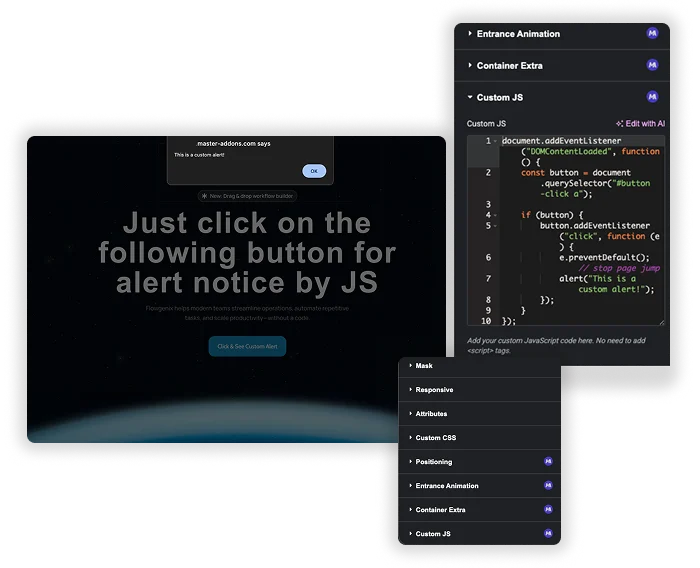
A Dedicated Code Space for Every Page
Stop stuffing scripts into HTML widgets or scattering them in global files. This extension adds a dedicated Custom JS field in the Page Settings > Advanced tab. Any code you write here runs only on this specific page or post. It’s the organized way to handle one-off scripts, A/B test tracking, or unique interactive elements.
- Clean Separation: Keep page-specific scripts isolated from your site-wide code. No risk of breaking other pages.
- Easy Access: Find your code instantly in the page settings—no digging through the Widgets Panel.
- Built-in Best Practice: The field automatically handles
$(document).ready()for you, so you can write your core logic directly.
Page-level and element-level JavaScript
Page-level code lives in Page Settings, Advanced, Custom JS, and runs on that page only. Element-level code lives in the Advanced tab of any widget, column, section or container. In element-level code, the word selector is swapped for that element’s CSS class, so the script only touches that element.
- No <script> tags and no document ready wrapper: the code is wrapped in
jQuery(document).readyfor you, and$works. - Scripts print in the page footer, after the content has loaded.
- Code runs on the live page, not inside the Elementor editor preview, so check the published page after saving.
- Every instance of the word selector is replaced in element-level code. Use
$('selector')rather thandocument.querySelectorthere.
How to add custom JavaScript in Elementor
These steps assume Master Addons Pro is active and your WordPress role can publish unfiltered HTML, which administrators can by default.
- In your dashboard, go to Master Addons, open the Extensions tab, turn on Custom JS and save.
- Edit the page with Elementor.
- For the whole page, open Page Settings, then Advanced, then Custom JS. For one element, select it and open its Advanced tab.
- Paste your code without <script> tags.
- Update the page and test it on the live URL.
Three Elementor custom JS examples
Paste any of these into a Custom JS field and change the class names to match your page.
1. Add a class to the header after scrolling (page level)
$(window).on('scroll', function () {
  $('.site-header').toggleClass('is-scrolled', $(window).scrollTop() > 80);
});
2. Toggle a class when an element is clicked (element level)
$('selector').on('click', function () {
  $(this).toggleClass('is-open');
});
3. Send a Google Analytics event when a button is clicked (page level)
$('.cta-button a').on('click', function () {
  if (typeof gtag === 'function') {
    gtag('event', 'cta_click', { location: 'pricing' });
  }
});
Ways to add JavaScript in Elementor compared
There are three common routes. The right one depends on where the script needs to run. If you also need styles scoped to one element, the free Custom CSS extension works the same way.
| HTML widget | Elementor Pro Custom Code | Master Addons Custom JS | |
|---|---|---|---|
| Plan | Free Elementor | Elementor Pro | Master Addons Pro |
| Scope | The page the widget sits on | Site-wide, with display conditions | One page, or one element |
| Where you write it | Inside a widget on the canvas | A Custom Code screen in the dashboard | Page Settings, or the element’s Advanced tab |
| Script tags | Needed | Needed | Not needed |
| Target one element | Write the selector yourself | Write the selector yourself | Use the selector keyword |
Frequently Asked Questions For Custom JS
When should I use this instead of an HTML widget or my theme's functions.php?
Use it for scripts that belong to one page or one element, like a calculator, a scroll effect or a click event. For code that every page needs, a site-wide option such as your theme or a code snippets plugin is a better home. The HTML widget works too, but scripts end up scattered across the canvas and are easy to miss later.
Is the code minified or optimized for performance?
No. The code is added as you write it, so keep it short and tidy. The only change Master Addons makes is swapping the selector keyword in element-level code for that element’s CSS class.
What happens if I write broken JavaScript? Will it break my whole page?
It can. A syntax error can stop other scripts on that page from running. Test the code in your browser console first, and try it on a staging site if the page matters.
Can I use this with Dynamic Data or Elementor's variables?
Directly, not within the JS field itself. However, you can write JavaScript that interacts with elements on the page that are populated by dynamic data. For example, you could write a script that reads text from a dynamically filled heading. You’d use normal JavaScript selectors to target those elements.
Trending Elementor Widgets & Extensions
Build sophisticated websites in less time.

Glassmorphism

Container Extras

Patterns
![Master Addons Post/Page Duplicator extension for Elementor: MA Duplicator row link in the WordPress Pages list creating a Landing Page - [Duplicated #128] draft](https://d1asvmc6qcowgk.cloudfront.net/wp-content/uploads/2026/09/15102930/post-page-duplicator-768x403.webp)
Post/Page Duplicator
