

Key Takeaways
- Elementor and Elementor Pro do not include a content switcher widget, so an Elementor content switcher always comes from an addon or from a workaround with the Tabs widget.
- The eight content switcher widgets compared here are from Master Addons, Happy Addons, Essential Addons, Ultimate Addons, PowerPack, Unlimited Elements, The Plus Addons and Crocoblock JetTabs.
- Content switcher widgets differ most on two points: what each option can hold (text, an image or a saved template) and whether the switch supports more than two options.
- Happy Addons describes its Content Switcher as a free widget with three content types: Plain or HTML Text, Saved Sections and Saved Page.
- The Master Addons Toggle Content widget is part of Master Addons Pro, supports two or more options and loads text or a saved Section, Page or Widget template into each one.
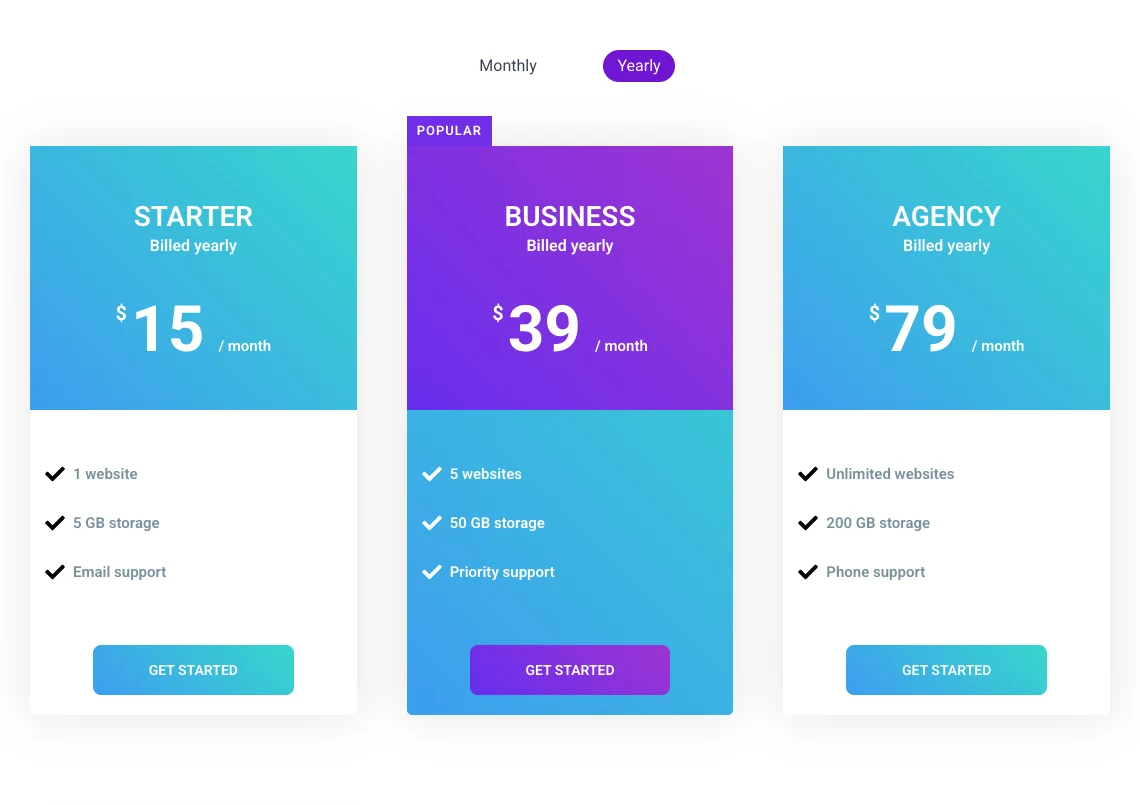
An Elementor content switcher is a widget that swaps one block of content for another when a visitor flips a switch, most often monthly prices for yearly ones. Elementor does not ship one, so the choice is between addons. They share the same basic idea and differ in what each option can contain, how many options you can add and which plan you need.
We make one of the eight widgets below, Toggle Content, so read our entry with that in mind. The facts about the other seven come from each vendor’s own widget page, read on 7 October 2026.
Table of Contents
What is a content switcher in Elementor?
A content switcher is a switch with two or more labels that shows one block of content and hides the others. Vendors use three names for the same widget: content switcher, content toggle and switcher.
It is different from Elementor’s old Toggle widget, which was a collapsible list like an accordion. If that is what you need, see Elementor toggle vs accordion vs tabs vs content switcher.
Elementor content switcher widgets compared
This table only records what each vendor states on its widget page. A blank plan cell means the page we read does not say which plan includes the widget, so check the vendor’s plan table before you buy.
| Widget | Addon | Content in each option | Options | Plan stated on the widget page |
|---|---|---|---|---|
| Toggle Content | Master Addons | Text, or a saved Section, Page or Widget template | Two or more | Pro |
| Content Switcher | Happy Addons | Plain or HTML text, Saved Sections, Saved Page | Two, or more with the right setup | Described as a free widget |
| Content Toggle | Essential Addons | Saved template, content or image | Two (primary and secondary) | Not stated |
| Content Toggle | Ultimate Addons (UAE) | Text, images, lists, saved templates | Two | UAE Pro |
| Content Toggle | PowerPack | Image, text or saved template | Two (primary and secondary) | Not stated |
| Content Switcher | Unlimited Elements | Multiple content types, can sync with other widgets | Two or more | Not stated |
| Switcher | The Plus Addons | Content and templates, including pricing tables | Two | Labelled Freemium |
| Switcher | Crocoblock JetTabs | Two content blocks | Two | Part of JetTabs |
The 8 content switcher widgets
The order below is not a ranking. Each entry says what the widget is good at and who it suits.
1. Master Addons Toggle Content
Toggle Content is our own widget and part of Master Addons Pro. Its Elements list starts with two items and takes as many as you add. Each item has a label, an optional icon and a Type control: Content for text from the editor, or Template for a saved Section, Page or Widget template.
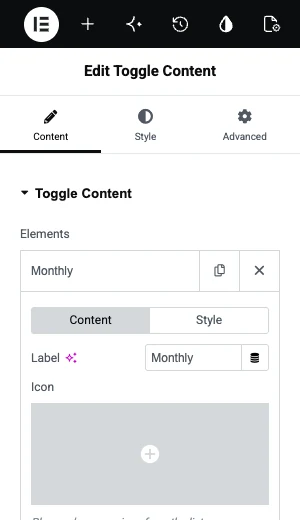
The switch is Round or Square and sits before or after the content. Active Index sets the default option, and Stack On stacks the labels on tablet or mobile. The widget does not remember a visitor’s choice between visits, and you cannot open a specific option from a link.
It does best with three or more options, templates of any kind, per-item label and indicator colours. It suits sites already on Master Addons Pro, since it adds nothing to the bill. The Toggle Content widget page has ten live demos.
2. Happy Addons Content Switcher
Happy Addons calls its widget Content Switcher and describes it as a free widget. It has three content types: Plain or HTML Text, Saved Sections and Saved Page. Its documentation notes that only the first two items are used as switchable content in the standard setup, and it shows a second setup for switching between more items.
It does best with a simple two-way switch at no cost, with saved sections supported. It suits sites that need one pricing switch and do not want a paid addon for it.
3. Essential Addons Content Toggle
Essential Addons names its widget Content Toggle. The widget page says you can use a saved template, content or an image in the primary and secondary content areas, and that you can choose the switch style and colours. It is built around two areas, which fits a before and after or a monthly and yearly pair.
It does best with two-option switches with image support. It suits sites that already run Essential Addons. We compare the two plugins in Master Addons vs Essential Addons.
4. Ultimate Addons Content Toggle
Ultimate Addons for Elementor lists Content Toggle among the widgets in UAE Pro. Its page describes switching between two saved templates and says the widget works with text blocks, images, lists and saved templates.
It does best with two saved templates behind a clean switch. It suits Astra and UAE Pro users. See Master Addons vs Ultimate Addons for the wider comparison.
5. PowerPack Content Toggle
PowerPack’s Content Toggle switches between two contents, which the vendor describes as primary and secondary or annual and monthly. Each side can be an image, text or a saved template, and the widget has a styled toggle label.
It does best with image against image or template against template, with a headline on the switch. It suits PowerPack users who need a two-way switch.
6. Unlimited Elements Content Switcher
Unlimited Elements describes its Content Switcher as a way to switch between two or more types of content with toggle buttons. Its page also describes syncing two or more item-based widgets together, so one switch can drive other widgets on the page.
It does best with more than two options and linking the switch to other widgets. It suits builders who already use the Unlimited Elements library.
7. The Plus Addons Switcher
The Plus Addons labels its Switcher as Freemium and presents it as a widget to toggle pricing tables and switch between different content. Its documentation covers pricing tables with a switcher, connecting a carousel remote and setting an anchor link to a switcher template.
It does best with pricing switches, and links that point at a switcher template. It suits sites built on The Plus Addons.
8. Crocoblock JetTabs Switcher
Crocoblock’s Switcher is part of the JetTabs plugin. The vendor describes it as a way to show the difference between two content blocks.
It does best with a plain two-block switch inside the Crocoblock suite. It suits Crocoblock subscribers, since JetTabs comes with the wider set.
Trying to build a pricing switch? Our step by step guide to adding a monthly and yearly pricing toggle in Elementor covers the template route and the Tabs route.
How to choose a content switcher
Start with the addon you already have. All eight widgets do the basic two-way switch, so installing a second addon for it rarely makes sense.
If you are choosing from scratch, four questions settle it:
- How many options? Monthly and yearly is two. Monthly, yearly and lifetime is three, and several of these widgets stop at two.
- What goes inside? For pricing tables you need saved template support. For a before and after, image support is handier.
- Do you need to link to an option? Most switchers always open on the default. If a button elsewhere must open the second option, check for that feature first.
- What else comes with the plan? A switcher alone is a small reason to buy an addon. Look at the rest of the plugin, as we do in our comparison of Elementor addons.

The no-addon option: Elementor Tabs
You can get the same behaviour from Elementor’s Tabs widget without any addon. Each tab holds any widget, so two tabs named Monthly and Yearly with pricing columns inside work as a switcher.
You give up the sliding switch look and the reuse that saved templates bring. For one pricing section on one page, that is a fair trade.
Frequently asked questions
Does Elementor have a content switcher widget?
No. Neither Elementor nor Elementor Pro has a content switcher or content toggle widget. The closest built-in option is the Tabs widget, which can hold a different set of widgets in each tab. A dedicated switcher comes from an addon.
Is there a free Elementor content switcher?
Happy Addons describes its Content Switcher as a free widget, and The Plus Addons labels its Switcher as Freemium. You can also build a switch with Elementor’s own Tabs widget at no cost. Check each vendor’s current plan table, because free and paid lists change.
What is the difference between a content switcher and a content toggle?
There is none. Content switcher, content toggle and switcher are different names for the same widget: a switch that shows one block and hides the others. Happy Addons and Unlimited Elements say Content Switcher, Essential Addons and PowerPack say Content Toggle, and Master Addons says Toggle Content.
Can a content switcher have more than two options?
Some can. Master Addons Toggle Content and the Unlimited Elements Content Switcher support two or more options. Several others are built around a primary and a secondary area, which means two. If you need monthly, yearly and lifetime, confirm this before you choose.
Which content switcher is best for pricing tables?
Any switcher that loads saved templates works for pricing tables, because each billing period is a saved set of tables. Pick the one in the addon you already use. If you need three billing options, pick one that supports more than two items.
Final thoughts
Every Elementor content switcher on this list does the core job. The differences are the number of options, the content types and the plan. If you already have one of these addons, use its switcher. If you need three or more options with templates, Master Addons Toggle Content and Unlimited Elements are the two that state support for it.
You can click through ten working examples on the Toggle Content widget page.
Disclosure: the Ultimate Addons link above is an affiliate link. It does not change what we wrote about the widget.
Related reading
