

Key Takeaways
- Elementor and Elementor Pro do not include a timeline widget, so every Elementor timeline plugin in this comparison is a third-party addon.
- Timeline Widget for Elementor by Cool Plugins is the only single-purpose plugin of the eight, with 70,000+ active installs on WordPress.org and vertical and horizontal layouts in its free version.
- The Master Addons Timeline widget has vertical and horizontal carousel layouts, four vertical alignments and six navigation options, and its Post Timeline type needs Master Addons Pro.
- Unlimited Elements lists four separate timeline widgets on WordPress.org: Unlimited Timeline is marked Free, while Horizontal Timeline, Post Timeline and Post Horizontal Timeline are marked Pro.
- Ultimate Addons for Elementor lists its Timeline widget as a Pro feature that shows milestones, history or process steps in vertical or horizontal timelines.
- Three questions settle most choices between Elementor timeline addons: whether you need a horizontal layout, whether the timeline should pull blog posts, and which addon is already installed.
Choosing an Elementor timeline plugin starts with one fact: Elementor has no timeline widget, in the core plugin or in Pro. You need an addon. We make one of them, the Master Addons Timeline widget, so read our own entry with that in mind. The other seven are described from their vendors’ pages and WordPress.org listings.
This post compares eight Elementor timeline widgets on the points that change the decision: layouts, whether blog posts can feed the timeline, and what plan the widget sits in. Install counts and versions were checked on WordPress.org on 6 October 2026. One link below is an affiliate link. If you buy through it we may earn a commission, at no extra cost to you.
Table of Contents
What to look for in an Elementor timeline widget
Four things separate one Elementor timeline addon from another. Check them before you install anything.
- Layouts. Vertical is standard. A horizontal timeline is a carousel, and not every widget has one.
- Content source. Custom items you type in, or a post timeline that reads your blog posts and updates itself.
- Styling depth. Separate controls for cards, dates, the line and the points, and whether the item in view can look different.
- The rest of the plugin. A timeline is one widget. If you already run an addon pack, its timeline is usually the lightest choice because nothing new loads.
You can also build a basic timeline by hand with containers and borders. The timeline tutorial shows that method and where it stops being worth the effort.
Elementor timeline widgets compared
This table sums up the eight widgets. “Listed” means the vendor’s own page or WordPress.org readme says so.
| Addon | Active installs | Timeline widgets | Horizontal | Blog posts as source | Plan |
|---|---|---|---|---|---|
| Master Addons | 30,000+ | Timeline (Custom or Post type) | Yes, carousel | Yes, Post Timeline | Post Timeline needs Pro |
| Timeline Widget for Elementor | 70,000+ | One timeline widget | Yes | Listed as a Pro feature | Free version plus Pro |
| Essential Addons | 1 million+ | Post Timeline, Content Timeline | Not listed | Yes | Free plugin plus Pro |
| Unlimited Elements | 300,000+ | Unlimited Timeline, Horizontal Timeline, Post Timeline, Post Horizontal Timeline | Yes | Yes | First is Free, other three are Pro |
| Ultimate Addons (UAE) | 2 million+ | Timeline | Listed | Yes, Posts Timeline | Pro |
| The Plus Addons | 100,000+ | Timeline | Not listed | Not listed | Pro |
| PowerPack Addons | 70,000+ | Timeline | Yes | Yes, posts and custom post types | Check the vendor’s plan page |
| HappyAddons | 400,000+ | Timeline, Horizontal Timeline | Yes, separate widget | Not listed | Check the vendor’s plan page |
1. Master Addons
The Master Addons Timeline is one widget with two types. Custom Timeline holds items you write yourself, and Post Timeline builds the line from blog posts.
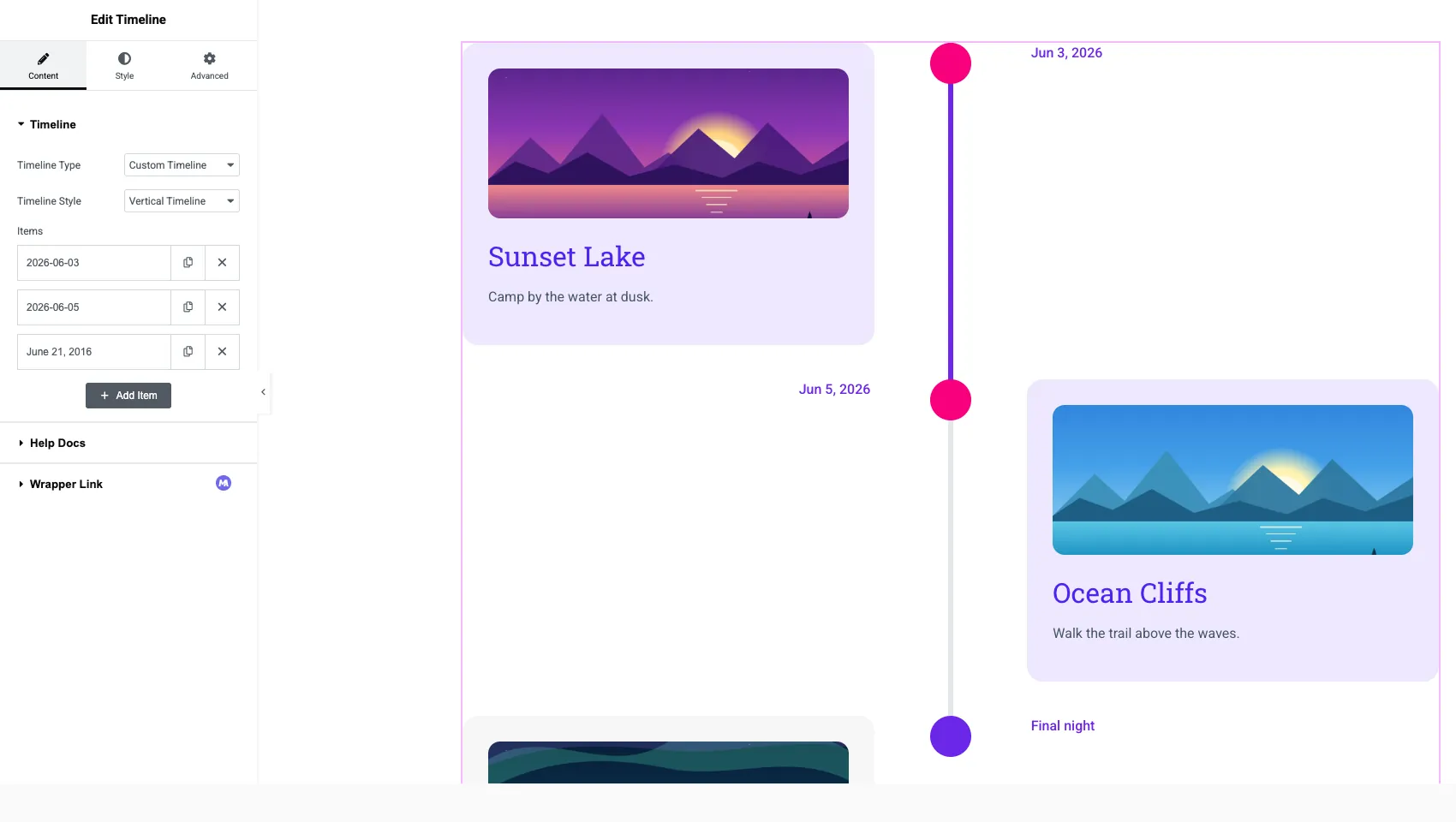
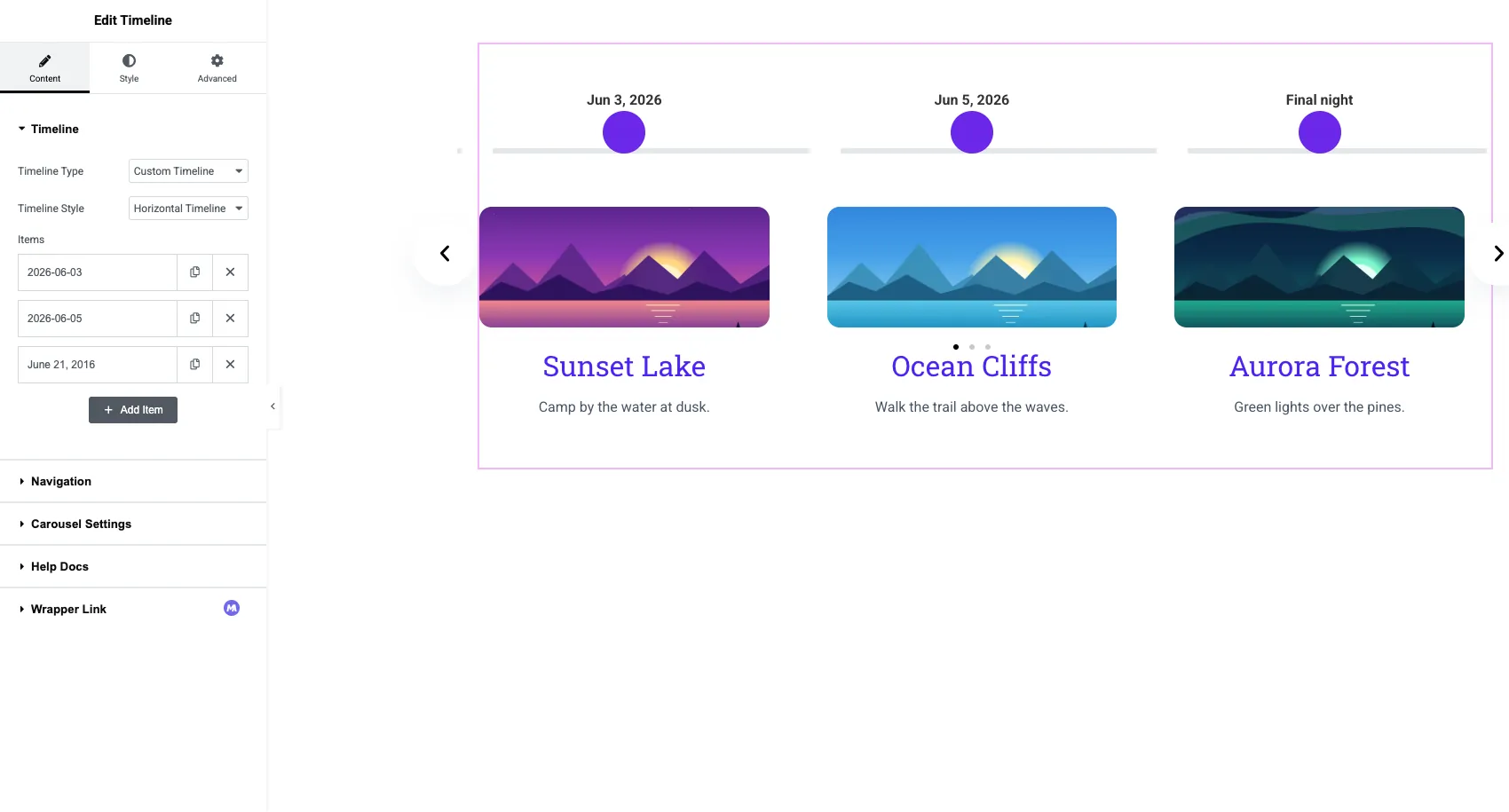
- Layouts: vertical with Left, Center, Overlay or Right alignment, or a horizontal carousel.
- Each item: a date or a custom label, rich content, an image and a link for the whole card.
- Horizontal navigation: Arrows and Dots, Arrows and Fraction, Arrows, Dots, Progress or None, with an optional scrollbar.
- Points: dots, icons, images, numbers or letters.
- Styling: ten Style sections, with Default, Hover and Focused states for cards, dates and points.
- Post Timeline (Pro): Posts Per Page, order, category, tag and author filters, excluded posts and an offset. Vertical only.
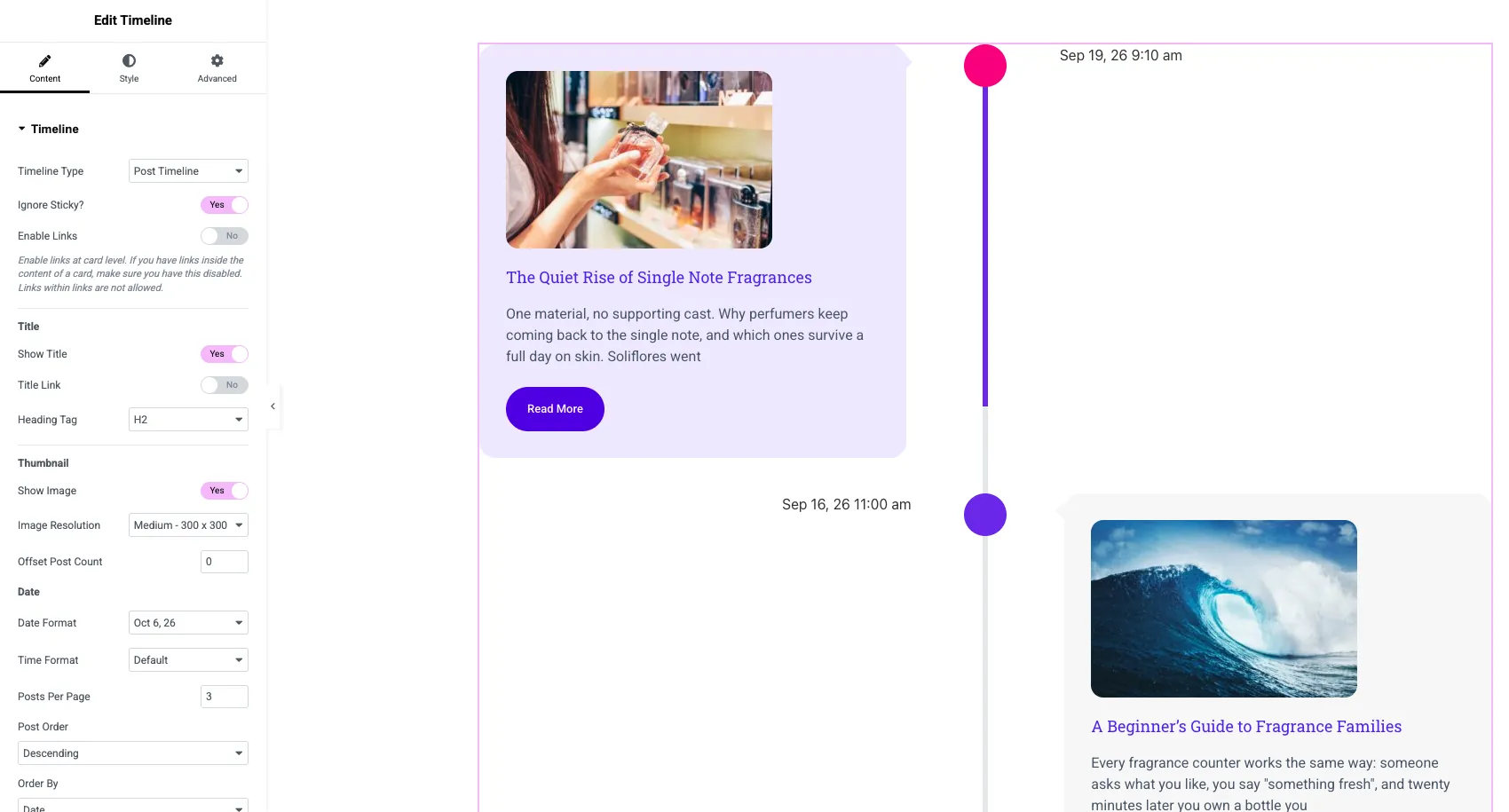
A Post Timeline cannot be horizontal, and there is no load more button for long post lists. If you need a horizontal timeline of posts, Unlimited Elements lists a widget for exactly that.
It is a good fit if you want vertical and horizontal layouts from one widget, or you already use Master Addons for its Theme Builder or other widgets. See the Timeline widget page for demos.
2. Timeline Widget for Elementor (Cool Plugins)
Timeline Widget for Elementor is the specialist here. It only does timelines, and it has 70,000+ active installs (version 1.7.2 at the time of writing).
- Layouts: vertical and horizontal in the free version. Its Pro version lists Vertical, Horizontal and One-Sided layouts.
- Extras listed for Pro: preset styles, a Post Timeline for blog posts, and Ajax load more.
- Markers: icons, custom text or images, per its listing.
It is one more plugin to maintain if you already run an addon pack that has a timeline.
It is a good fit if a timeline is the only extra widget you need and you would rather not install a full addon pack.
3. Essential Addons
Essential Addons is the most installed addon in this list at 1 million+ sites. Its WordPress.org page lists two timeline elements: Post Timeline, for posts and pages, and Content Timeline, which its site describes as working with a custom or a dynamic source.
- Layouts: vertical. Neither page mentions a horizontal layout.
- Content Timeline: custom entries or a dynamic source, with scroll animation.
- Post Timeline: a timeline of posts and pages.
No horizontal option is listed. The two elements also sit in different places in its feature list, so check which one your plan includes.
It is a good fit if Essential Addons is already on the site. We compare the two packs in Master Addons vs Essential Addons.
4. Unlimited Elements
Unlimited Elements (300,000+ installs) splits timelines into four widgets, and its WordPress.org listing labels each one.
| Widget | Label on WordPress.org |
|---|---|
| Unlimited Timeline | Free |
| Horizontal Timeline | Pro |
| Post Timeline | Pro |
| Post Horizontal Timeline | Pro |
Four widgets means changing layout or source later is a rebuild, where a single widget would let you switch a dropdown.
It is a good fit if you need a horizontal timeline that reads blog posts. It is the only one of the eight that lists that combination by name.
5. Ultimate Addons for Elementor
Ultimate Addons for Elementor comes from the team behind Astra and reports 2 million+ installs for its free plugin. The Timeline widget is marked Pro on WordPress.org, described as showing “milestones, history, or process steps in vertical or horizontal timelines”.
- Content Timeline: a date inside each item, responsive alignment, per-item style overrides and links.
- Posts Timeline: a query builder that fetches posts, with featured images.
- States: hover and focused styles for icons and cards.
There is no timeline in the free plugin, whose widgets are mostly header, footer and site parts.
It is a good fit if you run Astra with UAE Pro already. More detail in Master Addons vs Ultimate Addons for Elementor.
6. The Plus Addons
The Plus Addons (100,000+ installs) labels its Timeline widget PRO. The page pitches it for organization history, startup storylines, event history and step by step tutorials.
- Layout: vertical, with a masonry option.
- Pin: an icon or an image, with a pin title and position.
- Card content: text, video, image, HTML or iframe content.
Its page does not list a horizontal layout or a post source for this widget.
It is a good fit if you want video or embedded content inside timeline cards.
7. PowerPack Addons
PowerPack (70,000+ installs for its free plugin) describes four timeline layouts: Horizontal, Vertical, Left and Right. Its page says the widget supports custom and dynamic content, including custom post types.
- Layouts: Horizontal, Vertical, Left, Right.
- Sources: custom entries, posts or any post type.
The widget page does not say which plan includes the Timeline, so confirm on the pricing page before you count on it.
It is a good fit if your timeline should read a custom post type, such as events or projects.
8. HappyAddons
HappyAddons (400,000+ installs) lists two widgets on WordPress.org: Timeline, a “visual vertical timeline content builder”, and Horizontal TimeLine, a “visual horizontal storyline for history or roadmaps”.
- Layouts: vertical and horizontal, as separate widgets.
- Source: custom items. No post source is listed for either widget.
As with Unlimited Elements, moving between vertical and horizontal means swapping widgets. Check its widget list for which plan each one belongs to.
It is a good fit if HappyAddons is already installed and you need a simple hand-written timeline.
Want to see a timeline before you pick? The Master Addons Timeline widget page has sixteen live demos, vertical and horizontal.
Which timeline widget should you use?
Start from what you need the timeline to do, then check what is already installed.
| If you… | Start with |
|---|---|
| Only need a timeline and nothing else | Timeline Widget for Elementor |
| Want vertical and horizontal from one widget | Master Addons, PowerPack or Timeline Widget for Elementor |
| Need a horizontal timeline of blog posts | Unlimited Elements (Post Horizontal Timeline) |
| Need a vertical timeline of blog posts | Master Addons Pro, Essential Addons, UAE Pro or PowerPack |
| Want video or iframes inside cards | The Plus Addons |
| Already run one of these packs | Its own timeline widget |
If one of these packs is already on the site, use its timeline. Two addon packs on one site means two sets of scripts and settings. If you are picking a pack from scratch, our Elementor addons comparison compares the plugins as a whole.
Frequently asked questions
Does Elementor have a timeline widget?
No. Neither Elementor nor Elementor Pro includes one. You add a timeline with an addon widget, or build a simple one by hand from containers, borders and positioned icons.
Is there a free timeline plugin for Elementor?
Yes. Timeline Widget for Elementor has a free version on WordPress.org with vertical and horizontal layouts, and Unlimited Elements marks its Unlimited Timeline widget as Free. Several addon packs also list timeline widgets, so check the plan for each.
Which Elementor timeline addon has a horizontal layout?
Master Addons, Timeline Widget for Elementor, Unlimited Elements, PowerPack and HappyAddons all list a horizontal timeline. Ultimate Addons mentions horizontal timelines in its WordPress.org description.
Can an Elementor timeline show blog posts automatically?
Yes, with a post timeline. Master Addons Pro, Essential Addons, Unlimited Elements, Ultimate Addons and PowerPack all list one, and Timeline Widget for Elementor lists one in its Pro version. The timeline then updates whenever you publish a post.
Do I need a separate plugin just for a timeline?
Not if your addon pack already has a timeline widget. A single-purpose plugin makes sense when the timeline is the only extra you need.
Final thoughts
All eight Elementor timeline plugins build a vertical timeline. They differ on three points: a horizontal layout (five list one clearly), blog posts as a source (six list one, counting the Pro version of the Cool Plugins widget), and whether the timeline is one flexible widget or several separate ones.
If you want both layouts and a post source behind a single widget, look at the Master Addons Timeline widget. If a timeline is all you need, the Cool Plugins widget is the lighter install.
Related reading
