

Key Takeaways
- Elementor Pro’s Price Table widget is not in the lowest Pro tier; the Pro-vs-Free table lists it from the Advanced Solo plan up, and it has no billing toggle or feature tooltips.
- Six of the seven addon pricing table widgets compared here ship in the base version of their addon pack; the Pro plans mostly add layouts, tooltips and a separate toggle widget.
- No pricing table widget in this list has a monthly and yearly switch built in except HT Mega’s Flip Switcher Pricing Table; the others use a separate toggle widget, which is Pro in Essential Addons, Premium Addons, PowerPack, The Plus Addons and ElementsKit.
- Feature tooltips are documented in Essential Addons, Premium Addons, PowerPack and Master Addons, Pro only in The Plus Addons and Royal Addons, and not documented for Elementor Pro, ElementsKit or HT Mega.
- The Master Addons Pricing Table widget has five layouts, a sale price with the original struck through, a ribbon, tooltips per feature row and an Easy Digital Downloads button; the billing toggle comes from the Toggle Content widget in Master Addons Pro.
- Annual single-site Pro prices in the comparison run from $29 (HT Mega, on sale) to about $84 (Elementor Pro Advanced Solo).
An Elementor pricing table plugin is usually one widget inside an addon pack, and the packs differ in the details that matter on a pricing page: how many layouts, whether a plan can be highlighted, whether a feature row can carry a tooltip, whether a sale price shows the old price crossed out, and whether there is a monthly and yearly switch. This comparison checks those details for eight addons against their own documentation.
The eight are Elementor Pro, Essential Addons, The Plus Addons, Premium Addons, PowerPack, ElementsKit, Royal Addons and Master Addons, with HT Mega noted where its widget stands out. Every fact below comes from the vendor’s docs, demo or pricing page, checked on 2 November 2026. Master Addons is our plugin, so its row is held to the same test.
Table of Contents
What to compare in a pricing table widget
Six things decide whether a pricing table widget will do the job without custom CSS. Layouts: how many card designs you can switch between without rebuilding. Highlight and ribbon: whether one plan can be raised with a badge. Sale price: whether a discounted plan can show the original price crossed out. Tooltips: whether a feature row can explain itself on hover. Toggle: whether monthly and yearly prices can be switched, and with which widget. Plan: whether the widget is in the free version.
One widget usually equals one card, so a three-plan table is three widgets in three containers, and equal heights come from the container’s Align Items setting rather than the widget. And the billing toggle is almost never inside the pricing widget; it is a separate toggle or switcher widget that wraps two sets of cards, and that second widget is often the Pro one.
The comparison table
| Addon | Widget plan | Layouts | Billing toggle | Feature tooltips | Sale price | Ribbon | Lowest annual Pro price |
|---|---|---|---|---|---|---|---|
| Elementor Pro | Pro only (Advanced Solo and up) | Not documented | No | Not documented | Yes | Yes | About $84/yr (Advanced Solo) |
| Essential Addons | Free | 6 styles | Separate Toggle widget, Pro | Yes | Not documented | Yes | About $45/yr |
| The Plus Addons | Free, with Pro-only styles | 3 (1 free) | Separate Switcher widget, Pro | Pro | Yes | 3 styles (1 free) | $39/yr |
| Premium Addons | Free | Not documented | Separate Content Toggle, Pro | Yes | Yes | Yes, 4 types | $41 to $49/yr |
| PowerPack | Free | Not documented | Separate Content Toggle, Pro | Yes | Yes | Yes | $39/yr |
| ElementsKit | Free | 16 presets (3 free) | Advanced Toggle, Pro | Not documented | Not documented | Yes | $42/yr |
| Royal Addons | Free | 4 style pages | Separate Content Toggle, free (2 options) | Pro | Not documented | Not documented | Not published |
| Master Addons | Base plugin | 5 | Separate Toggle Content, Pro | Yes | Yes | Yes | See pricing page |
Sources are the vendors’ own docs and pricing pages, linked in each section below. “Not documented” means the feature is not mentioned in the docs or shown on the demo, which is different from “no”.
Elementor Pro Price Table
Elementor Pro’s Price Table widget is the baseline most people compare against, and it is paid twice over: it needs Elementor Pro, and Elementor’s Pro-vs-Free help table places it from the Advanced Solo plan up rather than the cheapest Essential plan. It does the core job well. Each card has a header, a price with a sale toggle that strikes through the original, a period, a feature list with an icon per row, a button and a corner ribbon with position and text controls.
What it lacks is everything above the basics. There is no feature tooltip, no documented layout presets and no billing toggle, and Elementor has no separate toggle widget, so a monthly and yearly switch means the Nested Tabs widget or an addon. Source: Elementor’s Price Table help page and Pro vs Free table.
Essential Addons Pricing Table
Essential Addons has the largest install base of the addons here, over a million, and its Pricing Table widget is in the free version. The docs list a default style plus five Pricing Style options, a Featured toggle with a ribbon style dropdown and a featured tag text, and an Enable Tooltip switch on each feature row. It also ships two sibling widgets, Pricing Slider and Multicolumn Pricing Table, for different page shapes.
The billing toggle comes from the separate Toggle (Content Toggle) widget, which is Pro. A sale price with the original struck through is not mentioned in the docs. Pro starts at $3.75 a month billed annually for one site. Source: Essential Addons Pricing Table docs.
The Plus Addons Pricing Table
The Plus Addons takes the freemium approach inside one widget. The Pricing Table widget is free, Layout Style 1 is free, and Styles 2 and 3, Price Styles 2 and 3, two of the three button styles, two of the three ribbon styles and the per-row tooltips are Pro. The previous price strike-through is free. One widget is one plan, so a three-plan table is three widgets.
The docs are explicit that there is no built-in monthly and yearly switcher; the separate Switcher widget (Pro) does it, with a “Pricing Plans Info with Monthly/Yearly Switcher” demo. Pro starts at $39 a year for one site. Source: The Plus Addons pricing table docs.
Premium Addons Pricing Table
Premium Addons’ Pricing Table is free and well documented. It has a slashed original price next to the current price, a ribbon in four types (triangle, circle, stripe, flag) on either side, per-feature tooltips with their own styling, and icons from Font Awesome, Lottie or an image for the header and each feature. There is a description editor and display toggles for each part of the card.
The toggle is the separate Content Toggle widget (previously Content Switcher), which is Pro; its nested mode handles Plan and then Monthly or Annual. Single-site Pro is listed at $41 to $49 a year depending on the current sale. Source: Premium Addons Pricing Table tutorial.
PowerPack Pricing Table
PowerPack’s Pricing Table is free and covers the list: a discount price with the old price slashed, a ribbon with text, position and spacing, and tooltips at two levels, a widget-wide Enable Tooltip plus a tooltip text per feature, with click or hover trigger, position and animation. The header takes an icon, title and subtitle, and the footer has one button.
The monthly and yearly switch is the Content Toggle widget, Pro, marketed as Dual Pricing. Pro starts at $39 a year for one site. Source: PowerPack Pricing Table overview and its tooltip guide.
ElementsKit Pricing Table
ElementsKit’s Pricing Table is free and comes with 16 widget presets, three of them free, which is the widest preset range in this comparison. The header takes an icon or image, features have icons, the button takes an icon, and the duration field offers daily, weekly, monthly, quarterly and annual. The demo shows a ribbon on the highlighted plan.
Tooltips and a struck-through sale price are not in the docs. The closest toggle is the Advanced Toggle widget, Pro, with a Monthly and Yearly demo; the separate Price Menu widget is also Pro. Personal Pro is $42 a year for one site. Source: ElementsKit Pricing Table doc.
Royal Addons Pricing Table
Royal Addons’ Pricing Table is free, with four premade style pages on the demo site. The free version includes a Content Toggle widget with two options that the readme says can be used as a pricing switcher, which makes Royal the only addon here where the toggle route is free. Per-feature tooltips are Pro.
Sale price and ribbon details are not confirmed on the vendor’s site, and the Pro price is not published on a public page, so the table leaves both blank. Source: Royal Elementor Addons on WordPress.org.
Master Addons Pricing Table
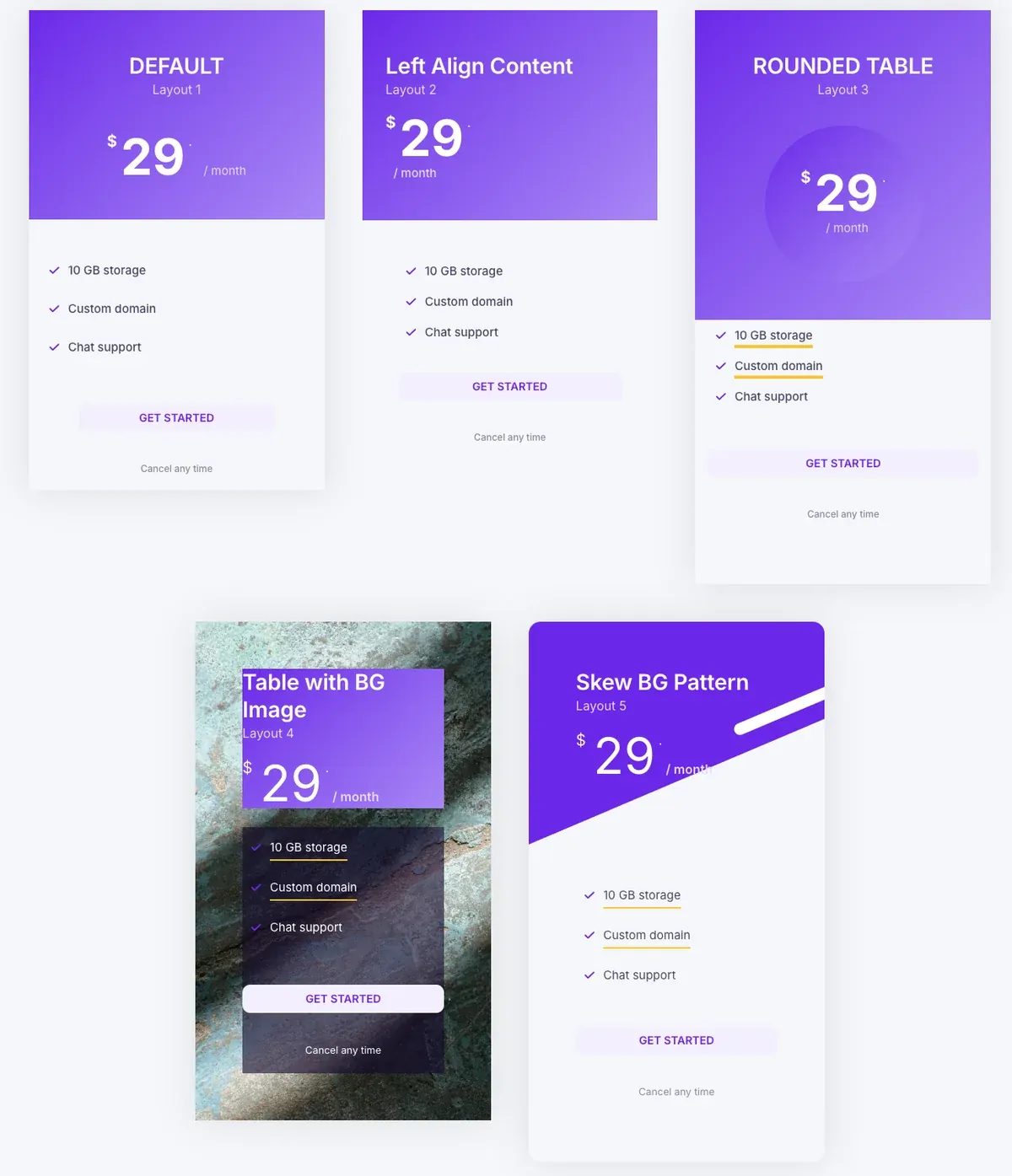
The Master Addons Pricing Table widget ships in the base plugin and has five layouts in a dropdown: Default, Left Align Content, Rounded Table, Table with BG Image and Skew BG Pattern. Content stays in place when you switch layout. Highlight Table raises one card, the ribbon has text, alignment, position and rotation controls, and the Sale switch shows the original price struck through next to the new one.
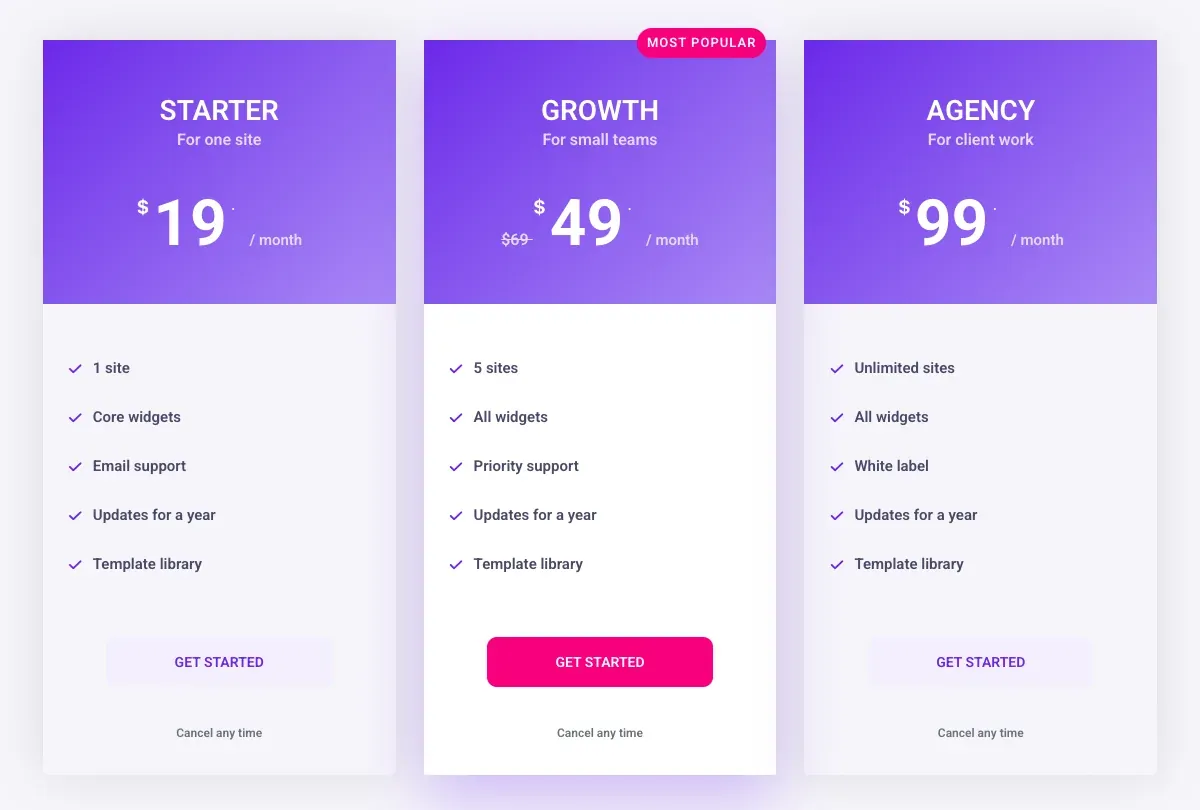
Each feature row has a text, an icon and an optional tooltip with placement. The footer button links anywhere, or becomes an Easy Digital Downloads purchase button. The card background can be a colour, gradient, image, video or slideshow.
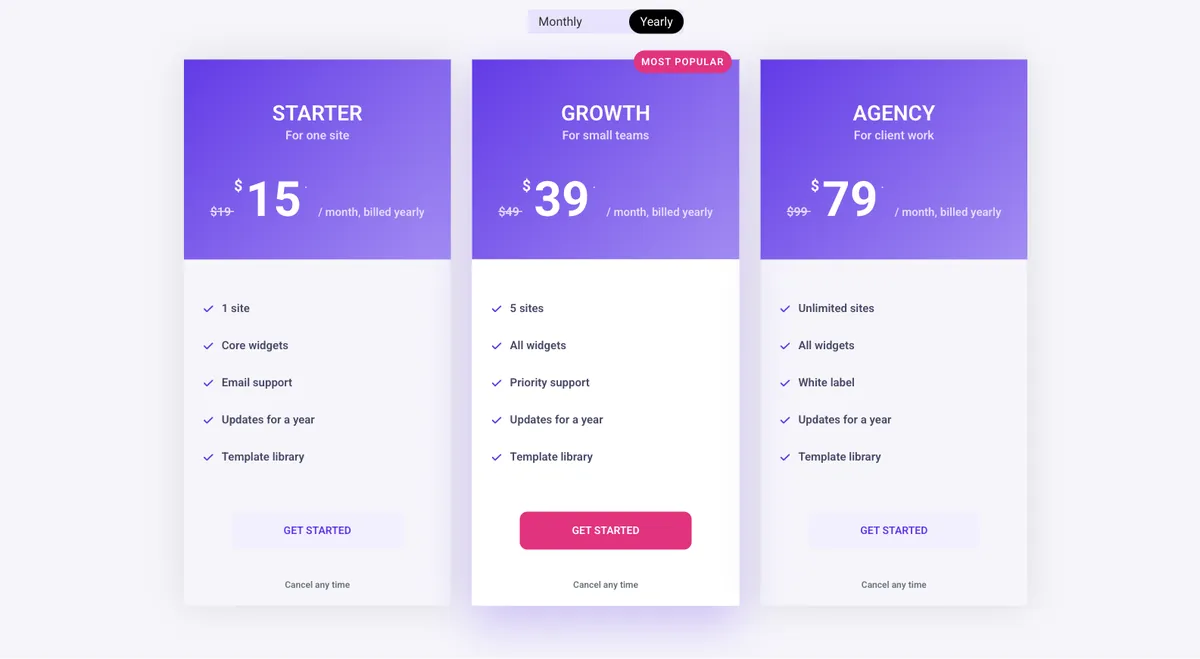
The billing toggle is the gap. The widget holds one price per card and has no switch, so a monthly and yearly table is two sets of cards saved as section templates and shown through the Toggle Content widget, which is in Master Addons Pro. The widget page has that setup running live, and the monthly and yearly toggle guide builds it step by step. A feature comparison matrix across plans is a separate widget too, the Comparison Table, also Pro. Pricing table vs comparison table covers when the matrix is the better fit.
The billing toggle question
Across the eight addons, the pattern is the same: the pricing widget shows one price, and a second widget switches between two pricing rows. Essential Addons, Premium Addons, PowerPack, The Plus Addons, ElementsKit and Master Addons all put that second widget in Pro. Royal Addons has a two-option toggle in the free version. Elementor Pro has no toggle widget at all, so its route is the free Nested Tabs widget.
HT Mega is the exception: its Flip Switcher Pricing Table has the switch inside the widget, though its own doc says the widget needs HT Mega Pro while the WordPress.org listing shows it without a Pro tag. If a built-in switch is the deciding factor, check that before buying.
Which one should you use?
| If you | Start with |
|---|---|
| Already pay for Elementor Pro Advanced and need a plain table | Elementor Pro Price Table |
| Want the most presets to pick from | ElementsKit (16 presets, 3 free) |
| Need tooltips and a sale price without a Pro upgrade | Premium Addons, PowerPack or Master Addons |
| Want a free toggle route | Royal Addons Content Toggle, or Nested Tabs with any widget |
| Want layouts, tooltips, ribbon, sale price and EDD in one widget | Master Addons Pricing Table |
Want to see the widget before you install anything? The Pricing Table widget page has all five layouts live, plus the monthly and yearly toggle built with Toggle Content.
Frequently asked questions
Does Elementor have a free pricing table widget?
No. The Price Table widget is in Elementor Pro, and the Pro-vs-Free table lists it from the Advanced Solo plan rather than the cheapest Essential plan. Free Elementor users get a pricing table from an addon; every addon in this comparison includes the widget in its base version.
Which Elementor pricing table widget has a monthly and yearly toggle?
Almost none have it inside the pricing widget. Essential Addons, Premium Addons, PowerPack, The Plus Addons, ElementsKit and Master Addons use a separate toggle widget in their Pro plans; Royal Addons’ Content Toggle is free with two options; HT Mega’s Flip Switcher Pricing Table builds it in.
Which pricing table widgets support feature tooltips?
Essential Addons, Premium Addons, PowerPack and Master Addons document per-feature tooltips in the base widget. The Plus Addons and Royal Addons offer them in Pro. Elementor Pro, ElementsKit and HT Mega do not document tooltips.
Can I show a sale price with the old price crossed out?
Elementor Pro, The Plus Addons, Premium Addons, PowerPack, HT Mega and Master Addons document a sale or previous price with the original struck through. Essential Addons, ElementsKit and Royal Addons do not mention it in their docs.
Do I need a pricing table plugin or an addon pack?
For Elementor, an addon pack. Standalone pricing table plugins render through a shortcode and ignore Elementor’s styling, so you lose the live editing and responsive controls. Every widget in this comparison edits inside the Elementor panel.
Final thoughts
Only Elementor Pro’s widget is paid-only; the other seven ship in the base version of their addon, so the differences sit in layouts, tooltips, sale prices and the toggle. Elementor Pro’s own widget costs the most and documents the least. Premium Addons, PowerPack and Master Addons cover tooltips, sale price and ribbon in their base widgets, ElementsKit has the most presets, and Royal Addons has the only free toggle route. Master Addons adds five layouts and an Easy Digital Downloads button, and its toggle lives in the Pro Toggle Content widget.
Pick by the one feature your pricing page cannot do without, then check that feature on the vendor’s doc before installing. The Master Addons widget list shows what else ships alongside the Pricing Table if you go that way.
Related reading
- Pricing Table Design: 10 Tips With Examples
- Master Addons vs Ultimate Addons for Elementor
- 100 Best Elementor Addons
- Comparison Table widget
- Pricing Table widget documentation
- How to Add a Monthly and Yearly Toggle to an Elementor Pricing Table
- Elementor Pricing Table Templates and Examples
- Elementor Pricing Table vs Comparison Table: Which to Use
- How to Build a Price List or Menu in Elementor
