

Key Takeaways
- The Envato Elements plugin for WordPress was closed on WordPress.org on 21 August 2025 at the author’s request, and the listing says the closure is permanent.
- Template kits that were imported with the Envato Elements plugin stay on your site, because they are saved as ordinary Elementor templates and pages.
- Template Kit Import is Envato’s own replacement plugin, with 400,000 active installs, and version 1.0.17 imported a kit on WordPress 7.1 and Elementor 4.3 in our test.
- Master Addons imports the same Envato kit ZIP from Master Addons, Template Kits, and its Theme Builder displays the kit’s header and footer without Elementor Pro.
- Elementor’s own Import Templates button accepts a whole Envato kit ZIP and saved all 14 templates of our test kit to Saved Templates.
The Envato Elements plugin is no longer available for WordPress. It was closed on WordPress.org in August 2025, so you cannot install it from the plugin directory, and the kit you downloaded from Envato needs another way in.
There are three ways that work today. We ran each one with the same Envato template kit ZIP on WordPress 7.1 and Elementor 4.3, and this guide shows what each does, where it stops, and which to choose.
Table of Contents
What happened to the Envato Elements plugin?
The plugin, listed as “Envato Elements – Photos & Elementor Templates”, was closed on WordPress.org on 21 August 2025. The listing page gives the reason as “Author Request” and adds that the closure is permanent. In other words, Envato asked for the plugin to be taken down.
The plugin did two jobs from inside the WordPress dashboard. It let you browse and import Elementor template kits, and it let you pull stock photos into the media library.
A closed plugin is not deleted from sites that already run it. If it is still installed on yours, the templates and pages you imported keep working, because they are stored as normal Elementor content. What you will not get is updates, so a future WordPress or Elementor release could break the plugin’s own screens.
Can you still download the Envato Elements plugin?
Not from an official source. WordPress.org shows the message “This plugin has been closed as of August 21, 2025 and is not available for download”, and a search inside your dashboard under Plugins, Add New no longer finds it.
Copies of the old ZIP are offered on third-party download sites, and we would not install one. Nobody maintains that code now, and a file from an unofficial site may not be the file Envato published. Setting up a supported alternative takes less time than vetting an old ZIP.
Envato Elements plugin alternatives compared
All three options below read the kit ZIP exactly as Envato delivers it. The differences come after the upload.
| Template Kit Import | Master Addons Template Kits | Elementor Import Templates | |
|---|---|---|---|
| Accepts the Envato kit ZIP as it is | Yes | Yes | Yes |
| How templates are imported | One Import Template button per template | One Import button per template, or all in a queue | All at once, into Saved Templates |
| Global Kit Styles | Listed first, with its own import button | Listed first, with its own import button | Saved as a template and not applied |
| Turns off Elementor’s default colors and fonts | Yes, through Install Requirements | By hand, in Elementor settings | By hand, in Elementor settings |
| Header and footer builder | No | Yes, Theme Builder | No |
| Ready-made kits in the same screen | No | 30+ kits | No |
| Plugin to keep installed | A single-purpose import plugin | Master Addons | None beyond Elementor |
| Status | Version 1.0.17, updated 17 Sep 2026 | Maintained | Part of Elementor |
Alternative 1: Template Kit Import, Envato’s own replacement
Template Kit Import is the plugin Envato now points to in its help article on installing template kits. It has 400,000 active installs. Its WordPress.org listing says it has only been tested up to WordPress 6.4, yet version 1.0.17 worked on WordPress 7.1 with Elementor 4.3 when we tried it.
Step 1: Install the plugin
Go to Plugins, Add New and search for “Template Kit Import”. The plugin is by envato. Click Install Now, then Activate.

Step 2: Open Tools, Template Kit and upload the ZIP
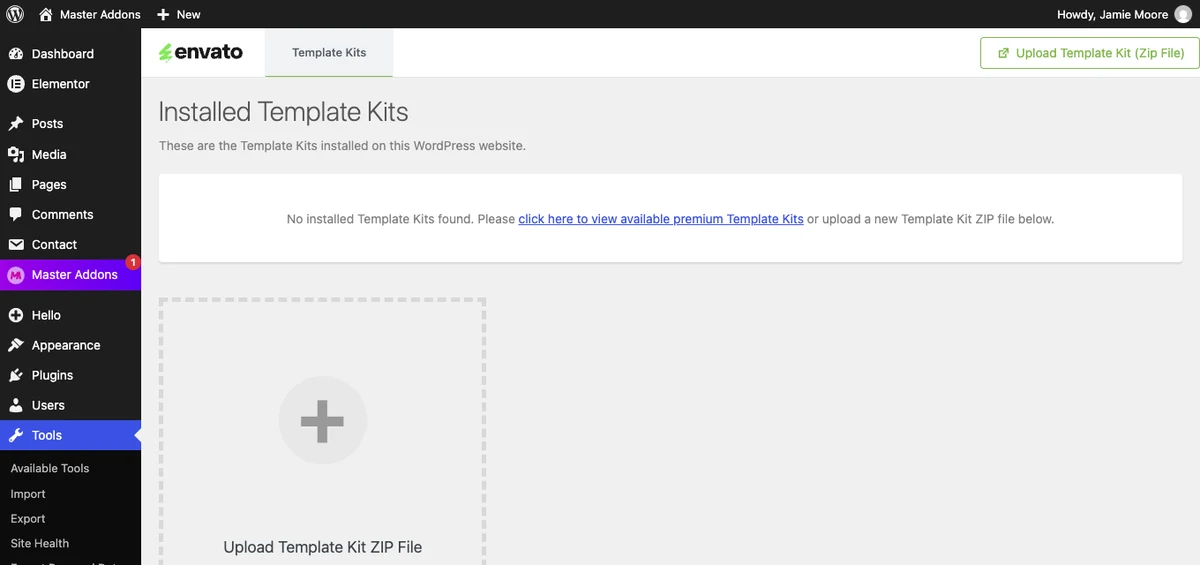
The plugin adds one menu item, Tools, Template Kit. On a new site the screen says “No installed Template Kits found”. Click the Upload Template Kit ZIP File box, or the Upload Template Kit (Zip File) button at the top right, and choose the ZIP from Envato. Do not unzip it first.
Step 3: Install the kit’s requirements
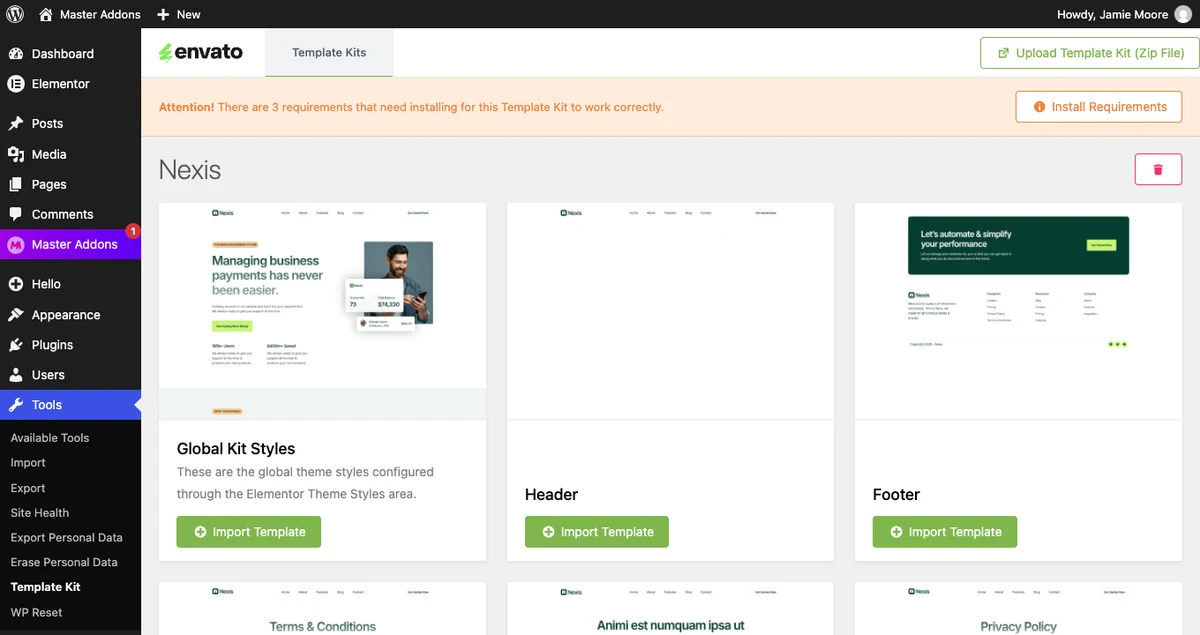
After the upload, the kit opens with all of its templates. Our 14-template test kit was listed in full, from Global Kit Styles to the 404 page. An orange bar at the top said “There are 3 requirements that need installing for this Template Kit to work correctly”.
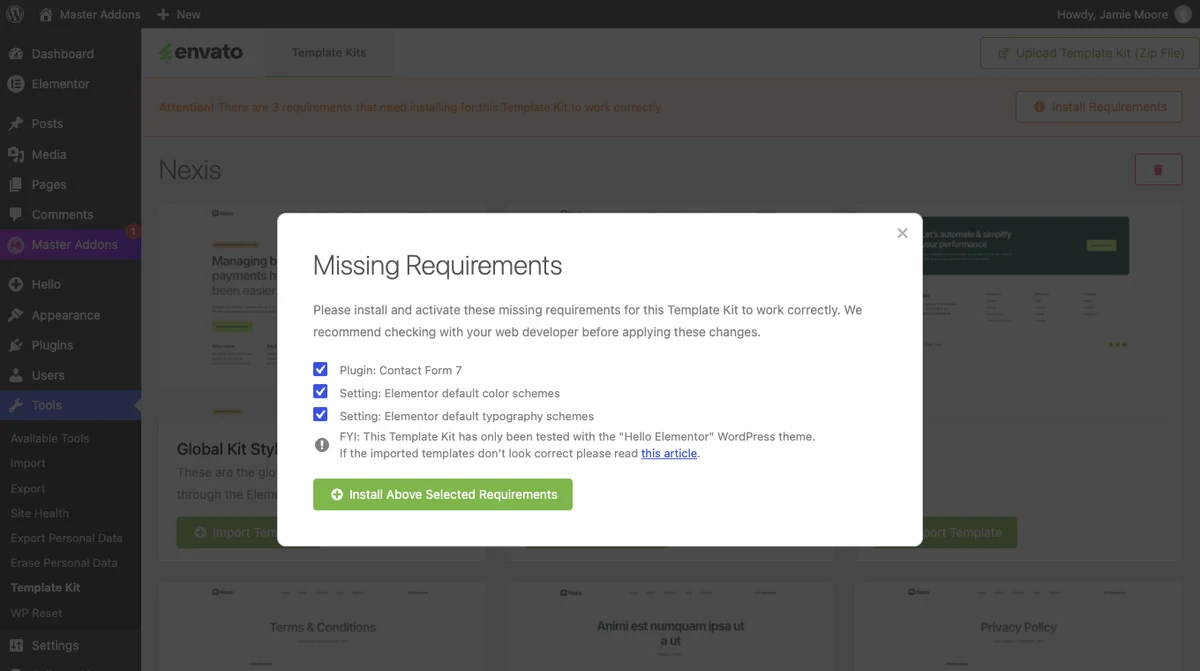
Click Install Requirements. A Missing Requirements window lists what the kit needs. For our kit that was one plugin, Contact Form 7, and two Elementor settings: the default color schemes and the default typography schemes. Leave the boxes ticked and click Install Above Selected Requirements. The plugin installs what is missing and switches those two Elementor defaults off for you.
Step 4: Import the templates
Click Import Template under Global Kit Styles first, then under each template you want. There is no button to import everything at once. When a template is done, its button changes to View Template and Import Again.
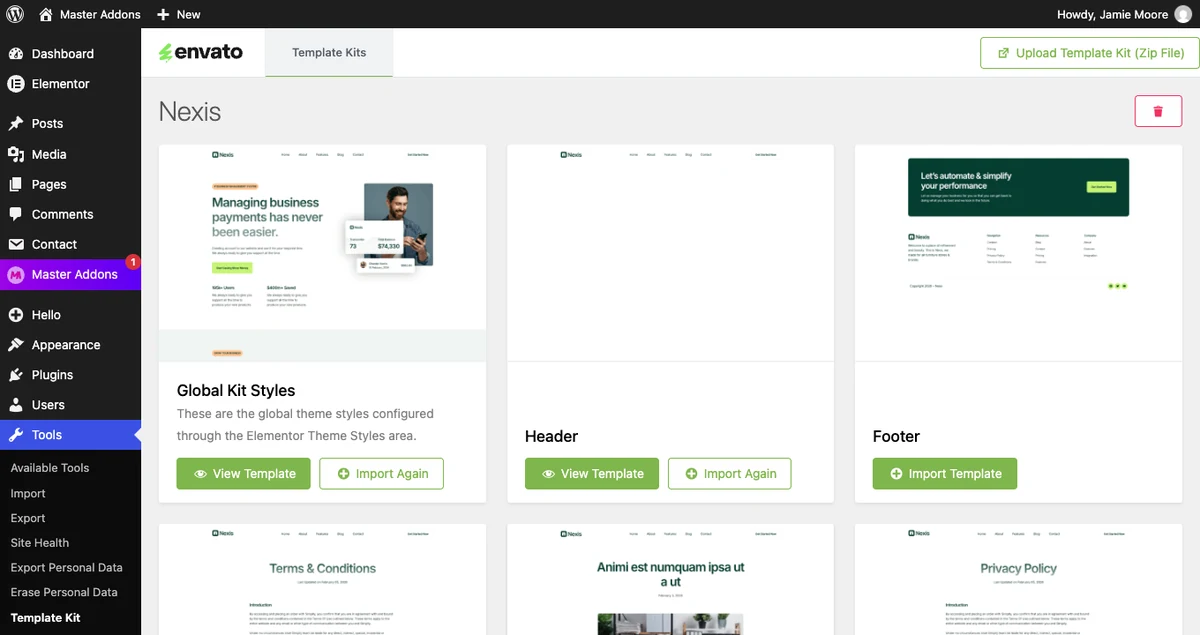
The imported templates are saved in Elementor under Templates, Saved Templates. To use one, create a page, edit it with Elementor and insert the template from the library. If one page is all you need, you can import it on its own from the Elementor page templates library.
Where Template Kit Import stops
The plugin has no header or footer builder, so the kit’s Header and Footer templates sit in your library until something displays them. That usually means Elementor Pro’s Theme Builder or a separate header and footer plugin. It is also one more plugin to keep updated for a job you may do once.
Alternative 2: Master Addons Template Kits
Master Addons has a Template Kits screen with an upload option that reads Envato kit ZIPs. It imports the templates and also covers the part the other two leave open, which is showing the kit’s header and footer on the site.
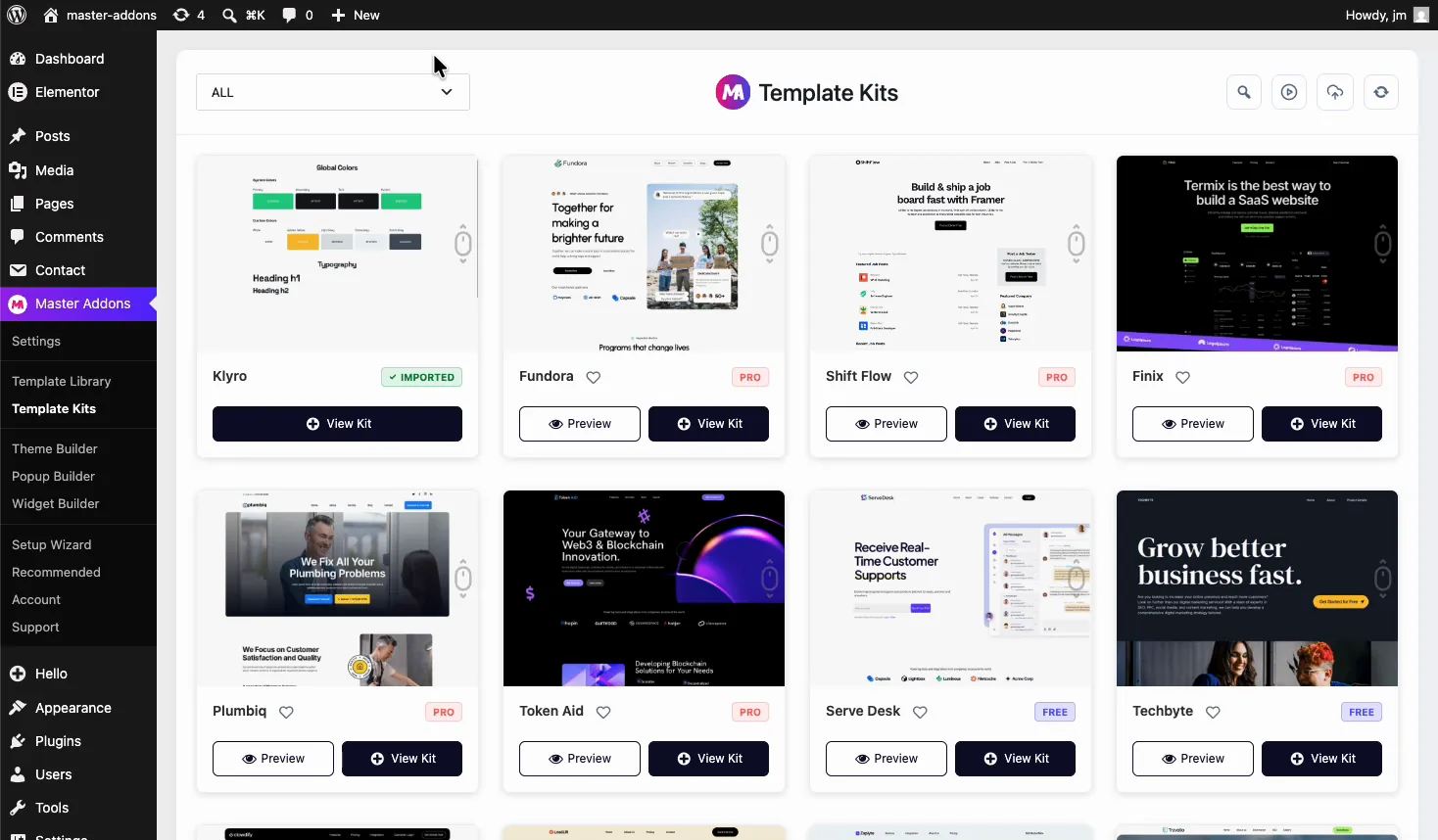
- Install and activate Master Addons, then go to Master Addons, Template Kits.
- Click the upload icon in the top-right icon row.
- In the Upload Template Kit window, drag in the Envato ZIP or click Browse files.
- When the kit has been read, import Global Kit Styles first, then the other templates.
- Go to Master Addons, Theme Builder, create a Header and a Footer template, and insert the kit’s Header and Footer sections into them.
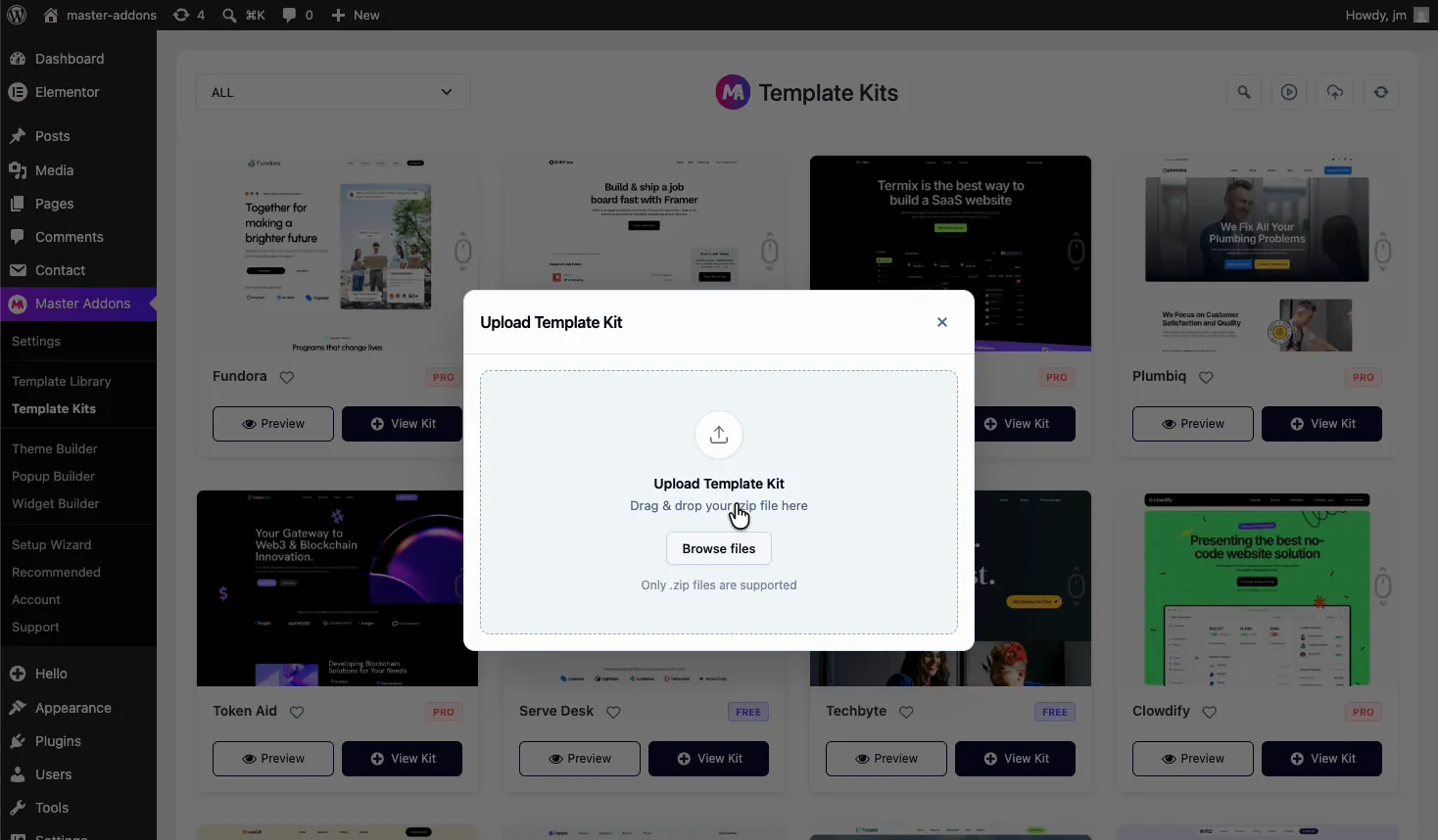
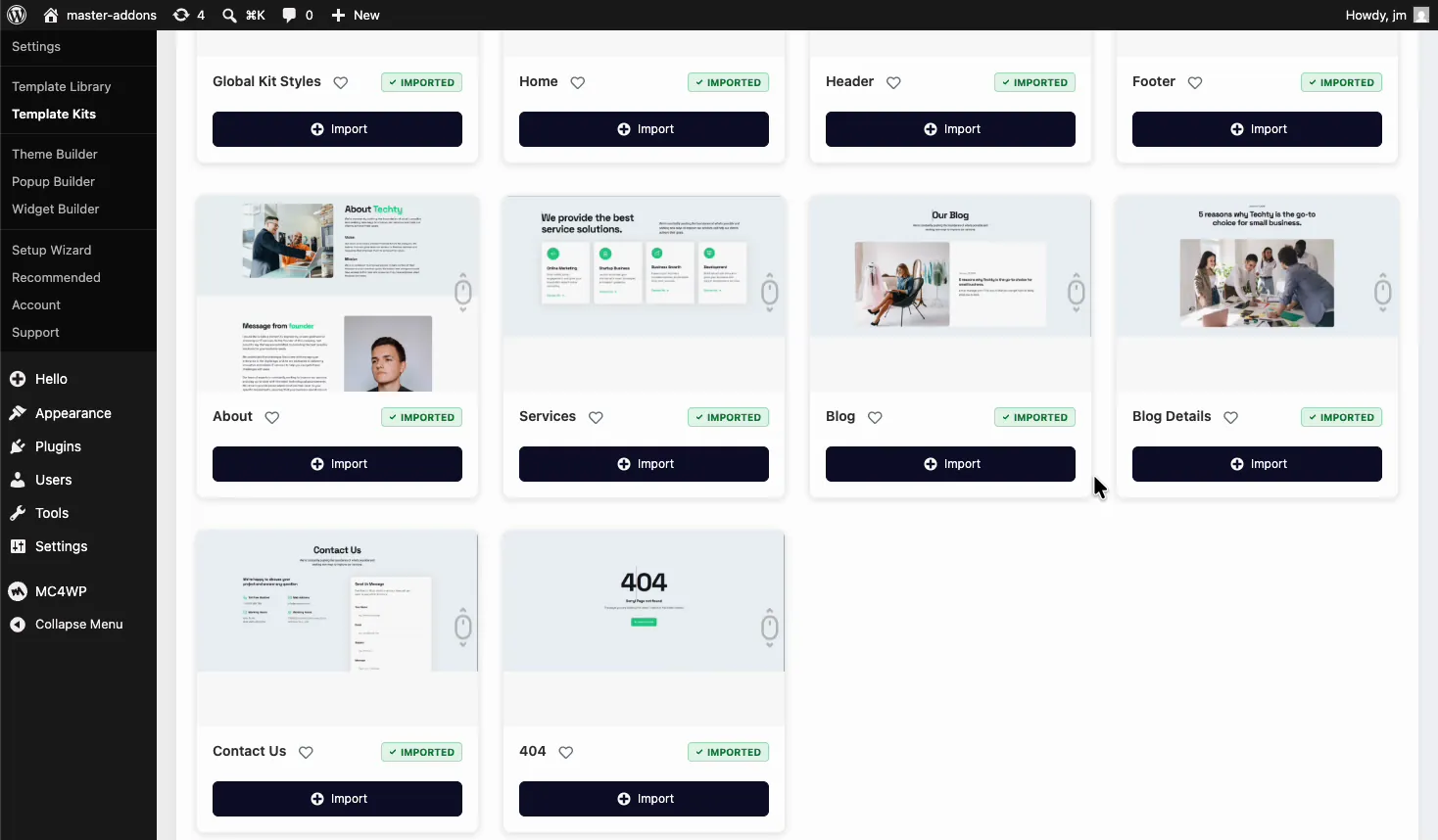
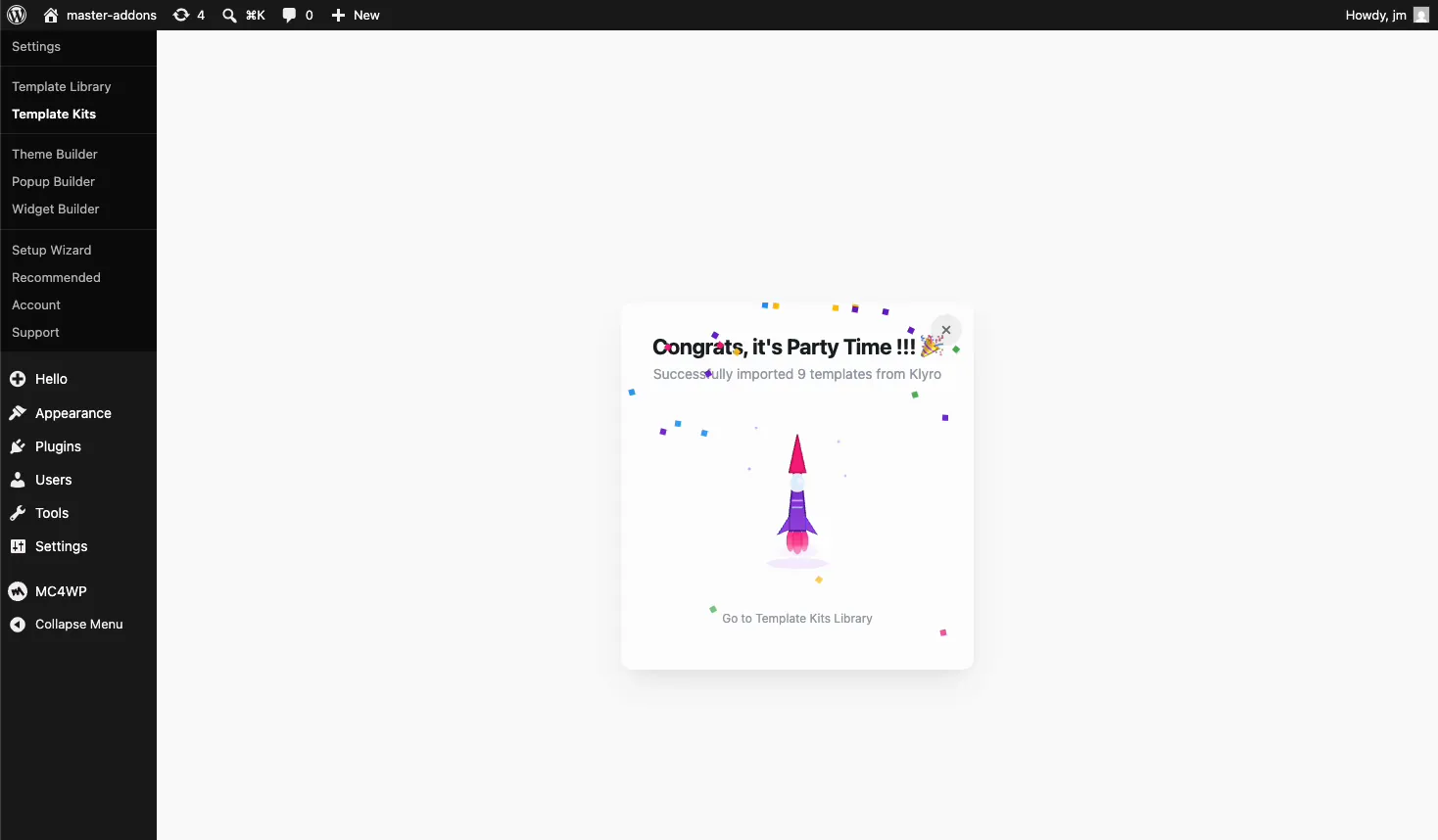
When the import finishes, a confirmation shows how many templates were added. The pages appear under Pages with the kit’s name in front, and an MA Imported filter on that screen lists only what the kit created.
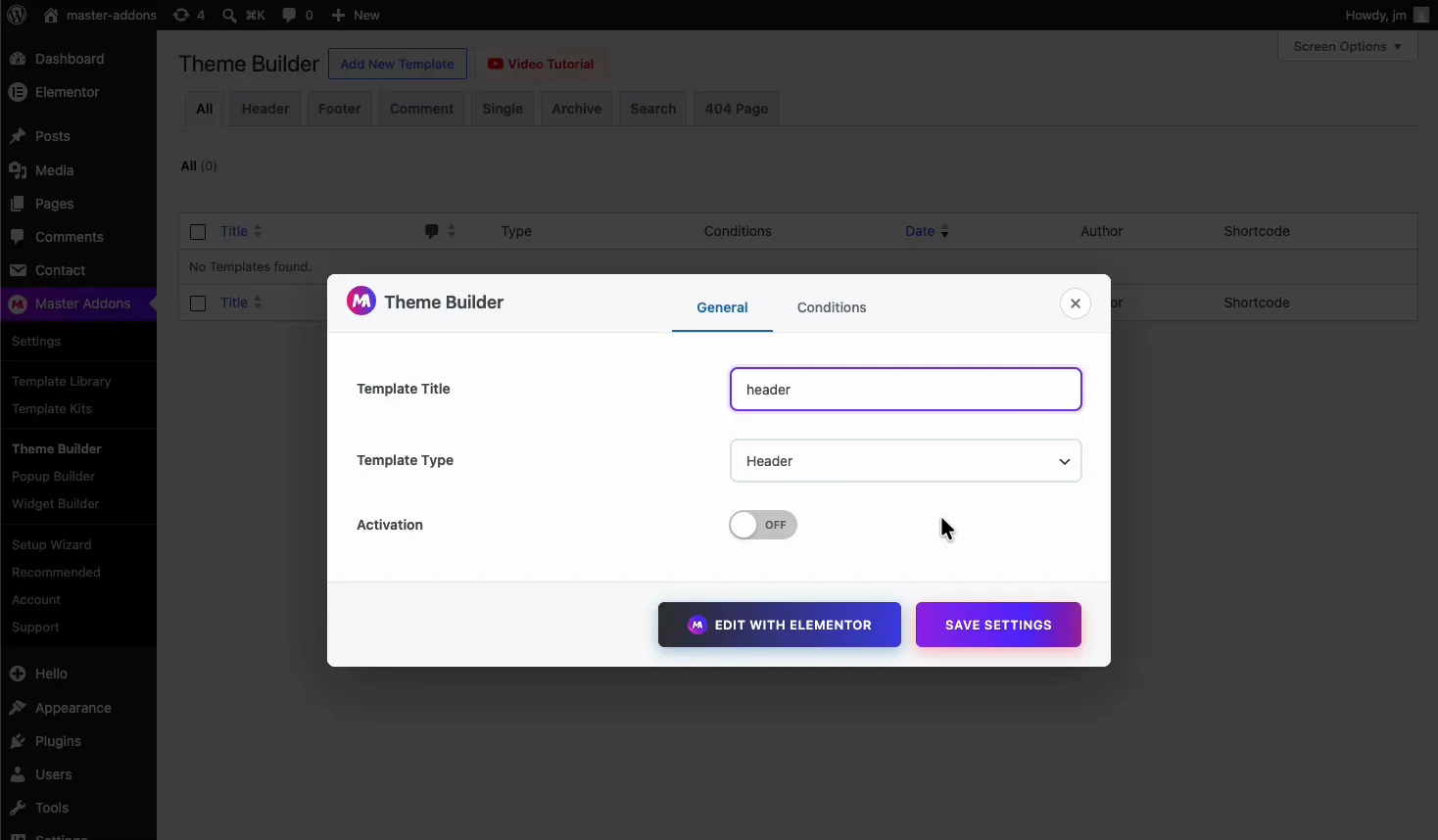
The header and footer are the main reason to pick this route. A kit’s Header and Footer arrive as saved templates, and your theme’s own header keeps showing until a theme builder takes over. The Master Addons Theme Builder does that with a display condition such as Entire Site, and its header and footer builder is free.
No kit chosen yet? The same screen has 30+ ready-made website kits. Browse them on the Elementor template kits page.
Master Addons is a full addon plugin, so it is more than you need if importing one kit is the only goal and you already own Elementor Pro. Most of the ready-made kits in its library also need Master Addons Pro.
The steps above are the short version. The complete walkthrough, with the page layout and color settings that make a kit match its demo, is in how to import Envato Elements template kits in WordPress.

Alternative 3: Elementor’s own template import
You can also import a kit with no extra plugin. Elementor’s template importer accepts a ZIP of templates, and an Envato kit ZIP is close enough to that format to go through.
- Go to Templates, Saved Templates.
- Click Import Templates at the top.
- Choose the Envato kit ZIP and confirm.
In our test this added all 14 templates of the kit to Saved Templates in one go, with Home as a Page template and the rest as Section templates.
This route leaves the most work for you. Nothing is turned into pages, so you create each page and insert its template from the library. Global Kit Styles arrives as one more saved template and is not applied to the site, which means colors and fonts will not match the demo until you set them yourself in Site Settings. There is also no prompt for the plugins the kit needs. It suits you when you want two or three sections from a kit. For a whole website, either of the first two options is quicker. Importing single templates is covered in how to import an Elementor template.
Which alternative should you use?
| Your situation | Use |
|---|---|
| You have Elementor Pro and want Envato’s official route | Template Kit Import |
| You use the free Elementor plugin and need the kit’s header and footer to show | Master Addons Template Kits |
| You build sites for clients and import kits often | Master Addons Template Kits |
| You only want a few sections from a kit | Elementor Import Templates |
| You do not want any extra plugin | Elementor Import Templates |
Whichever you choose, put a light theme under the kit. The kit replaces nearly everything the theme draws, so a heavy theme only slows the site. Our list of lightweight WordPress themes for Elementor has good candidates.
What you lose without the old plugin
None of the alternatives replaces everything the Envato Elements plugin did.
- Browsing kits inside WordPress. You now pick and download a kit on the Envato Elements site, then upload the ZIP.
- Stock photos in the dashboard. The old plugin could import photos into the media library. Now you download them from Envato and upload them like any other image.
Importing itself has not changed. The kit files have the same format, and all three methods above read them.
Problems after switching
- The upload is rejected. The importers expect the original ZIP. Safari unzips downloads by default, so turn off “Open safe files after downloading” in Safari’s settings and download the kit again.
- The theme’s header still shows. The kit’s header is only a saved template until a theme builder displays it. Set the imported pages to the Elementor Full Width layout as well.
- Colors and fonts look wrong. Import Global Kit Styles first. Then go to Elementor, Settings and tick Disable Default Colors and Disable Default Fonts.
- Widgets are missing. The kit needs a plugin you have not installed. Check the requirements on the kit’s Envato page.
- Images are missing. Slow hosts can time out while images download. Import that template again.
Each of these is explained with screenshots in the troubleshooting part of our Envato template kit import guide. Kits are image heavy, so read how to speed up Elementor websites before you launch.
Frequently asked questions
What happened to the Envato Elements plugin?
The Envato Elements WordPress plugin was closed on WordPress.org on 21 August 2025 at the author’s request, and the listing states the closure is permanent. It can no longer be downloaded or installed from the plugin directory. Envato now directs users to its Template Kit Import plugin.
Is there still an Envato Elements plugin for WordPress?
No. The plugin named “Envato Elements – Photos & Elementor Templates” is closed. Envato’s remaining WordPress plugin for kits is Template Kit Import, which uploads a kit ZIP that you download from the Envato Elements or ThemeForest website.
Is it safe to keep the old Envato Elements plugin installed?
It still runs, but it will not receive updates or security fixes. Templates you imported do not depend on it, because they are stored as regular Elementor content. Once you have another import method in place, you can deactivate it.
Does Template Kit Import still work?
Yes. Version 1.0.17, updated on 17 September 2026, uploaded and listed a 14-template kit on WordPress 7.1 and Elementor 4.3 in our test. It imports templates only, so you need another tool to display the kit’s header and footer.
Can I import an Envato template kit without Elementor Pro?
Usually yes. Most kits are built for the free Elementor plugin. The missing piece is a theme builder for the header and footer, which Master Addons provides. A few kits use Elementor Pro widgets such as Forms, so check the requirements on the kit’s page.
Do I need an Envato subscription to import a template kit?
You need a kit ZIP, and that comes from an Envato Elements subscription or a single purchase on ThemeForest. None of the three import methods asks for an Envato login. They only read the ZIP file.
Final thoughts
The Envato Elements plugin is closed for good, but the kits still import. Template Kit Import is Envato’s official replacement, and Elementor’s Import Templates button works with no extra plugin. Master Addons imports the kit and also gives you the header and footer builder that the other two lack.
If you are starting a new site with the free Elementor plugin, the Master Addons route leaves the least to fix by hand. You can see what else the plugin includes on the widgets and extensions page, and what Pro adds on the pricing page.
Related reading
