

Key Takeaways
- Elementor has no table widget in its core plugin or in Elementor Pro, so every Elementor table plugin on this list adds one or embeds a table built elsewhere.
- TablePress is the most used table plugin on WordPress.org, with 600,000 active installs and a 5.0 rating, and version 3.4 includes an Elementor widget called TablePress table.
- Essential Addons has two table widgets: Data Table for hand-typed cells and Advanced Data Table with search, sorting, pagination and CSV import.
- The Table widget in Ultimate Addons for Elementor builds a table from a CSV file and adds sorting and search, and it is part of the paid plan.
- The Master Addons Dynamic Table widget is for hand-built tables with merged cells, icons and images in cells and mobile stacking, and it has no sorting, search or CSV import.
An Elementor table plugin fills a gap Elementor left open: the builder has no widget for rows and columns of data. Some of the eight options below are full table plugins, and others are a single widget inside an addon pack you may already use.
We make one of them, so we have kept the comparison to facts you can check: install counts and ratings from WordPress.org on 7 October 2026, and features from each vendor’s own page.
Table of Contents
Elementor table plugins compared
This table answers the four questions people ask first. “Not listed” means the vendor’s page does not mention the feature, so check before you rely on it.
| Option | Type cells by hand | CSV import | Sorting | Search | Plan |
|---|---|---|---|---|---|
| TablePress | Yes | Yes, plus Excel, HTML and JSON | Yes | Yes | Free plugin; Pro from $89 a year |
| Essential Addons: Advanced Data Table | Yes | Yes | Yes | Yes | Listed in the free plugin |
| Happy Addons: Data Table | Yes | Not listed | Not listed | Not listed | Listed in the free plugin |
| Ultimate Addons: Table | Yes | Yes | Yes | Yes | Pro |
| ElementsKit: Data Table | Yes | Not listed | Yes | Yes | Pro |
| The Plus Addons: Data Table | Yes | Yes, plus Google Sheets | Yes | Yes | Freemium |
| Table Addons for Elementor | Yes | No (table export and import between sites) | Not listed | Not listed | Free plugin with a Pro version |
| Master Addons: Dynamic Table | Yes | No | No | No | Master Addons plugin |
How to choose an Elementor table plugin
Start with the data. It settles most of the choice.
- Where does the data come from? If it lives in a spreadsheet, you want CSV or Excel import. If you will type 20 or 30 cells, any widget here works.
- Will visitors need to find a row? Tables past about 20 rows need search, sorting or pagination. Short tables do not.
- Who edits it later? A client who lives in Elementor will find a widget easier than a separate admin screen.
- What happens on a phone? Check whether rows stack, the table scrolls sideways, or columns just overflow.
- Do you already run an addon pack? Using its table widget beats installing another plugin.
The 8 Elementor table plugins and widgets
1. TablePress
The numbers: 600,000 active installs · 5.0 stars (4,625 ratings) · version 3.4 · updated 30 September 2026.
TablePress is a table plugin first, with Elementor support added on top. You build or import the table on its own admin screen, then drop it into a page with the TablePress table widget or a shortcode. It reads Excel, CSV, HTML and JSON files, and visitors get sorting, search and pagination out of the box.
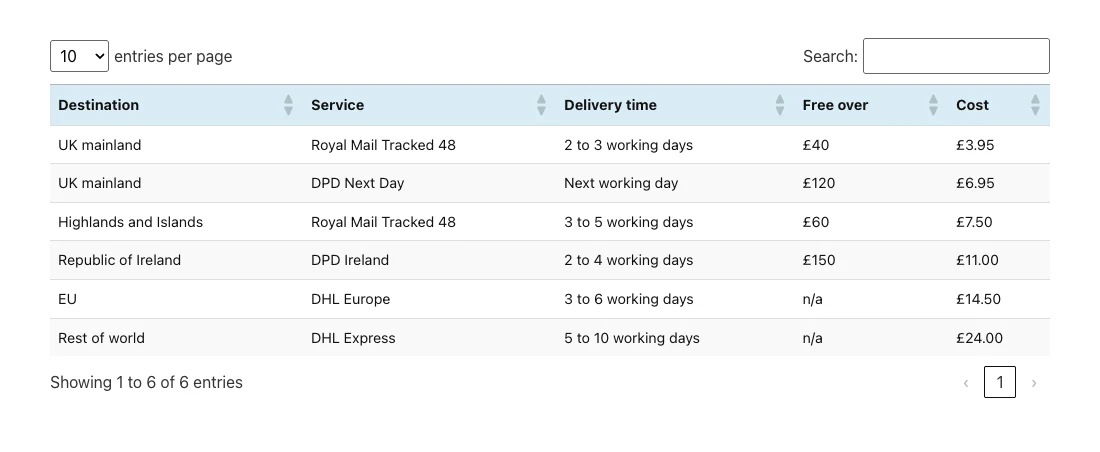
Styling is the weak spot. The Elementor widget has no Style tab, so colors come from TablePress and custom CSS. Its stacking and collapsing layouts for phones belong to the Pro plan. The free version offers a Horizontal Scrolling switch per table.
- Pick it for: long tables, imported spreadsheets, searchable directories.
- Skip it if: you want to style the table in the Elementor panel.
2. Essential Addons for Elementor
The numbers: 1,000,000 active installs · 4.9 stars (4,126 ratings) · version 6.8.5 · updated 30 September 2026.
Essential Addons lists two table widgets. Data Table is the simple one: you add headers and cells in the panel, and there is a Table Sorting option. Advanced Data Table is the heavier one. Its documentation covers search, CSV import and export, and resizing columns by dragging, and the vendor page mentions sorting, pagination and connections to Google Sheets, TablePress and Ninja Tables.
- Pick it for: a sortable, searchable table inside Elementor when you already use Essential Addons.
- Skip it if: you only need one small table and do not want a 120-widget plugin for it.
We compare the two plugins in more detail in Master Addons vs Essential Addons.
3. Happy Addons
The numbers: 400,000 active installs · 4.8 stars (488 ratings) · version 3.50.1 · updated 5 October 2026.
Happy Addons describes its Data Table widget as “fully customizable data tables built inside Elementor”. Its documentation also mentions a switch for horizontal scrolling on phones. A second widget, Advanced Data Table, is described as building a table from Google Sheets, TablePress, CSV or a local database.
- Pick it for: hand-typed tables with a sideways scroll on mobile, or pulling in a Google Sheet.
- Skip it if: you need to confirm sorting and search first. Its listing does not spell them out for the basic widget.
4. Ultimate Addons for Elementor
The numbers: 2,000,000 active installs · 4.9 stars (2,527 ratings) · version 2.9.5 · updated 25 September 2026.
The Table widget in Ultimate Addons is a Pro widget. Its page describes uploading a CSV file to create the table, a sorting option for visitors, and a search box with an entries dropdown for longer tables. The free plugin does not include it.
- Pick it for: CSV-driven tables if you already pay for Ultimate Addons Pro.
- Skip it if: you are on the free version.
More on how the two plugins differ: Master Addons vs Ultimate Addons.
5. ElementsKit
The numbers: 1,000,000 active installs · 4.9 stars (2,045 ratings) · version 4.0.7 · updated 29 September 2026.
ElementsKit lists Data Table under its Pro widgets on WordPress.org. The vendor describes it as a way to show a large amount of data “in a sorted way”, with search, navigation and an entries control, plus an image option for header cells.
- Pick it for: larger tables when ElementsKit Pro is already your addon pack.
- Skip it if: you want a table widget without a paid plan.
6. The Plus Addons for Elementor
The numbers: 100,000 active installs · 4.6 stars (387 ratings) · version 6.5.3 · updated 7 October 2026.
The Plus Addons labels its Data Table widget as freemium. The feature list covers a custom table, a CSV file or a Google Sheet as the source, icons, images and buttons in cells, and filter, search and sorting. Which of those sit in the paid plan is not stated on the page, so check its Free vs Pro table.
- Pick it for: a table fed from Google Sheets with buttons in cells.
- Skip it if: you need to know the free limits before installing.
7. Table Addons for Elementor
The numbers: 20,000 active installs · 3.2 stars (19 ratings) · version 2.1.6 · updated 20 March 2026.
Table Addons for Elementor is a single-purpose plugin that adds one Table widget. Its listing covers unlimited rows and cells, merging and splitting cells with ColSpan and RowSpan, striped and bordered styles, and exporting a table to import on another site. It also names a Pro version.
- Pick it for: one table widget and nothing else.
- Skip it if: the rating and the March 2026 update date worry you. It was last tested with an older WordPress version than the others here.
8. Master Addons: Dynamic Table
The numbers: 30,000 active installs · 4.5 stars (212 ratings) · version 3.2.3 · updated 10 September 2026.
This one is ours. Dynamic Table builds a real HTML table from two lists in the Elementor panel, one for header cells and one for body cells. Cells can merge across columns or rows, hold an icon or an image, and take dynamic tags. A Responsive Table switch, on by default, stacks each row into a card on devices up to 768px wide.
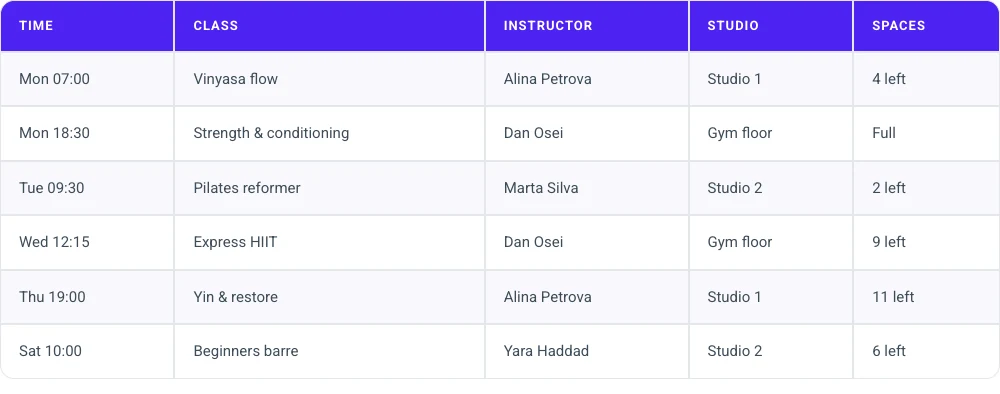
It has no sorting, search, pagination or CSV import, and every cell is typed by hand. That suits a timetable, a spec sheet or a shipping table. For a 500-row directory it is the wrong tool.
- Pick it for: small and medium tables you want to edit and style inside Elementor.
- Skip it if: visitors need to sort or search, or the data arrives as a spreadsheet.
Need a simple table inside Elementor? See three live tables and the full control list on the Dynamic Table page.
Which one should you pick?
| Your situation | Pick |
|---|---|
| A long table from Excel or CSV that visitors will search | TablePress |
| Sortable table inside Elementor, and you run Essential Addons | Advanced Data Table |
| A table that follows a Google Sheet | The Plus Addons or Happy Addons Advanced Data Table |
| CSV table and you already pay for Ultimate Addons Pro | Ultimate Addons Table |
| A timetable, spec sheet or price list typed by hand | Dynamic Table |
| Plans with prices and a buy button | A pricing table widget |
Frequently asked questions
What is the best table plugin for Elementor?
For long or imported tables, TablePress, because it reads Excel and CSV files and adds sorting, search and pagination. For a table you type and style inside Elementor, an addon widget such as Advanced Data Table in Essential Addons or Dynamic Table in Master Addons is simpler.
Does Elementor have a built-in table widget?
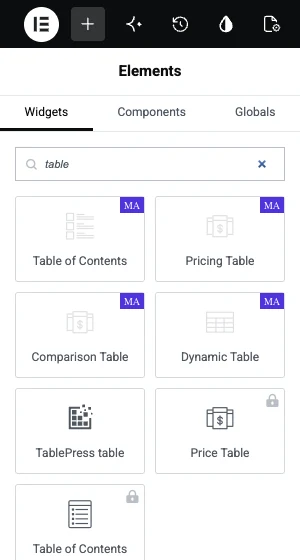
No. Elementor Pro has Price Table and Table of Contents, but nothing for rows and columns of data. You need a table plugin, an addon widget or an HTML table pasted into the HTML widget.
Which Elementor table widget supports CSV import?
TablePress imports CSV and Excel files. Among addon widgets, Advanced Data Table in Essential Addons, the Table widget in Ultimate Addons Pro and the Data Table in The Plus Addons list CSV as a source. Dynamic Table does not import files.
Can I use TablePress with Elementor?
Yes. TablePress 3.4 adds a widget named TablePress table to the Elementor panel, where you pick a table from a dropdown. The shortcode also works in the Shortcode widget, in the form [table id=1 /].
Do I need a separate plugin just for tables?
Not if your addon pack already has a table widget. Check its widget list first. A dedicated table plugin earns its place when you need imports, search and sorting on large tables.
Final thoughts
The right Elementor table plugin depends on the data. Spreadsheet-sized tables belong in TablePress or an advanced data table widget. Hand-typed tables that should match the page design are easier in a panel widget.
If you want to try the hand-built route, Dynamic Table comes with Master Addons, and the plans are on the pricing page.
Related reading
