

A new page builder just landed in the WordPress space, and it doesn’t look like the others. Mosaic Builder takes a class-based, design-system approach to building WordPress sites, closer to Webflow than to Elementor. We spent time with this, followed the official getting-started walkthrough, and built a site from scratch to see what it actually does well.
So here’s our full Mosaic Builder review: what it is, how the editor feels, and whether you should trust it with a real project yet.
Quick note before we start: we build Master Addons for Elementor, so we live in the Elementor ecosystem every day. That gives us a useful lens for judging a new builder, and we’ll flag anywhere our perspective colors the verdict.
What Is Mosaic Builder?
Mosaic is a WordPress page builder and theme builder rolled into one. Its pitch is simple: “Tired of design limits in WordPress? Meet Mosaic.”
Instead of dropping widgets onto a canvas and styling each one individually, Mosaic is built around a design system. You get:
- A class system with element classes and utility classes, similar to how developers write CSS
- Style guides that control colors and typography across the whole site
- Components, reusable elements you edit once and update everywhere
- Masters and templates that handle theme-level layouts (headers, footers, archives, single posts)
- An interaction builder for scroll, hover, and click animations
- A loop builder for dynamic content like blog archives and custom post types
It ships with three starter themes: Gibraltar (bold, modern), Monolith (clean, minimalist), and Blank for building from zero. If you’ve used Webflow or Bricks Builder, this model will feel familiar. If you’re coming straight from Elementor, expect a mental shift.
Getting Started: The Setup Wizard
Mosaic’s onboarding is better than most plugins we’ve tested. After activation, a four-step wizard walks you through Settings, Master, Templates, and Pages.
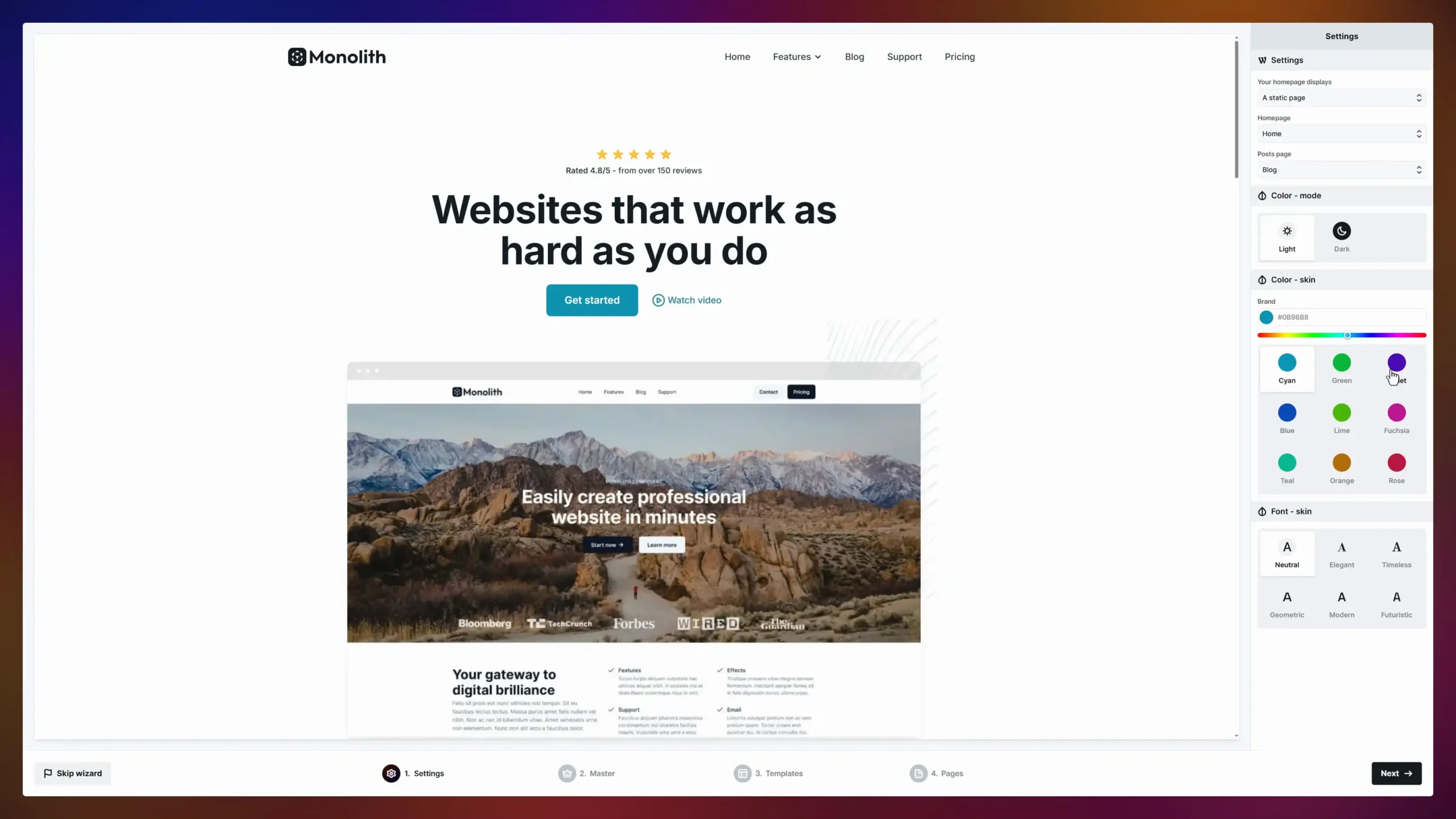
The clever part is the skinning system. Pick a theme like Monolith, then choose a color skin (Cyan, Violet, Rose, Teal, and six others) and a font skin (Neutral, Elegant, Timeless, Geometric, Modern, Futuristic). The entire demo site restyles instantly, including a light or dark color mode toggle.
This works because everything in the theme references style variables instead of hard-coded values. Change the brand color once and every button, link, and icon follows. Elementor has Global Colors that do something similar, but Mosaic’s implementation goes deeper since the starter themes are built entirely on the variable system from day one.
Within a few minutes we had a full demo site installed: homepage, blog archive, blog post, contact page with a map, 404 page, and search results, all editable.
The Editor: A Structure-First Canvas
Open a page in Mosaic and the layout is recognizable: element tree on the left, live canvas in the middle, style controls on the right. But the philosophy is different from Elementor’s.
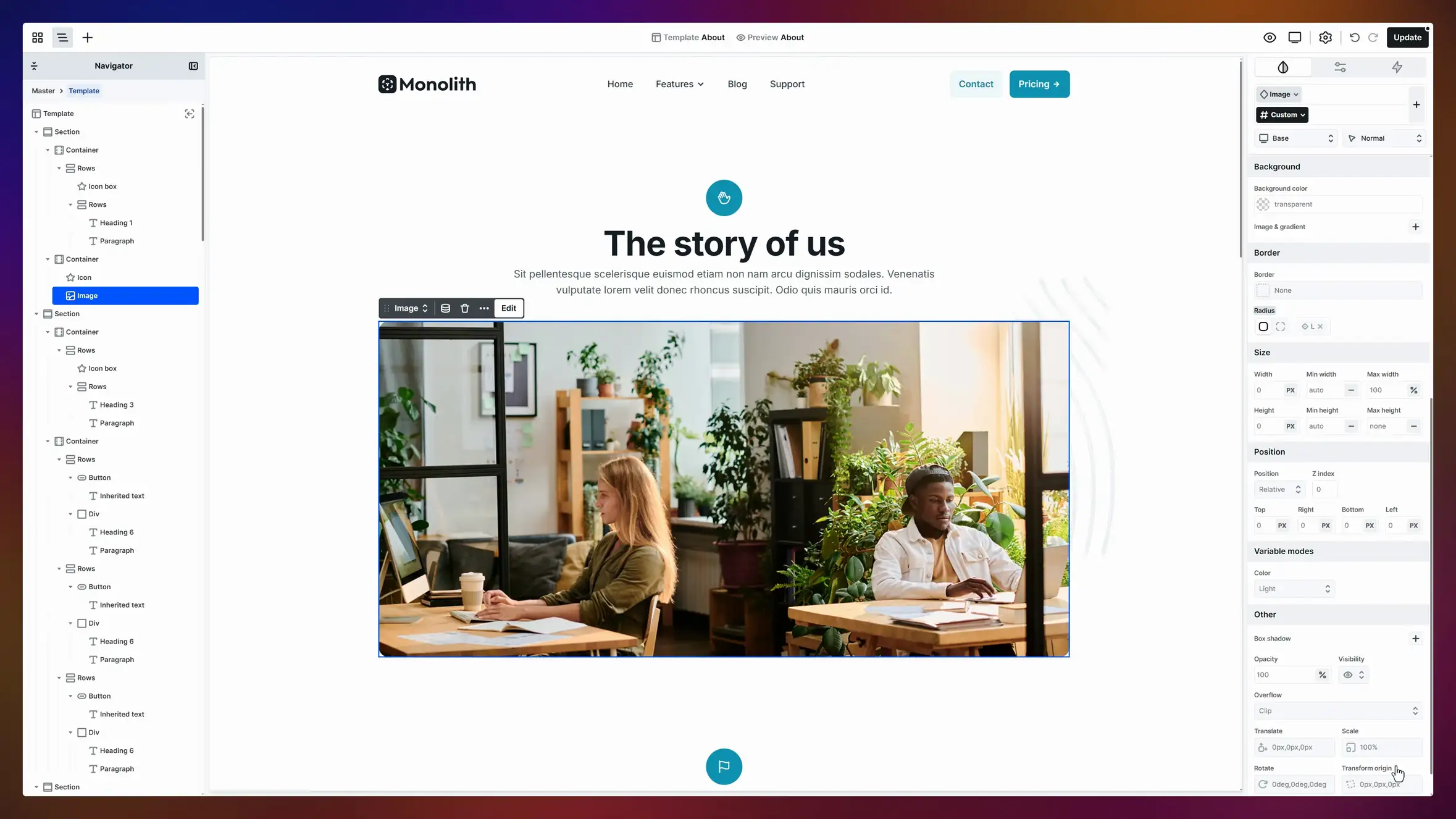
Mosaic’s Navigator shows your page as a nested structure: Section, Container, Rows, then elements like headings, paragraphs, buttons, icon boxes, and divs. You select elements from the tree as often as from the canvas. The right panel exposes real CSS concepts: width with min/max values, position with z-index, flex controls, transforms (translate, scale, rotate), box shadows, and overflow.
For developers, this is refreshing. The controls map one-to-one with the CSS you’d write by hand, so nothing feels hidden or renamed. For beginners, it’s a steeper hill. Elementor lets you style a heading without knowing what a flex container is. Mosaic quietly assumes you do.
One thing we appreciated: the editor stayed responsive throughout our test build, even with the full Monolith demo loaded.
The Class System: Mosaic’s Biggest Idea
This is where Mosaic separates itself from most WordPress page builders. Every element can carry classes, and classes come in two flavors:
- Element classes define what something is: Button, Card, Nav Link
- Utility classes define single properties you can stack: spacing, text color, size
Classes also nest. The Monolith theme’s Button class has Primary and Secondary variants, each with S, M, and L sizes. Select any button, swap its sub-class, and it restyles instantly. Edit the Primary class itself and every primary button on the site updates.
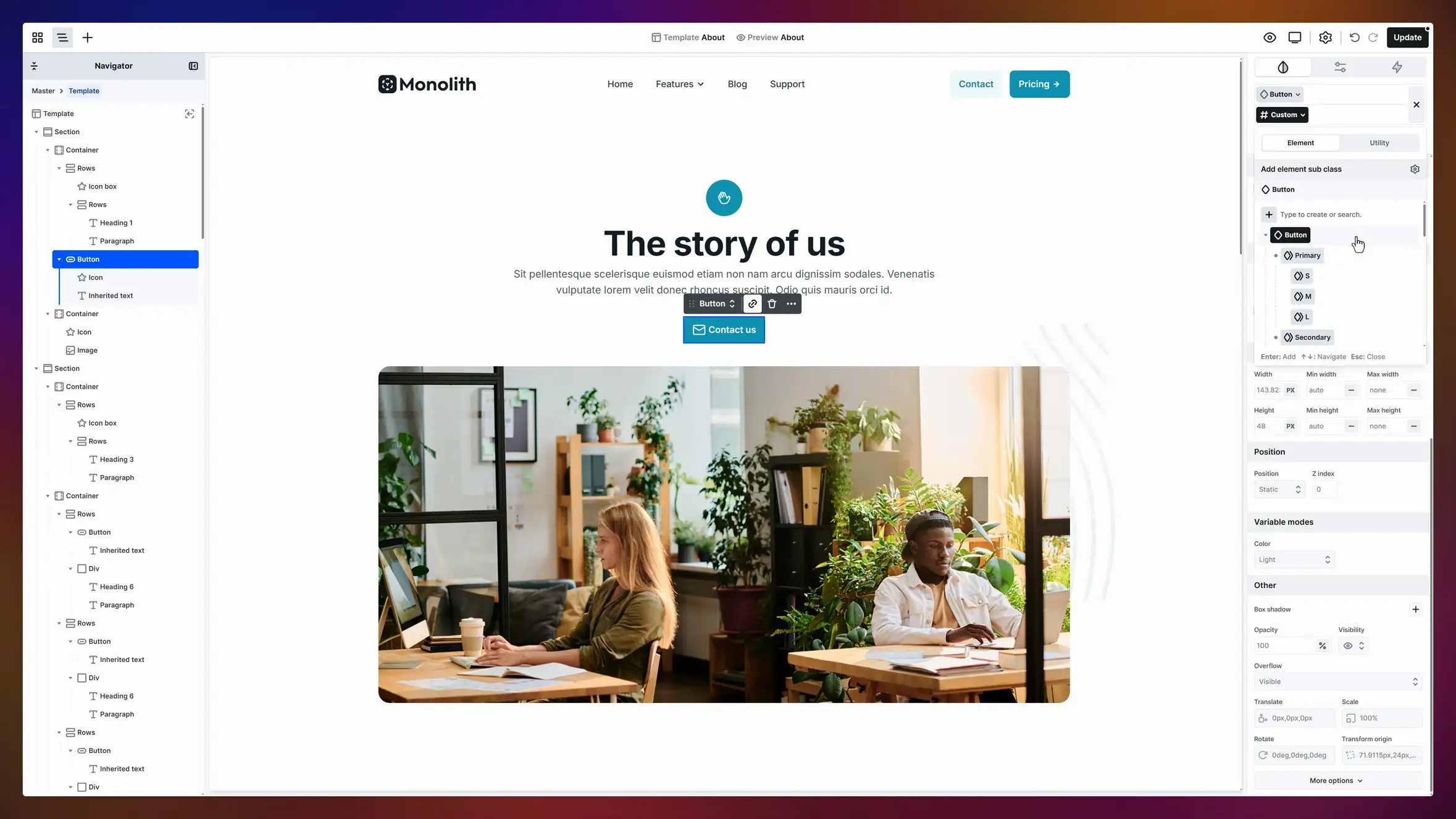
If you’ve ever inherited an Elementor site where every button was styled by hand, slightly differently, you understand the problem this solves. You stop relying on discipline to keep styles consistent; the structure does it for you.
The trade-off is real, though. A class system demands planning. You need to think about naming, hierarchy, and reuse before you build, which is exactly the kind of overhead a freelancer knocking out a five-page brochure site may not want.
Components, Masters, and Theme Building
Mosaic handles site-wide layouts through two connected ideas:
Masters are your outer shell: header, footer, and anything that wraps every page. Edit the master once and the change appears everywhere.
Templates live inside masters and control content areas. Mosaic’s demo includes templates for the homepage, blog archive, single posts, contact, archive, 404, and search results.
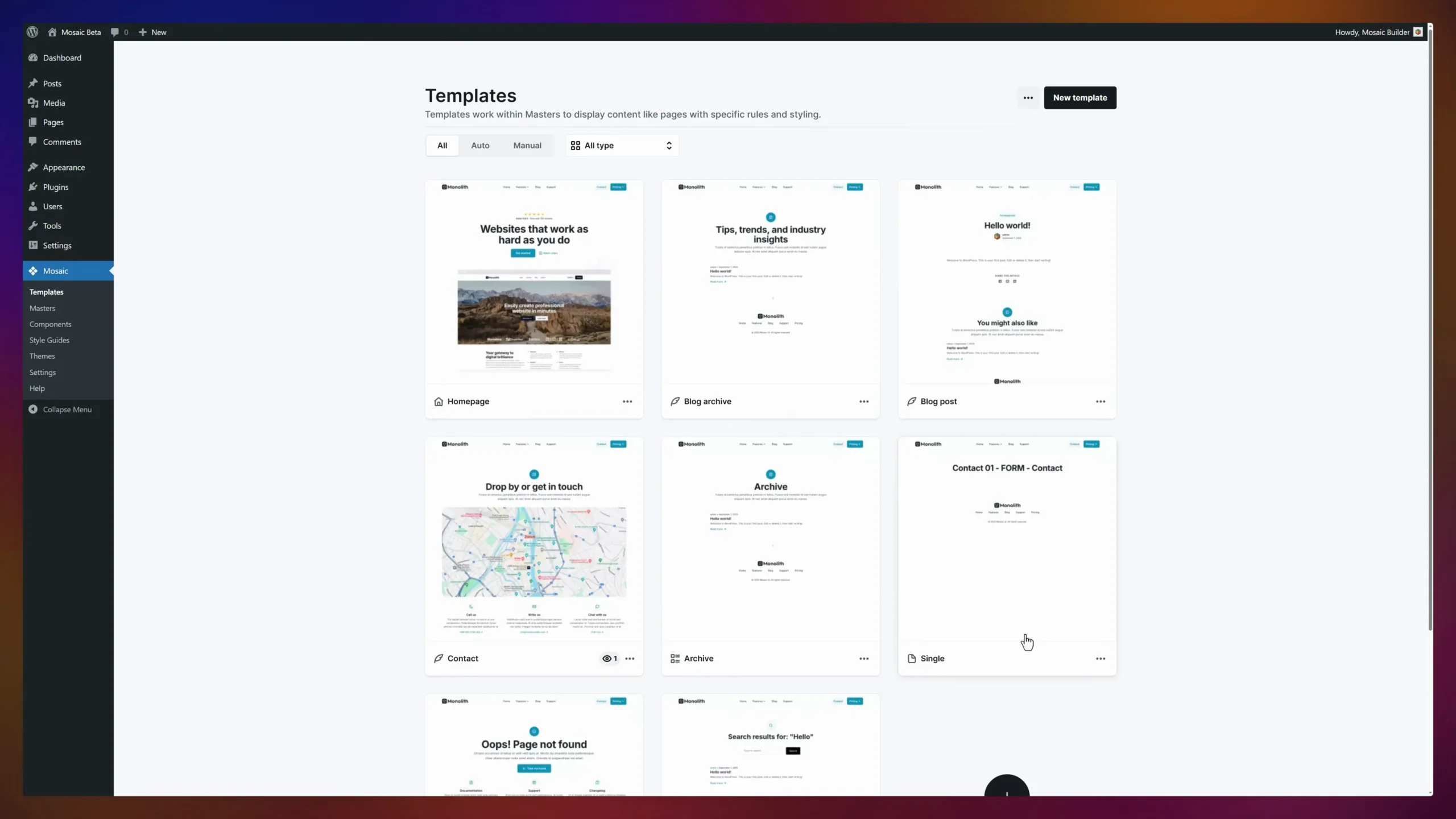
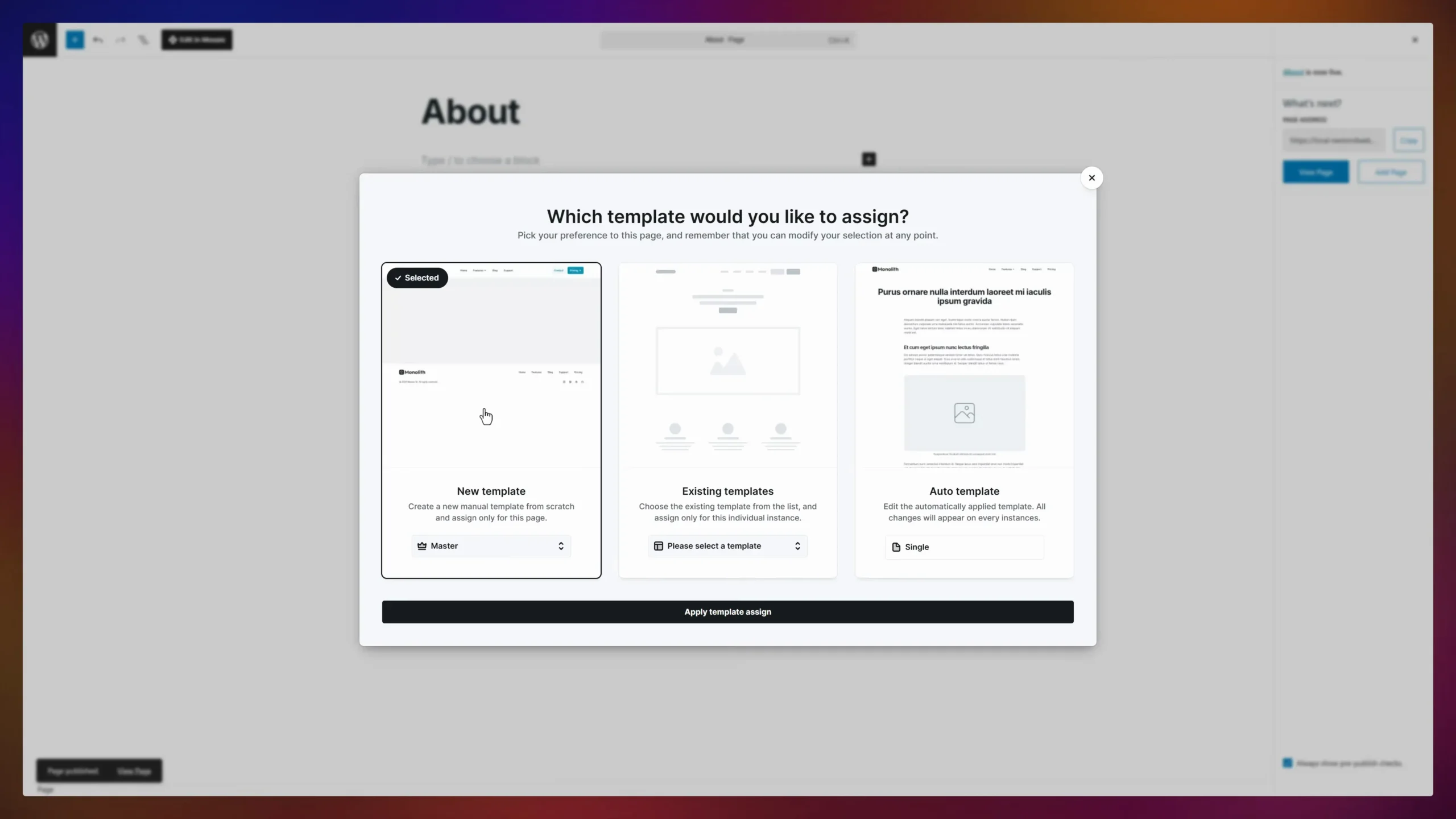
When you create a new page, a dialog asks whether to assign a new template, an existing one, or an auto template that applies changes across every instance.
Components are reusable blocks: a pricing card, a testimonial, a CTA section. Drop instances anywhere, edit the component, and all instances sync.
This is real theme building, and it works without a separate theme. For comparison, Elementor users get the same coverage through the Master Addons Theme Builder, which adds custom headers, footers, archives, single templates, and 404 pages on top of Elementor’s editor. The end result is similar; Mosaic just bakes it into the core product rather than treating it as an add-on layer.
Interactions and Animations
Mosaic includes an interaction builder with two trigger categories:
- Simple triggers: scroll into view, hover, click, page load, scroll direction change
- Continuous triggers: mouse move and while scrolling
Attach a trigger to any section or element, then define what animates. It covers the modern-landing-page essentials: fade-ins on scroll, parallax-style movement, hover states beyond simple color swaps.
It’s a capable system, though not revolutionary. Elementor users have had similar options for years through motion effects and addons. Master Addons alone covers entrance animations, floating effects, and scroll-based movement, plus extras like particle backgrounds. What Mosaic offers is tighter integration: interactions live in the same panel as everything else instead of being scattered across tabs.
Loops and Dynamic Content
The loop builder handled our blog archive test well. You design one item (image, category, title, excerpt, author, date), and Mosaic repeats it for every post, complete with pagination controls and a “no results” state.
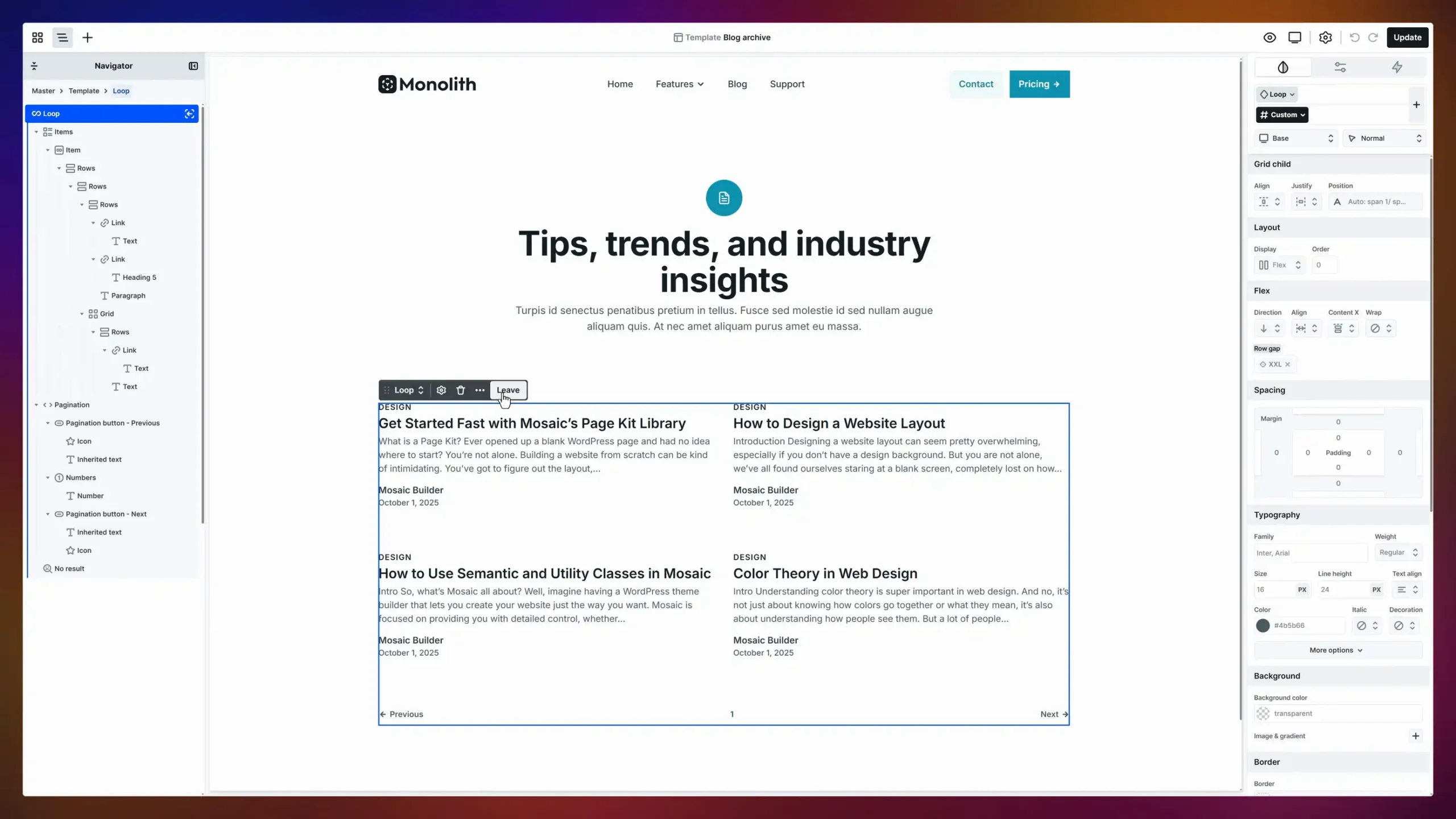
Loops connect to posts, pages, and custom post types, and pair with template conditions so archives, categories, and search results each get the right layout. Combined with conditional visibility logic, you can show or hide content based on context, similar to what display conditions do in Elementor.
If you build content-heavy sites, this is one of Mosaic’s strongest areas. Building a custom blog layout felt faster here than in most builders we’ve tested. Elementor users typically reach for a widget like Blog Element to build a blog page, which gets you there too, but Mosaic’s approach gives you finer structural control over each loop item.
Mosaic Builder Pricing
Mosaic’s launch pricing is aggressive, clearly designed to build a user base fast:
| Plan | Price | Sites | License |
|---|---|---|---|
| Personal | Free first year, then $39/year | 1 site | Annual |
| Creator | Free first year, then $149/year | 10 sites | Annual |
| Agency | $199 lifetime (early bird, regular $499) | Unlimited | Lifetime |
A few details worth knowing:
- The free first year on Personal and Creator plans is an early-bird offer running through the end of 2026. You pay nothing now and the subscription starts in year two.
- All plans include every Pro feature. The tiers differ only in site count and activation limits (2 per year on Personal, 15 on Creator, unlimited on Agency).
- There is no permanent free version.
A free year with unlimited Pro features is about as low as the barrier to entry gets. The $199 lifetime Agency deal is also strong value if the product survives and matures.
Verdict: A Promising Builder That Needs Time
Mosaic Builder is one of the more interesting WordPress builders we’ve seen launch in years. The class system is well executed, the onboarding is excellent, theme building is built in rather than bolted on, and the free-first-year pricing removes any excuse not to try it.
Our recommendation:
- Try it on a staging or side project, especially if you know CSS and like the Webflow model. The free year makes this a zero-risk experiment.
- Stick with Elementor if you rely on the addon ecosystem, need a free tier, or want the safest path for client work. A well-chosen stack covers almost everything Mosaic promises today, which is why Elementor still tops our page builder comparison.
We’ll update this Mosaic Builder review when a stable release ships. If the class system holds up on real client sites, Elementor will have a rival worth taking seriously, and that pressure tends to make every builder better.
Frequently Asked Questions
What is Mosaic Builder?
Mosaic Builder is a new WordPress page builder and theme builder. It uses a class-based design system with reusable components, style variables, an interaction builder, and dynamic loops, taking an approach closer to Webflow than to traditional WordPress builders.
Is Mosaic Builder free?
There’s no permanent free version, but Personal and Creator annual plans are free for the first year as an early-bird offer through the end of 2026. After that, plans start at $39 per year for one site, with a $199 lifetime Agency deal.
Can beginners use Mosaic Builder?
Beginners can use it, but the learning curve is steeper than Elementor’s. Mosaic is built around developer concepts like classes, containers, and flexbox. The included video course helps, but non-technical users should budget real learning time.
Does Mosaic Builder work with existing WordPress themes?
Mosaic replaces your theme layer with its own Masters and Templates system. It ships with two designed themes, Gibraltar and Monolith, plus a Blank starter for building completely from scratch.
Related reading: If you’re weighing your options, see our roundups of the best Elementor themes and best lightweight WordPress themes for Elementor, or check what’s new in Master Addons v3.
