


Elementor News Ticker Widget: Posts and RSS Breaking News Bar

News Ticker is a Pro widget in Master Addons that adds a scrolling news bar to any Elementor page. Show your latest posts, products or other post types, or paste an RSS feed URL to run headlines from another site. Add a “Breaking News” label, choose horizontal, vertical or continuous scrolling, and style the label, text, thumbnails and arrows from the Elementor panel.

Blog or External RSS Content

Your own posts or an RSS feed

Ticker Type decides where the headlines come from. Content pulls from your own site: pick a post type, filter blog posts by category or tag, then set how many items to show and in what order. RSS Feed takes a feed URL and a limit of up to 30 items, so the bar can show headlines from a news site or a partner blog.

  • Content source: posts, products or any other public post type, with category and tag filters for blog posts.
  • Sorting by date, title, last modified, comment count, random order and more.
  • RSS Feed source: paste a feed URL and choose how many items to show.

Label, title or excerpt, thumbnails and dates

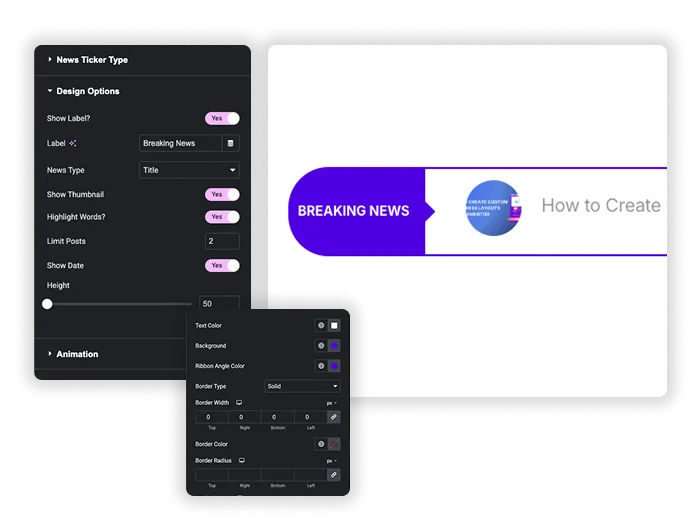
Keep the label and change its text from “Breaking News” to whatever fits, like “Latest” or “Offers”. Each item can show the post title or the excerpt, plus a thumbnail. Titles can also show the publish date. The Height slider sets the bar anywhere from 50 to 500px. In the Style tab, the label gets its own colors, typography, border radius and a ribbon angle that joins it to the scrolling area.

  • Label: text, colors, typography, border radius and ribbon angle color.
  • Items: title or excerpt, optional date, text and hover colors.
  • Thumbnails: set the width and choose a Square or Rounded shape.
Smart Design & Display Controls
Smooth Animation & Navigation

Horizontal, vertical or continuous scroll

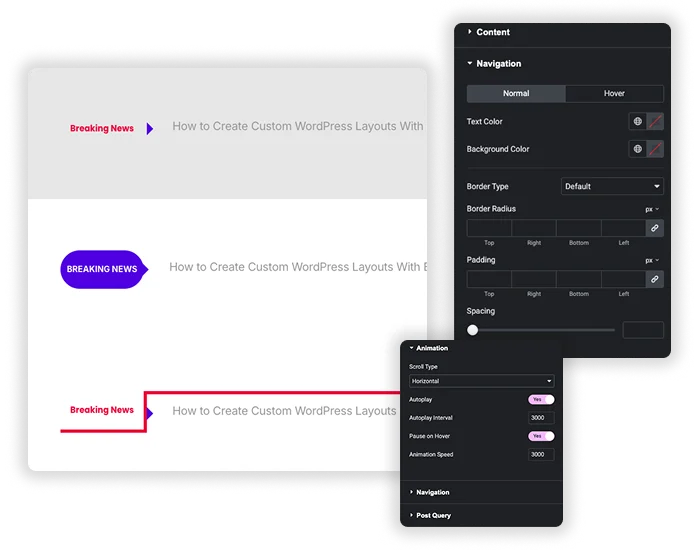
Scroll Type has three modes. Horizontal slides one headline in at a time, Vertical rolls them upward, and Horizontal Scroll runs them nonstop like a marquee. Turn on Autoplay, set the interval and animation speed in milliseconds, and let visitors pause the bar by hovering over it. Previous and next arrows let people step through items themselves, with separate styling for the normal and hover states.

  • Three scroll types: Horizontal, Vertical and continuous Horizontal Scroll.
  • Autoplay with interval, animation speed and Pause on Hover.
  • Arrow navigation with size, color, border, radius and padding controls.

Add an RSS news ticker in WordPress without jQuery code

Most RSS ticker tutorials start with a jQuery plugin, a feed parser and your own CSS. On an Elementor site, the News Ticker widget does the same job from the panel.

  1. Turn on News Ticker in the Master Addons dashboard. It needs an active Pro license.
  2. Drag the News Ticker widget under your header menu or into the section where the bar should sit.
  3. Open News Ticker Type and set Ticker Type to RSS Feed.
  4. Paste the feed URL, for example https://example.com/feed/, and set Limit Posts.
  5. In Design Options, change the label text.
  6. Choose a Scroll Type in the Animation section, then publish.

Want headlines from your own blog instead? Leave Ticker Type on Content and pick categories under Post Query. For a full blog layout next to the ticker, use the free Blog widget, or show dated events with Timeline.

Template Viewer
Facebook
Twitter
WhatsApp
Copy Link
Buy Now
News Ticker
News Ticker
News Ticker with Block Post

Frequently Asked Questions For News Ticker

Learn the most asked queries users have about News Ticker and find answers in one place.
Can the ticker show my latest WooCommerce products?

Yes. Keep Ticker Type on Content, open Post Query and set Post Type to Product. The ticker then shows your newest products by title, with thumbnails if you turn them on. The Categories and Tags filters use blog categories and tags, so leave them empty for products.

Yes. The widget reads the feed URL you entered, so new items in the feed appear in the ticker. If your site uses page caching, visitors see the new headlines once the cache refreshes.

Is the ticker responsive on phones?

Yes. The bar takes the width of its container. Preview it in Elementor’s mobile view and adjust the label and text typography for small screens. The Vertical scroll type also works well in narrow spots like a sidebar.

No, News Ticker is part of Master Addons Pro. If you only need logos or images that scroll nonstop, the free Logo Slider can do that with autoplay. Our Elementor marquee guide compares both options.

Trending Elementor Widgets & Extensions

Build sophisticated websites in less time.

Master Addons Glassmorphism extension for Elementor: frosted glass cards with the Blur Value control set to 20px

Glassmorphism

Home Free Elementor Glassmorphism Extension: Frosted Glass Effect in One Toggle Glassmorphism is the frosted...
View Details

Master Addons Container Extras extension for Elementor: container capped at a 1400px Max Width, with Max Width, Max Height, Min Width and Min Height controls

Container Extras

Home Elementor Container Max Width and Max Height Controls Container Extras is a free Master...
View Details

Master Addons Patterns extension for Elementor: hero with the Purple Gradient Grid Left style, three more pattern styles and the Enable Pattern panel

Patterns

Home 70+ Free Elementor Background Patterns Patterns is a free Master Addons extension that adds...
View Details
Master Addons Post/Page Duplicator extension for Elementor: MA Duplicator row link in the WordPress Pages list creating a Landing Page - [Duplicated #128] draft

Post/Page Duplicator

Home Duplicate Elementor Pages and Posts in One Click Post/Page Duplicator is a free Master...
View Details

Master Addons Reading Progress Bar extension for Elementor: blue bar 42% filled across the top of a privacy policy page, with enable, position, height and fill color settings

Reading Progress Bar

Home Add a Reading Progress Bar in WordPress (Elementor) Reading Progress Bar is a free...
View Details