

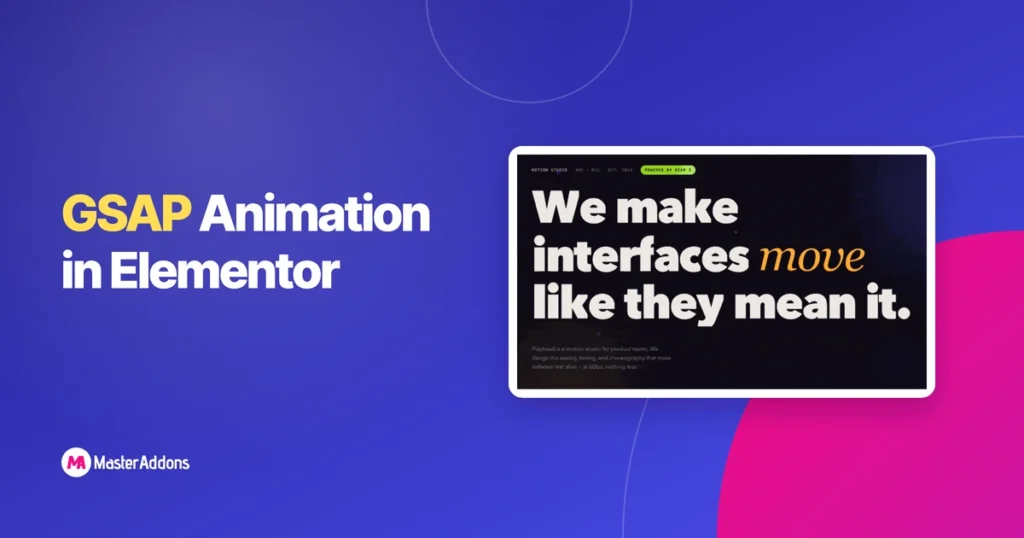
You can run full GSAP animation inside Elementor. Split-text reveals, pinned horizontal scroll, scroll-scrubbed parallax, counters, all of it, with no plugin development and no functions.php edits, and your clients keep the ability to edit every headline and color. The trick is the Widget Builder in Master Addons: paste your HTML, CSS, and JS once, mark what should be editable, and it becomes a normal Elementor widget anyone can drop on a page and edit from the panel.
To prove it, I built a complete one-page GSAP landing template (a fictional motion studio called Playhead) and converted every section into an importable widget. You can download all six widgets as one zip at the end of this post, import them in a couple of clicks, and pick them apart to see exactly how they work.
In this guide I’ll walk through how I built the hero section widget step by step, then summarize the other five sections. If you’ve ever wanted to convert an HTML/CSS/JS design to Elementor, including code you generated with ChatGPT or Claude, this is the workflow.
One shortcut before you start: if the motion you want is a row of images that moves, you may not need to write the GSAP at all. We already shipped 20 carousel and slider widgets built this same way – one rotates side panels in 3D, one peels cards off a stack, one rides its slides around a curved rim – and each imports as a normal Elementor widget you edit from the panel.
Eight of them run on the free plugin, twelve need Pro. Even if none is an exact match, importing the closest one and reading the JS inside it beats starting from an empty editor, and the build steps further down this post are what turn that JS into controls.
Table of Contents
What Is GSAP Animation?
GSAP (GreenSock Animation Platform) is a JavaScript animation library that animates anything on a web page — text, images, SVG, CSS properties — with frame-accurate timing and easing control. It powers the scroll effects and text reveals you see on award-winning sites, and since version 3.13 the entire library, including premium plugins like ScrollTrigger and SplitText, is 100% free.
That last part matters more than people realize. SplitText (the plugin that breaks headlines into individually animated characters) used to cost $99+ per year behind the “Club GreenSock” paywall. After Webflow acquired GSAP, everything went free. So the only real barrier left for WordPress users is integration, and that’s what this post removes.
The Problem: Elementor Doesn’t Speak GSAP
Elementor’s built-in motion effects cover entrance animations, basic parallax, and mouse tracking. Good for 80% of pages. But they can’t do:
- Split-text reveals where each character animates in with its own delay
- Pinned sections that scroll horizontally while the page scrolls vertically
- Scroll-scrubbed animation tied to exact scroll position (ScrollTrigger’s specialty)
- Chained timelines where one animation hands off to the next
- Velocity-reactive effects, where elements respond to how fast the visitor scrolls
The usual workarounds all share one flaw. You can paste code into an HTML widget, but then the headline text lives inside a code block your client will never dare touch. You can install a GSAP-specific animation plugin, but you’re limited to its preset effects. You can enqueue scripts by hand in your child theme, but now editing a headline requires a developer.
4 Ways to Add GSAP Animation to Elementor (Compared)
| Method | Custom animations? | Client-editable? | Coding needed |
|---|---|---|---|
| HTML widget code paste | Yes, unlimited | No — text buried in code | Every edit |
| Child theme enqueue + custom JS | Yes, unlimited | No | PHP + JS |
| Master Addons Widget Builder | Yes, unlimited | Yes — panel controls | Once, up front |
Preset plugins are genuinely fine if a fade-on-scroll is all you need. The Widget Builder wins when you want an animation nobody else has, because you (or an AI) wrote it. You do the code work once, wire the editable parts to controls, and from then on it behaves like any stock Elementor widget: text fields, color pickers, link controls, the lot.
The Free Template: A Full GSAP Landing Page as 6 Widgets

Playhead is a one-page site for a fictional motion studio. I picked that niche on purpose: for a motion studio, the animation is the portfolio, so every effect earns its place. The page runs on GSAP 3.15 with ScrollTrigger and SplitText, loaded from the official CDN.
The six widgets in the download:
- Hero — SplitText character reveal, parallax diamond shapes, drifting glow orbs, magnetic buttons
- Marquee — infinite ticker that speeds up when the visitor scrolls faster
- Work Gallery — pinned horizontal scroll with a live card counter and velocity-based card skew
- Stats — counters that roll up from zero when they enter the viewport
- Process — four easing curves that literally draw themselves, each using its own GSAP ease
- CTA — scroll-triggered split-text reveal with a magnetic email button
Every widget is self-contained: scoped CSS so it can’t clash with your theme, its own GSAP loader that fetches the library once even if all six widgets sit on the same page, and fallbacks so the content stays visible if the CDN ever fails. Reduced-motion preferences are respected too. Visitors who turn off animations in their OS get a static page.
How I Built the Hero Widget, Step by Step
This is the part that generalizes to any animation you’ll ever want. Same seven steps every time.
Step 1: Start With Working HTML, CSS, and JS
The source can be anything: a CodePen you admire, a section you coded, or output from an AI chat. My hero was three files — the markup, the styles, and a script that builds a GSAP timeline. Before touching the Widget Builder, make sure it works as a plain .html file in a browser. Debugging is 10x easier there than inside any page builder.
Step 2: Scope Everything to One Wrapper Class
Your widget will live on pages with other widgets, other plugins, other CSS. Wrap the whole section in one unique class and hang every selector off it:
<section class="ph-hero-wrap">
  ...
</section>
/* every rule starts with the wrapper */
.ph-hero-wrap .ph-title { font-size: clamp(3rem, 10.5vw, 8.6rem); }
.ph-hero-wrap .ph-btn-solid { background: var(--ph-primary, #5551f0); }Also rename generic animation keyframes. @keyframes spin becomes @keyframes ph-hero-spin, so two widgets on one page never fight over the same name. This single step prevents 90% of “my widget broke the page” support tickets.
Step 3: Replace Editable Text With Tokens
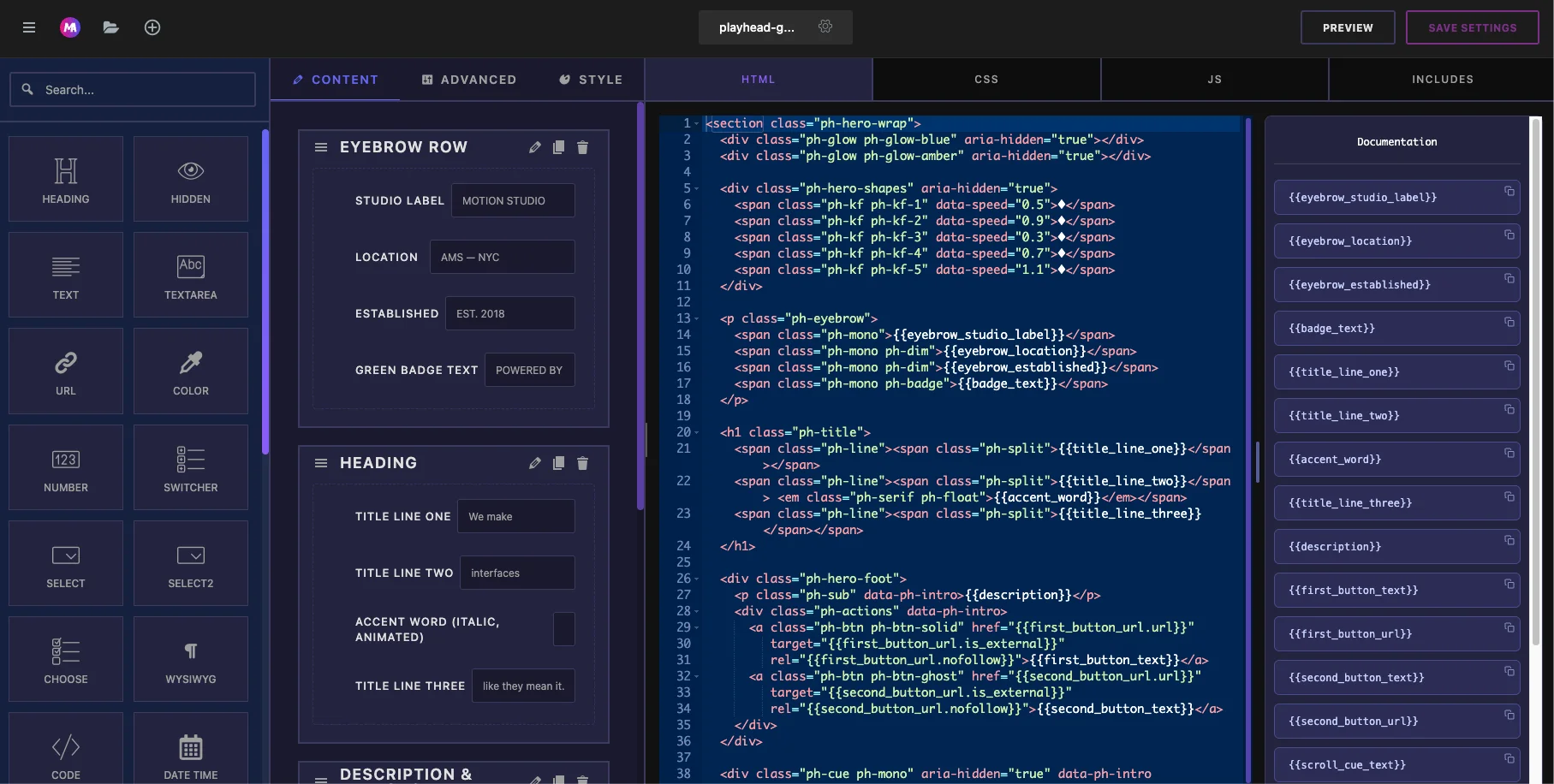
Anywhere a site owner might want different words, swap the hardcoded text for a token in double curly braces:
<h1 class="ph-title">
  <span class="ph-split">{{title_line_one}}</span>
  <span class="ph-split">{{title_line_two}}</span>
  <em class="ph-serif">{{accent_word}}</em>
</h1>
Notice I split the headline into three tokens instead of one. The accent word (“move”) is styled differently — italic serif, amber, animated — so it gets its own control. The person editing never needs to know that; they just see three labeled text fields. Each token becomes a Text control in the builder.
Buttons get a URL control so the link, the new-tab toggle, and nofollow all work from the panel:
<a class="ph-btn" href="{{first_button_url.url}}"
   target="{{first_button_url.is_external}}"
   rel="{{first_button_url.nofollow}}">{{first_button_text}}</a>
Step 4: Turn Brand Colors Into Style Controls
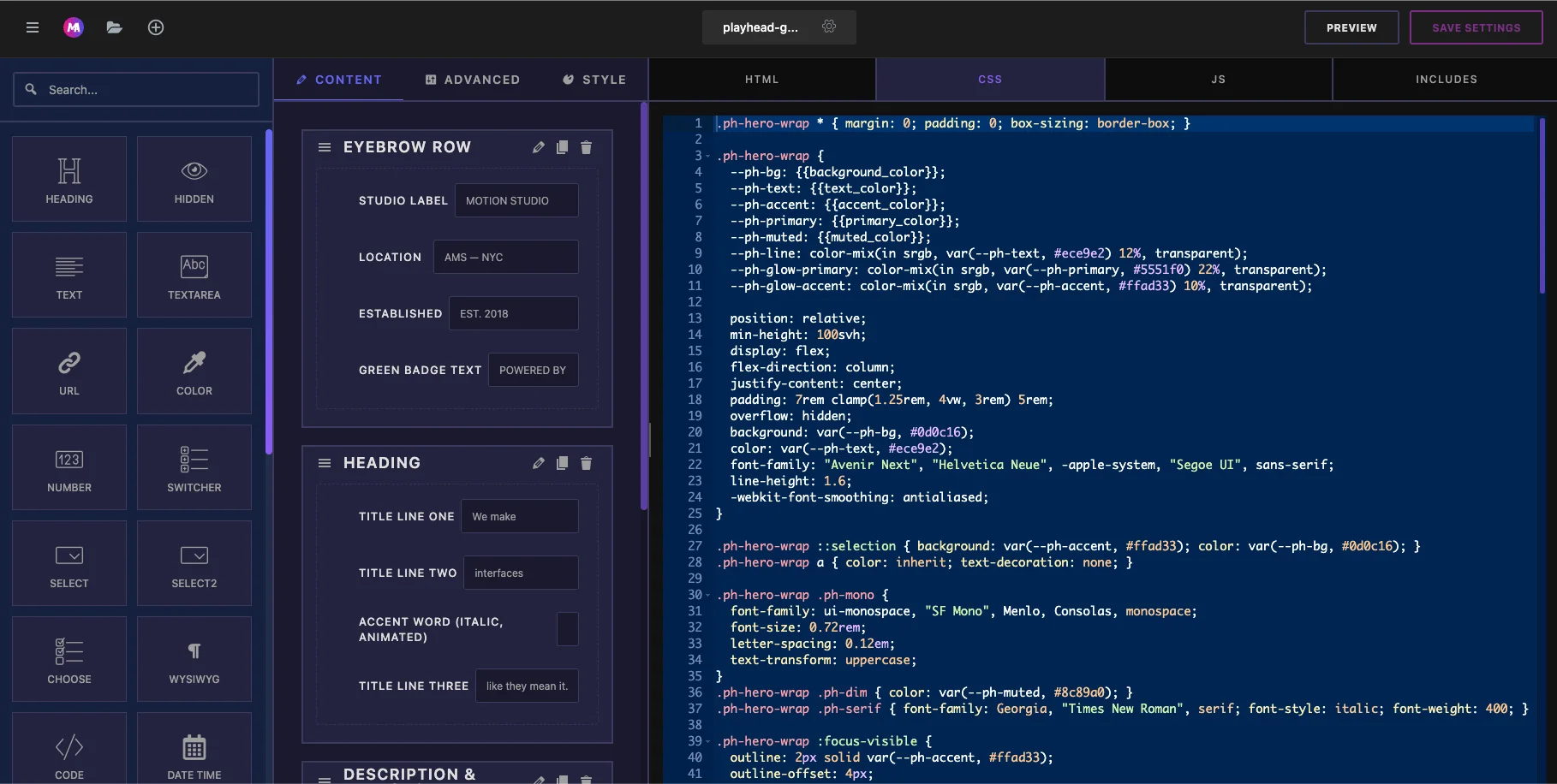
Resist the urge to make thirty color controls. My hero has five: background, text, accent, primary, and muted. They feed CSS variables on the wrapper, and every derived color (glows, borders, shadows) is computed from them with color-mix():
.ph-hero-wrap {
  --ph-accent: {{accent_color}};
  --ph-primary: {{primary_color}};
  --ph-glow-primary: color-mix(in srgb, var(--ph-primary, #5551f0) 22%, transparent);
}
Change “Primary” in the Color control and the button, the glow orb, and the diamond shapes all update together. That’s what makes a widget feel designed instead of assembled.
Step 5: Load GSAP From the CDN — Once
The JS injects the GSAP scripts with guarded IDs, so six widgets on one page still load the library exactly once:
["ph-gsap-core", "https://cdn.jsdelivr.net/npm/gsap@3.15/dist/gsap.min.js"],
["ph-gsap-st",   "https://cdn.jsdelivr.net/npm/gsap@3.15/dist/ScrollTrigger.min.js"],
["ph-gsap-split","https://cdn.jsdelivr.net/npm/gsap@3.15/dist/SplitText.min.js"]
Then the animation itself is a standard GSAP timeline. Characters rise in with a stagger, the accent word pops with back.out(2.5), the diamonds scrub against scroll position. If you already know GSAP, nothing changes. If you don’t, this is exactly the code an AI will happily write for you (more on that below).
Step 6: Create the Widget in the Widget Builder
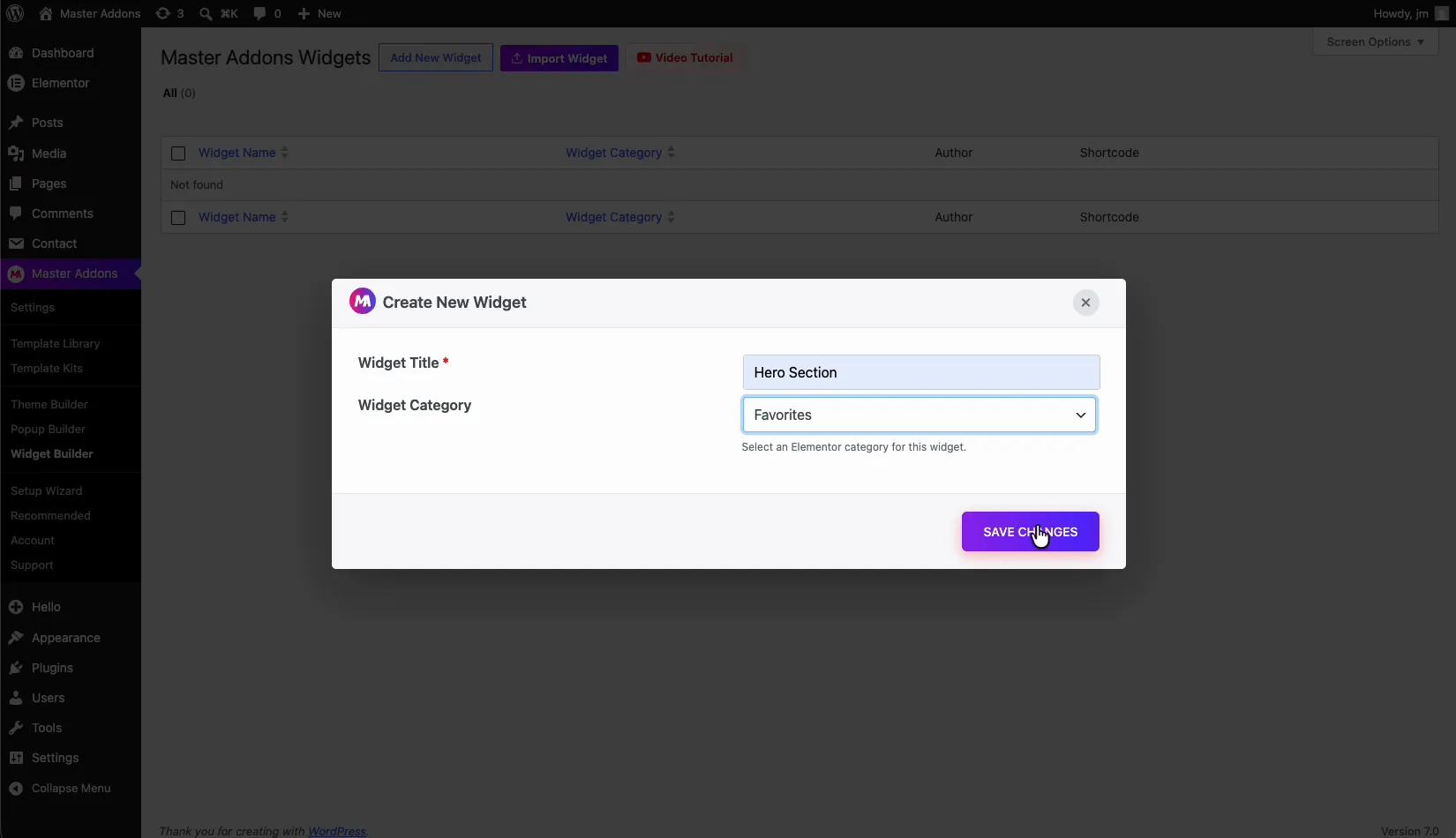
In your WordPress dashboard: Master Addons → Widget Builder → Add New. Name the widget, pick an icon, then paste your three files into the HTML, CSS, and JS tabs.
Now add one control per token: 19 for my hero — four eyebrow texts, four heading fields, the description, two buttons with their links, the scroll cue, and five colors on the Style tab. Control name must match the token exactly: the {{title_line_one}} token needs a control named title_line_one. The full control reference lives in the Widget Builder documentation.
One detail worth copying: give every color control a default matching your design. A widget that imports gray because its color controls were empty looks broken even when it isn’t.
Step 7: Drop It Into Elementor and Edit Like Any Widget
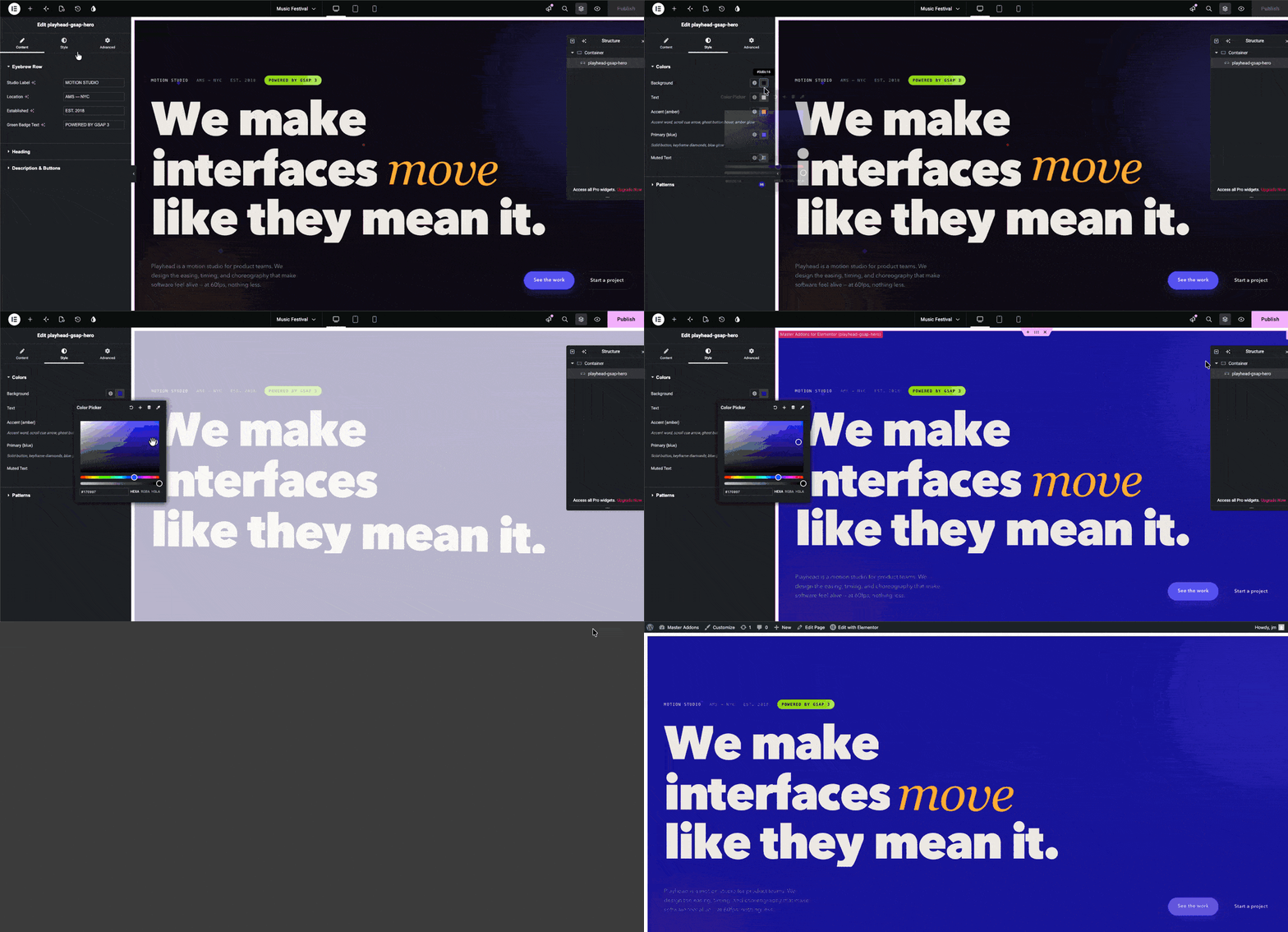
Publish the widget and it appears in the Elementor panel under Master Addons. Drag it onto a page, and the left panel shows your labeled fields. Change “We make” to your own headline, recolor the accent, point the buttons at your pricing page. The GSAP timeline keeps running through every edit. That’s the whole promise: animation complexity hidden, content editing exposed.
The Other Five Sections, Briefly
Marquee (3 controls). The ticker text prints twice for a gapless CSS loop, and GSAP takes over to react to scroll velocity. Scroll fast and it accelerates up to 4x, then eases back. Fun teaching example because the fallback is pure CSS: if GSAP never loads, it still scrolls.
Work Gallery (22 controls). The showpiece. ScrollTrigger pins the section while the card track translates horizontally, a counter ticks 01 / 05, and cards skew slightly based on scroll velocity. Five cards, each with editable title, timecode, and tags. On mobile it degrades to a native swipe carousel, no pinning and no JS required. Needs a full-width section in Elementor for the pin math to work.
Stats (13 controls). Four numbers that count up with an expo ease when scrolled into view. The final numbers live in the markup itself, so even with JavaScript disabled visitors see “142”, not “0”.
Process (20 controls). My favorite conceit on the page: four process steps, each paired with an SVG easing curve that draws itself using that exact ease. The linear curve draws linearly, the back-out curve overshoots. The code captions are editable text controls, so you can swap the GSAP references for your own step descriptions.
CTA (11 controls). Same split-text technique as the hero but triggered on scroll, plus a magnetic button that follows the cursor and springs back with an elastic ease. Point the URL control at a mailto: link and it’s a contact section.
Download the Template (6 Widgets, One Zip)
Download gsap-animation-elementor-widgets.zip — all six widget JSON files, free, no email gate. If you need finished pages to put them on, the Elementor page templates library has more than 200.
One note before you start: the free version of Master Addons ships a limited Widget Builder, and the full feature set these widgets use comes with Master Addons Pro. To import:
- Unzip the download — you’ll see six JSON files, one per section
- Go to Master Addons → Widget Builder in your WordPress dashboard
- Click Import, choose a JSON file, and confirm
- Repeat for the sections you want (you don’t need all six)
- Open any page with Elementor and drag the widgets in from the Master Addons category
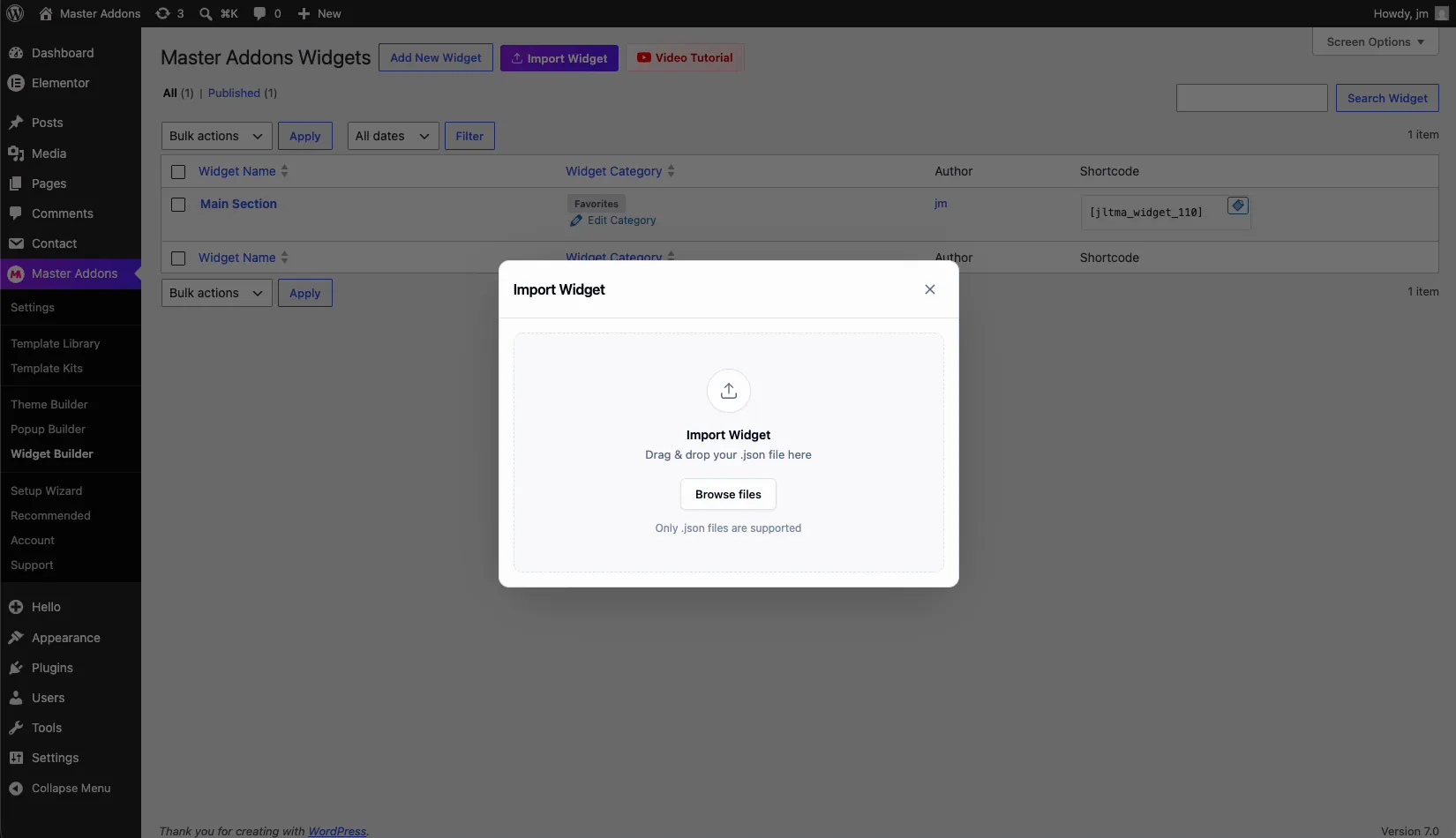
Everything is editable after import: 88 controls across the six widgets, every color, every headline, every link. No images to upload. All the visuals are CSS and SVG, which also keeps the whole template under 200KB.
The AI Angle: Convert Any Generated Design to Elementor
AI tools write genuinely good GSAP code now. Ask ChatGPT or Claude for “a hero section with GSAP split-text reveal, dark background, scroll parallax” and you’ll get working HTML, CSS, and JS in one response. The problem was always the last mile: that code was stuck as a static file, useless to a client who edits in Elementor.
The Widget Builder is that last mile. A prompt pattern that works well:
Build a [section type] with GSAP animation.
Requirements:
- Wrap everything in one unique class, prefix all selectors with it
- Load gsap from cdn.jsdelivr.net/npm/gsap@3.15 via injected script tags
- Put editable text in {{token}} placeholders
- Define brand colors as CSS variables on the wrapper
Ask for those four constraints up front and the output drops into the Widget Builder almost unchanged. I’d still test it as a flat HTML file first. AI code usually works, but “usually” isn’t a word you want to discover inside a client’s live page.
Performance: Keep GSAP Animation Fast
- Load the library once. The guarded script IDs from Step 5 handle this automatically across multiple widgets.
- Animate transforms and opacity, not width/height/top/left. GSAP does this by default with
x,y, andscale— the browser compositor handles them without reflow. - Respect prefers-reduced-motion. Every widget in the template checks it and serves static content. Accessibility, but also battery life.
- Total cost is small. GSAP core + ScrollTrigger + SplitText is roughly 90KB minified, less than most single hero images. Pair the template with lean pages and you’ll pass Core Web Vitals comfortably; our animation effects guide covers the broader speed picture.
If GSAP feels like more than you need, Master Addons also ships no-code motion out of the box — entrance animations, floating effects (Pro), and the animation system — with zero setup. The Timeline widget is another: its cards slide in and the line fills as the visitor scrolls, and you don’t write any script for it. GSAP is for when presets stop being enough.
Video Tutorial Guideline
Maybe you don’t prefer reading, so I create a video for you on how to download and install the widget with GSAP Animation in your Elementor editor.
Frequently Asked Questions
Is GSAP free to use on a WordPress site?
Yes. Since GSAP 3.13 (April 2025), the entire library including formerly paid plugins like ScrollTrigger, SplitText, and MorphSVG is free for all uses, commercial included. The template in this post uses GSAP 3.15 from the public CDN.
Does the Widget Builder work with Elementor Free?
Yes, it works with the free version of Elementor — no Elementor Pro required. On the Master Addons side, the free plugin includes a limited version of the Widget Builder; the full feature set comes with Master Addons Pro.
Will GSAP animations slow down my Elementor site?
Not meaningfully, if you load the library once and animate transforms. The three GSAP files total about 90KB, comparable to one optimized image. The heavy performance mistakes are loading GSAP per-widget (avoided here with guarded script IDs) and animating layout properties.
Can I use this to convert any HTML template to Elementor?
Any self-contained section, yes — animated or not. The same seven steps apply: scope the CSS, tokenize the text, wire the colors, then paste into the builder. Full multi-page themes with PHP templating are a different job, but landing page sections convert cleanly.
Do my clients need to know GSAP to edit the widgets?
No. That’s the point of the conversion. After import, editing happens entirely through Elementor panel controls — text fields, color pickers, link inputs. The animation code is invisible to the editor.
What happens if the GSAP CDN is unreachable?
Every widget in this template has a fallback: text un-hides, the marquee falls back to a CSS animation, the gallery becomes a swipe carousel, and stats show their final numbers. Visitors get a working page either way.
Start With the Template, Then Build Your Own
Import the six widgets, break them, rebuild them. The fastest way to understand the Widget Builder is to open the hero widget after import and see how 19 controls map to the tokens in its HTML tab. After that, every CodePen you bookmark and every AI-generated section becomes a widget candidate.
Master Addons runs on 30,000+ WordPress sites, and the full Widget Builder ships with the Pro version. See everything included on the widgets and extensions page, download the template above, and your first custom GSAP widget can be live today.
