

Key Takeaways
- Four tab titles that fit a 1,200px desktop column have about 390px on a phone, so they wrap, squash or overflow.
- Elementor’s Tabs widget has a Breakpoint control that switches the strip to a vertical accordion below the width you choose. Mobile is the default.
- Horizontal Scroll is the other option: titles stay in one row and visitors swipe through them.
- The Master Addons Tabs widget stacks its titles into a full-width column on a phone, with the open panel underneath. That is readable, but it is not an accordion.
- Three or fewer short titles usually survive a phone untouched. Past that, pick accordion or scroll deliberately.
Tabs are a desktop pattern. They assume horizontal room for several titles plus a panel, and a phone has about a third of that width.
Elementor gives you two ways out, and addon widgets behave differently again. The phone screenshots below are 390px captures of a real test page, so what you see is what the setting does.
Table of Contents
What goes wrong
A tab strip wants one line. Give it less width than the titles need and you get one of three results, none of them good:
- The titles wrap onto a second and third row, and the strip stops reading as a strip.
- They squash instead, until each label is a few pixels of unreadable text.
- Or the last one overflows off the edge, usually bringing a horizontal page scrollbar with it.
Tap targets make it worse. Touch guidelines put a comfortable target at around 44px, and a squashed title is well under that, so people miss and hit the neighbour.
Option 1: switch to an accordion
This is the behaviour most people want, and the Tabs widget does it without CSS.
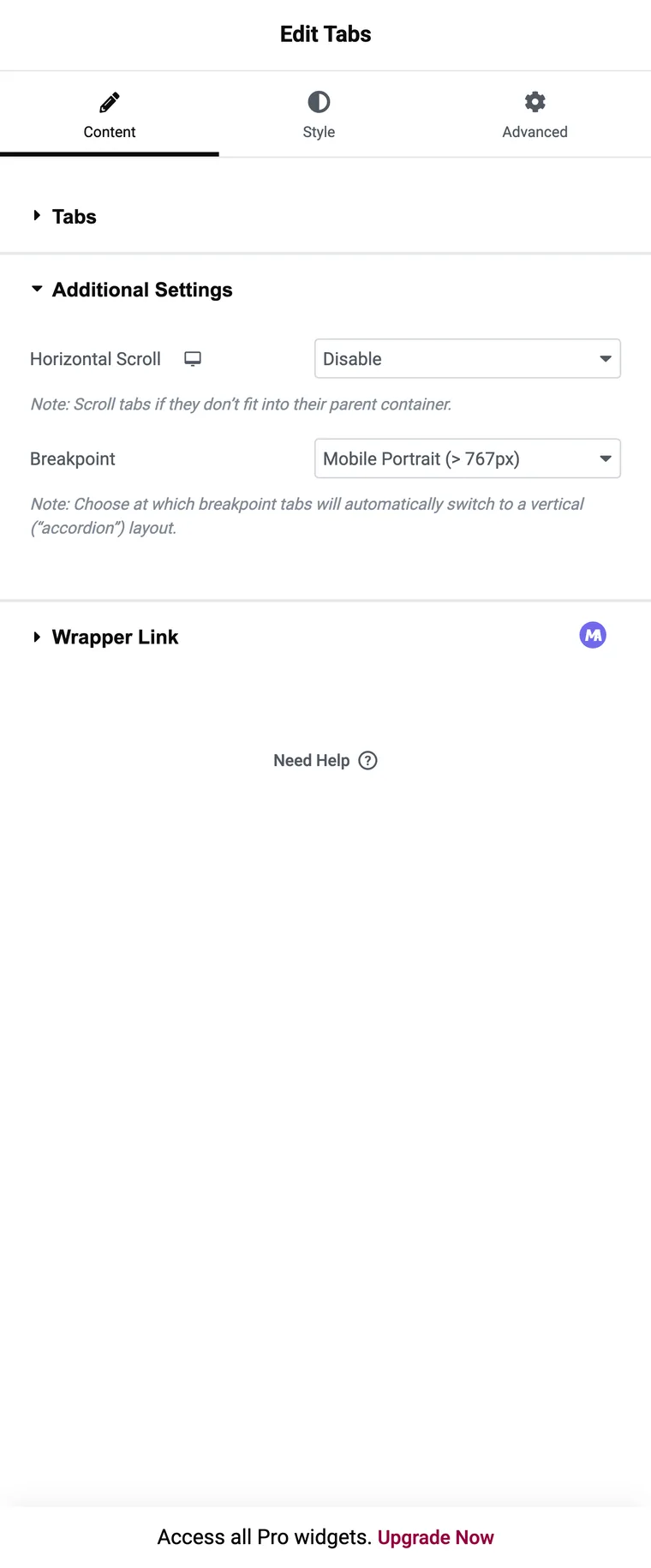
- Select the Tabs widget and open Additional Settings in the Content tab.
- Set Breakpoint to the width where the strip should give up. Mobile is the default and is usually the right answer; tablet makes sense when the titles are long.
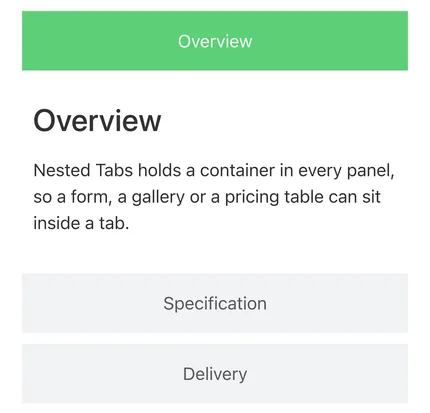
Below that width, each title sits directly above its own panel and tapping one opens it. One title per row means a full-width tap target, and the content stays collapsed so the page does not get longer.
Option 2: let the strip scroll
Turn Horizontal Scroll on and the titles stay in one row at any width, with the row scrolling sideways. Visitors swipe along it to reach the ones off screen.
This suits a strip that reads as a sequence, like months or sizes, where keeping the order visible matters more than seeing every option at once. Its weakness is discovery: a visitor who does not notice that the row scrolls never finds the later tabs. Leaving the next title half visible at the edge helps, because a cut-off label is an obvious invitation to swipe.
Scroll and the accordion breakpoint are not mutually exclusive, so if you set both, decide which one you actually want below the breakpoint and check the result on a phone.
What addon tabs do on a phone
The Master Addons widget handles narrow screens by stacking: the titles become a full-width column and the open panel sits below the whole list.
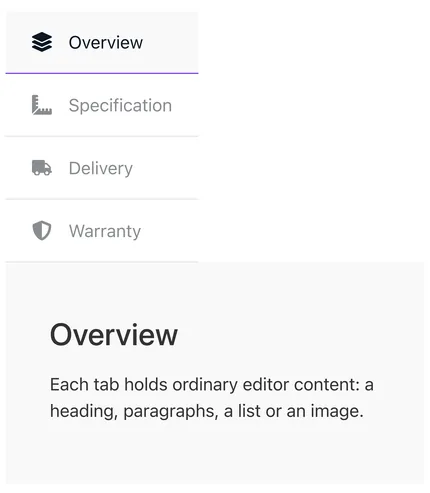
Each title gets a full-width tap target, which solves the squashing. It does not pair each title with its own panel, so with six or seven tabs a visitor scrolls past the whole list before reaching any content.
The practical rule: the addon is fine on a phone with three or four tabs, and the core widget with a breakpoint is better when there are more.
Which option for which page
| Situation | Setting |
|---|---|
| Three or four short titles, mostly desktop traffic | Leave it, then check on a phone |
| Five or more tabs | Core Tabs with Breakpoint set to mobile |
| Long titles such as “Shipping and returns” | Core Tabs with Breakpoint set to tablet |
| Titles that read as a sequence, like months or sizes | Horizontal Scroll |
| Mostly phone traffic and long panels | An accordion widget instead of tabs |
| Icon titles, three or four tabs | Addon widget, stacked column is fine |
When tabs stop working on mobile
“Tabs not working on mobile” usually turns out to be one of four things:
- A hover effect. Hover does not exist on a touch screen, so a tab set to switch on hover needs a tap, sometimes two. Set the effect to click on any page with phone traffic.
- Cached CSS. After changing the breakpoint, regenerate Elementor’s CSS and clear the page cache, or the phone keeps serving the old stylesheet.
- A deferred script. Aggressive JavaScript deferral holds the tab script back until the visitor interacts with the page, so the first tap does nothing. Exclude the widget’s script in the optimisation plugin.
- A tap target that is too small. Nothing is broken, the title is just smaller than a thumb, and the accordion breakpoint fixes it.
Frequently asked questions
How do I make Elementor tabs turn into an accordion on mobile?
Select the Tabs widget, open Additional Settings and set Breakpoint. Below that width the strip switches to a vertical accordion layout, with mobile as the default.
Why do my tab titles overlap on a phone?
The strip has less width than the titles need. Set an accordion breakpoint, turn on Horizontal Scroll, or shorten the titles.
Do tabs hurt mobile SEO?
No. Content inside a tab is in the HTML and gets indexed whether or not the panel is open.
Should I use tabs or an accordion on mobile?
If most of your traffic is phones and the panels are long, build it as an accordion from the start. Tabs with a breakpoint are the better call when desktop is the primary view.
Why does my first tap do nothing?
Usually a hover effect or a deferred script. Set the tab effect to click, and exclude the tab script from JavaScript deferral.
Final thoughts
None of this needs CSS. Elementor’s Breakpoint control covers the common case, Horizontal Scroll covers sequences, and addon widgets stack into a readable column. Then open the page on an actual phone and tap every title, because that is the step people skip.
Related reading
