
Search “free Elementor carousel” and you’ll get a dozen plugins that all say free. Install three of them and you’ll find the carousel is free but autoplay is Pro, or the widget is free but capped at five slides, or it’s free until you want it to work on mobile.
So here’s the honest version. What Elementor gives you without Pro, what Master Addons adds for free (six classic carousel widgets plus eight named carousel designs you can import without a licence), where the free tier genuinely stops, and which of those limits will actually bother you.
What Elementor gives you free
Elementor’s free plugin ships two things that can act as a carousel:
- Image Carousel: images, arrows, dots, autoplay. No captions on the slides, no per-breakpoint control beyond slides-per-view.
- Basic Gallery: a grid, not a carousel, but people use it as one when they only have six images.
Everything else carousel-shaped in Elementor is Pro:
- Media Carousel (images plus video, coverflow skin)
- Testimonial Carousel
- Reviews Carousel
- Loop Carousel (the dynamic one that pulls posts and products)
That last one catches people out most often. Loop Carousel is the widget you want if you’re building a “latest posts” or “featured products” slider, and it sits behind Elementor Pro with no free equivalent in core.
The six classic free widgets
Master Addons adds six carousel-family widgets to the free tier, no licence:
| Widget | What it does | Use it for |
|---|---|---|
| Image Carousel | Images with captions, lightbox, coverflow layout, per-breakpoint controls | Galleries, portfolios, product shots |
| Logo Slider | Logo grid or infinite marquee, grayscale-to-colour hover, link per logo | Client logos, partners, press mentions |
| Team Slider | Team cards in a carousel, social icons, hover presets, content drawer | About pages, agency team sections |
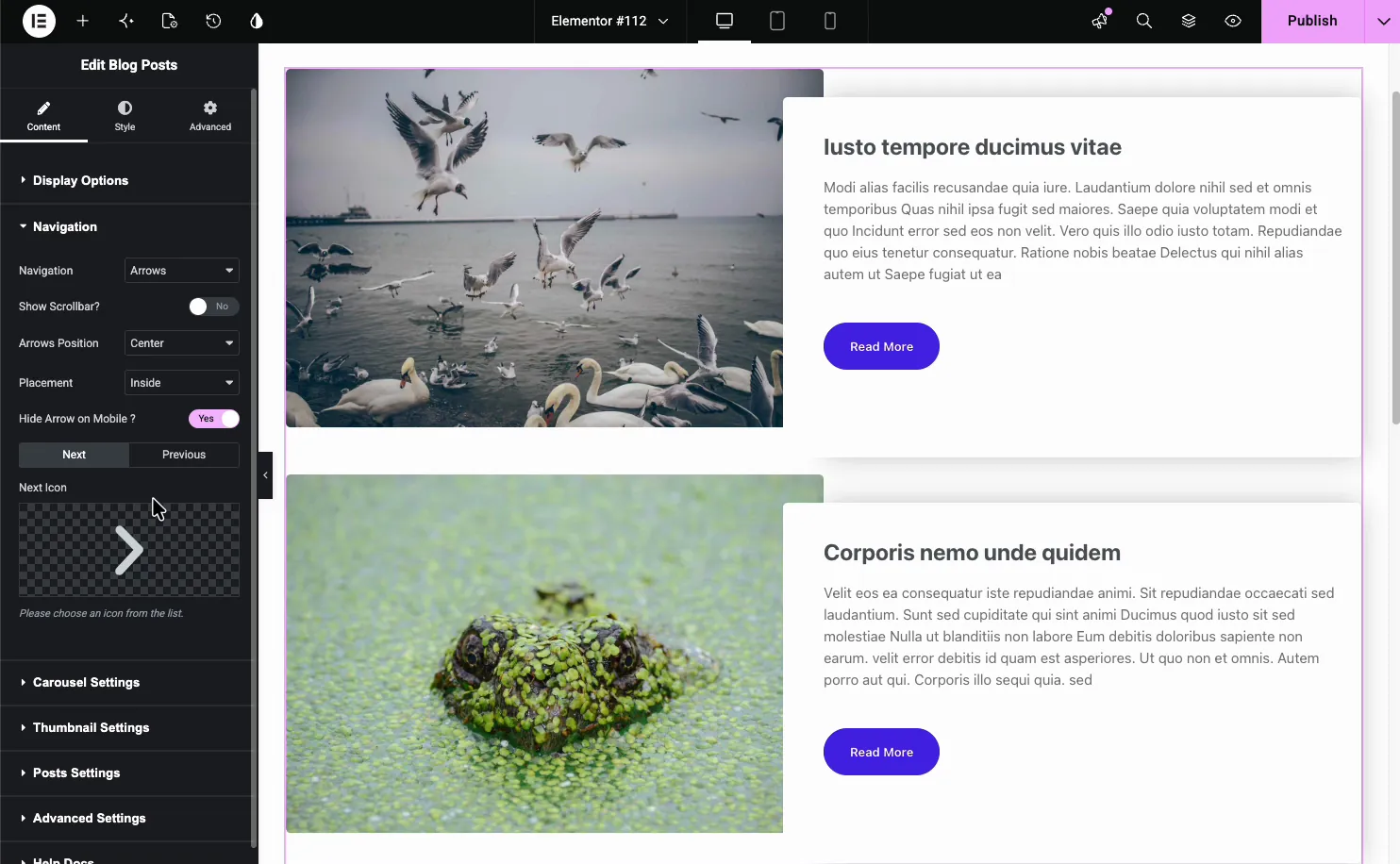
| Blog (carousel mode) | Posts pulled by category, tag or post type, then put on a sliding track | Latest posts, related articles, news strips |
| Timeline | Dated entries on a Swiper track, horizontal or vertical, with carousel settings | Company histories, roadmaps, process steps |
| Image Comparison | Drag-handle before/after slider, horizontal or vertical | Retouching, renovations, before-and-after proof |
Plus one that isn’t a widget: the Background Slider extension, also free, which turns any container’s background into a slideshow. That covers the “hero with rotating background images” job without a slider widget at all.
The one worth pointing at is the Blog widget’s carousel mode. A carousel that queries your posts and refills itself is exactly the thing Elementor keeps behind Pro as Loop Carousel, and most addons gate their post carousel too. Turn on carousel mode in the Blog widget and it’s free.
The eight free importable carousel designs
This is the part that’s changed recently. Master Addons ships twenty named carousel and slider designs built with its Widget Builder. Twelve of them need a Pro licence to import. Eight don’t. They import on the free plugin through Master Addons → Widget Builder → Import Widget (drag the .json in), and then show up in Elementor’s widget panel under Favorites, edited like any other widget. Each ships with three slides or entries ready to fill in, all of them keyboard-navigable, several with swipe gestures.
To be clear about the boundary: importing these eight is free. Building or editing your own designs with the full Widget Builder remains Pro-only. Here’s each of the eight.
Plinth Hero Slider

A full-bleed hero slider. The caption sits on a plinth in the lower-left, the controls (dots, arrows, a slide counter) sit lower-right, and slides swap instantly rather than sliding or fading. Each slide takes its own link, with a shared CTA label across the set, and it responds to swipe on touch screens. It’s the only design in the free eight with a link control, which makes it the one to reach for when the slider’s job is sending people somewhere.
Best use: the top of a homepage or landing page where you’d otherwise be pricing up a slider plugin.
The drawback is the instant swap. If you want a crossfade or a sliding transition between frames, this design doesn’t do one. The change is a hard cut, which suits the editorial look but won’t please everyone.
Ledger Index Slider
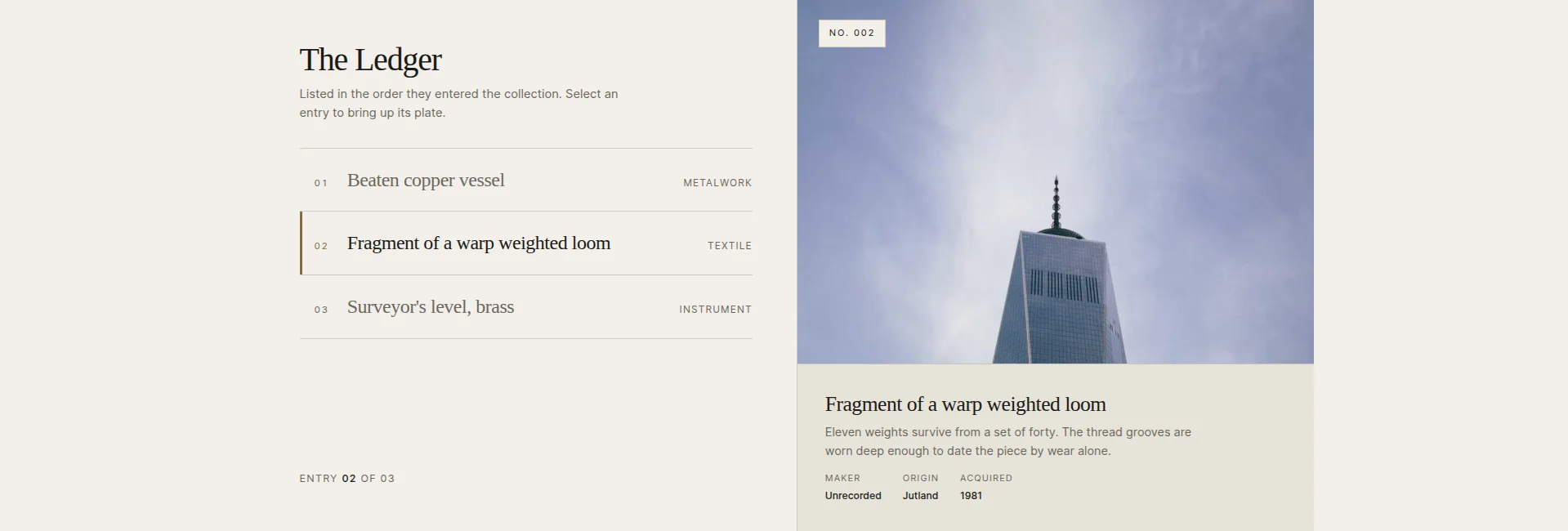
An index of entry rows sits beside a large image plate. Pick a row and the plate, stamp and caption swap to match. There’s an optional select-on-hover mode if you’d rather rows respond to the pointer than to clicks. It reads like a table of contents you can browse.
Best use: catalogues, archives, lists of works, anywhere a visitor should scan a list of names and preview each one without leaving the section.
The drawback: it’s a browsing pattern, driven entirely by the visitor. Three entries ship in the box, and the index column only really earns its place once you have a handful of items worth listing. With two entries it looks like furniture.
Vitrine Plate Gallery
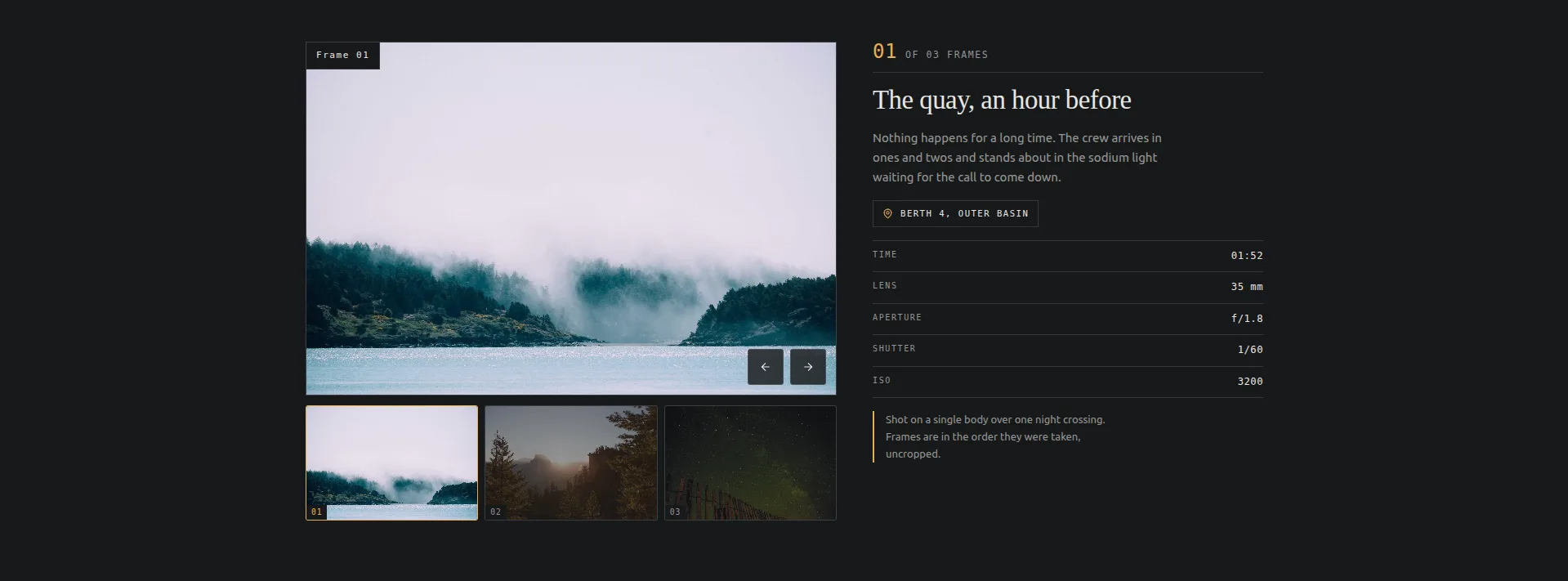
A single large plate under a strip of thumbnails, with a sticky caption panel alongside carrying a frame-data table: place, time, lens, aperture, shutter, ISO. Click a thumbnail, the plate and its data swap. It’s the thumbnail-strip gallery pattern that, as a ready-made widget, otherwise sits in the Pro tier as Gallery Slider. The gallery slider guide compares the two.
Best use: photography. Portfolio pages, exhibition pages, anywhere the shot’s technical details are part of the story.
The drawback follows from that: the caption panel is built around camera metadata. If you’re showing products or artwork rather than photographs, the lens-and-ISO table needs its labels reworded, and at that point you’re bending the design away from what it’s for.
Quadrant Paged Catalogue
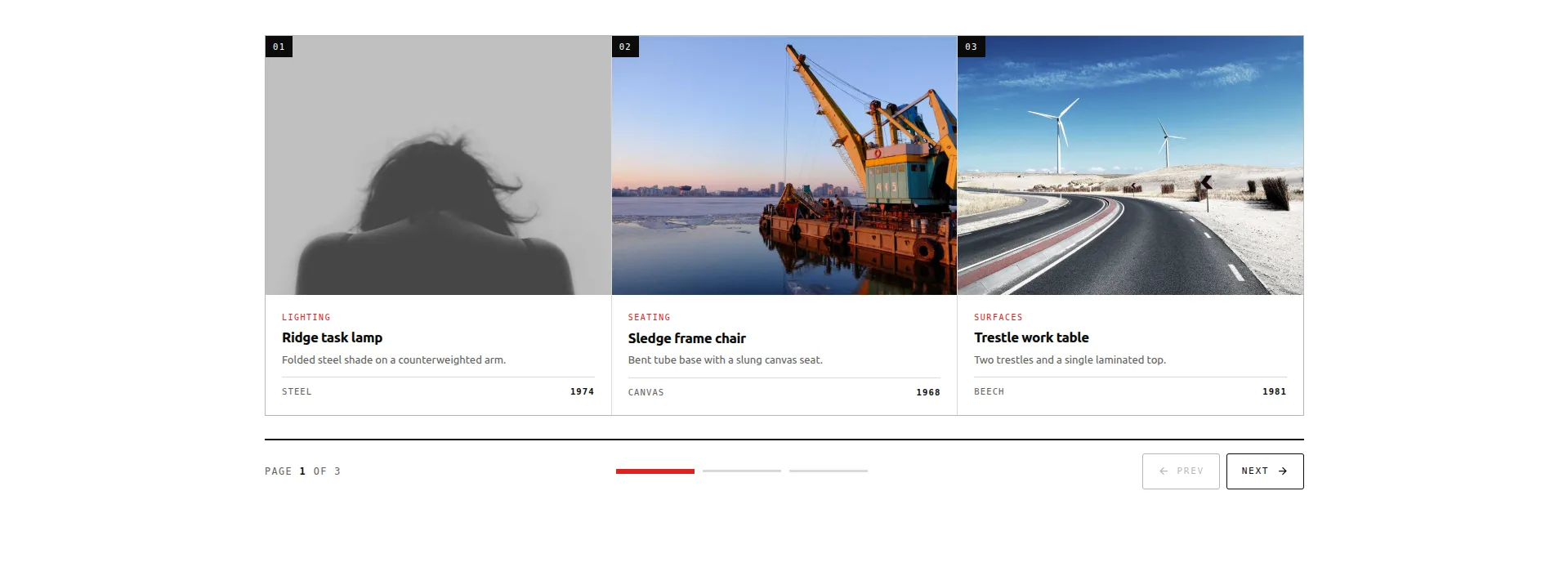
A grid of item boxes paged three at a time, with a segment rail that shows where you are and jumps straight to any page. Nine items across three pages, each item carrying an image, category, title, copy and a stat. It’s the middle ground between a static grid and a one-at-a-time carousel.
Best use: a product-style catalogue of services, packages or case studies, where you want more than a row of cards but less than a whole archive page.
The drawback: the content is fixed, not query-driven. You fill in the nine items by hand in the panel. For a curated set that’s fine; for a shop feed that changes weekly you want a query-driven widget instead, either Elementor Pro’s Loop Carousel, or the free Blog widget in carousel mode if it’s posts rather than products. The WooCommerce product carousel guide works through the options.
Bulletin Tabbed Panels
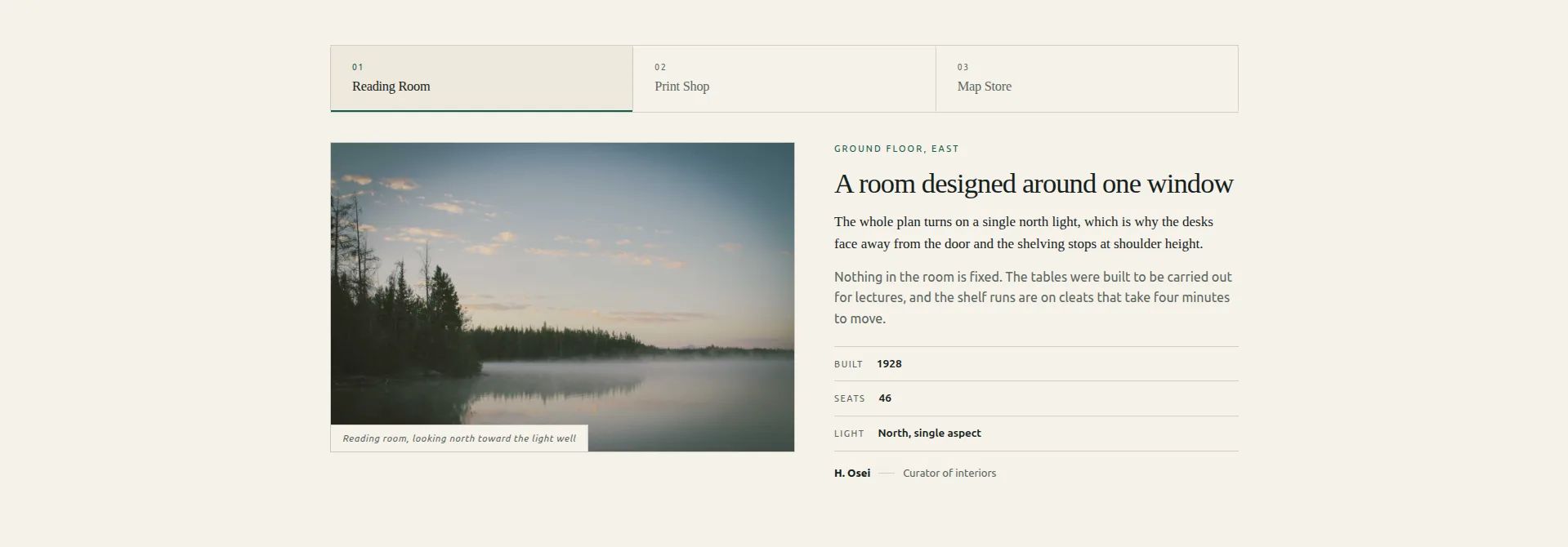
A tab strip over stacked editorial panels. Each panel is a proper article layout: figure with caption, kicker, title, lede, body copy, a three-row facts table and a byline. Under the surface it uses correct ARIA tablist semantics, which most tab widgets skip and screen readers notice.
Best use: comparing a few substantial things side by side (locations, programmes, editions) where each one deserves paragraphs, not a card.
The drawback: it’s a tabbed panel, not a rotating carousel. Nothing advances on its own, and the panel layout is long-form by design. If you just need three short tabs of text, this is more structure than the job calls for.
If tabs are what you actually wanted, skip the slider part. The Tabs widget switches panels from a tab strip with none of the carousel settings around it.
Rostrum Quote Slider

A quote panel beside a portrait, stepped through with chevrons, with a progress bar and tally keeping count. The step buttons can name the next voice, so visitors see who’s coming before they click. Fields per entry: portrait, quote, name, role and tenure, plus an editable quote mark.
Best use: testimonials and reviews. Elementor’s own Testimonial Carousel is Pro-only, and this is the free answer to it. Building a testimonial carousel covers the setup either way. We’ve written up the testimonials on our own site around it in full.
The drawback: the layout leans on the portrait. Every entry pairs the quote with a photo of the person, and text-only testimonials, the kind you pull from emails and reviews, leave an obvious hole where the face should be.
Almanac Timeline Slider
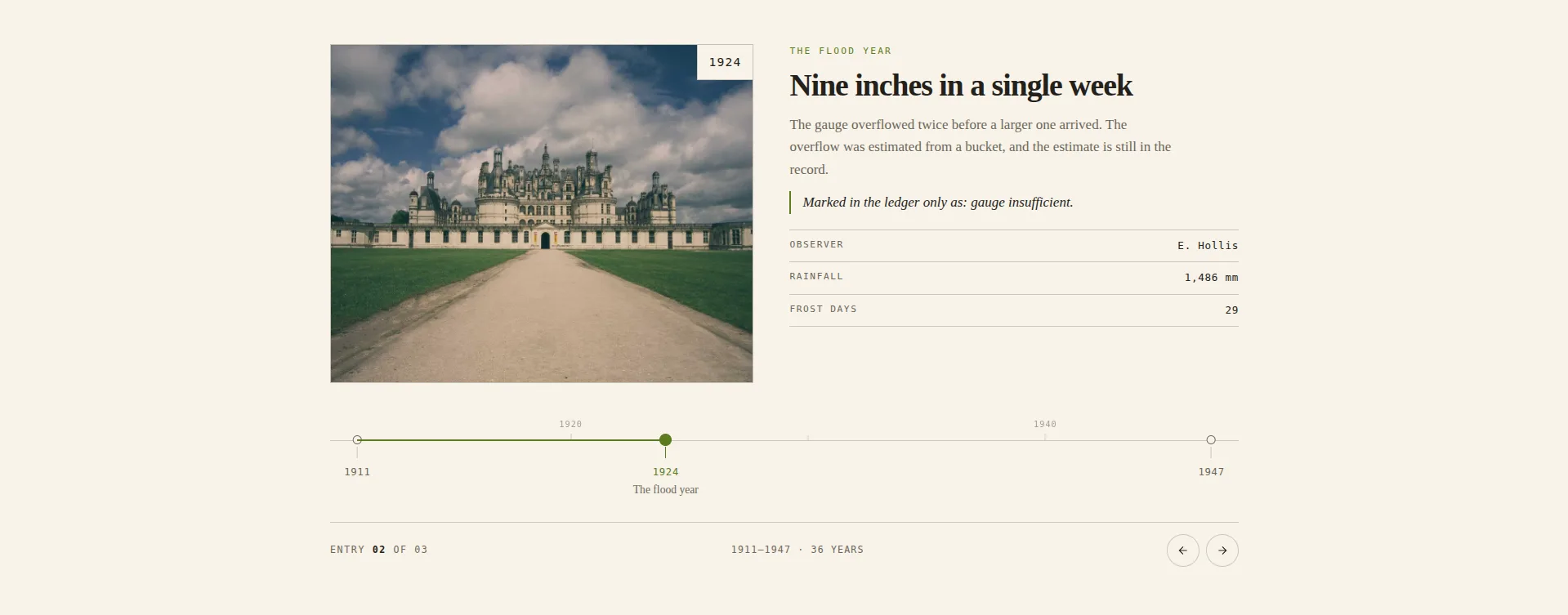
Entries pinned to a dated axis, with a decade comb running above the rule. The clever bit: tick spacing is computed from the actual years you enter, so a quiet stretch in your history shows up as a visible gap rather than being squashed into even spacing. Few timeline widgets bother with that.
Best use: company histories, project retrospectives, anything where when things happened matters as much as what happened.
The drawback is the panel. This design exposes 143 controls, and while that’s what makes it flexible, it also makes it the slowest of the eight to set up. Budget an evening, not ten minutes.
Keystone Feature Slider
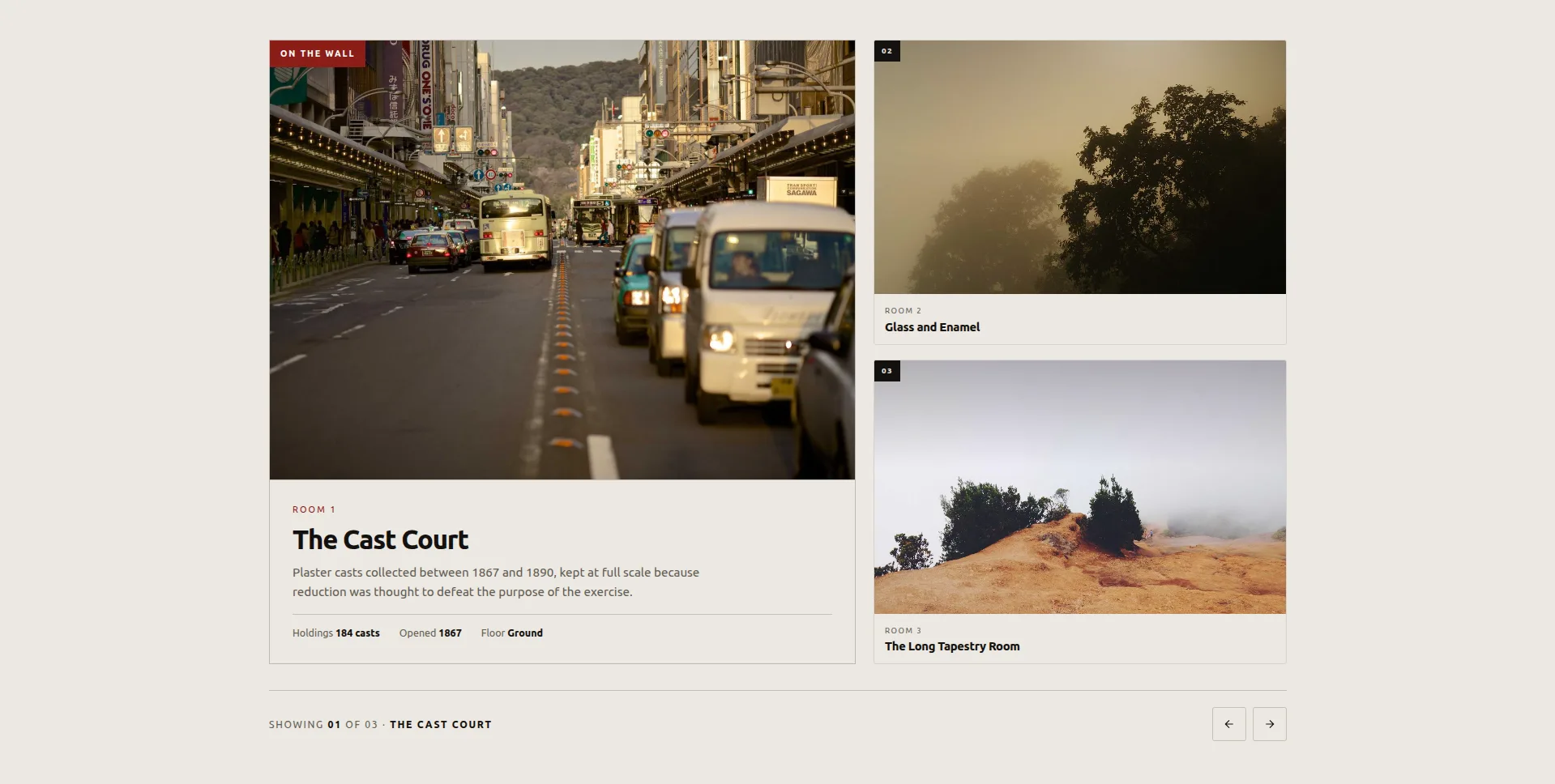
One item shown large, with the others waiting as satellites beside it. Click a satellite and it’s promoted to the feature spot with a FLIP animation, the smoothest motion in the free set. The featured item carries a three-fact plaque alongside its image.
Best use: rooms, spaces, exhibits. A small set of things where one deserves the spotlight at a time and the rest should stay visible in the wings.
The drawback: it’s built for a small curated set. Three items ship, and the satellite column is a showcase, not a list. Pile many items into it and the pattern stops making sense. It also depends on the click; visitors who don’t interact only ever see your first feature large.
Live previews of all eight, and the twelve Pro designs, are on the Elementor carousel widgets page. Demos are free to browse for all twenty either way. If you want the download-and-import walkthrough with the files, that’s covered in free Elementor slider templates.
Where the free tier actually stops
This is the part the comparison tables skip.
Autoplay, loop, arrows, dots, pause-on-hover, per-breakpoint slides-per-view: all free, across Image Carousel, Logo Slider, Team Slider, Timeline and the Blog carousel. These are the settings people assume are gated, and they aren’t. If your requirement is “a carousel that autoplays, loops, and shows two slides on tablet,” the free tier finishes the job. The Background Slider extension is free too, which catches people out, because it looks like the paid half of the pair and isn’t.
What needs Pro:
- The twelve Pro carousel designs: Meridian Coverflow (3D coverflow), Concertina Accordion (expanding image panels), Pivot Flip (two-sided flip cards), Halo Orbit (circular orbit), plus eight more including Stratum Deck, Bisect Split, Arc Curved and Slate Curtain. All twenty are compared on the free carousel widget Elementor page. Same import route, Pro licence required.
- Gallery Slider: the ready-made widget with a thumbnail strip and large preview pane. (The free Vitrine Plate Gallery import covers the same pattern for photography.)
- News Ticker: the scrolling headline ticker, the one marquee-shaped widget in the set.
- Featured Product: the WooCommerce widget, which puts one product on the page rather than a track of them.
- Widget Builder authoring: importing the eight free designs is free; building your own widgets or editing the designs’ structure in the full Widget Builder is Pro-only.
There’s a pattern in that list. The free tier covers the standard content types (images, logos, people, posts, dates, before-and-after) plus eight finished designs for the common layouts. Pro covers the ready-made thumbnail gallery, the ticker, the WooCommerce widget, the showier motion designs, and the tool for building your own.
Filter tabs over a grid sit outside this list because they are not a carousel at all. That layout comes from the Filterable Image Gallery widget.
The honest gap is WooCommerce. There is no product carousel widget in either tier here. A sliding row of products comes from Elementor Pro’s Loop Carousel, or you hand-curate one with the free Quadrant Paged Catalogue design.
Free vs Pro, side by side
| Capability | Elementor free | Master Addons free | Master Addons Pro |
|---|---|---|---|
| Image carousel | Yes, basic | Yes, with captions + lightbox | Yes |
| Coverflow / 3D layout | No | Yes (Image Carousel) | Yes, plus Meridian Coverflow design |
| Logo carousel | No | Yes | Yes |
| Team carousel | No | Yes | Yes |
| Product carousel (Woo) | Pro only (Loop Carousel) | No | No. Featured Product shows one product |
| Before/after slider | No | Yes (Image Comparison) | Yes |
| Autoplay + infinite loop | Yes | Yes | Yes |
| Per-breakpoint controls | Partial | Yes | Yes |
| Full-width hero slider | No | Plinth Hero Slider (import) | Same, plus the 12 Pro designs |
| Thumbnail gallery slider | No | Vitrine Plate Gallery (import) | Gallery Slider widget |
| Testimonial carousel | Pro only | Rostrum Quote Slider (import) | Same, plus Pro designs |
| Timeline slider | No | Timeline widget + Almanac Timeline Slider (import) | Same |
| Tabbed content panels | No | Bulletin Tabbed Panels (import) | Same |
| Dynamic post loop | Pro only | Blog widget, carousel mode | Blog widget, carousel mode |
| Scrolling ticker / marquee | No | No | News Ticker widget |
| Background slideshow | Yes, basic (Slideshow background type) | Yes, 24 transitions (Background Slider extension) | Yes |
| Named carousel designs | No | 8 of 20 (free import) | All 20 |
| Build your own designs | No | No | Yes (Widget Builder) |
One honest gap left in that table, worth naming rather than hiding: dynamic loops. The Blog widget’s carousel mode covers most of what people use Elementor’s Loop Carousel for: query by category, tag or post type, then slide through the results. It’s not a template-driven loop like Elementor’s, so if you’ve already built a Loop Item template, Elementor Pro is the better fit.
How to add a free carousel to Elementor
Two routes, depending on whether you’re using a classic widget or one of the eight designs.
Classic widgets, under two minutes, assuming Elementor and Master Addons are installed:
- Open the page in Elementor and search the widget panel for “carousel” or “slider.”
- Drag the widget in. Image Carousel for photos, Logo Slider for logos, Team Slider for people, Blog for posts.
- Add your content. For Image Carousel that’s the gallery picker; for Logo Slider it’s a repeater with one row per logo.
- Open Carousel Settings and set slides-per-view, autoplay delay, and loop. Switch to the tablet and mobile icons at the top of the panel and set slides-per-view for each. This is the step people skip, and it’s why carousels look wrong on phones.
- Style tab for arrows, dots, spacing and hover states.
The eight designs, one extra step at the start:
- In WordPress admin, go to Master Addons → Widget Builder → Import Widget and drag the design’s .json file in.
- Open your page in Elementor. The imported design appears in the widget panel under Favorites.
- Drag it in and fill the panel. Each design ships with three example slides or entries you replace with your own content.
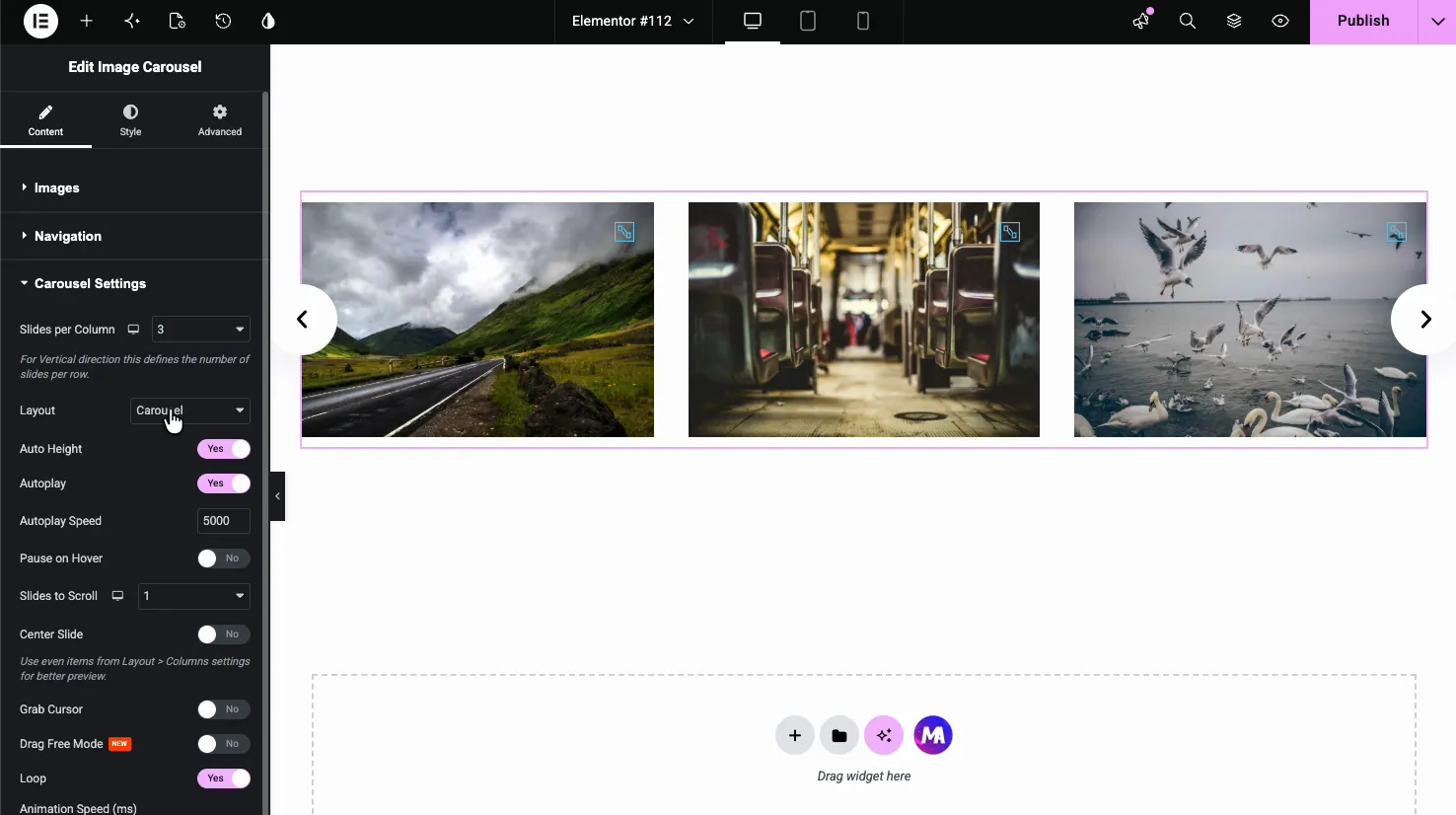
Step-by-step with screenshots for the classic widgets: how to create an image carousel in Elementor.
Is a free carousel widget good enough?
For most sites, yes, and I’d rather say that plainly than pretend otherwise.
If you need images sliding with arrows and dots, autoplay, and sensible mobile behaviour, the free tier is complete. Nothing in the paid version makes those work better. They’re the same Swiper engine, the same settings. And with the eight importable designs, the free tier now stretches to layouts that used to be paywall territory: a hero slider, a thumbnail gallery, a testimonial slider, a timeline.
Pro earns its money in two situations. One: you want a presentation format the free set doesn’t reach, like the ready-made Gallery Slider, a scrolling News Ticker, or one of the twelve Pro designs such as Meridian Coverflow or Halo Orbit. Two: you’re building sites for clients and you want to author your own carousel designs rather than import finished ones, which is what the full Widget Builder is for.
If neither applies, install the free version and stop reading comparison posts.
Frequently asked questions
Does Elementor have a free carousel widget?
Yes. Image Carousel ships in Elementor’s free plugin. It handles images, arrows, dots and autoplay, but has no slide captions and limited responsive control. Media Carousel, Testimonial Carousel and Loop Carousel all require Elementor Pro.
What’s the best free Elementor carousel plugin?
Depends what you’re sliding. For images alone, Elementor’s own widget is enough. For logos, team members, posts or before-and-after comparisons you need an addon. Master Addons puts all four in its free tier, plus eight importable carousel designs, which most competitors don’t match.
How do I import the free carousel designs?
In WordPress admin, go to Master Addons → Widget Builder → Import Widget and drag the design’s .json file in. The design then appears in Elementor’s widget panel under Favorites and edits like a normal widget. Eight designs import this way on the free plugin: Plinth Hero Slider, Ledger Index Slider, Vitrine Plate Gallery, Quadrant Paged Catalogue, Bulletin Tabbed Panels, Rostrum Quote Slider, Almanac Timeline Slider and Keystone Feature Slider. The other twelve designs need Master Addons Pro.
Can I make an Elementor carousel autoplay for free?
Yes. Autoplay, infinite loop, autoplay delay and pause-on-hover are all free settings in both Elementor’s carousel and every Master Addons carousel widget. None of them are gated.
Is there a free Elementor testimonial carousel?
Yes. Elementor’s own Testimonial Carousel is Pro, but the Rostrum Quote Slider imports free through Master Addons’ Widget Builder: a quote panel beside a portrait with chevron stepping, a progress bar and per-entry fields for name, role and tenure. Full walkthrough in the Elementor testimonial carousel guide.
How many slides can a free Elementor carousel have?
No cap in either Elementor’s widget or the Master Addons free widgets. Practical limit is performance, not licensing. Past about thirty image slides you’ll want lazy loading, which is on by default. The eight importable designs work differently: each ships with three slides or entries controlled by show toggles.
Does the free version put a watermark or branding on the carousel?
No. No watermark, no “powered by” link, no nag inside the widget output. The free widgets and the imported designs render the same markup the Pro ones do.
Start here
Install the free plugin, try the classic widgets, and import whichever of the eight designs fits your page before you think about a licence. Most people find the free tier does the job. Every widget and all twenty designs are demoed in one place on the carousel widget hub, and if you do hit a Pro-only feature, the pricing page has the tiers.