

অনুসন্ধান “ফ্রি এলিমেন্টর ক্যারোজেল” এবং আপনি এক ডজন প্লাগইন পাবেন যেগুলো সবাই বিনামূল্যে বলে। তাদের মধ্যে তিনটি ইনস্টল করুন এবং আপনি দেখতে পাবেন ক্যারোজেলটি বিনামূল্যে কিন্তু অটোপ্লে প্রো, বা উইজেটটি বিনামূল্যে কিন্তু পাঁচটি স্লাইডে ক্যাপ করা হয়েছে, অথবা আপনি এটি মোবাইলে কাজ করতে না চাওয়া পর্যন্ত এটি বিনামূল্যে।
তাই এখানে সৎ সংস্করণ। এলিমেন্টর আপনাকে প্রো ছাড়া কী দেয়, মাস্টার অ্যাডনস বিনামূল্যে কী যোগ করে (ছয়টি ক্লাসিক ক্যারোজেল উইজেট প্লাস আটটি নামযুক্ত ক্যারোজেল ডিজাইন আপনি লাইসেন্স ছাড়াই আমদানি করতে পারেন), যেখানে বিনামূল্যের স্তরটি সত্যিকার অর্থে বন্ধ হয়ে যায় এবং সেই সীমাগুলির মধ্যে কোনটি আপনাকে বিরক্ত করবে।
এলিমেন্টর আপনাকে বিনামূল্যে কি দেয়
এলিমেন্টরের ফ্রি প্লাগইন দুটি জিনিস পাঠায় যা ক্যারোজেল হিসেবে কাজ করতে পারে:
- ইমেজ ক্যারোজেল: ছবি, তীর, বিন্দু, অটোপ্লে। স্লাইডে কোনো ক্যাপশন নেই, স্লাইড-প্রতি-ভিউ-এর বাইরে কোনো প্রতি-ব্রেকপয়েন্ট নিয়ন্ত্রণ নেই।
- বেসিক গ্যালারি: একটি গ্রিড, একটি ক্যারোজেল নয়, কিন্তু লোকেরা এটিকে একটি হিসাবে ব্যবহার করে যখন তাদের কাছে মাত্র ছয়টি চিত্র থাকে।
এলিমেন্টরে ক্যারোজেল আকৃতির বাকি সবকিছুই প্রো:
- মিডিয়া ক্যারোজেল (ছবি প্লাস ভিডিও, কভারফ্লো স্কিন)
- প্রশংসাপত্র ক্যারোজেল
- রিভিউ Carousel
- লুপ ক্যারোজেল (গতিশীল যা পোস্ট এবং পণ্য টানে)
যে শেষ এক প্রায়ই মানুষ ধরা আউট। লুপ ক্যারোজেল আপনি যদি একটি "সর্বশেষ পোস্ট" বা "বৈশিষ্ট্যযুক্ত পণ্য" স্লাইডার তৈরি করেন এবং এটি এলিমেন্টর প্রো-এর পিছনে থাকে যার মূলে কোনো বিনামূল্যের সমতুল্য নেই।
ছয়টি ক্লাসিক ফ্রি উইজেট
মাস্টার অ্যাডনস বিনামূল্যে স্তরে ছয়টি ক্যারোজেল-ফ্যামিলি উইজেট যোগ করে, লাইসেন্স নেই:
| উইজেট | এটা কি করে | জন্য এটি ব্যবহার করুন |
|---|---|---|
| ইমেজ ক্যারোজেল | ক্যাপশন, লাইটবক্স, কভারফ্লো লেআউট, প্রতি-ব্রেকপয়েন্ট নিয়ন্ত্রণ সহ ছবি | গ্যালারী, পোর্টফোলিও, পণ্য শট |
| লোগো স্লাইডার | লোগো গ্রিড বা অসীম মার্কি, গ্রেস্কেল-টু-কালার হোভার, লোগো প্রতি লিঙ্ক | ক্লায়েন্ট লোগো, অংশীদার, প্রেস উল্লেখ |
| টিম স্লাইডার | একটি ক্যারোসেলে টিম কার্ড, সামাজিক আইকন, হোভার প্রিসেট, সামগ্রী ড্রয়ার | পৃষ্ঠা, এজেন্সি দলের বিভাগ সম্পর্কে |
| ব্লগ (ক্যারোজেল মোড) | বিভাগ, ট্যাগ বা পোস্টের ধরন দ্বারা টানা পোস্ট, তারপর একটি স্লাইডিং ট্র্যাকে রাখুন | সর্বশেষ পোস্ট, সম্পর্কিত নিবন্ধ, সংবাদ স্ট্রিপ |
| টাইমলাইন | ক্যারোজেল সেটিংস সহ একটি সুইপার ট্র্যাকে, অনুভূমিক বা উল্লম্ব তারিখের এন্ট্রি | কোম্পানির ইতিহাস, রোডম্যাপ, প্রক্রিয়া পদক্ষেপ |
| চিত্র তুলনা | স্লাইডারের আগে/পরে, অনুভূমিক বা উল্লম্ব টেনে আনুন | রিটাচিং, সংস্কার, আগে এবং পরে প্রমাণ |
প্লাস এক যে একটি উইজেট নয়: ব্যাকগ্রাউন্ড স্লাইডার এক্সটেনশন, এছাড়াও বিনামূল্যে, যা যেকোনো কন্টেইনারের পটভূমিকে একটি স্লাইডশোতে পরিণত করে। এটি একটি স্লাইডার উইজেট ছাড়াই "হিরো ঘূর্ণায়মান ব্যাকগ্রাউন্ড ইমেজ" কাজকে কভার করে।
ব্লগ উইজেটের ক্যারোজেল মোডের দিকে ইঙ্গিত করার মতো একটি। একটি ক্যারোজেল যা আপনার পোস্টগুলিকে জিজ্ঞাসা করে এবং নিজেই রিফিল করে ঠিক সেই জিনিসটি এলিমেন্টর প্রো-কে লুপ ক্যারোজেল হিসাবে পিছনে রাখে এবং বেশিরভাগ অ্যাডঅন তাদের পোস্ট ক্যারোজেলকেও গেট করে। ব্লগ উইজেটে ক্যারোজেল মোড চালু করুন এবং এটি বিনামূল্যে।
আটটি বিনামূল্যে আমদানিযোগ্য ক্যারোজেল ডিজাইন
এই অংশ যে সম্প্রতি পরিবর্তিত হয়েছে। মাস্টার অ্যাডনস বিশটি নামের ক্যারোজেল এবং স্লাইডার ডিজাইনের সাথে তৈরি করে উইজেট নির্মাতা। তাদের মধ্যে বারো জনের আমদানি করার জন্য একটি প্রো লাইসেন্স প্রয়োজন৷ আট না। তারা বিনামূল্যে প্লাগইন মাধ্যমে আমদানি মাস্টার অ্যাডঅন → উইজেট নির্মাতা → উইজেট আমদানি করুন (json টেনে আনুন), এবং তারপর এলিমেন্টরের উইজেট প্যানেলে ফেভারিটের অধীনে দেখান, অন্য যেকোনো উইজেটের মতো সম্পাদিত। তিনটি স্লাইড বা এন্ট্রি সহ প্রতিটি জাহাজ পূরণ করার জন্য প্রস্তুত, তাদের সবকটি কীবোর্ড-নেভিগেবল, বেশ কয়েকটি সোয়াইপ অঙ্গভঙ্গি সহ।
সীমানা সম্পর্কে পরিষ্কার হতে: এই আটটি আমদানি বিনামূল্যে। সম্পূর্ণ উইজেট বিল্ডার দিয়ে আপনার নিজস্ব ডিজাইন তৈরি বা সম্পাদনা করা শুধুমাত্র প্রো-ই থাকে। এখানে আট প্রতিটি।
প্লিন্থ হিরো স্লাইডার
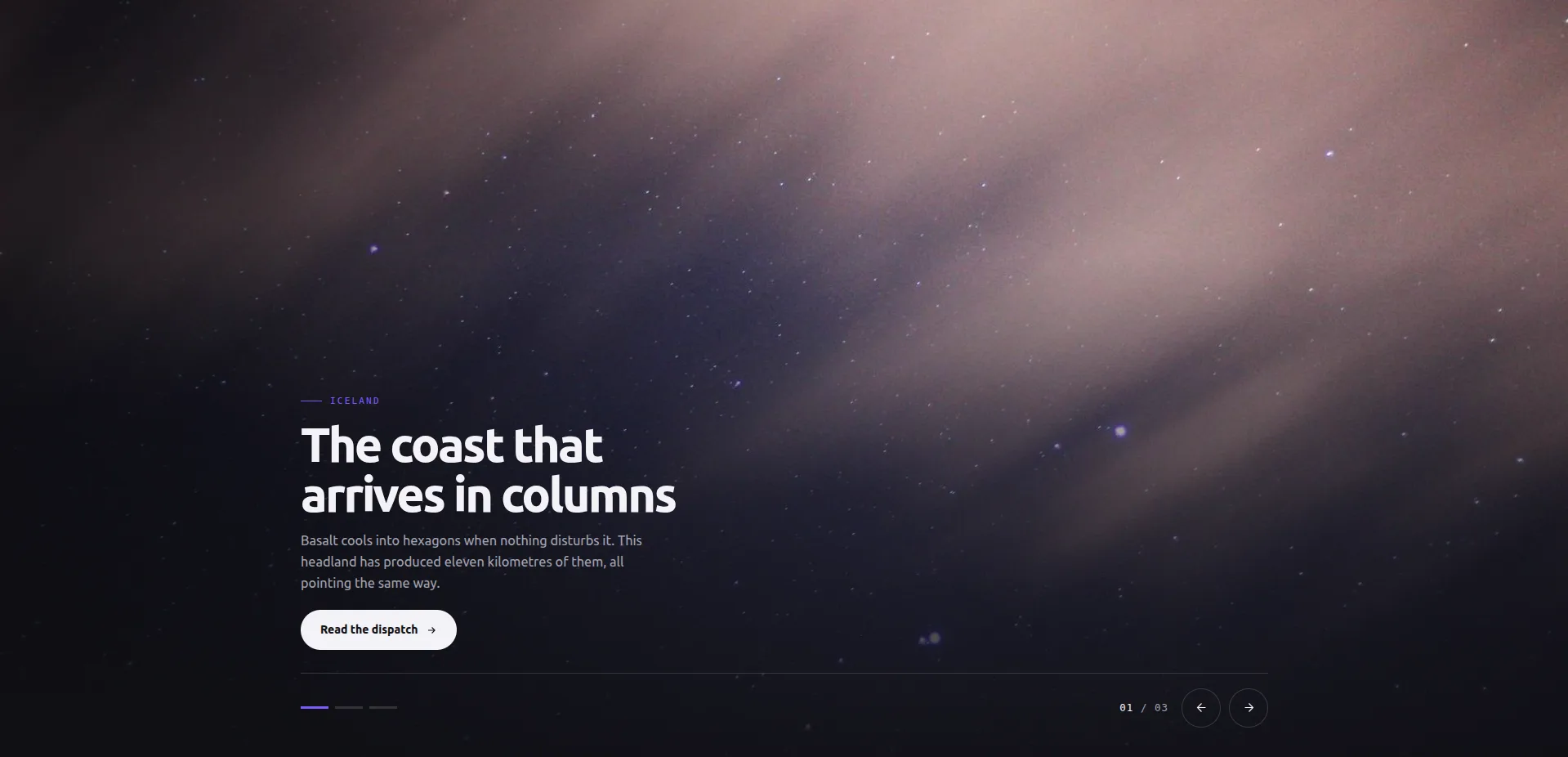
একটি ফুল-ব্লিড হিরো স্লাইডার। ক্যাপশনটি নীচের-বাম দিকে একটি প্লিন্থে বসে, নিয়ন্ত্রণগুলি (বিন্দু, তীর, একটি স্লাইড কাউন্টার) নীচে-ডানে বসে এবং স্লাইডগুলি স্লাইডিং বা বিবর্ণ হওয়ার পরিবর্তে তাত্ক্ষণিকভাবে অদলবদল করে৷ প্রতিটি স্লাইড সেট জুড়ে একটি ভাগ করা CTA লেবেল সহ নিজস্ব লিঙ্ক নেয় এবং এটি টাচ স্ক্রিনে সোয়াইপ করতে সাড়া দেয়। এটি একটি লিঙ্ক কন্ট্রোল সহ ফ্রি আটের একমাত্র ডিজাইন, যা স্লাইডারের কাজ যখন লোকেদের কোথাও পাঠাচ্ছে তখন এটিকে পৌঁছাতে পারে৷।
সর্বোত্তম ব্যবহার: একটি হোমপেজ বা ল্যান্ডিং পৃষ্ঠার শীর্ষে যেখানে আপনি অন্যথায় একটি স্লাইডার প্লাগইনের মূল্য নির্ধারণ করবেন।
অপূর্ণতা তাত্ক্ষণিক অদলবদল হয়। আপনি যদি ফ্রেমের মধ্যে একটি ক্রসফেড বা স্লাইডিং ট্রানজিশন চান তবে এই নকশাটি একটি কাজ করে না। পরিবর্তনটি একটি হার্ড কাট, যা সম্পাদকীয় চেহারার সাথে মানানসই কিন্তু সবাইকে খুশি করবে না।
লেজার ইনডেক্স স্লাইডার
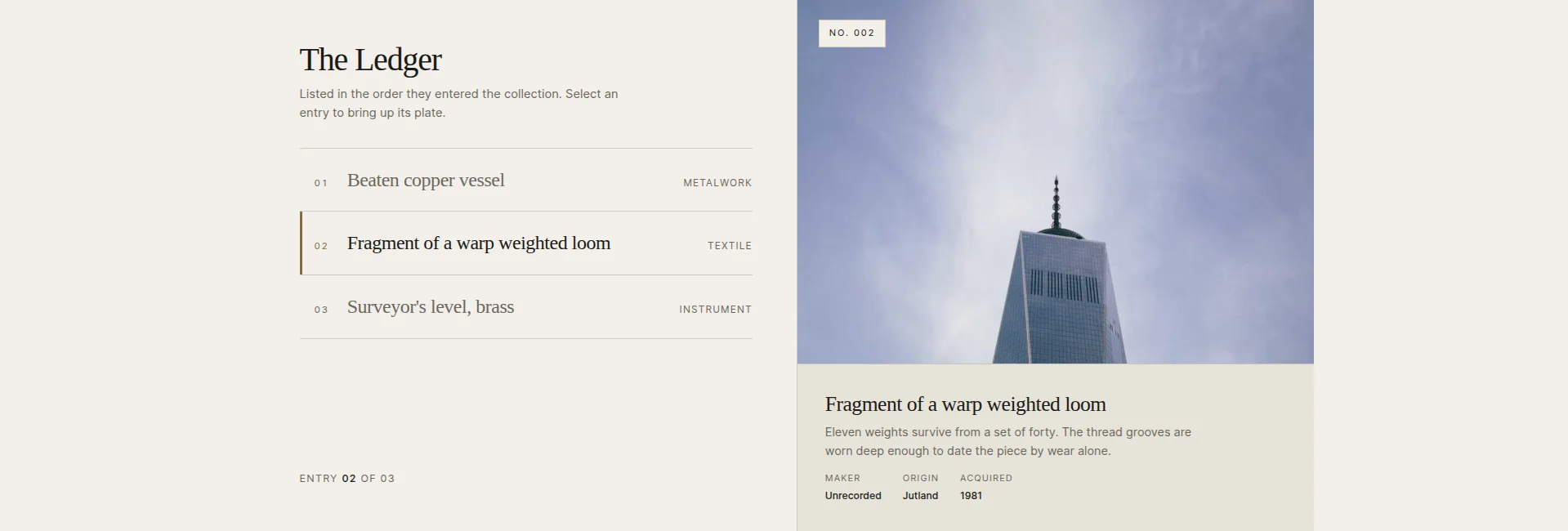
এন্ট্রি সারিগুলির একটি সূচী একটি বড় ইমেজ প্লেটের পাশে বসে। একটি সারি বাছাই করুন এবং প্লেট, স্ট্যাম্প এবং ক্যাপশন অদলবদল করুন। একটি ঐচ্ছিক নির্বাচন-অন-হোভার মোড আছে যদি আপনি ক্লিকের চেয়ে সারিগুলি পয়েন্টারে সাড়া দেন। এটি আপনি ব্রাউজ করতে পারেন বিষয়বস্তুর টেবিলের মত পড়ে।
সর্বোত্তম ব্যবহার: ক্যাটালগ, সংরক্ষণাগার, কাজের তালিকা, যে কোনও জায়গায় একজন দর্শকের নামের তালিকা স্ক্যান করা উচিত এবং বিভাগটি না রেখে প্রতিটির পূর্বরূপ দেখা উচিত।
অপূর্ণতা: এটি একটি ব্রাউজিং প্যাটার্ন, সম্পূর্ণরূপে দর্শক দ্বারা চালিত। তিনটি এন্ট্রি বাক্সে পাঠানো হয়, এবং সূচী কলামটি শুধুমাত্র তখনই তার স্থান অর্জন করে যখন আপনার কাছে তালিকাভুক্ত করার মতো মুষ্টিমেয় আইটেম থাকে। দুটি এন্ট্রি সহ এটি আসবাবপত্রের মতো দেখায়।
ভিট্রিন প্লেট গ্যালারি
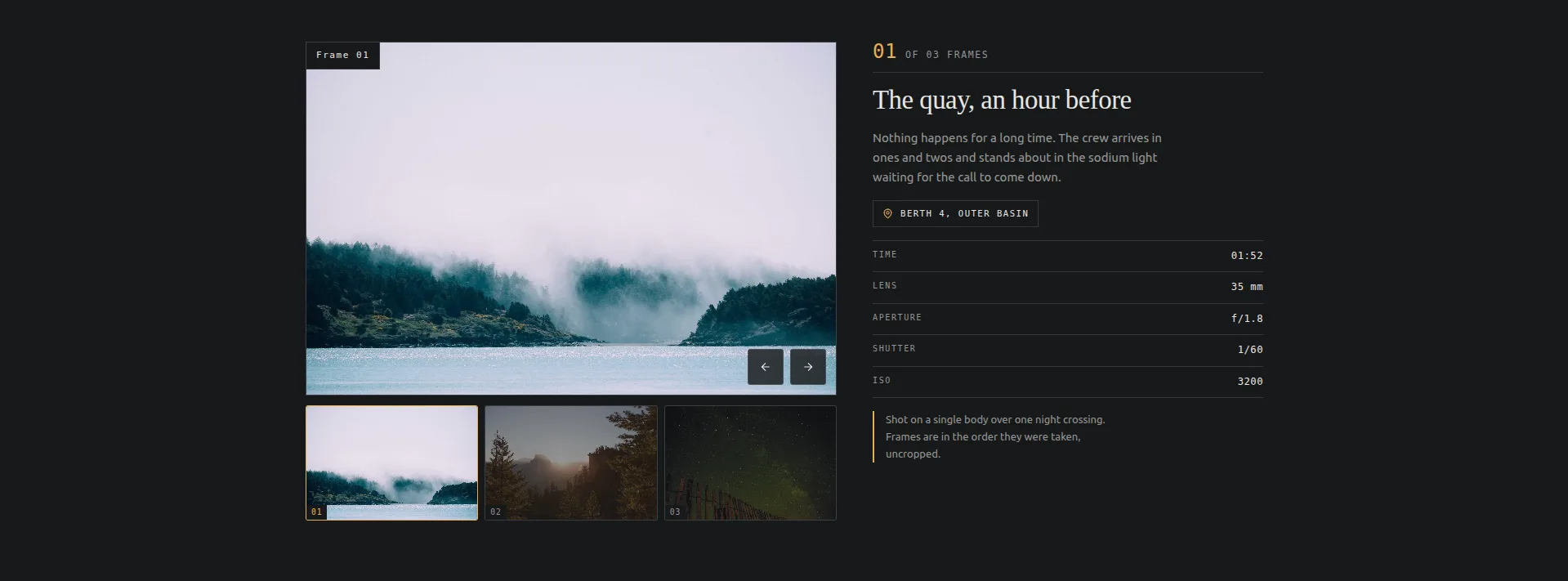
থাম্বনেইলের স্ট্রিপের নীচে একটি বড় প্লেট, একটি ফ্রেম-ডেটা টেবিল বহন করার পাশাপাশি একটি স্টিকি ক্যাপশন প্যানেল সহ: স্থান, সময়, লেন্স, অ্যাপারচার, শাটার, ISO। একটি থাম্বনেইল, প্লেট এবং এর ডেটা অদলবদল ক্লিক করুন। এটি থাম্বনেইল-স্ট্রিপ গ্যালারি প্যাটার্ন যা একটি রেডিমেড উইজেট হিসাবে, অন্যথায় গ্যালারি স্লাইডার হিসাবে প্রো স্তরে বসে। দ্য গ্যালারি স্লাইডার গাইড দুটির তুলনা।
সেরা ব্যবহার: ফটোগ্রাফি। পোর্টফোলিও পৃষ্ঠা, প্রদর্শনী পৃষ্ঠা, যে কোনও জায়গায় শটের প্রযুক্তিগত বিবরণ গল্পের অংশ।
এর থেকে ত্রুটিটি অনুসরণ করে: ক্যাপশন প্যানেলটি ক্যামেরা মেটাডেটার চারপাশে তৈরি করা হয়েছে। আপনি যদি ফটোগ্রাফের পরিবর্তে পণ্য বা আর্টওয়ার্ক দেখান, তাহলে লেন্স-এবং-আইএসও টেবিলের লেবেলগুলিকে পুনরায় শব্দ করা প্রয়োজন এবং সেই সময়ে আপনি ডিজাইনটিকে এটির জন্য যা আছে তার থেকে দূরে সরিয়ে দিচ্ছেন।
চতুর্ভুজ পৃষ্ঠাযুক্ত ক্যাটালগ
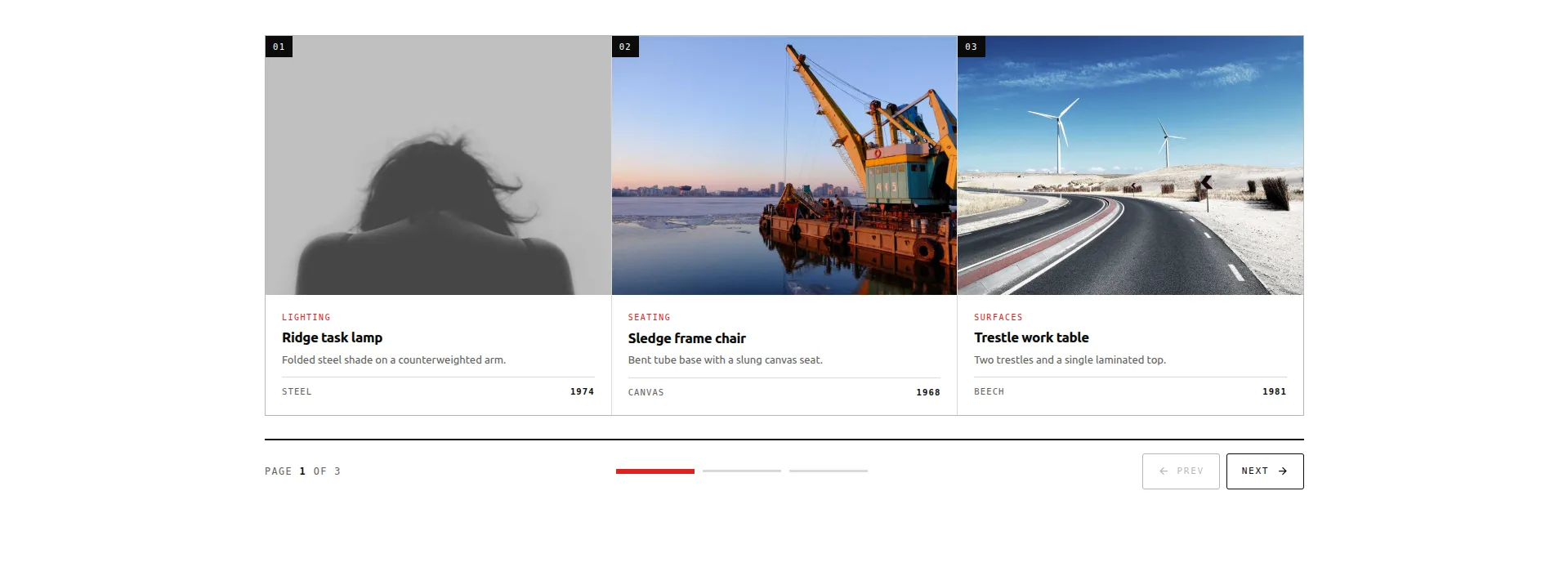
আইটেম বাক্সের একটি গ্রিড একবারে তিনটি পৃষ্ঠাযুক্ত, একটি সেগমেন্ট রেল সহ যা দেখায় যে আপনি কোথায় আছেন এবং সরাসরি যেকোনো পৃষ্ঠায় চলে যায়। তিনটি পৃষ্ঠা জুড়ে নয়টি আইটেম, প্রতিটি আইটেম একটি চিত্র, বিভাগ, শিরোনাম, অনুলিপি এবং একটি স্ট্যাট বহন করে। এটি একটি স্ট্যাটিক গ্রিড এবং একটি ওয়ান-এ-টাইম ক্যারোজেলের মধ্যবর্তী স্থল।
সর্বোত্তম ব্যবহার: পরিষেবা, প্যাকেজ বা কেস স্টাডির একটি পণ্য-শৈলী ক্যাটালগ, যেখানে আপনি কার্ডের সারির বেশি চান কিন্তু পুরো সংরক্ষণাগার পৃষ্ঠার চেয়ে কম।
অপূর্ণতা: বিষয়বস্তু স্থির, প্রশ্ন-চালিত নয়। আপনি প্যানেলে হাত দিয়ে নয়টি আইটেম পূরণ করুন। একটি কিউরেটেড সেটের জন্য যা ঠিক আছে; একটি শপ ফিডের জন্য যা সাপ্তাহিক পরিবর্তিত হয় আপনি পরিবর্তে একটি ক্যোয়ারী-চালিত উইজেট চান, হয় Elementor Pro এর লুপ ক্যারোজেল, অথবা ক্যারোজেল মোডে বিনামূল্যের ব্লগ উইজেট যদি এটি পণ্যের পরিবর্তে পোস্ট হয়। দ্য WooCommerce পণ্য ক্যারোজেল গাইড বিকল্পগুলির মাধ্যমে কাজ করে।
বুলেটিন ট্যাবড প্যানেল
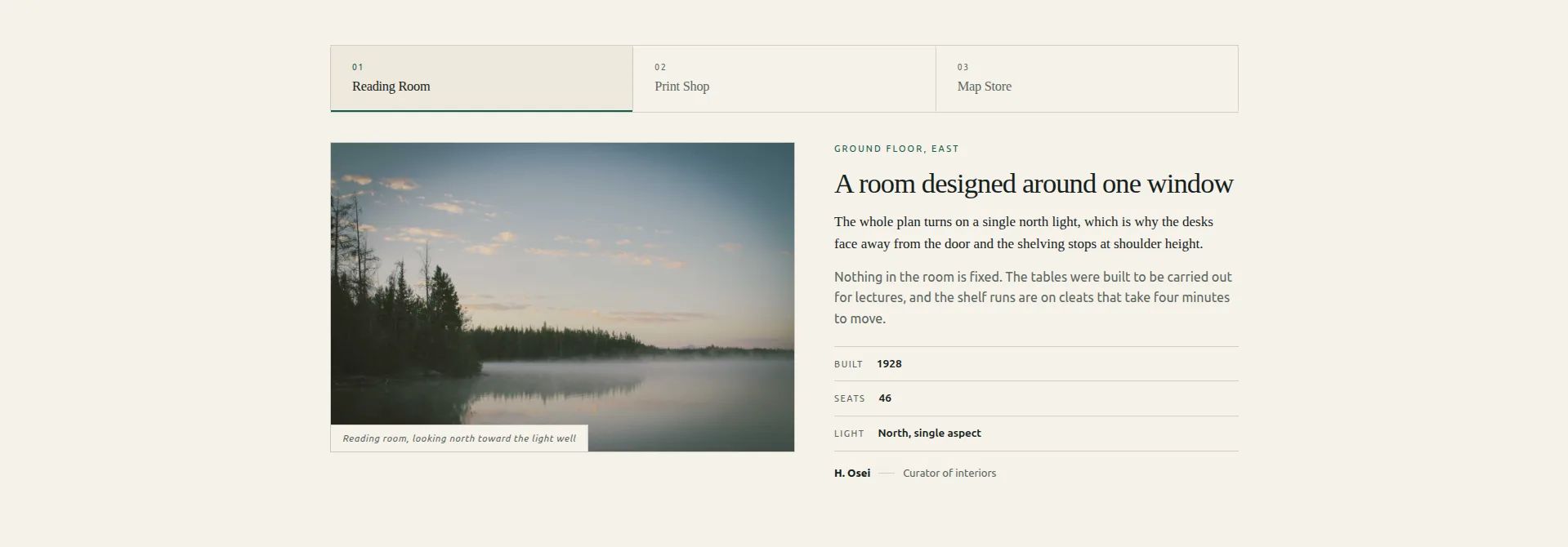
স্ট্যাক করা সম্পাদকীয় প্যানেলের উপর একটি ট্যাব স্ট্রিপ। প্রতিটি প্যানেল একটি সঠিক নিবন্ধ বিন্যাস: ক্যাপশন, কিকার, শিরোনাম, লেড, বডি কপি, একটি তিন-সারি তথ্য টেবিল এবং একটি বাইলাইন সহ চিত্র। পৃষ্ঠের নীচে এটি সঠিক ARIA ট্যাবলিস্ট শব্দার্থবিদ্যা ব্যবহার করে, যা বেশিরভাগ ট্যাব উইজেটগুলি এড়িয়ে যায় এবং স্ক্রিন পাঠকরা লক্ষ্য করে।
সর্বোত্তম ব্যবহার: পাশাপাশি কয়েকটি উল্লেখযোগ্য জিনিসের তুলনা করা (অবস্থান, প্রোগ্রাম, সংস্করণ) যেখানে প্রতিটি অনুচ্ছেদের প্রাপ্য, একটি কার্ড নয়।
অপূর্ণতা: এটি একটি ট্যাবযুক্ত প্যানেল, একটি ঘূর্ণায়মান ক্যারোজেল নয়। কিছুই নিজে থেকে অগ্রসর হয় না, এবং প্যানেল লেআউটটি ডিজাইন অনুসারে দীর্ঘ আকারের। আপনার যদি শুধু তিনটি সংক্ষিপ্ত টেক্সট ট্যাবের প্রয়োজন হয়, তাহলে এটি কাজের চেয়ে বেশি কাঠামো।
যদি ট্যাবগুলি আপনি আসলে যা চেয়েছিলেন তা হলে, স্লাইডার অংশটি এড়িয়ে যান। দ্য ট্যাব উইজেট একটি ট্যাব স্ট্রিপ থেকে প্যানেল স্যুইচ করে যার চারপাশে ক্যারোজেল সেটিংস নেই।
রোস্ট্রাম কোট স্লাইডার
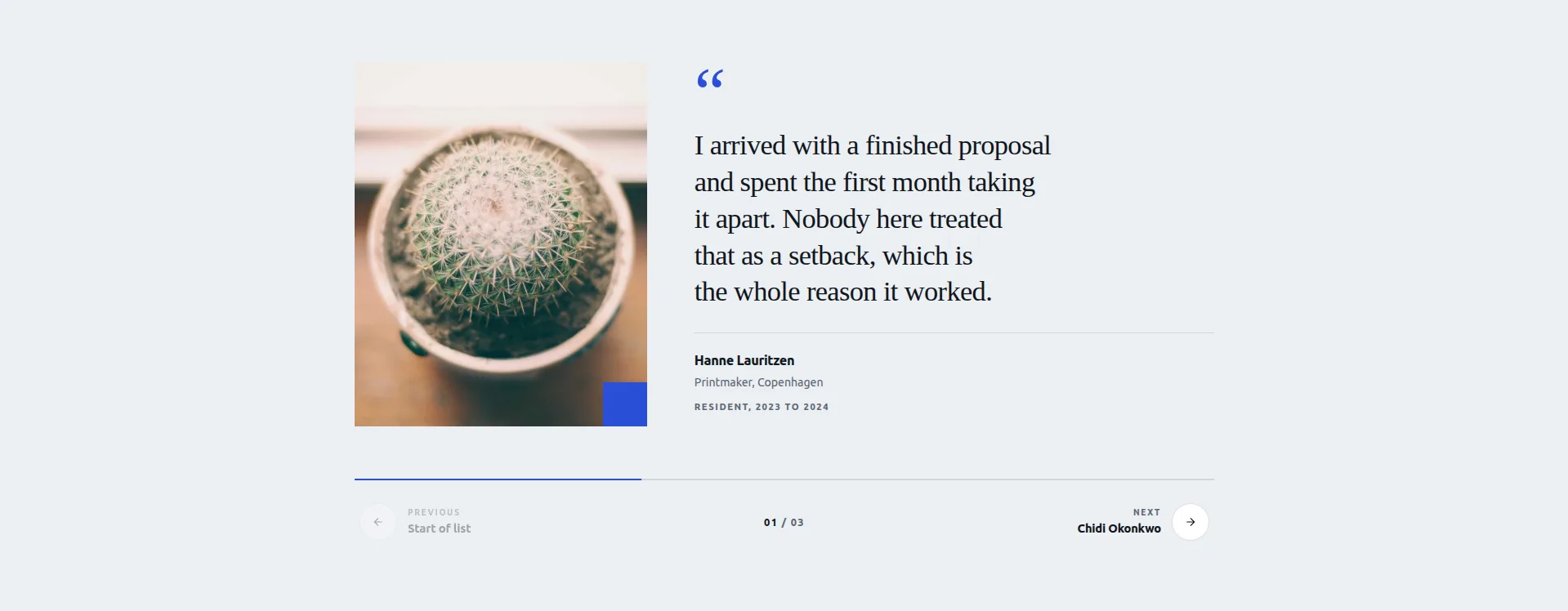
একটি প্রতিকৃতির পাশে একটি উদ্ধৃতি প্যানেল, শেভরন দিয়ে ধাপে ধাপে, একটি অগ্রগতি বার এবং ট্যালি রাখা গণনা সহ। স্টেপ বোতামগুলি পরবর্তী ভয়েসের নাম দিতে পারে, যাতে দর্শকরা ক্লিক করার আগে কে আসছে তা দেখতে পায়। এন্ট্রি প্রতি ক্ষেত্র: প্রতিকৃতি, উদ্ধৃতি, নাম, ভূমিকা এবং মেয়াদ, এবং একটি সম্পাদনাযোগ্য উদ্ধৃতি চিহ্ন।
সর্বোত্তম ব্যবহার: প্রশংসাপত্র এবং পর্যালোচনা। এলিমেন্টরের নিজস্ব প্রশংসাপত্র ক্যারোজেল শুধুমাত্র প্রো-, এবং এটি এটির বিনামূল্যের উত্তর। একটি প্রশংসাপত্র ক্যারোজেল নির্মাণ যে কোনো উপায়ে সেটআপ কভার করে। আমরা লিখেছি আমাদের নিজস্ব সাইটে প্রশংসাপত্র পুরোটা চারপাশে।
অপূর্ণতা: বিন্যাস প্রতিকৃতি উপর ঝুঁকে। প্রতিটি এন্ট্রি ব্যক্তির একটি ছবির সাথে উদ্ধৃতি যুক্ত করে, এবং শুধুমাত্র পাঠ্য প্রশংসাপত্র, আপনি ইমেল এবং পর্যালোচনা থেকে যে ধরনের টানছেন, মুখটি যেখানে হওয়া উচিত সেখানে একটি সুস্পষ্ট গর্ত ছেড়ে দেয়।
অ্যালম্যানাক টাইমলাইন স্লাইডার
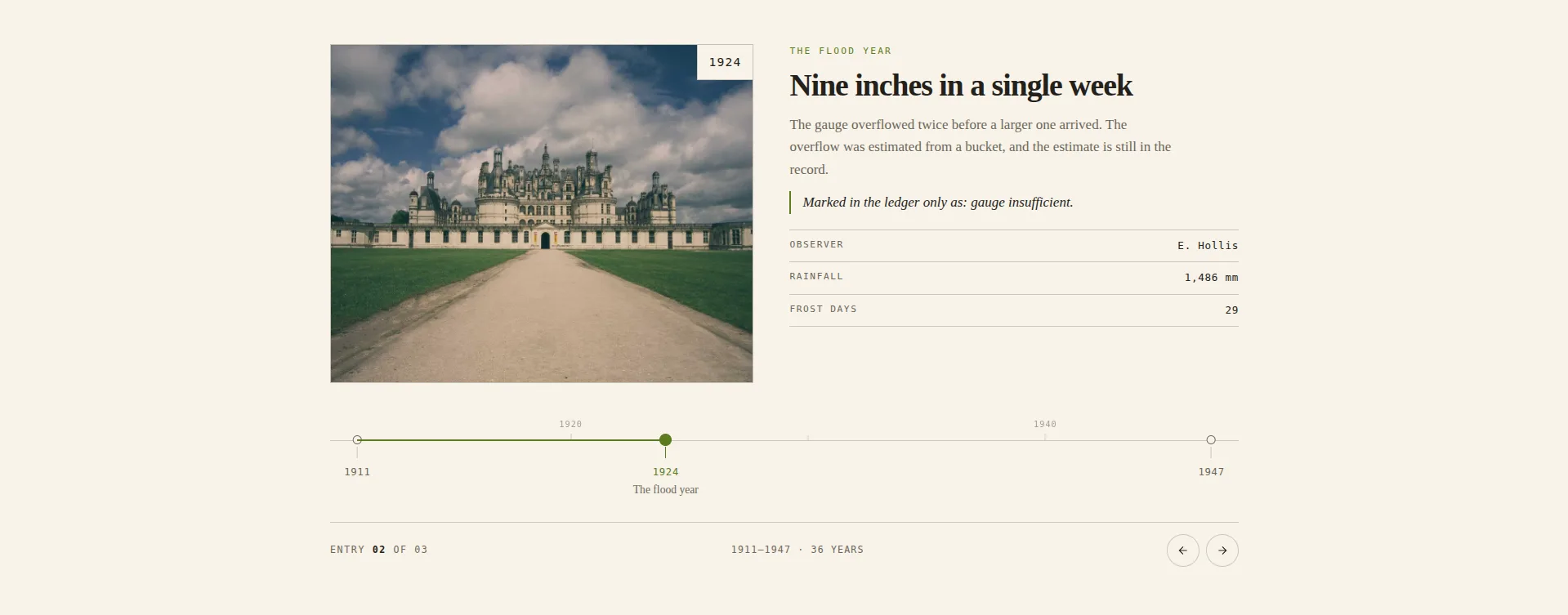
একটি তারিখের অক্ষে পিন করা এন্ট্রি, নিয়মের উপরে এক দশকের চিরুনি সহ। চতুর বিট: টিক ব্যবধান আপনার প্রবেশের প্রকৃত বছর থেকে গণনা করা হয়, তাই আপনার ইতিহাসে একটি শান্ত প্রসারিত একটি দৃশ্যমান ব্যবধান হিসাবে দেখায় যা সমান ব্যবধানে স্কোয়াশ করার পরিবর্তে। কিছু টাইমলাইন উইজেট এতে বিরক্ত হয়।
সর্বোত্তম ব্যবহার: কোম্পানির ইতিহাস, প্রকল্পের পূর্ববর্তী, যে কোনও কিছু যেখানে যখন জিনিসগুলি ঘটেছিল তা যতটা গুরুত্বপূর্ণ ছিল ততটাই গুরুত্বপূর্ণ।
অপূর্ণতা হল প্যানেল। এই নকশাটি 143টি নিয়ন্ত্রণ প্রকাশ করে, এবং এটিই এটিকে নমনীয় করে তোলে, এটি সেট আপ করা আটটির মধ্যে এটিকে সবচেয়ে ধীর করে তোলে। একটি সন্ধ্যায় বাজেট করুন, দশ মিনিট নয়।
কীস্টোন ফিচার স্লাইডার
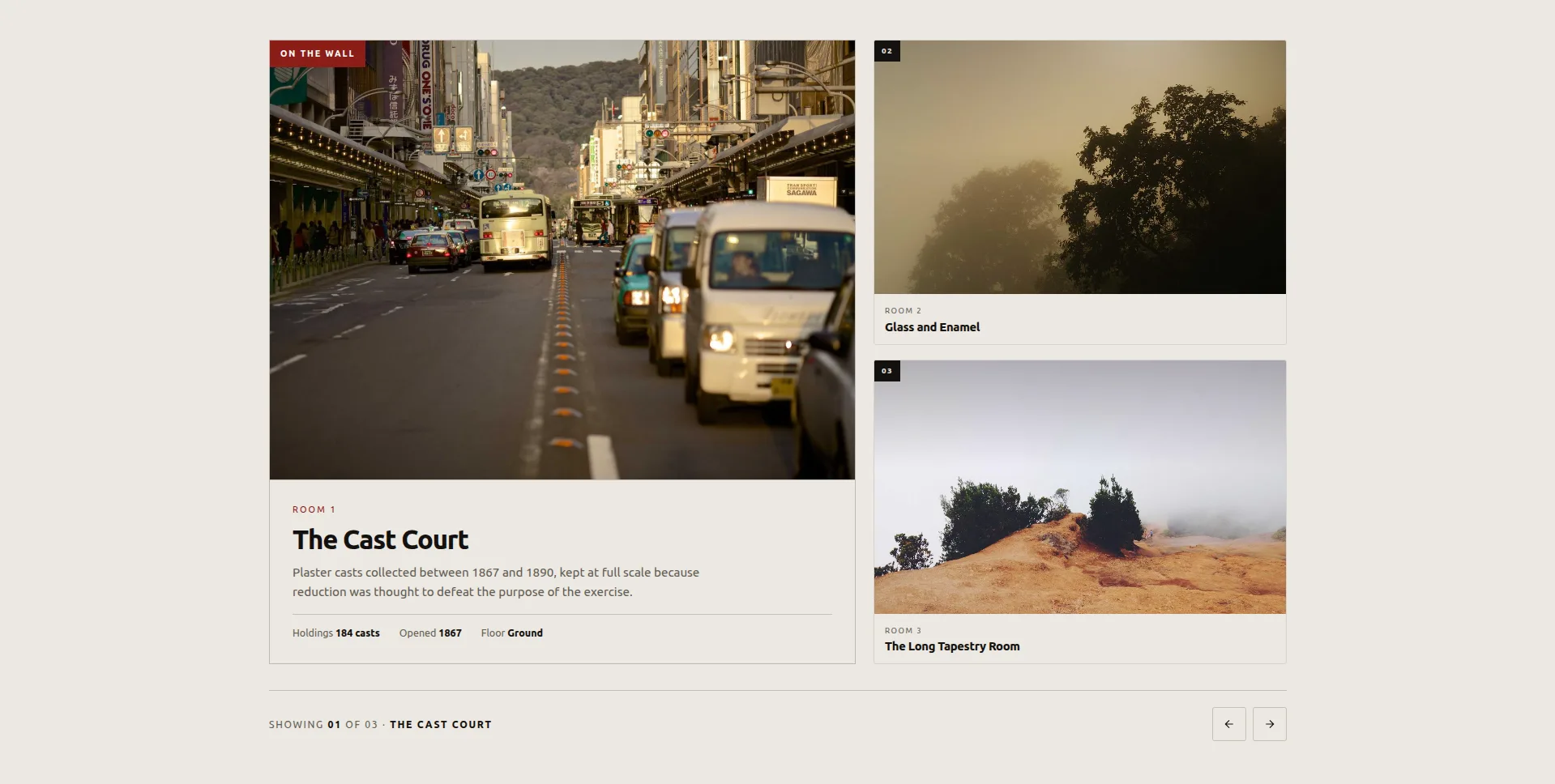
একটি আইটেম বড় দেখানো হয়েছে, অন্যরা এটির পাশে স্যাটেলাইট হিসাবে অপেক্ষা করছে। একটি স্যাটেলাইটে ক্লিক করুন এবং এটি একটি FLIP অ্যানিমেশন সহ বৈশিষ্ট্য স্পটে উন্নীত হয়েছে, বিনামূল্যে সেটের সবচেয়ে মসৃণ গতি। বৈশিষ্ট্যযুক্ত আইটেমটি তার চিত্রের পাশাপাশি একটি তিন-ফ্যাক্ট ফলক বহন করে।
সর্বোত্তম ব্যবহার: রুম, স্পেস, প্রদর্শনী। জিনিসগুলির একটি ছোট সেট যেখানে একজন একবারে স্পটলাইটের যোগ্য এবং বাকিগুলি ডানাগুলিতে দৃশ্যমান থাকা উচিত।
অপূর্ণতা: এটি একটি ছোট কিউরেটেড সেটের জন্য নির্মিত। তিনটি আইটেম জাহাজ, এবং স্যাটেলাইট কলাম একটি শোকেস, একটি তালিকা নয়। এটিতে অনেক আইটেম গাদা এবং প্যাটার্ন অর্থ করা বন্ধ করে দেয়। এটি ক্লিকের উপরও নির্ভর করে; যে দর্শকরা ইন্টারঅ্যাক্ট করেন না তারা শুধুমাত্র আপনার প্রথম বৈশিষ্ট্যটি বড় দেখতে পান।
আটটি এবং বারোটি প্রো ডিজাইনের লাইভ প্রিভিউ রয়েছে এলিমেন্টর ক্যারোজেল উইজেট পৃষ্ঠা। ডেমো সব বিশ জন্য যে কোনো উপায়ে ব্রাউজ করার জন্য বিনামূল্যে। আপনি যদি ফাইলগুলির সাথে ডাউনলোড-এবং-আমদানি ওয়াকথ্রু চান, তাহলে সেটি কভার করা আছে বিনামূল্যে এলিমেন্টর স্লাইডার টেমপ্লেট.
যেখানে মুক্ত স্তর আসলে থামে
এই অংশ তুলনা টেবিল এড়িয়ে যান।
অটোপ্লে, লুপ, তীর, বিন্দু, পজ-অন-হোভার, প্রতি-ব্রেকপয়েন্ট স্লাইড-প্রতি-ভিউ: সমস্ত বিনামূল্যে, ইমেজ ক্যারোজেল, লোগো স্লাইডার, টিম স্লাইডার, টাইমলাইন এবং ব্লগ ক্যারোজেল জুড়ে। এই সেটিংস মানুষ অনুমান গেট করা হয়, এবং তারা না। যদি আপনার প্রয়োজন হয় "একটি ক্যারোজেল যা অটোপ্লে করে, লুপ করে এবং ট্যাবলেটে দুটি স্লাইড দেখায়," বিনামূল্যের স্তরটি কাজটি শেষ করে৷ ব্যাকগ্রাউন্ড স্লাইডার এক্সটেনশনটিও বিনামূল্যে, যা লোকেদের ধরে ফেলে, কারণ এটি জোড়ার অর্ধেক অর্থপ্রদানের মতো দেখায় এবং তা নয়৷।
প্রো কি প্রয়োজন:
- বারোটি প্রো ক্যারোজেল ডিজাইন: মেরিডিয়ান কভারফ্লো (3D কভারফ্লো), কনসার্টিনা অ্যাকর্ডিয়ন (প্রসারিত ইমেজ প্যানেল), পিভট ফ্লিপ (দুই-পার্শ্বযুক্ত ফ্লিপ কার্ড), হ্যালো অরবিট (বৃত্তাকার কক্ষপথ), এছাড়াও স্ট্র্যাটাম ডেক, দ্বিখণ্ডিত স্প্লিট, আর্ক কার্ভড এবং স্লেট কার্টেন সহ আরও আটটি। সব বিশ তুলনা করা হয় বিনামূল্যে ক্যারোজেল উইজেট এলিমেন্টর পৃষ্ঠা। একই আমদানি রুট, প্রো লাইসেন্স প্রয়োজন।
- গ্যালারি স্লাইডার: একটি থাম্বনেইল স্ট্রিপ এবং বড় প্রিভিউ ফলক সহ তৈরি উইজেট। (ফ্রি ভিট্রিন প্লেট গ্যালারি আমদানি ফটোগ্রাফির জন্য একই প্যাটার্ন কভার করে।)
- নিউজ টিকার: স্ক্রলিং হেডলাইন টিকার, সেটে একটি মার্কি-আকৃতির উইজেট।
- বৈশিষ্ট্যযুক্ত পণ্য: WooCommerce উইজেট, যা একটি পণ্যকে তাদের ট্র্যাকের পরিবর্তে পৃষ্ঠায় রাখে।
- উইজেট নির্মাতা রচনা: আটটি বিনামূল্যের ডিজাইন আমদানি বিনামূল্যে; আপনার নিজস্ব উইজেট তৈরি করা বা সম্পূর্ণ উইজেট বিল্ডারে ডিজাইনের কাঠামো সম্পাদনা করা শুধুমাত্র প্রো-অনলি।
সেই তালিকায় একটি প্যাটার্ন আছে। বিনামূল্যের স্তরটি সাধারণ লেআউটের জন্য স্ট্যান্ডার্ড বিষয়বস্তুর ধরন (ছবি, লোগো, মানুষ, পোস্ট, তারিখ, আগে-পরে) এবং আটটি সমাপ্ত ডিজাইন কভার করে। Pro রেডিমেড থাম্বনেইল গ্যালারি, টিকার, WooCommerce উইজেট, শোওয়ার মোশন ডিজাইন এবং আপনার নিজস্ব তৈরির টুল কভার করে।
একটি গ্রিডের উপর ফিল্টার ট্যাবগুলি এই তালিকার বাইরে বসে কারণ সেগুলি মোটেও ক্যারোজেল নয়৷ যে লেআউট থেকে আসে ফিল্টারযোগ্য ইমেজ গ্যালারি উইজেট।
সৎ ফাঁক হল WooCommerce। এখানে উভয় স্তরে কোন পণ্য ক্যারোজেল উইজেট নেই। পণ্যের একটি স্লাইডিং সারি Elementor Pro এর লুপ ক্যারোজেল থেকে আসে, অথবা আপনি বিনামূল্যে কোয়াড্রেন্ট পেজড ক্যাটালগ ডিজাইনের সাথে একটি হ্যান্ড-কিউরেট করেন।
ফ্রি বনাম প্রো, পাশাপাশি
| সামর্থ্য | এলিমেন্টর ফ্রি | মাস্টার অ্যাডঅন বিনামূল্যে | মাস্টার অ্যাডনস প্রো |
|---|---|---|---|
| ইমেজ ক্যারোজেল | হ্যাঁ, মৌলিক | হ্যাঁ, ক্যাপশন + লাইটবক্স সহ | হ্যাঁ |
| কভারফ্লো / 3D লেআউট | না | হ্যাঁ (ছবি ক্যারোজেল) | হ্যাঁ, প্লাস মেরিডিয়ান কভারফ্লো ডিজাইন |
| লোগো ক্যারোজেল | না | হ্যাঁ | হ্যাঁ |
| টিম ক্যারোজেল | না | হ্যাঁ | হ্যাঁ |
| পণ্য ক্যারোজেল (উউ) | শুধুমাত্র প্রো (লুপ ক্যারোজেল) | না | না। বৈশিষ্ট্যযুক্ত পণ্য একটি পণ্য দেখায় |
| স্লাইডারের আগে/পরে | না | হ্যাঁ (ছবি তুলনা) | হ্যাঁ |
| অটোপ্লে + অসীম লুপ | হ্যাঁ | হ্যাঁ | হ্যাঁ |
| প্রতি-ব্রেকপয়েন্ট নিয়ন্ত্রণ | আংশিক | হ্যাঁ | হ্যাঁ |
| পূর্ণ-প্রস্থ হিরো স্লাইডার | না | প্লিন্থ হিরো স্লাইডার (আমদানি) | একই, প্লাস 12 প্রো ডিজাইন |
| থাম্বনেইল গ্যালারি স্লাইডার | না | ভিট্রিন প্লেট গ্যালারি (আমদানি) | গ্যালারি স্লাইডার উইজেট |
| প্রশংসাপত্র ক্যারোজেল | শুধুমাত্র প্রো | রোস্ট্রাম কোট স্লাইডার (আমদানি) | একই, প্লাস প্রো ডিজাইন |
| টাইমলাইন স্লাইডার | না | টাইমলাইন উইজেট + অ্যালম্যানাক টাইমলাইন স্লাইডার (আমদানি) | একই |
| ট্যাবড কন্টেন্ট প্যানেল | না | বুলেটিন ট্যাবড প্যানেল (আমদানি) | একই |
| ডায়নামিক পোস্ট লুপ | শুধুমাত্র প্রো | ব্লগ উইজেট, ক্যারোজেল মোড | ব্লগ উইজেট, ক্যারোজেল মোড |
| স্ক্রলিং টিকার / মার্কি | না | না | নিউজ টিকার উইজেট |
| পটভূমি স্লাইডশো | হ্যাঁ, মৌলিক (স্লাইডশো ব্যাকগ্রাউন্ড টাইপ) | হ্যাঁ, 24টি ট্রানজিশন (ব্যাকগ্রাউন্ড স্লাইডার এক্সটেনশন) | হ্যাঁ |
| নাম দেওয়া হয়েছে ক্যারোজেল ডিজাইন | না | 20 এর মধ্যে 8 (বিনামূল্যে আমদানি) | সব 20 |
| আপনার নিজস্ব ডিজাইন তৈরি করুন | না | না | হ্যাঁ (উইজেট বিল্ডার) |
সেই টেবিলে একটি সৎ ফাঁক বাকি, লুকানোর পরিবর্তে নামকরণের মূল্য: গতিশীল লুপ। ব্লগ উইজেটের ক্যারোজেল মোড বেশিরভাগ লোকেরা এলিমেন্টরের লুপ ক্যারোজেল ব্যবহার করে তার বেশিরভাগই কভার করে: বিভাগ, ট্যাগ বা পোস্টের ধরন অনুসারে প্রশ্ন, তারপর ফলাফলের মাধ্যমে স্লাইড করুন। এটি Elementor-এর মতো একটি টেমপ্লেট-চালিত লুপ নয়, তাই আপনি যদি ইতিমধ্যে একটি লুপ আইটেম টেমপ্লেট তৈরি করে থাকেন, তাহলে Elementor Pro সবচেয়ে উপযুক্ত।
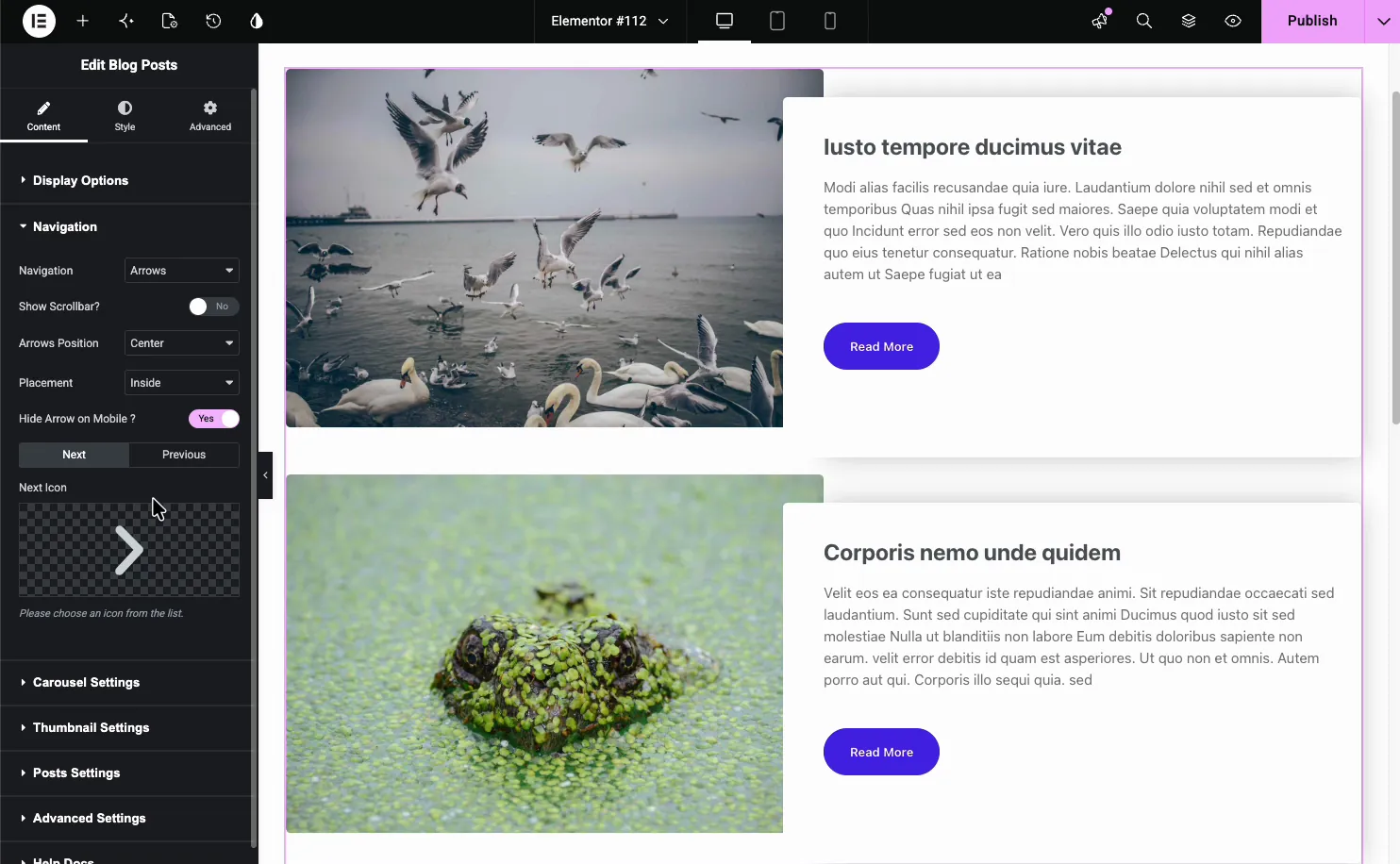
এলিমেন্টরে কীভাবে একটি বিনামূল্যের ক্যারোজেল যোগ করবেন
দুটি রুট, আপনি একটি ক্লাসিক উইজেট ব্যবহার করছেন নাকি আটটি ডিজাইনের একটি ব্যবহার করছেন তার উপর নির্ভর করে।
ক্লাসিক উইজেট, দুই মিনিটের মধ্যে, এলিমেন্টর এবং মাস্টার অ্যাডঅন ইনস্টল করা হয়েছে বলে ধরে নেওয়া হচ্ছে:
- Elementor এ পৃষ্ঠাটি খুলুন এবং “carousel” বা “slider।” এর জন্য উইজেট প্যানেল অনুসন্ধান করুন
- উইজেটটি টেনে আনুন। ছবির জন্য ইমেজ ক্যারোজেল, লোগো স্লাইডার লোগোর জন্য, মানুষের জন্য টিম স্লাইডার, পোস্টের জন্য ব্লগ।
- আপনার বিষয়বস্তু যোগ করুন। ইমেজ ক্যারোজেলের জন্য এটি গ্যালারি পিকার; লোগো স্লাইডারের জন্য এটি প্রতি লোগোতে একটি সারি সহ একটি রিপিটার।
- ক্যারোজেল সেটিংস খুলুন এবং স্লাইড-প্রতি-ভিউ, অটোপ্লে বিলম্ব এবং লুপ সেট করুন। প্যানেলের শীর্ষে ট্যাবলেট এবং মোবাইল আইকনগুলিতে স্যুইচ করুন এবং প্রতিটির জন্য স্লাইড-প্রতি-ভিউ সেট করুন৷ এই পদক্ষেপটি লোকেরা এড়িয়ে যায় এবং এই কারণেই ফোনে ক্যারোসেলগুলি ভুল দেখায়৷।
- শৈলী ট্যাব তীর, বিন্দু, ব্যবধান এবং হোভার অবস্থার জন্য।
আটটি ডিজাইন, শুরুতে একটি অতিরিক্ত পদক্ষেপ:
- ওয়ার্ডপ্রেস অ্যাডমিনে, যান মাস্টার অ্যাডঅন → উইজেট নির্মাতা → উইজেট আমদানি করুন এবং ডিজাইনের ।json ফাইলটি টেনে আনুন।
- Elementor এ আপনার পৃষ্ঠা খুলুন। আমদানি করা নকশা নীচে উইজেট প্যানেলে প্রদর্শিত হবে প্রিয়.
- এটি টেনে আনুন এবং প্যানেলটি পূরণ করুন। প্রতিটি ডিজাইন তিনটি উদাহরণ স্লাইড বা এন্ট্রি সহ আপনার নিজস্ব সামগ্রী দিয়ে প্রতিস্থাপন করে।
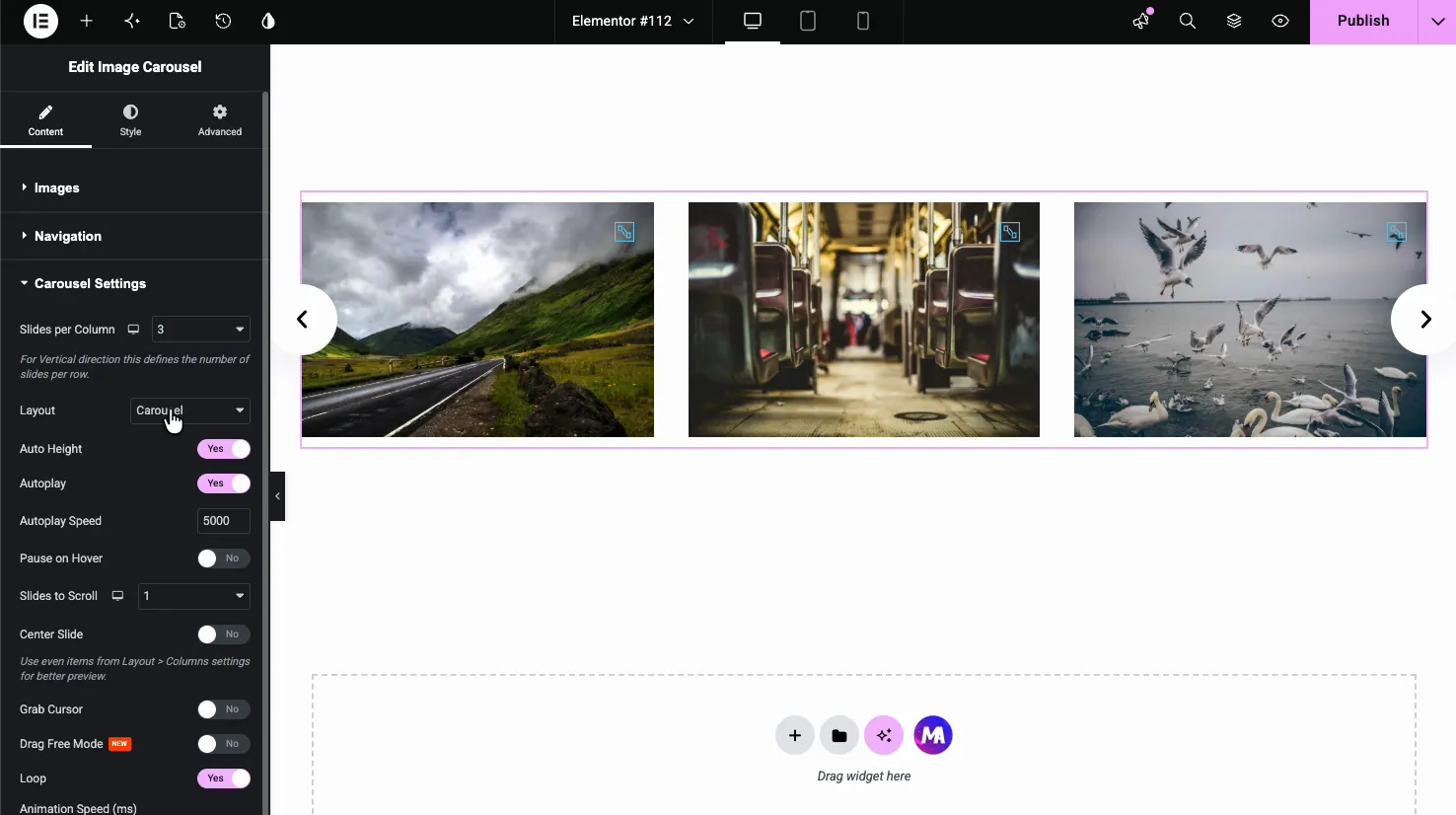
ক্লাসিক উইজেটগুলির জন্য স্ক্রিনশট সহ ধাপে ধাপে: এলিমেন্টরে কীভাবে একটি ইমেজ ক্যারোজেল তৈরি করবেন.
একটি বিনামূল্যে ক্যারোজেল উইজেট যথেষ্ট ভাল?
বেশিরভাগ সাইটের জন্য, হ্যাঁ, এবং আমি অন্যথায় ভান করার চেয়ে স্পষ্টভাবে বলতে চাই।
আপনার যদি তীর এবং বিন্দু, অটোপ্লে এবং সংবেদনশীল মোবাইল আচরণের সাথে স্লাইডিং চিত্রগুলির প্রয়োজন হয় তবে বিনামূল্যের স্তরটি সম্পূর্ণ। প্রদত্ত সংস্করণে কিছুই তাদের ভাল কাজ করে না। তারা একই সুইপার ইঞ্জিন, একই সেটিংস। এবং আটটি আমদানিযোগ্য ডিজাইনের সাথে, বিনামূল্যের স্তরটি এখন লেআউটগুলিতে প্রসারিত হয় যা পেওয়াল অঞ্চল হিসাবে ব্যবহৃত হত: একটি হিরো স্লাইডার, একটি থাম্বনেইল গ্যালারি, একটি প্রশংসাপত্র স্লাইডার, একটি টাইমলাইন৷।
প্রো দুটি পরিস্থিতিতে তার অর্থ উপার্জন করে। এক: আপনি একটি উপস্থাপনা বিন্যাস চান যে বিনামূল্যে সেটটি পৌঁছায় না, যেমন রেডিমেড গ্যালারি স্লাইডার, একটি স্ক্রলিং নিউজ টিকার, বা মেরিডিয়ান কভারফ্লো বা হ্যালো অরবিটের মতো বারোটি প্রো ডিজাইনের একটি৷ দুই: আপনি ক্লায়েন্টদের জন্য সাইট তৈরি করছেন এবং আপনি সমাপ্তগুলি আমদানি করার পরিবর্তে আপনার নিজস্ব ক্যারোজেল ডিজাইন লিখতে চান, যার জন্য সম্পূর্ণ উইজেট নির্মাতা।
যদি কোনটিই প্রযোজ্য না হয়, বিনামূল্যে সংস্করণ ইনস্টল করুন এবং তুলনা পোস্ট পড়া বন্ধ করুন।
প্রায়শই জিজ্ঞাসিত প্রশ্নাবলী
Elementor একটি বিনামূল্যে ক্যারোজেল উইজেট আছে?
হ্যাঁ। এলিমেন্টরের ফ্রি প্লাগইনে ইমেজ ক্যারোজেল জাহাজ। এটি ছবি, তীর, বিন্দু এবং অটোপ্লে পরিচালনা করে, কিন্তু কোন স্লাইড ক্যাপশন এবং সীমিত প্রতিক্রিয়াশীল নিয়ন্ত্রণ নেই। মিডিয়া ক্যারোজেল, টেস্টিমোনিয়াল ক্যারোজেল এবং লুপ ক্যারোজেল সকলেরই এলিমেন্টর প্রো প্রয়োজন।
সেরা বিনামূল্যে এলিমেন্টর ক্যারোজেল প্লাগইন কি?
আপনি কি স্লাইড করছেন তা নির্ভর করে। একা ছবির জন্য, এলিমেন্টরের নিজস্ব উইজেট যথেষ্ট। লোগো, দলের সদস্য, পোস্ট বা আগে-পরে তুলনার জন্য আপনার একটি অ্যাডঅন প্রয়োজন। মাস্টার অ্যাডনস চারটিই তার বিনামূল্যের স্তরে রাখে, এছাড়াও আটটি আমদানিযোগ্য ক্যারোজেল ডিজাইন, যা বেশিরভাগ প্রতিযোগীদের সাথে মেলে না।
আমি কিভাবে বিনামূল্যে ক্যারোজেল ডিজাইন আমদানি করব?
ওয়ার্ডপ্রেস অ্যাডমিনে, মাস্টার অ্যাডঅন → উইজেট বিল্ডার → উইজেট আমদানি করুন এবং ডিজাইনের ।json ফাইলটি টেনে আনুন। ডিজাইনটি তখন এলিমেন্টরের উইজেট প্যানেলে ফেভারিটের অধীনে প্রদর্শিত হয় এবং একটি সাধারণ উইজেটের মতো সম্পাদনা করে। আটটি ডিজাইন ফ্রি প্লাগইনে এইভাবে আমদানি করে: প্লিন্থ হিরো স্লাইডার, লেজার ইনডেক্স স্লাইডার, ভিট্রিন প্লেট গ্যালারি, কোয়াড্রেন্ট পেজড ক্যাটালগ, বুলেটিন ট্যাবড প্যানেল, রোস্ট্রাম কোট স্লাইডার, অ্যালম্যানাক টাইমলাইন স্লাইডার এবং কীস্টোন ফিচার স্লাইডার। অন্য বারোটি ডিজাইনের জন্য মাস্টার অ্যাডনস প্রো প্রয়োজন।
আমি কি বিনামূল্যে একটি এলিমেন্টর ক্যারোজেল অটোপ্লে তৈরি করতে পারি?
হ্যাঁ। অটোপ্লে, অসীম লুপ, অটোপ্লে বিলম্ব এবং পজ-অন-হোভার হল এলিমেন্টরের ক্যারোজেল এবং প্রতিটি মাস্টার অ্যাডনস ক্যারোজেল উইজেট উভয়েরই বিনামূল্যের সেটিংস৷ তাদের কোনটিই গেটেড নয়।
একটি বিনামূল্যে Elementor প্রশংসাপত্র ক্যারোজেল আছে?
হ্যাঁ। এলিমেন্টরের নিজস্ব প্রশংসাপত্র ক্যারোজেল প্রো, কিন্তু রোস্ট্রাম কোট স্লাইডার মাস্টার অ্যাডনস উইজেট বিল্ডারের মাধ্যমে বিনামূল্যে আমদানি: শেভরন স্টেপিং সহ একটি প্রতিকৃতির পাশে একটি উদ্ধৃতি প্যানেল, একটি অগ্রগতি বার এবং নাম, ভূমিকা এবং মেয়াদের জন্য প্রতি-প্রবেশ ক্ষেত্র। Elementor প্রশংসাপত্র ক্যারোজেল গাইডে সম্পূর্ণ ওয়াকথ্রু।
একটি বিনামূল্যের এলিমেন্টর ক্যারোজেলের কয়টি স্লাইড থাকতে পারে?
Elementor এর উইজেট বা Master Addons বিনামূল্যের উইজেটগুলিতে কোন ক্যাপ নেই। ব্যবহারিক সীমা হল কর্মক্ষমতা, লাইসেন্সিং নয়। প্রায় ত্রিশটি ইমেজ স্লাইডের পরে আপনি অলস লোডিং চাইবেন, যা ডিফল্টরূপে চালু থাকে। আটটি আমদানিযোগ্য ডিজাইন ভিন্নভাবে কাজ করে: তিনটি স্লাইড বা শো টগল দ্বারা নিয়ন্ত্রিত এন্ট্রি সহ প্রতিটি জাহাজ।
বিনামূল্যের সংস্করণটি কি ক্যারোসেলে একটি জলছাপ বা ব্র্যান্ডিং রাখে?
না। কোন ওয়াটারমার্ক নেই, কোন "” লিঙ্ক দ্বারা চালিত", উইজেট আউটপুটের ভিতরে কোন ন্যাগ নেই। বিনামূল্যের উইজেট এবং আমদানি করা ডিজাইন একই মার্কআপ রেন্ডার করে যা প্রো-এর করে।
এখানে শুরু
বিনামূল্যে প্লাগইন ইনস্টল করুন, ক্লাসিক উইজেটগুলি চেষ্টা করুন এবং লাইসেন্স সম্পর্কে চিন্তা করার আগে আটটি ডিজাইনের মধ্যে যেটি আপনার পৃষ্ঠার সাথে মানানসই হয় তা আমদানি করুন৷ অধিকাংশ মানুষ বিনামূল্যে স্তর কাজ করে খুঁজে। প্রতিটি উইজেট এবং সমস্ত বিশটি ডিজাইন এক জায়গায় ডেমো করা হয় ক্যারোজেল উইজেট হাব, এবং যদি আপনি একটি প্রো-শুধু বৈশিষ্ট্য আঘাত করেন, মূল্য পৃষ্ঠা স্তর আছে।
