

主要外卖
- Elementor没有一键复制页面的按钮,所以内置的路线是将页面保存为模板,并将该模板插入到新的页面中。
- 主插件帖子/页面复制器向 WordPress 页面屏幕上的每一行添加 MA 复制器链接,并将副本创建为使用原始页面 ID 命名的草稿。
- Elementor 右键菜单中的所有内容复制页面的每个部分,但会省略页面设置,例如页面布局和标题。
- 要复制另一个网站上的 Elementor 页面,请从模板导出,将模板保存为 JSON 文件,然后将该文件导入到第二个网站。
- 导出的 Elementor JSON 文件保存图像 URL,而不是图像文件,因此原始站点必须保持在线状态,而第二个站点则导入它。
Elementor中复制一个页面,要么用复制器从WordPress Pages屏幕中克隆出来,要么保存为模板,并将该模板插入到一个新的页面中,Elementor不会自己发送一个重复页面按钮,这就是为什么这个简单的工作会将这么多人发送到搜索引擎。
4种方法,其中一种还携带一个页面到不同的站点,每一步都是在Elementor 4.3。4上用WordPress 7.1和Master Addons 3.2。3检查的,而且都不需要Elementor Pro。
目录
您应该使用哪种方法?
当您想要在同一网站上提供精确副本时,请使用复制器;当副本必须传输时,请使用模板或 JSON 文件。
| 方法 | 最好的 | 复制页面设置 | 跨站点工作 | 点击 |
|---|---|---|---|---|
| MA 复制器链接 | 同一网站上的精确副本 | 是的 | 否 | 1 |
| 另存为模板 | 您将重复使用多次的布局 | 是的,如果您将它们应用到插入物上 | 是的,通过出口 | 6 X 1000 1000 1000 1000 1000 1000 1000 1000 1000 1000 1000 1000 |
| 复制所有内容 | 将内容移动到已经存在的页面中 | 否 | 是的,使用其他网站的粘贴 | 4锛屽湪娴欐睙鏉 |
| JSON 导出和导入 | 将页面复制到另一个网站 | 是的 | 是的 | 8 |
方法一:一键复制页面
Elementor页面的复制最快的方法是WordPress页面屏幕上的重复链接,WordPress和Elementor不添加一个,因此它来自一个插件,主插件将其作为Post/Page Duplicator扩展包含在内。
- 去 页数 在您的 WordPress 仪表板中。
- 悬停在您要复制的页面上。
- 单击 MA 复制器 在标题下的链接行中。

List 重新加载,副本位于顶部。它被保存为草稿,并以带有其 ID 的原件命名,例如 “Cleanery Gallery ´ [Duplicated #1200]”。Elementor 布局、小部件和页面设置会遇到,因此草稿在编辑器中打开,看起来与源代码相同。

由于副本是草稿,因此在发布之前,live 站点上没有任何变化。重新命名并首先设置新的 URL slug。帖子上出现相同的链接,扩展名也重复 WooCommerce 产品。
要一键版吗? 的 帖子/页面复制器扩展 在主插件中添加了页面、帖子和产品的重复链接。
方法2:将页面保存为模板
Elementor本身文档的方法保存页面,不需要额外的插件,需要更多的点击,但是模板留在你的库中,所以下个月可以再次盖出同一页面。
- 打开页面 使用元素器编辑.
- 单击旁边的箭头 发表 顶部栏中的按钮并选择 另存为模板.

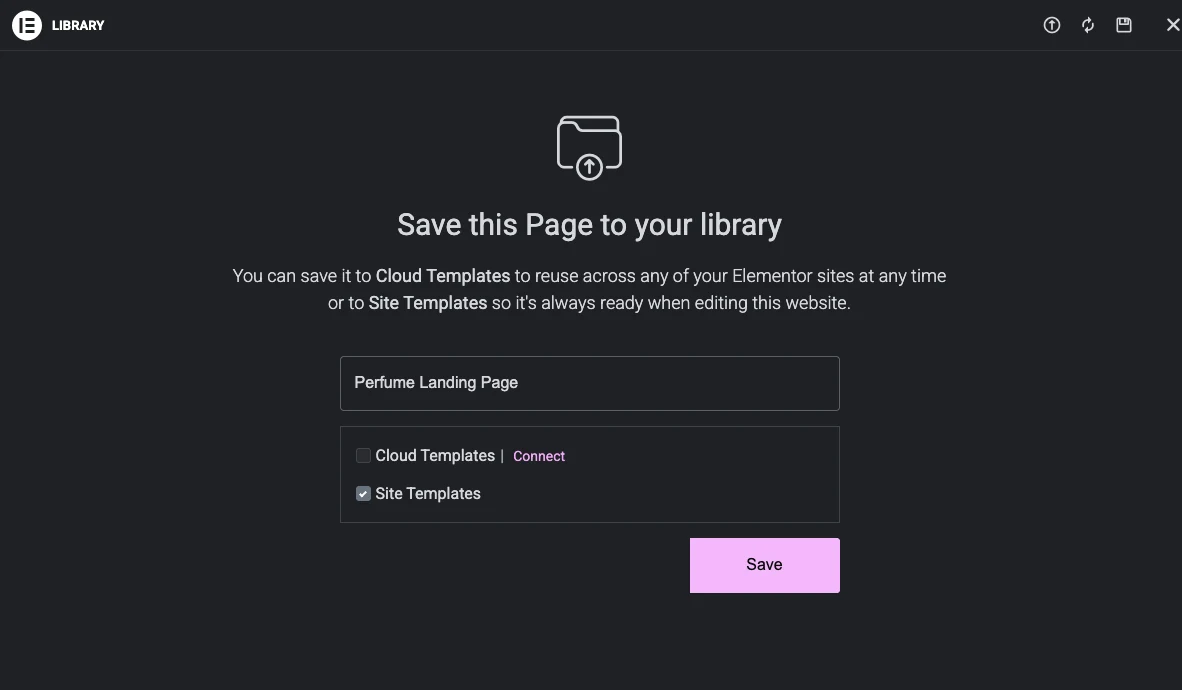
- 命名模板,离开 站点模板 勾选并单击 保存.
- 在下面创建一个新页面 页数, 添加页面 并将其打开到 Elementor 中。
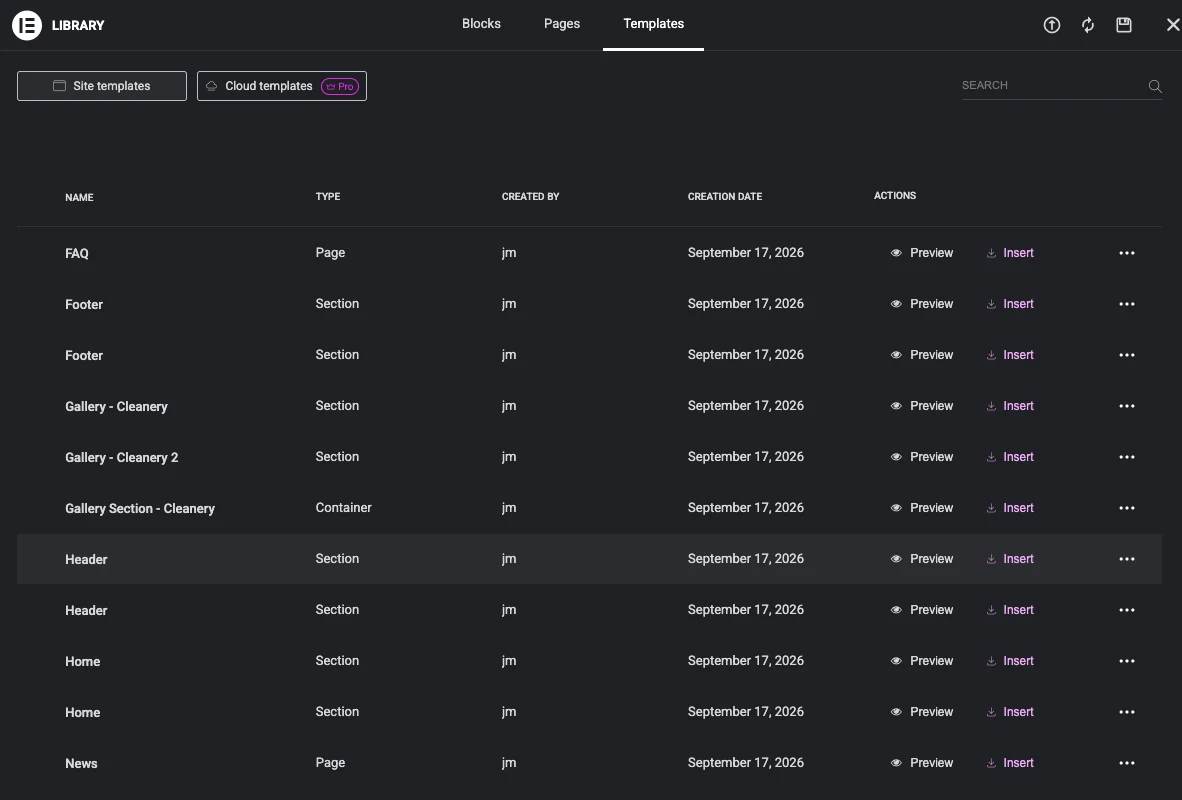
- 单击空滴区域中的文件夹图标打开库,然后切换到 模板 选项卡。
- 找到您的模板并单击 插入。Elementor询问是否也应用页面设置时,如果您想要相同的布局和背景,请选择是。
完整的演练,包括保存单个部分,请参阅我们的指南 elementor 页面如何保存为模板.元素者自己的步骤在其 帮助文章复制页面.
方法 3:复制所有内容并粘贴
Copy All Content 是将整个布局移动到已经存在的页面中最快的内置方式,它跳过了库,所以没有留下任何东西来整理。
- Elementor 中打开源页面,然后滚动到底部。
- 右键单击包含加号和文件夹图标的虚线下降区域。
- 选择 复制所有内容.
- Elementor中打开目标页面,右键单击其下拉区域并选择 膏.
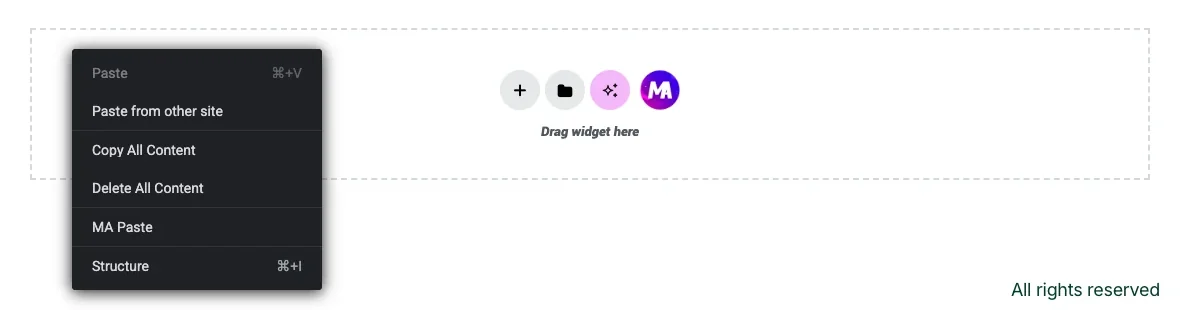
Copy 只保存部分和小部件,因此页面布局、隐藏标题设置和任何页面级别自定义 CSS 都留在后面,剪贴板也住在您的浏览器中,因此在关闭之前粘贴。
如果粘贴的页面显示您的主题标头,而原始标头没有,则页面布局不会遇到。在页面设置下再次设置它。
方法 4:将页面复制到另一个站点
Elementor页面复制到另一个网站,导出为JSON文件,导入第二个站点上的文件,即使两个站点在不同的主机或登录时,它也有效。
- 将页面保存为模板(方法 2,步骤 1 至 3)。
- 在仪表板中,转到 模板, 保存的模板.
- 将鼠标悬停在模板上并单击 导出页面。你的浏览器下载a
.json文件。
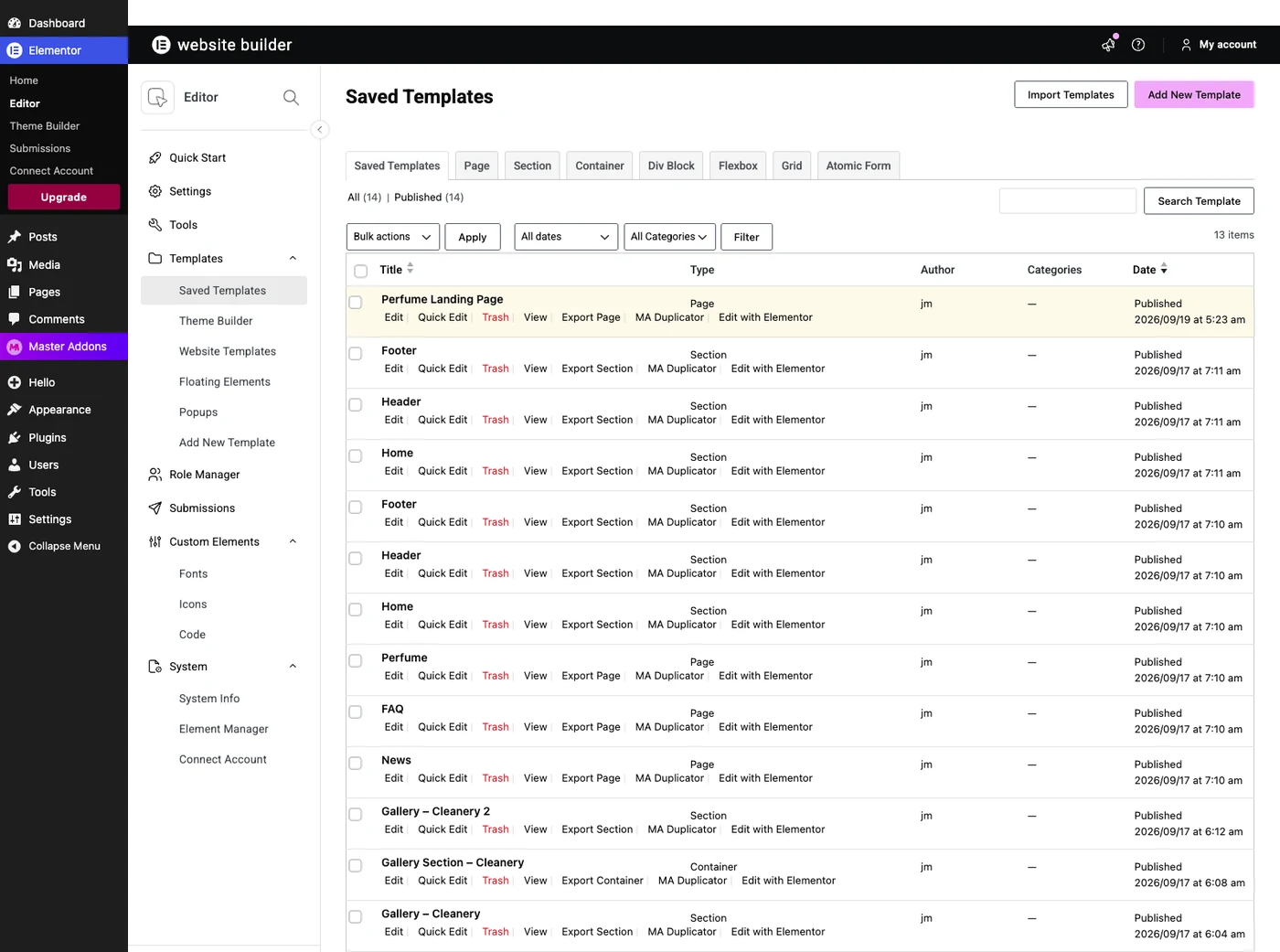
- 在第二个站点上,打开 模板, 保存的模板 然后单击 导入模板.
- 选择 JSON 文件并单击 立即导入.
- 创建页面,打开库,然后从 中插入模板 模板 选项卡。
JSON文件存储了你的图片的布局和地址,图片文件不在里面,第二个站点在导入的时候从第一个站点下载,所以保持原站点在线和公开,直到导入结束,字体和全局颜色来自第二个站点自己的设置,这就是为什么复制页面一开始看起来会略有不同。
对于快速的一次性操作,右键单击菜单也有 来自其他网站的粘贴。在站点一上复制一个部分或整个页面,在同一浏览器中打开站点二,右键单击掉落区域,从其他站点中选择粘贴,并在提示时按 Ctrl+V(Mac 上的 Cmd+V)。
每条进口路线都涵盖在内 如何导入 Elementor 模板。移动整个站点, 带有头、页脚和全局样式, 使用Elementor、工具、网站模板下的导出工具。
复制页面后要修复什么
重复的页面是一个精确的副本,一旦上线就会造成麻烦,两个相同文本的已发布页面在搜索中相互竞争,在点击发布之前先浏览此列表。
- 标题和蛞蝓。 掉“[重复#...]”部分,并写一个描述新页面的网址。
- SEO标题和元描述。 SEO插件中重写两者,因为复制的描述将搜索者指向错误的页面。
- Headings and body text. Change the H1 and enough of the copy that the page has its own reason to exist.
- Forms and buttons. Check where each form sends its entries and where each button links.
- Display rules. If the original was targeted by a popup or a header rule, add the new page to that rule or it will go without.
当模板击败重复项时
Duplicate when you need the same page again. Start from a template when you need a different page that only matches in style. Copying your About page to build a Pricing page means deleting most of what you just copied.
The Master Addons library has 211 元素页模板 sorted by page type, so a pricing, contact or 404 page arrives already shaped for its job. For single bands such as a testimonial row, the 元素单元部分模板 are a better fit, and the Elementor 模板套件 bring a whole site in one style.
常见问题
Can I duplicate a page in Elementor?
Yes. Elementor has no Duplicate Page button, but you can save the page as a template and insert it into a new page, or right-click and use Copy All Content. A duplicator such as the Master Addons Post/Page Duplicator adds a one-click link on the Pages screen.
How do I copy an Elementor page to another site?
Save the page as a template, then go to Templates, Saved Templates and click Export Page to download a JSON file. On the other site, click Import Templates, upload the file and insert the template into a new page. Keep the first site online so the images can transfer.
How do I duplicate multiple Elementor pages at once?
Elementor has no bulk duplicate. For a handful of pages, click the duplicate link on each row. For a whole site, export it under Elementor, Tools, Website Templates and import the ZIP file on the new site, which copies pages and site settings together.
Does duplicating an Elementor page copy its SEO settings?
A page duplicator copies the post meta, which usually includes the SEO title and description, so rewrite both on the copy. Save as Template and Copy All Content carry the design only, so the new page starts with empty SEO fields.
Why is the duplicate link not showing on my pages?
The link comes from a plugin, so it disappears when the duplicator is switched off or your user role cannot edit pages. In Master Addons, check that the Post/Page Duplicator extension is enabled in the plugin settings, then reload the Pages screen.
最后的想法
There are four ways to duplicate an Elementor page, and the right one depends on where the copy is going. The MA Duplicator link takes one click and makes a draft on the same site. Save as Template takes about six clicks and leaves you with a reusable layout. Copy All Content moves the sections without the page settings. A JSON export carries the page to another website.
Whichever you use, change the title, slug and SEO fields before publishing. If you would rather start from a finished design than copy an old one, browse the 元素页模板.
相关阅读
