

جدول المحتويات
إذا كنت تريد أوسع مكتبة عناصر واجهة مستخدم وأكبر مجتمع حولها، فاختر الإضافات الأساسية. إذا كنت تريد أداة إنشاء نافذة منبثقة مجانية، ومنشئ سمات مجاني، ومنشئ عناصر واجهة مستخدم يتيح لك إنشاء عناصر واجهة مستخدم Elementor مخصصة بدون تعليمات برمجية، بسعر إدخال أقل، فاختر Master Addons. كلا المكونين الإضافيين قويان. ينقسم هذا الدليل إلى حيث يفوز كل منهما بالفعل، وأين لا يفوز.
نحن نصنع الإضافات الرئيسية، لذا اقرأ هذا مع أخذ ذلك في الاعتبار. يتم سحب كل رقم أدناه مباشرة من Wordpress.org وصفحة التسعير الخاصة بكل مكون إضافي، ونشير بوضوح إلى المكان الأفضل الذي تكون فيه الإضافات الأساسية هي الاختيار الأفضل. إذا تبين خطأ ما هنا، أخبرنا وسنقوم بإصلاحه.
مقارنة الميزات: الإضافات الرئيسية مقابل الإضافات الأساسية
إليك الصفحة الكاملة جنبًا إلى جنب، مأخوذة من wordpress.org وصفحة التسعير الخاصة بكل بائع.
| ميزة | الإضافات الرئيسية | الإضافات الأساسية |
|---|---|---|
| عمليات التثبيت النشطة (wordpress.org) | 30،000+ | 2،000،000+ |
| التقييم (wordpress.org) | 4.5/5 من 211 تقييمًا | 4.9/5 من حوالي 4098 تقييمًا |
| منشئ النوافذ المنبثقة مجانا | نعم، 5 مشغلات: النقر، تحميل الصفحة، نية الخروج، التمرير، عدم النشاط | لا يوجد منشئ منبثق مخصص (Lightbox وامتداد Modal فقط) |
| منشئ موضوع مجاني | نعم: رأس، تذييل، فردي، أرشيف، بحث، 404، نموذج تعليق | لا يتم تقديمه كمنشئ مستقل |
| القائمة الضخمة | نعم، مجانًا، يمكن لأي عنصر واجهة مستخدم أن يسقط داخل لوحة القائمة | نعم، عبر أداة القائمة المتقدمة |
| شروط العرض لكل عنصر واجهة مستخدم | نعم، متضمنة من الخطة الشخصية البالغة 39 دولارًا سنويًا | نعم، عبر ملحق العرض الشرطي |
| نقاط توقف مخصصة | نعم، أحجام الأجهزة المخصصة مجانية وغير محدودة | لا يتم تقديمه كوظيفة إضافية (يغطي Elementor Pro هذا محليًا) |
| منشئ عناصر واجهة المستخدم بدون تعليمات برمجية | نعم، فريدة من نوعها للإضافات الرئيسية | غير معروض |
| تبديل المحتوى | تبديل المحتوى (PRO): التبديل بين كتلتين أو أكثر ، كل نص أو قالب محفوظ | نعم، أداة تبديل المحتوى |
| عدد القطعة | 55+ مجانًا، 80+ عناصر وامتدادات إجمالاً | إجمالي 120+ عنصر واجهة مستخدم، مجانًا وPro مجتمعين |
| إعلانات لوحة تحكم المشرف | لم يبلغ أي شيء | تم الإبلاغ عنه من قبل بعض المستخدمين في مراجعات Wordpress.org |
| تحميل الأصول | يتم إيقاف التشغيل افتراضيًا، ويتم تحميل ما تقوم بتمكينه فقط | يقوم بعض المستخدمين بالإبلاغ عن تحميل الأصول على مستوى الموقع |
| سعر الدخول (Pro، موقع واحد/سنة) | 39 دولارًا | 49.97 دولارًا |
بعض هذه الصفوف تستحق السياق، لذلك نقوم بتغطيتها في الأقسام أدناه بدلاً من تركك مع طاولة عارية.
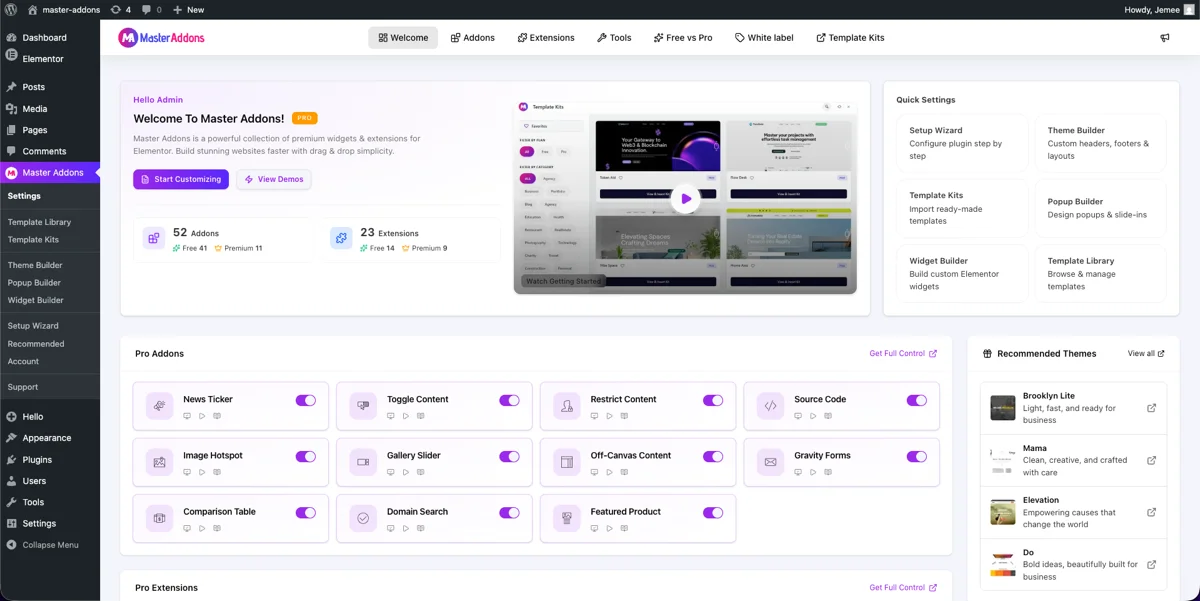
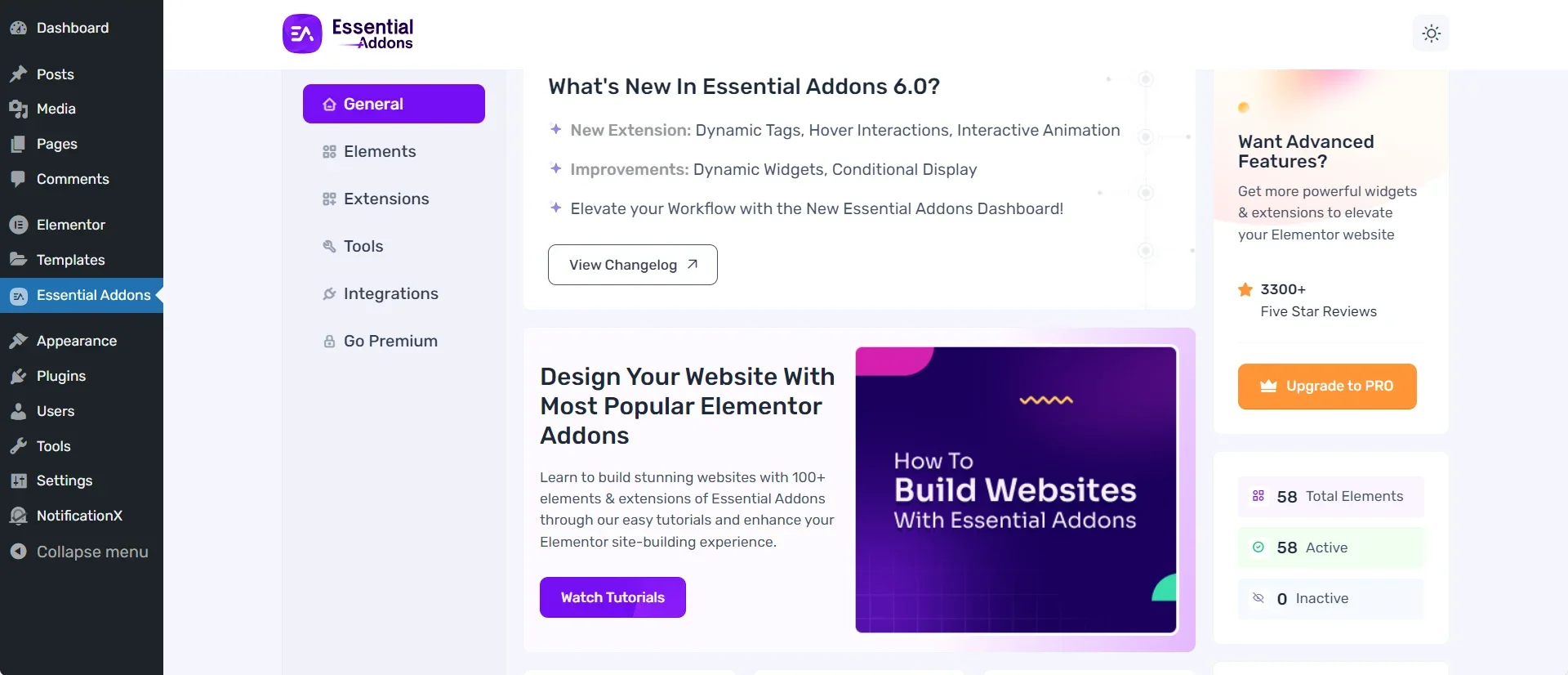
وهنا لوحة معلومات الإضافات الأساسية 6.0 للمقارنة. نفس الفكرة، تخطيط مختلف: العناصر والامتدادات موجودة في علامات تبويب الشريط الجانبي الأيسر، مع تلخيص الأعداد النشطة وغير النشطة على اليمين.
ما هي الإضافات الأساسية التي تفعل الأفضل
اكتسبت الإضافات الأساسية 2 مليون تثبيتومن الجدير أن نقول بوضوح أين يضربنا.
- عدد القطعة. تغطي عناصر واجهة المستخدم 120+ مساحة أكبر من أي مكون إضافي آخر لـ Elementor، بما في ذلك عناصر واجهة مستخدم WooCommerce العميقة مثل Woo Product Carousel وWoo Checkout وWoo Account Dashboard.
- مكتبة القوالب. تأتي الإضافات الأساسية مع 6،500+ قالب جاهز على موقع Wordpress.org، وهو ما يمثل بداية أكبر مما يقدمه معظم المنافسين.
- نضج النظام البيئي. البرنامج المساعد موجود منذ سنوات، ويتم تحديثه باستمرار، ويتكامل مع قائمة طويلة من أدوات الطرف الثالث: BetterDocs، وLearnDash، وTypeform، وFluent Forms، والمزيد.
- حجم المجتمع. مع ما يقرب من 4098 مراجعة و2 مليون عملية تثبيت نشطة، وصل عدد أكبر بكثير من الأشخاص إلى نفس الخطأ أو السؤال الذي لديك، ويوجد المزيد من البرامج التعليمية له.
- عمق التوثيق. تقوم الإضافات الأساسية بتوثيق كل عنصر واجهة مستخدم تقريبًا باستخدام دليل خاص بها، مما يؤدي إلى تقصير منحنى التعلم للفرق التي تقوم بتسليم مواقع العملاء.
- جداول البيانات. تحتوي الإضافات الأساسية على أداة جدول بيانات متقدمة مع البحث والفرز والصفحة ترقيم الصفحات واستيراد CSV. خاصتنا الجدول الديناميكي الأداة للجداول التي تكتبها باليد. لقد دمجت الخلايا والأيقونات والصور في الخلايا ، والصفوف التي تتراكم على الهواتف ، لكنها لا تفرز أو تستورد.
إذا كانت أي من هذه النقاط الست تهمك أكثر مما تليها ، فإن الإضافات الأساسية هي المكون الإضافي الصحيح. نفضل أن نخبرك بذلك مقدمًا على التظاهر بخلاف ذلك.
ما هي الإضافات الرئيسية التي تفعل الأفضل
هذا هو المكان الذي نطرح فيه قضيتنا، وسندعم كل نقطة برابط حتى تتمكن من التحقق منها بنفسك.
علامات التبويب هي اختبار جيد مثل مقابل مثل. تحتفظ Essential Addons بعلامات التبويب المتقدمة في مستواها الاحترافي، بينما تمتلك Master Addons علامات تبويب خاصة بها القطعة علامات التبويبلذا، قارن هذين الاثنين مباشرة إذا كان المحتوى المبوب موجودًا في قائمتك.
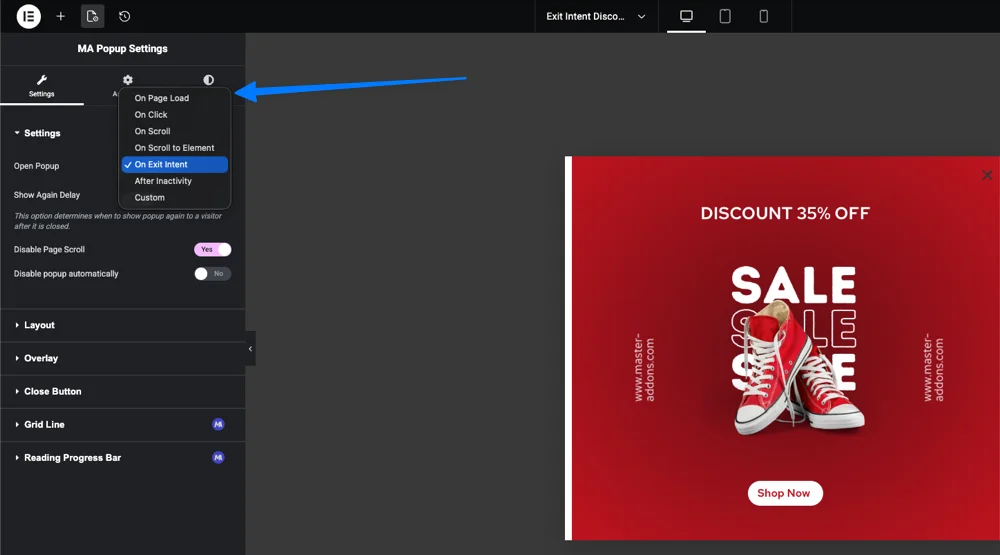
- مجاني منشئ النوافذ المنبثقة مع خمسة مشغلات: عند النقر، عند تحميل الصفحة، عند التمرير، عند نية الخروج، وبعد عدم النشاط، بالإضافة إلى 100+ قالب جاهز. يقوم Elementor نفسه بالبوابات المنبثقة خلف Elementor Pro.
- مجاني منشئ الموضوع تغطية الرأس والتذييل والمنشور الفردي والأرشيف ونتائج البحث و404 قوالب، لا يلزم وجود Elementor Pro.
- مجاني القائمة الضخمة منشئ يتيح لك ذلك سحب أي عنصر واجهة مستخدم Elementor أو Master Addons إلى لوحة القائمة.
- أ منشئ القطعة يؤدي ذلك إلى تحويل HTML وCSS وJavaScript، بما في ذلك المكونات التي تم إنشاؤها بواسطة الذكاء الاصطناعي أو مقتطفات CodePen، إلى عنصر واجهة مستخدم أصلي قابل لإعادة الاستخدام بدون PHP. معظم المنافسين، بما في ذلك الإضافات الأساسية، ليس لديهم ما يعادلها.
- نقاط توقف مخصصة ما وراء طرق العرض الافتراضية للجوال والكمبيوتر اللوحي وسطح المكتب، مجانًا، دون الحاجة إلى أي وظيفة إضافية.
- بنية معيارية: يتم إيقاف تشغيل كل عنصر واجهة مستخدم وملحق بشكل افتراضي. تقوم بتشغيل ما يستخدمه المشروع فقط، والباقي لا يقوم بتحميل أصوله أبدًا.
- لا توجد إعلانات داخل مسؤول WordPress.
- أقل سعر دخول في هذه الفئة هو 39 دولارًا سنويًا لموقع واحد.
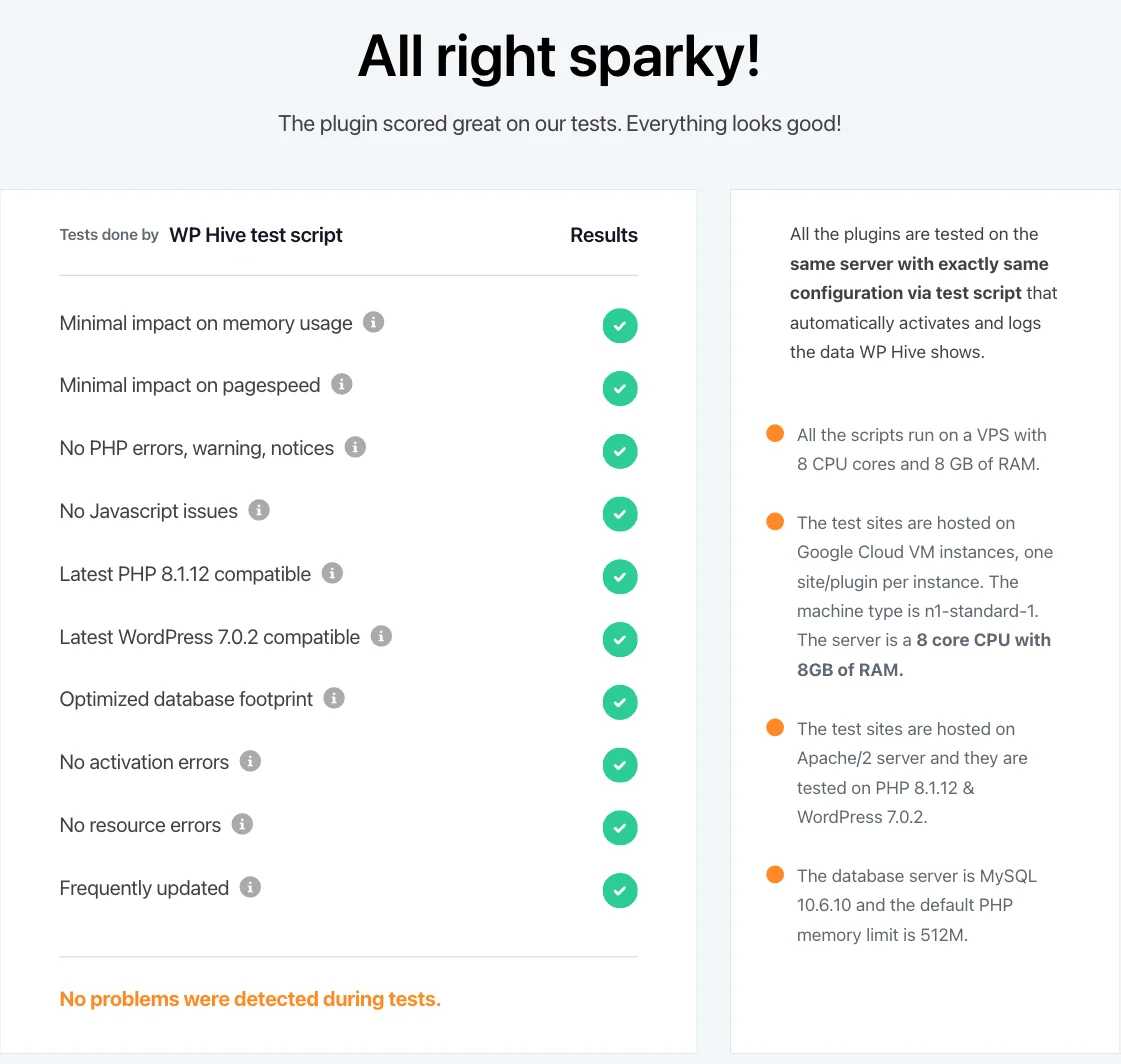
ويدعم الاختبار المستقل بعضًا من هذا أيضًا. اختبرت WPHive الإصدار 3.1.6 من Master Addons وأبلغت عن تأثير ضئيل على استخدام الذاكرة، وهو ما يطابق ما تتوقعه من مكون إضافي لا يقوم بتحميل أي شيء حتى تقوم بتشغيله.
مجانًا مقابل مدفوع: ما تحصل عليه بالفعل
يعمل كلا المكونين الإضافيين على نموذج فريميوم. وهذا ما يعنيه ذلك عمليًا، وليس في النسخة التسويقية.
إضافات الماجستير مجانية مقابل Pro
النسخة المجانية قابلة للتحميل من WordPress.org، يتضمن 55+ عنصر واجهة مستخدم، و20+ امتدادًا، ومنشئ النوافذ المنبثقة الكاملة، ومنشئ السمات الكاملة. Pro، بدءًا من 39 دولارًا سنويًا، يفتح الأدوات المتبقية، وهي منشئ القطعة'دعم CSS وJS لكل عنصر واجهة مستخدم شروط العرض، وضع العلامات البيضاء، ومجموعات القوالب المتميزة. انظر التفاصيل الكاملة على صفحة التسعير.
الإضافات الأساسية مجانية مقابل Pro
يقوم الإصدار المجاني من Essential Addons Lite بشحن مجموعة أدوات أساسية صلبة. Pro، الذي يبدأ بسعر 49.97 دولارًا سنويًا لموقع واحد، يفتح بقية عدد عناصر واجهة المستخدم البالغ 120+، وعناصر واجهة مستخدم WooCommerce، ومكتبة القوالب المتميزة. إذا كان مشروعك يعتمد بشكل كبير على WooCommerce، فإن هذا المستوى الاحترافي يقوم بالكثير من العمل الذي لا تحاول Master Addons مطابقته حاليًا.
الأداء وسرعة الموقع
لن يؤدي أي من المكونين الإضافيين إلى إبطاء موقعك إذا كنت تستخدمه بالطريقة التي من المفترض أن يتم استخدامها: قم بتمكين عناصر واجهة المستخدم التي تحتاجها، واترك الباقي مغلقًا. السرعة هي نصف معادلة الترتيب فقط؛ النصف الآخر عبارة عن بنية على الصفحة، والتي لدينا العنصر SEO دليل يمشي خطوة بخطوة.
يقوم Master Addons بتحميل عناصر واجهة المستخدم والإضافات الخاصة به بشكل افتراضي، لذا فإن التثبيت الجديد لا يضيف شيئًا تقريبًا حتى تبدأ في تشغيل الأشياء. سجل اختبار WPHive المستقل للإصدار 3.1.6 تأثيرًا ضئيلًا على الذاكرة، وهو الرقم الأكثر أهمية للاستضافة المشتركة.
تم تحسين الإضافات الأساسية بشكل جيد بشكل عام أيضًا، ولكن مراجعات Wordpress.org الخاصة بها تتضمن نمطًا متكررًا يستحق الذكر إلى حد ما: أبلغ بعض المستخدمين عن أن التحديثات تعمل تلقائيًا على تمكين الميزات الجديدة وتحميل أصول إضافية على مستوى الموقع، ويصف عدد أقل تحميلات الصفحة البطيئة بعد التثبيت الإصدار الاحترافي. هذا ليس عالميًا، والعديد من المواقع الكبيرة تقوم بتشغيل الإضافات الأساسية دون مشكلة. إنه ببساطة نوع التعليقات التي تظهر كثيرًا في المراجعات بما يكفي لتستحق المعرفة قبل التثبيت.
الأسعار مقارنة
يبدأ سعر Master Addons Pro من 39 دولارًا سنويًا لموقع واحد، و99 دولارًا سنويًا لخمسة مواقع، و299 دولارًا سنويًا لمواقع غير محدودة، مع توفر تراخيص مدى الحياة تبدأ من 129 دولارًا. انظر الأرقام الحالية على صفحة التسعير.
يبدأ سعر Essential Addons Pro من 49.97 دولارًا سنويًا لموقع واحد، مع توسيع نطاق خطط الوكالة والمواقع غير المحدودة. وهذا يزيد بنسبة 28 بالمائة تقريبًا عن Master Addons في طبقة الإدخال، بالنسبة لمكون إضافي يحتوي على عدد أكبر بكثير من عناصر واجهة المستخدم. يعتمد ما إذا كانت هذه الفجوة تستحق الدفع كليًا على ما إذا كنت ستستخدم عناصر واجهة المستخدم الإضافية.
تقدم كلتا الشركتين نافذة استرداد لمدة 14 يومًا، وبالتالي فإن التكلفة الحقيقية لاختبار أي منهما هي وقتك، وليس أموالك.
عندما تكون الإضافات الأساسية هي الخيار الأفضل
اختر الإضافات الأساسية إذا كان أي منها يصف مشروعك:
- أنت تدير متجرًا ثقيلًا في WooCommerce وتحتاج إلى منتج مخصص وعربة التسوق وأدوات الدفع خارج الصندوق.
- تريد أكبر تحديد ممكن لعنصر واجهة المستخدم في مكون إضافي واحد ولا تمانع في دفع المزيد مقابل ذلك.
- أنت تعتمد على مكون إضافي موثق جيدًا ومستخدم على نطاق واسع حتى يتمكن أي مطور في فريقك من العثور على إجابة سريعة.
- أنت تعتمد بالفعل على عمليات تكامل الإضافات الأساسية مثل BetterDocs أو LearnDash أو Typeform.
- أنت تفضل مكونًا إضافيًا يتمتع بسجل حافل لعدة سنوات على نطاق واسع على مكون أصغر وأسرع حركة.
عندما تكون الإضافات الرئيسية هي الخيار الأفضل
اختر الإضافات الرئيسية إذا كان أي منها يصف مشروعك:
- تريد منشئ النوافذ المنبثقة ومنشئ السمات دون الدفع مقابل Elementor Pro أو البرنامج المساعد المنبثق منفصل.
- تفضل إنشاء عنصر واجهة مستخدم Elementor مخصص من التعليمات البرمجية الخاصة بك بدلاً من البحث في قائمة عناصر واجهة المستخدم الخاصة بشخص آخر على أمل وجودها.
- تريد بصمة أخف، مع عدم تحميل أي شيء حتى تقوم بتشغيله.
- أنت حساس للسعر وتريد أقل تكلفة دخول في هذه الفئة.
- لا تريد إعلانات داخل مسؤول WordPress الخاص بك.
- تريد قائمة ضخمة مجانية ونقاط توقف مخصصة مجانية وتريد رؤية قائمة عناصر واجهة المستخدم والملحقات الكاملة قبل اتخاذ القرار.
كيفية التبديل من الإضافات الأساسية إلى الإضافات الرئيسية
لا يعد تبديل المكونات الإضافية الإضافية عملية بنقرة واحدة، وأي شخص يخبرك بخلاف ذلك يتخطى الخطوات. هنا هو المسار الصادق.
- قم بتثبيت الإضافات الرئيسية جنبًا إلى جنب مع الإضافات الأساسية أولاً. لا تقم بإلغاء تنشيط المكون الإضافي القديم حتى يتم إعداد المكون الإضافي الجديد بالكامل. احصل عليه مجانًا من دليل البرنامج المساعد WordPress.org.
- تحقق من قائمة القطعة مقابل عناصر واجهة المستخدم الأساسية التي تستخدمها صفحاتك فعليًا. لا يتم تعيين كل عنصر واجهة مستخدم واحدًا لواحد. ستحتاج شبكة Post Grid المبنية باستخدام الإضافات الأساسية إلى إعادة بنائها باستخدام أداة مدونة Master Addons، ولن يتم ترحيلها تلقائيًا.
- أعد بناء عنصر واجهة المستخدم للصفحات حسب عنصر واجهة المستخدم، بدءًا من صفحتك الرئيسية. يحافظ Elementor على توفر عناصر واجهة المستخدم الخاصة بكلا المكونين الإضافيين أثناء نشاطهما، حتى تتمكن من تبديل قسم واحد في كل مرة ومعاينته أثناء التنقل.
- انقل رأسك وتذييلك إلى منشئ الموضوع أخير. تؤثر القوالب على مستوى الموقع على كل صفحة، لذا اختبرها على موقع التدريج أولاً.
- قم بإلغاء تنشيط الإضافات الأساسية فقط بعد عرض كل صفحة بشكل صحيح بدونه. ثم تحقق من سرعة موقعك مرة أخرى، نظرًا لأن إزالة أصول البرنامج المساعد غير المستخدم من شأنها أن تساعد فقط.
- تمكين الأدوات التي تستخدمها فقط ضمن إعدادات الإضافات الرئيسية. ترك كل شيء على يهزم نقطة البرنامج المساعد المعياري. توجد ميزات احترافية مثل شروط العرض أو العلامات البيضاء في صفحة التسعير إذا كانت عملية الترحيل تحتاج إليها.
قم بتخصيص فترة ما بعد الظهر لموقع صغير، لفترة أطول لأي شيء يحتوي على عشرات الصفحات. إن الإسراع في تبديل المكونات الإضافية على موقع مباشر هو الطريقة التي تختفي بها الرؤوس.
الأسئلة المتداولة
ما هو أفضل ملحق لـ Elementor؟
لا يوجد أفضل ملحق لكل موقع. تفوز الإضافات الأساسية إذا كنت تريد أكبر مكتبة عناصر واجهة مستخدم ومجموعة قوالب في مكون إضافي واحد، مع 120+ عنصر واجهة مستخدم وآلاف القوالب خلفها. تفوز الإضافات الرئيسية إذا كنت تريد أداة إنشاء منبثقة مجانية، وأداة إنشاء سمات مجانية، وأداة إنشاء عناصر واجهة مستخدم بدون تعليمات برمجية، بسعر إدخال أقل. اختر بناءً على أي من العناصر التي تحتاجها بالفعل، وليس أي مكون إضافي يحتوي على الرقم الأكبر في صفحة Wordpress.org الخاصة به.
هل الإضافات الأساسية لـ Elementor مجانية؟
نعم. الإضافات الأساسية لـ Elementor Lite مجانية على Wordpress.org وتتضمن مجموعة أدوات قوية. يفتح الإصدار Pro، الذي يبدأ سعره من 49.97 دولارًا سنويًا، بقية مكتبة عناصر واجهة المستخدم التي يبلغ عددها 120+ وعناصر واجهة مستخدم WooCommerce والقوالب المميزة. تتبع الإضافات الرئيسية نموذجًا مشابهًا: مكون إضافي أساسي مجاني بالإضافة إلى ترقية Pro من 39 دولارًا سنويًا والتي تفتح عناصر واجهة المستخدم والإضافات المتبقية ومكتبة القوالب الكاملة.
ما هو أفضل مكون إضافي للقائمة الضخمة لـ Elementor؟
إذا كنت تقوم بالفعل بتشغيل Master Addons، فإن ملحق Mega Menu المجاني الخاص به ينشئ قوائم متعددة الأعمدة تحتوي على أيقونات وشارات وأي عنصر واجهة مستخدم Elementor أو Master Addons موجود بالداخل، دون الحاجة إلى مكون إضافي منفصل. إذا قمت بتشغيل الإضافات الأساسية، فإن عنصر واجهة المستخدم في القائمة المتقدمة يغطي أرضية مماثلة. إما أن تقوم بتثبيت مكون إضافي ثالث لقائمة ميجا أعلى مكتبة الإضافات الخاصة بك، لأن ذلك يضيف فقط المزيد من البرامج النصية للتصفح لتحميلها.
ما هي أساسيات Elementor Pro؟
تشير هذه العبارة عادةً إلى عناصر واجهة المستخدم والمنشئات داخل Elementor Pro نفسه، مثل أداة إنشاء السمات وPopup Builder وForm، المنفصلة عن أي مكون إضافي إضافي تابع لجهة خارجية. تعمل كل من الإضافات الرئيسية والإضافات الأساسية جنبًا إلى جنب مع Elementor Pro وتضيف عناصر واجهة مستخدم لا تتضمنها. تذهب الإضافات الرئيسية خطوة أبعد وتشحن أداة إنشاء النوافذ المنبثقة ومنشئ السمات الخاصة بها مجانًا، لذلك تحصل على هذه الوظيفة حتى بدون تثبيت Elementor Pro.
القراءة ذات الصلة
