


يضع دائري الشهادة عروض أسعار العملاء على مسار منزلق بحيث يتناسب القسم الذي سيتم تشغيله بثلاث شاشات طويلة مع شاشة واحدة. لديك خياران حقيقيان. يقوم Elementor Pro بشحن أداة Testimonial Carousel الأصلية، لذلك إذا كان لديك Pro، فهذه ثلاث دقائق من العمل. على Elementor المجاني، فإن أسرع طريق هو شريط تمرير اقتباس المنصة، أ القطعة دائري مستورد مجانا من الإضافات الرئيسية: قم بتنزيل JSON، واستورده من خلاله منشئ القطعة، واسحبه إلى الصفحة. لا يوجد ترخيص ولا إعادة بناء البطاقات باليد.
يغطي هذا الدليل كلاً من الخطأ الاحتياطي المصمم يدويًا إذا كنت تفضل امتلاك كل بكسل، وخطأ المخطط الذي يحصل على إجراءات يدوية للمواقع من Google، والتي لم يذكرها أحد تقريبًا يكتب عن دوارات الشهادات. إذا كنت لا تزال تعمل على معرفة ما إذا كان هذا القسم يريد شريط تمرير عرض الأسعار أو شريط تمرير كامل العرض، فإن مقارنة دائري مقابل شريط التمرير هي القراءة الأقصر.
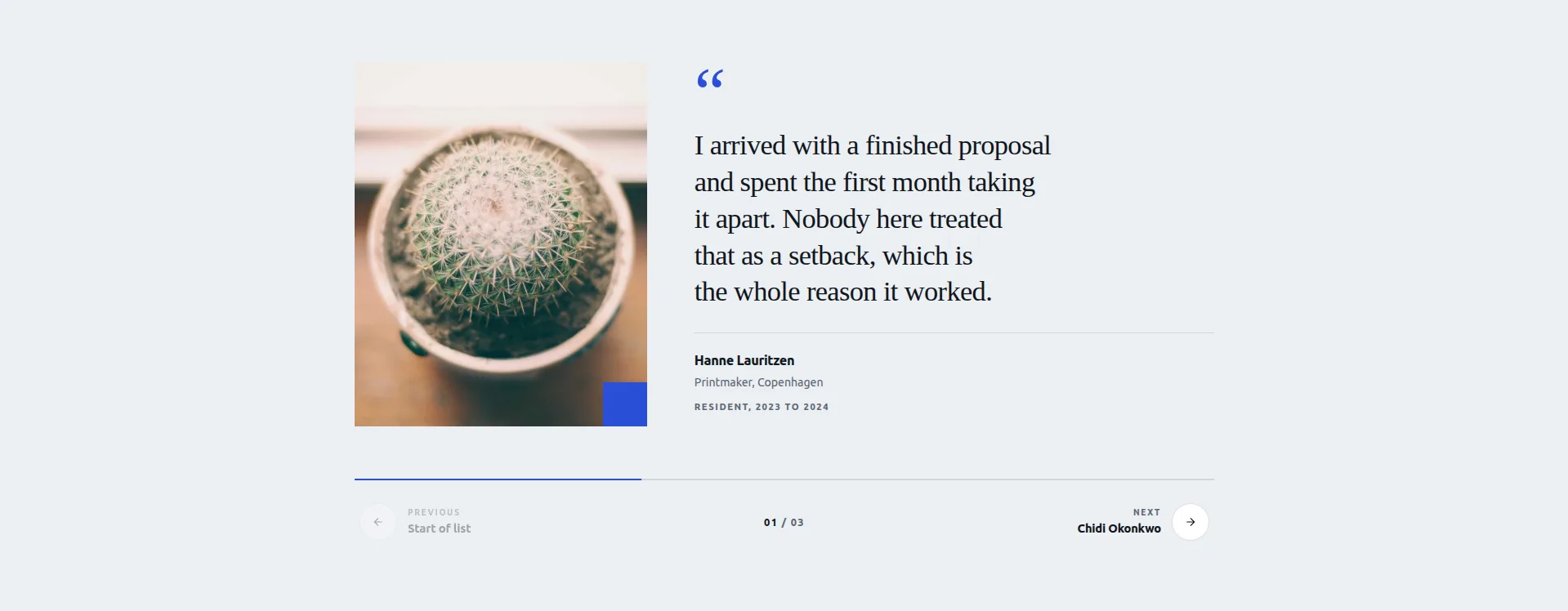
العرض المباشر تحميل القطعة JSON
أي طريقة للاستخدام
| طريقة | تكلفة | الأفضل عندما |
|---|---|---|
| Elementor Pro شهادة دائري | إليمنتور برو | لديك بالفعل Pro وتريد القيام بذلك في ثلاث دقائق |
| شريط تمرير اقتباس المنصة (استيراد) | حر | أنت تستخدم Elementor مجانًا وتريد شريط تمرير مصممًا، وليس لوحة قماشية فارغة |
| أداة البطاقة في حاوية دائري | حر | تريد تصميم البطاقة بنفسك من الصفر |
حالة أخرى: إذا كان الدليل الخاص بك عبارة عن لقطات شاشة للمراجعات ولا يوجد نص اقتباس للكتابة، فهذا أمر عادي صورة دائري باستخدام الصندوق الضوئي يظهرهم بشكل أفضل من تخطيط الشهادة.
إذا كان لديك Elementor Pro
ابحث في اللوحة عن دائري “testimonial، ثم اسحب عنصر واجهة المستخدم إلى الداخل، واملأ المكرر بصف واحد لكل شهادة: المحتوى والاسم والعنوان والصورة. إعدادان يستحقان التغيير من الإعدادات الافتراضية: الشرائح لكل عرض وصولاً إلى 2 على سطح المكتب و1 على الهاتف المحمول، والتشغيل التلقائي، لأن الشهادة تستغرق ثماني ثوانٍ للقراءة والتشغيل التلقائي الافتراضي إلى خمس.
لا بأس وسريع. القيد هو أن تخطيط البطاقة ثابت. تحصل على الإعدادات المسبقة وعلامة التبويب "النمط"، وليس تصميمًا مميزًا. إذا كان هذا كافيًا، توقف عن القراءة وابدأ في بنائه.
الخيار المجاني: شريط تمرير اقتباس المنصة
المنصة هي إحدى الأدوات المجانية في مجموعة ماستر أدونز الدائرية، وهي مصممة خصيصًا للشهادات. التخطيط عبارة عن لوحة اقتباس بجانب الصورة: شيفرون خطوة بين الأصوات، وشريط التقدم وعرض الإحصاء مكانك، ويمكن لأزرار الخطوات تسمية الصوت التالي، لذلك بدلاً من سهم مجهول، يقرأ الزر مثل “التالي: سارة، قائد العمليات.” علامة الاقتباس كبيرة الحجم قابلة للتحرير، والأمر برمته يستجيب للتنقل والتمرير على لوحة المفاتيح.
يحمل كل صوت خمسة مجالات: الصورة والاقتباس والاسم والدور والحيازة. ثلاثة أصوات تأتي مع الأداة، كل منها خلف مفتاح العرض، حتى تتمكن من تشغيل واحد أو اثنين أو الثلاثة جميعًا.
العيب الصادق: ثلاثة أصوات هي التنسيق. إنه شريط تمرير منسق لأقوى اقتباساتك، وليس أداة تعتمد على الاستعلام والتي تسحب كل شهادة جمعتها على الإطلاق. إذا كنت بحاجة إلى عشرات المراجعات الدورية، فإن الطريقة المصممة يدويًا أدناه تتدرج بشكل أكبر.
كيفية بنائه: خطوة بخطوة
- قم بتثبيت البرنامج المساعد Master Addons المجاني إذا لم يكن نشطًا بالفعل. إنه نفس المكون الإضافي الذي يعمل على 30.000+ موقع، ويعمل الاستيراد على الطبقة المجانية.
- قم بتنزيل شريط تمرير اقتباس المنصة JSON من ال مجموعة قوالب منزلق Elementor المجانية. إنه التصميم 18 من العشرين.
- استيراده. في مسؤول ووردبريس، انتقل إلى الإضافات الرئيسية → منشئ عناصر واجهة المستخدم → استيراد عناصر واجهة المستخدم واسحب ملف JSON إلى المستورد.
- افتح صفحتك في Elementor. تظهر الأداة في اللوحة أدناه المفضلة. اسحب شريط تمرير عرض أسعار المنصة إلى الحاوية.
- املأ الصوت الأول: صورة، اقتباس، اسم، دور، فترة. قم بالقيادة باستخدام الاقتباس الأكثر تحديدًا، أو الاقتباس الذي يحتوي على رقم أو نتيجة فيه.
- قم بتشغيل الصوتين الثاني والثالث مع تبديل العرض الخاص بهم وملئها بنفس الطريقة. قم بإيقاف تشغيل أي شيء لا تحتاجه.
- اضبط تسميات زر الخطوة. تسمية الصوت التالي على الزر تعطي الأشخاص سببًا للنقر. إنها أفضل تفاصيل تحويل الأداة، لذا استخدمها.
- تحقق من علامة الاقتباس واختبر التنقل. اضبط علامة الاقتباس القابلة للتحرير لتناسب الطباعة الخاصة بك، ثم قم بمعاينة: شيفرون، وأسهم لوحة المفاتيح، واسحب على الهاتف.
يبلغ إجمالي الوقت حوالي خمس دقائق، يقضي معظمها في اختيار عروض الأسعار الثلاثة التي تستحق هذه الفترة.
خيار آخر من نفس المجموعة: سطح الطبقةتصميم احترافي حيث يتم تكديس البطاقات وتقشير الجزء العلوي منها. إنها مناسبة بشكل طبيعي للشهادات إذا كنت تريد الشعور بسطح البطاقة بدلاً من لوحة الأسعار.
إذا كنت تفضل بنائه باليد
لا يزال المسار من الصفر منطقيًا عندما تريد تصميم بطاقة يتوافق تمامًا مع علامتك التجارية، أو شهادات أكثر مما يحمله شريط التمرير ثلاثي الأصوات. أنت تصمم البطاقة بنفسك، لذا قم بميزانية عشر دقائق بدلاً من خمس.
- قم ببناء بطاقة واحدة أولاً. قم بإسقاط أداة البطاقة في الحاوية. بداخلها: نص الاقتباس، وصورة رمزية، واسم، ودور، وصف نجمة إذا كان لديك تقييمات. قم بتصميمها بالكامل: الحشو، والخلفية، ونصف قطر الحدود، وعلامة الاقتباس، والطباعة. احصل على هذه البطاقة تمامًا قبل تكرار أي شيء.
- نسخ البطاقة لكل شهادة وتبديل المحتوى. ستة أرقام جيدة: كافية لتشعر بأنها كبيرة، وقليلة بما يكفي بحيث لا يصبح القسم مهمة صيانة.
- تحويل الحاوية الأم إلى دائري. في إعدادات تخطيط الحاوية، قم بتبديل الشاشة إلى دائري. تحصل على شرائح لكل عرض، وتشغيل تلقائي، وحلقة، وأسهم ونقاط، نفس الشيء ضوابط سوابر يتم استخدام الأدوات المخصصة، لأنها نفس المكتبة الموجودة أسفلها.
- قم بتعيين الشرائح لكل عرض لكل نقطة توقف. اثنان على سطح المكتب، وواحد على الجهاز اللوحي والهاتف المحمول. الشهادات عبارة عن نص، والنص يحتاج إلى عرض.
- نمط الملاحة الجلوس أسفل البطاقات بدلاً من تداخلها. يغطي السهم الموجود أعلى الاقتباس كلمة، والكلمة المغطاة هي الكلمة التي يركز عليها الأشخاص.
لا حاجة إلى ترخيص، والبطاقة لك. إذا كنت تريد مرجعًا مرئيًا للنمط، فإن صفحة مراجعات العملاء للإضافات الرئيسية يستخدمه.
فخ المخطط
هذا هو الجزء الذي يهم أكثر من التخطيط.
من المغري إضافة مخطط المراجعة أو التقييم الإجمالي إلى دائري الشهادات حتى يظهر النجوم في نتائج البحث. لا تفعل ذلك، على الأقل ليس للحصول على شهادات حول عملك الخاص على موقعك الخاص.
توضح إرشادات البيانات المنظمة من Google أن المراجعات ذاتية الخدمة ليست مؤهلة للحصول على نتائج غنية بالمراجعة. يجب أن تأتي مراجعات الكيان من مصدر مستقل، وليس من الكيان نفسه. المواقع التي تقوم بترميز شهادات الصفحة الرئيسية الخاصة بها كمخطط مراجعة يتم تجاهل العلامات في أحسن الأحوال، ويتم تجاهل الإجراء اليدوي للبيانات المنظمة في أسوأ الأحوال.
ما يمكنك فعله بشكل قانوني: ترميز صفحات المنتج الفردية بالمراجعات التي تم جمعها من العملاء الفعليين من خلال نظام المراجعة، واستخدامها Organization المخطط على الصفحة الرئيسية بدون خصائص المراجعة. إذا كنت تريد نجومًا في البحث، فقم بجمع المراجعات على Google Business Profile أو G2 أو Trustpilot، لأنها تظهر كطرف ثالث.
دائري الشهادة هو عنصر تحويل. تعامل معه كواحد، واترك المخطط بعيدًا عنه. إذا كان كل ما تريده هو اقتباس واحد مسحوب يجلس بمفرده بدلاً من مجموعة دوارة، فإن القطعة Blockquote يقوم بهذه المهمة دون أي علامات.
قرارات التصميم التي تغير التحويلات
وجوه تغلبت على الشعارات. تتفوق صورة شخص ما على شعار الشركة، وكلاهما لا يتفوق على أي منهما. تم بناء تخطيط Rostrum للصورة بجانب الاقتباس على هذا. إذا لم تتمكن من الحصول على صورة، فسيظل الاسم والدور يتفوقان على الاقتباس المجهول بمسافة.
يدق محددة متوهجة. “قطع وقت إنشاء صفحتنا من يومين إلى ثلاث ساعات، يقوم” بأكثر من مكون إضافي مذهل، نوصي بشدة!”، على الرغم من أن الثاني يبدو أكثر حماسًا. اسحب السطر المحدد من شهادة أطول وقم بالقيادة معه.
لا تقم بالتشغيل التلقائي. الشهادات هي النوع الدائري الوحيد الذي يؤلمه التشغيل التلقائي بشكل فعال، لأن المحتوى عبارة عن نص كثيف يستغرق وقتًا أطول للقراءة من أي تأخير معقول للشرائح. خطوات المنصة عند النقر أو لوحة المفاتيح أو التمرير السريع، والتي يتم ضبطها حسب التصميم بواسطة القارئ. إذا قمت بالبناء يدويًا، فاترك مفتاح التشغيل التلقائي مغلقًا.
إظهار العدد. يشير العدد إلى مستوى الصوت بطريقة لا تشير إليها النقاط المجهولة، ولهذا السبب يقوم Rostrum بإقران شريط التقدم الخاص به بشريط واحد. إذا كان لديك الكثير من العملاء السعداء، فقل ذلك باستخدام عنصر التحكم.
اثنان على سطح المكتب، وليس ثلاثة. بالنسبة للدوارات المصنوعة يدويًا: ثلاثة أعمدة من نص الاقتباس على شاشة مقاس 1440 بكسل تعطي كل عمود حوالي 380 بكسل، وهو أقل من مقياس القراءة المريح. اثنان هو الرقم.
الأسئلة المتداولة
هل لدى Elementor أداة دائري للشهادة؟
يقوم Elementor Pro بما يلي: أداة Testimonial Carousel مع مكرر لعروض الأسعار والأسماء والصور. لا يتضمنه المكون الإضافي المجاني لـ Elementor. في الطبقة المجانية، أسرع طريق هو استيراد شريط تمرير عرض أسعار Rostrum من خلال أداة إنشاء عناصر واجهة المستخدم الخاصة بـ Master Addons، أو إنشاء بطاقتك الخاصة داخل حاوية مضبوطة على شاشة عرض دائرية.
كيف يمكنني إضافة شريط تمرير الشهادة في Elementor مجانًا؟
استيراد شريط تمرير اقتباس المنصة المجاني: قم بتنزيل JSON، وانتقل إلى Master Addons → Widget Builder → استيراد Widget في مسؤول WordPress، واسحب الملف إلى الداخل، وستظهر الأداة في Elementor ضمن المفضلة. املأ حقول الصورة والاقتباس والاسم والدور والحيازة لكل صوت، وبذلك تكون قد انتهيت، دون الحاجة إلى ترخيص Pro.
هل يجب تشغيل دائري الشهادة تلقائيًا؟
لا. تستغرق الشهادة من ست إلى عشر ثوانٍ للقراءة، وتكون تأخيرات التشغيل التلقائي النموذجية من ثلاث إلى خمس ثوانٍ. يفقد الزائرون الجملة جزئيًا ويفكون الارتباط. اترك التشغيل التلقائي ودع الأشخاص يتقدمون عندما يكونون جاهزين، لأن الشهادات هي النوع الدائري الوحيد الذي يعمل فيه المؤقت ضدك.
هل يمكنني إضافة تقييمات النجوم إلى دائري شهادة Elementor؟
نعم، كعنصر مرئي: صف أيقونات أو حقل تصنيف في تصميم بطاقة مصنوع يدويًا. ما لا ينبغي عليك فعله هو إضافة ترميز مخطط المراجعة أو التقييم الإجمالي للشهادات حول عملك الخاص، لأن Google لا تسمح بالمراجعات ذاتية الخدمة في مراجعة النتائج الغنية ويمكن أن يؤدي الترميز إلى إجراء يدوي.
كم عدد الشهادات التي يجب أن يكون لدى الكاروسيل؟
ثلاثة قوية تتفوق على اثني عشر صوتًا غامضًا، ويجبر تنسيق Rostrum ثلاثي الأصوات على الانضباط. عادة ما يكون هذا هو النداء الصحيح. إذا كنت تقوم بالبناء اليدوي ولديك المزيد من المواد، فمن ستة إلى اثني عشر عملاً؛ بعد اثني عشر لا أحد يصل إلى النهاية، لذا قم بالتبديل إلى مجموعة تمت تصفيتها لكل صفحة بدلاً من شريط طويل واحد.
كيف يمكنني تحديث الشهادات تلقائيًا؟
قم بتسجيل نوع منشور مخصص للشهادة، ثم استخدم أداة دوارة تعتمد على الاستعلام وموجهة إليها: مجانًا القطعة المدونة في الوضع الدائري، أو Elementor Pro حلقة دائري مع قالب عنصر الحلقة. تظهر منشورات الشهادات الجديدة في كل دائري على الموقع دون تحرير أي صفحات.
ماذا تفعل بعد ذلك
إذا كان لديك Elementor Pro، فإن عنصر واجهة المستخدم الأصلي الخاص به هو أقصر مسار. في Elementor المجاني، قم باستيراد شريط تمرير عرض أسعار Rostrum واقضِ الوقت الموفر في اختيار أفضل ثلاثة عروض أسعار لديك، لأن هذا الاختيار يحرك التحويلات أكثر من أي عنصر تحكم في التصميم. قم بالبناء يدويًا فقط عندما يتطلب ملخص التصميم ذلك.
يتم استيراد المنصة على البرنامج المساعد المجاني. إذا كنت تريد لاحقًا تصميمات Pro الاثني عشر أيضًا، فإن صفحة التسعير لديه الطبقات، و تصاميم دائري 3D أظهر كيف تبدو أنماط الحركة المدفوعة بالفعل.
قبل أن تقوم ببناء أي شيء من الصفر، تحقق مما هو موجود بالفعل: دليل الحاجيات الدائرية Elementor يسرد كل عنصر واجهة مستخدم وتصميم دائري، و انهيار الحرة مقابل الاحترافية يُظهر بالضبط أين تتوقف الطبقة المجانية.
