


Ein Testimonial-Karussell setzt Kundenzitate auf eine Schiebebahn, so dass ein Abschnitt, der drei Bildschirme hoch laufen würde, in einen passt Sie haben zwei echte Optionen Elementor Pro versendet ein natives Testimonial Carousel Widget, also wenn Sie Pro haben, ist das drei Minuten Arbeit Auf freiem Elementor ist die schnellste Route die Rostrum-Zitat-Slider, a Kostenloses importierbares Karussell-Widget Von Master Addons: Laden Sie das JSON herunter und importieren Sie es durch Widget-builder, und ziehen Sie es auf die Seite Keine Lizenz, keine Neuaufbaukarten von Hand.
Diese Anleitung behandelt sowohl einen handgefertigten Fallback, wenn Sie lieber jedes Pixel besitzen möchten, als auch den Schemafehler, der Seiten zu manuellen Aktionen von Google führt, die fast niemand erwähnt, der über Testimonialkarusselle schreibt. Wenn Sie noch herausfinden, ob dieser Abschnitt einen Zitat-Slider oder einen Slider über die gesamte Breite haben möchte, wird der Vergleich zwischen Karussell und Schieber Ist der kürzere Lesevorgang.
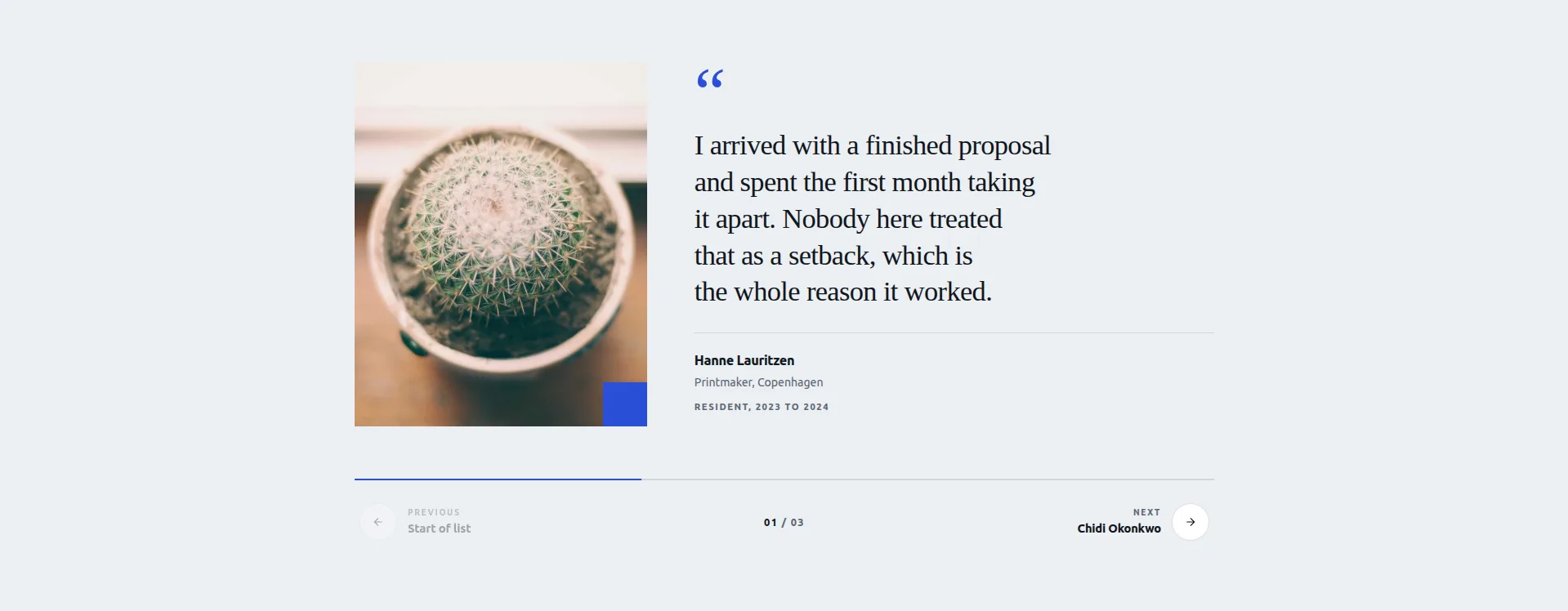
Live-Demo Widget JSON herunterladen
Welche Methode verwendet werden soll
| Methode | Kosten | Am besten wann |
|---|---|---|
| Elementor Pro Testimonialkarussell | Elementor Pro | Pro hast du schon und willst es in drei Minuten geschafft haben |
| Rostrum-Zitat-Slider (Import) | Kostenlos | Sie befinden sich auf kostenlosem Elementor und möchten einen entworfenen Schieberegler, keine leere Leinwand |
| Karten-Widget in einem Karussellbehälter | Kostenlos | Sie möchten die Karte von Grund auf selbst gestalten |
Ein Fall noch: wenn Ihr Beweis Screenshots von Bewertungen sind und es keinen Zitatetext zum Tippen gibt, eine einfache Bild Karussell Mit einer Lightbox zeigt sie besser als ein Testimonial-Layout.
Wenn Sie Elementor Pro
Durchsuchen Sie das Panel nach „Testimonialkarussell“ziehen Sie das Widget hinein und füllen Sie den Repeater mit einer Zeile pro Testimonial: Inhalt, Name, Titel, Bild. Zwei Einstellungen, die es wert sind, von den Standardeinstellungen geändert zu werden: Folien pro Ansicht auf 2 auf dem Desktop und 1 auf dem Mobilgerät und automatische Wiedergabe aus, da das Lesen eines Testimonials acht Sekunden dauert und die automatische Wiedergabe der Standardeinstellungen fünf beträgt.
Es ist in Ordnung und es ist schnell Seine Einschränkung ist, dass das Kartenlayout fest ist Man bekommt die Presets und den Style-Tab, kein markantes Design, wenn das reicht, hört auf zu lesen und geht es bauen.
Die kostenlose Option: Rostrum Zitat Slider
Rostrum ist eines der kostenlosen Widgets in der Karussellkollektion Master AddonsUnd es wurde speziell für Erfahrungsberichte entwickelt. Das Layout besteht aus einem Zitatfeld neben einem Porträt: Chevrons treten zwischen Stimmen, eine Fortschrittsleiste und eine Zählung zeigen an, wo Sie sich befinden, und die Schritttasten können die nächste Stimme benennen, also lautet die Schaltfläche anstelle eines anonymen Pfeils wie „Weiter: Sarah, Operations Lead“” Die übergroße Anführungszeichenmarke ist bearbeitbar und das Ganze reagiert auf Tastaturnavigation und Wischen.
Jede Stimme trägt fünf Felder: Porträt, Zitat, Name, Rolle und Tenure Drei Stimmen werden mit dem Widget ausgeliefert, jede hinter einem Show-Toggle, sodass Sie eine, zwei oder alle drei ausführen können.
Das ehrliche Manko: drei Stimmen sind das Format Es ist ein kuratierter Slider für Ihre stärksten Zitate, kein abfragegesteuertes Widget, das jedes Testimonial zieht, das Sie jemals gesammelt haben Wenn Sie ein Dutzend rotierende Bewertungen benötigen, skaliert die handgefertigte Methode darunter weiter.
Wie man es baut: Schritt für Schritt
- Installieren Sie das kostenlose Master Addons Plugin Wenn es nicht schon aktiv ist Es ist das gleiche Plugin, das auf 30.000+ Seiten läuft, und der Import funktioniert auf der freien Stufe.
- Laden Sie den Rostrum-Zitat-Slider JSON herunter Aus dem Kostenlose Elementor-Slider-Vorlagensammlung. Es ist Design 18 der 20.
- Importieren Sie es. Gehen Sie im WordPress-Admin zu Master-Addons → Widget Builder → Widget importieren und ziehen Sie die JSON-Datei in den Importeur.
- Öffnen Sie Ihre Seite in Elementor. Das Widget erscheint im Panel unter Favoriten. Rostrum-Zitat-Slider in einen Container ziehen.
- Die erste Stimme füllen: Porträt, Zitat, Name, Rolle, Amtszeit Führen Sie mit Ihrem spezifischsten Zitat, dem mit einer Zahl oder einem Ergebnis darin.
- Schalten Sie die zweite und dritte Stimme ein Mit ihren Show-Toggles und füllen Sie sie genauso aus Schalten Sie alle aus, die Sie nicht benötigen.
- Legen Sie die Beschriftungen der Schritttaste fest. Die Benennung der nächsten Stimme auf dem Button gibt den Leuten einen Grund zum Klicken Es ist das beste Konvertierungsdetail des Widgets, also verwenden Sie es.
- Überprüfen Sie das Anführungszeichen und testen Sie die Navigation. Passen Sie die bearbeitbare Anführungszeichen an Ihre Typografie an und geben Sie dann eine Vorschau an: Winkel, Tastaturpfeile und Wischen auf einem Telefon.
Die Gesamtzeit beträgt etwa fünf Minuten. Der Großteil davon wurde mit der Auswahl der drei Angebote verbracht, die den Platz verdienen.
Eine weitere Option aus derselben Sammlung: Stratum Deck„ein Pro-Design, bei dem Karten gestapelt werden und sich die oberste ablöst. Es passt natürlich zu Erfahrungsberichten, wenn Sie anstelle eines Zitatfelds ein Kartendeck-Feeling wünschen.
Wenn man es lieber von Hand bauen möchte
Die From-Scratch-Route macht immer noch Sinn, wenn Sie ein Kartendesign wünschen, das genau zu Ihrer Marke passt, oder mehr Erfahrungsberichte, als ein dreistimmiger Schieberegler hält. Sie entwerfen die Karte selbst, also planen Sie zehn statt fünf Minuten ein.
- Bauen Sie zuerst eine Karte. Ein Karten-Widget in einen Container werfen Drinnen: der Zitatetext, ein Avatar-Bild, ein Name, eine Rolle, und eine Sternzeile, wenn du Bewertungen hast Style es komplett: Polsterung, Hintergrund, Randradius, Anführungszeichen, Typografie Hol dir diese eine Karte genau richtig, bevor du etwas duplizierst.
- Die Karte duplizieren Für jedes Testimonial und tauschen Sie den Inhalt aus Sechs ist eine gute Zahl: genug, um sich substanziell zu fühlen, wenige genug, dass der Abschnitt nicht zu einem Wartungsjob wird.
- Verwandeln Sie den Elterncontainer in ein Karussell. Schalten Sie in den Layouteinstellungen des Containers die Anzeige auf Karussell Sie erhalten Dias-per-View, Autoplay, Loop, Pfeile und Punkte, das gleiche Wischersteuerungen Die dedizierten Widgets verwenden, da es sich um dieselbe Bibliothek darunter handelt.
- Setzen Sie Folien pro Ansicht pro Haltepunkt. Zwei auf dem Desktop, eines auf dem Tablet und auf dem Handy. Testimonials sind Text, und Text braucht Breite.
- Gestalten Sie die Navigation Unter den Karten zu sitzen, anstatt sie zu überlappen Ein Pfeil oben auf einem Zitat bedeckt ein Wort, und ein bedecktes Wort ist das, auf das sich die Leute fixieren.
Keine Lizenz erforderlich, und die Karte gehört Ihnen Wenn Sie eine visuelle Referenz für das Muster wünschen, wird die Seite Kundenbewertungen von Master Addons Verwendet es.
Die Schema-Falle
Das ist der Teil, der mehr zählt als das Layout.
Es ist verlockend, einem Testimonialkarussell ein Review - oder AggregateRating-Schema hinzuzufügen, damit Sterne in den Suchergebnissen auftauchen Nicht, zumindest nicht für Testimonials über das eigene Geschäft auf der eigenen Seite.
In den strukturierten Datenrichtlinien von Google wird ausdrücklich darauf hingewiesen, dass eigennützige Bewertungen nicht für rezensionsreiche Ergebnisse in Frage kommen. Bewertungen eines Unternehmens müssen von einer unabhängigen Quelle stammen, nicht vom Unternehmen selbst. Websites, die ihre eigenen Homepage-Testimonials als Bewertungsschema markieren, lassen den Aufschlag bestenfalls ignorieren, und im schlimmsten Fall eine strukturierte Aktion im Datenhandbuch.
Was Sie berechtigterweise tun können: Markieren Sie einzelne Produktseiten mit Bewertungen, die Sie über ein Bewertungssystem von tatsächlichen Kunden erhalten haben, und verwenden Sie sie Organization Schema auf der Startseite ohne Bewertungseigenschaften Wenn Sie Sterne in der Suche haben möchten, sammeln Sie Bewertungen auf Google Business Profile, G2 oder Trustpilot, da diese als Drittanbieter angezeigt werden.
Ein Testimonialkarussell ist ein Konvertierungselement Behandeln Sie es als eins, und lassen Sie das Schema davon Wenn Sie nur ein gezogenes Zitat wollen, das auf sich selbst sitzt, anstatt eine rotierende Menge, wird die Blockquote-widget Erledigt diesen Job ohne Aufschlag.
Designentscheidungen, die Conversions verändern
Gesichter schlagen Logos. Ein Foto einer Person übertrifft ein Firmenlogo, und beide schlagen keines von beiden Darauf baut das Portrait-Aben-Zitat-Layout von Rostrum aufWenn man kein Foto bekommt, schlagen Name und Rolle ein anonymes Zitat noch um Längen.
Spezifische Schläge leuchten. “Schneiden Sie unsere Seitenaufbauzeit von zwei Tagen auf drei Stunden” leistet mehr als “Amazing-Plugin, wärmstens empfehlen!”, auch wenn die zweite enthusiastischer klingt Ziehen Sie die konkrete Zeile aus einem längeren Testimonial und führen Sie mit.
Nicht autoplay. Testimonials sind der eine Karussell-Typ, bei dem Autoplay aktiv weh tut, denn der Inhalt ist dichter Text, dessen Lesen länger dauert als jede sinnvolle Folienverzögerung Rostrum tritt auf Klick, Tastatur oder Wischen, was vom Design her lesergesteuert ist Wenn Sie von Hand bauen, lassen Sie das Autoplay ausschalten.
Zeigen Sie die Zählung. Eine Zählung signalisiert Lautstärke in einer Weise, wie es anonyme Punkte nicht tun, weshalb Rostrum seine Fortschrittsleiste mit einem koppelt Wenn Sie viele glückliche Kunden haben, sagen Sie es mit der Steuerung.
Zwei auf dem Desktop, nicht drei. Bei handgefertigten Karussells: drei Spalten Zitatetext auf einem 1440 px Bildschirm gibt jeder etwa 380 px, was unter dem komfortablen Lesemaß liegt Zwei ist die Zahl.
Häufig gestellte Fragen
Hat Elementor ein Testimonial-Karussell-Widget?
Elementor Pro schon: das Testimonial Carousel Widget mit Repeater für Anführungszeichen, Namen und Bilder Das kostenlose Plugin von Elementor enthält es nicht Auf der freien Stufe ist der schnellste Weg der Import des Rostrum Quote Sliders durch den Widget Builder von Master Addons, oder der Bau einer eigenen Karte im Inneren eines Containers, der auf Karussell-Display eingestellt ist.
Wie füge ich einen Testimonial-Slider kostenlos in Elementor hinzu?
Importieren Sie den kostenlosen Rostrum-Anführungszeichen-Slider: Laden Sie den JSON herunter, gehen Sie zu Master-Addons → Widget Builder → Widget im WordPress-Admin importieren, ziehen Sie die Datei hinein und das Widget erscheint in Elementor unter Favoriten Füllen Sie das Porträt, Zitat, den Namen, die Rolle und die Amtszeitfelder jeder Stimme und Sie sind fertig, ohne dass eine Pro-Lizenz erforderlich ist.
Sollte ein Testimonial-Karussell-Autoplay erfolgen?
Nein. Das Lesen eines Testimonials dauert sechs bis zehn Sekunden und die typischen Verzögerungen bei der automatischen Wiedergabe betragen drei bis fünf. Besucher verlieren den Satz mitten durch und lösen sich. Lassen Sie das Autoplay aus und lassen Sie die Leute weiterkommen, wenn sie bereit sind, denn Testimonials sind der eine Karusselltyp, bei dem der Timer gegen Sie arbeitet.
Kann ich einem Elementor-Testimonialkarussell Sternebewertungen hinzufügen?
Ja, als visuelles Element: eine Icon-Reihe oder ein Bewertungsfeld im handgefertigten Kartendesign, was Sie nicht tun sollten, ist Review - oder AggregateRating-Schema-Markup für Erfahrungsberichte über Ihr eigenes Unternehmen hinzuzufügen, denn Google erlaubt keine eigennützigen Bewertungen in Rezensionsreichen Ergebnissen und das Markup kann eine manuelle Aktion auslösen.
Wie viele Erfahrungsberichte sollte ein Karussell haben?
Drei starke schlagen zwölf vage, und das dreistimmige Format von Rostrum zwingt diese Disziplin dazu, meist ist es die richtige AufforderungWenn man Hand baut und mehr Material hat, sechs bis zwölf Werke; nach zwölf erreicht niemand das Ende, also wechseln Sie zu einem gefilterten Set pro Seite statt zu einem langen Streifen.
Wie mache ich Testimonials automatisch aktualisieren?
Registrieren Sie einen benutzerdefinierten Testimonial-Posttyp und verwenden Sie dann ein abfragegesteuertes Karussell-Widget, das darauf zeigt: das kostenlose Blog-widget Im Karussellmodus oder im Elementor Pro Schleifenkarussell Mit einer Loop Item Vorlage Neue Testimonial-Beiträge erscheinen in jedem Karussell der Seite, ohne Seiten zu bearbeiten.
Was als nächstes zu tun ist
Wenn Sie Elementor Pro haben, ist sein natives Widget der kürzeste Weg. Im kostenlosen Elementor importieren Sie den Rostrum-Anführungszeichen-Slider und verbringen Sie die eingesparte Zeit damit, Ihre drei besten Angebote auszuwählen, da diese Auswahl die Konvertierungen stärker bewegt als jede Styling-Steuerung. Bauen Sie von Hand nur, wenn der Design-Short es erfordert.
Rostrum importiert auf dem kostenlosen Plugin, wenn Sie später die zwölf Pro-Designs sowie Preisseite Ebenen hat, und die 3 D Karussell Designs Zeigen, wie die Paid Motion Styles tatsächlich aussehen.
Bevor Sie etwas von Grund auf neu aufbauen, überprüfen Sie, was bereits vorhanden ist: die Leitfaden für Elementorkarussell-Widgets Listet jedes Karussell-Widget und -Design auf und Die Free-versus-Pro-Aufschlüsselung Zeigt genau an, wo der freie Rang hält.
