

الشاشة الاسمية هي المحتوى الذي يتم تمريره بشكل مستمر في اتجاه واحد ولا يتوقف أبدًا: لا توجد أسهم ولا نقاط ولا حدود شرائح. القديم <marquee> لقد ماتت علامة HTML منذ سنوات، لكن التأثير عاد في عام 2021 تقريبًا وهي الآن موجودة على نصف مواقع الوكالات التي ستزورها.
ثلاث طرق لبناء واحدة في Elementor: مجانًا أداة تمرير الشعار للشعارات، ال شريط الأخبار بالنسبة للنص، أو حوالي اثني عشر سطرًا من CSS إذا كنت تريد ذلك على شيء لا تغطيه عناصر واجهة المستخدم. الشاشة الاسمية هي حقا القطعة دائري مع إزالة نقاط التوقف، ولهذا السبب تبدأ طريقتان من الطرق الثلاث من طريقة واحدة. الثلاثة أدناه، مع التفاصيل التي تحدد ما إذا كانت حلقاتك تلتقط بشكل نظيف أو واضح.
الشيء الوحيد الذي يجعل الشاشة الاسمية تبدو مكسورة
ابدأ هنا، لأن هذا هو السبب الذي يجعل معظم السرادقات المصنوعة يدويًا تبدو خاطئة.
الشاشة الاسمية عبارة عن شريط من المحتوى ينزلق يسارًا حتى يخرج عن الشاشة، ثم يعود إلى البداية. إذا كانت هناك نسخة واحدة فقط من المحتوى، فستحصل على فجوة. يغادر الذيل، وهناك مساحة فارغة حتى يعود الرأس مرة أخرى.
الإصلاح هو تكرار المسار. نسختان متطابقتان جنبًا إلى جنب، متحركتان بعرض نسخة واحدة بالضبط. عند إعادة ضبط الرسوم المتحركة، تكون النسخة الثانية موجودة بالضبط حيث كانت النسخة الأولى، وتكون القفزة غير مرئية.
هذا كل شيء. هذه هي التقنية بأكملها. كل سرادق رأيته يتكرر بسلاسة يفعل ذلك، وكل سرادق يتلعثم لا يفعل ذلك.
الطريقة الأولى: سرادق الشعار مع شريط تمرير الشعار المجاني
إذا كنت تقوم بتمرير شعارات العميل، وهو ما تهدف إليه معظم السرادقات، فإن القطعة شريط التمرير الشعار يفعل ذلك بدون CSS. إنه موجود في البرنامج المساعد المجاني.
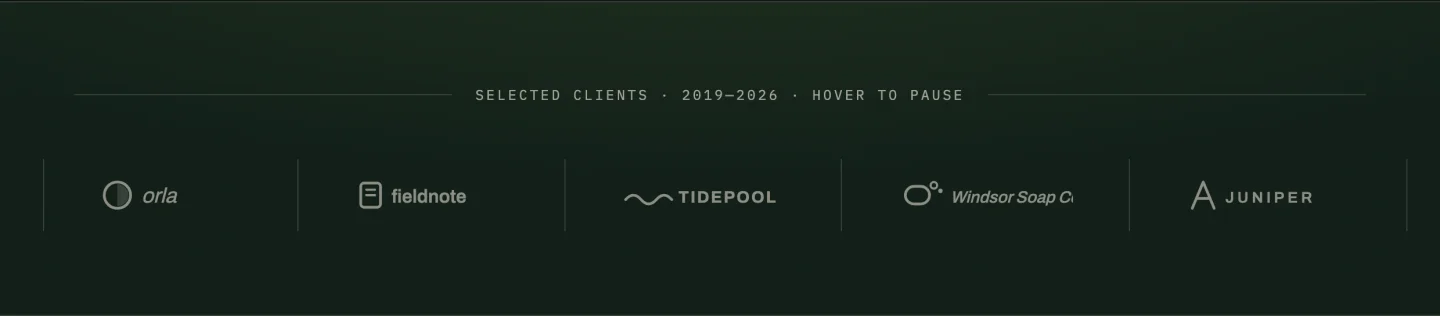
- اسحب شريط تمرير الشعار إلى الصفحة وأضف شعارك في المكرر، صف واحد لكل منها، مع رابط اختياري.
- افتح إعدادات الكاروسيل وقم بتشغيل التشغيل التلقائي، ثم الحلقة اللانهائية.
- قم بتعيين تأخير التشغيل التلقائي إلى 0. هذا هو المفتاح الذي يحول الرف الدائري إلى سرادق. التأخير بمقدار الصفر يعني أنه لا يتوقف أبدًا على الشريحة، وبالتالي تصبح الحركة مستمرة بدلاً من أن تكون متدرجة.
- ضبط السرعة على شيء بطيء، 4000 إلى 6000 مللي ثانية. يقرأ السرادقات بهدوء عندما تكون أبطأ مما تتوقع. تبدو الحالات السريعة وكأنها حالة خطأ.
- قم بإيقاف تشغيل الأسهم والنقاط. التنقل على الشاشة الاسمية متناقض؛ لا يوجد شيء للتنقل إليه.
- قم بإيقاف تشغيل الإيقاف المؤقت أثناء التحليق إذا كنت تريد أن يكون مستمرًا حقًا، أو اتركه قيد التشغيل إذا كانت الشعارات قابلة للنقر عليها.
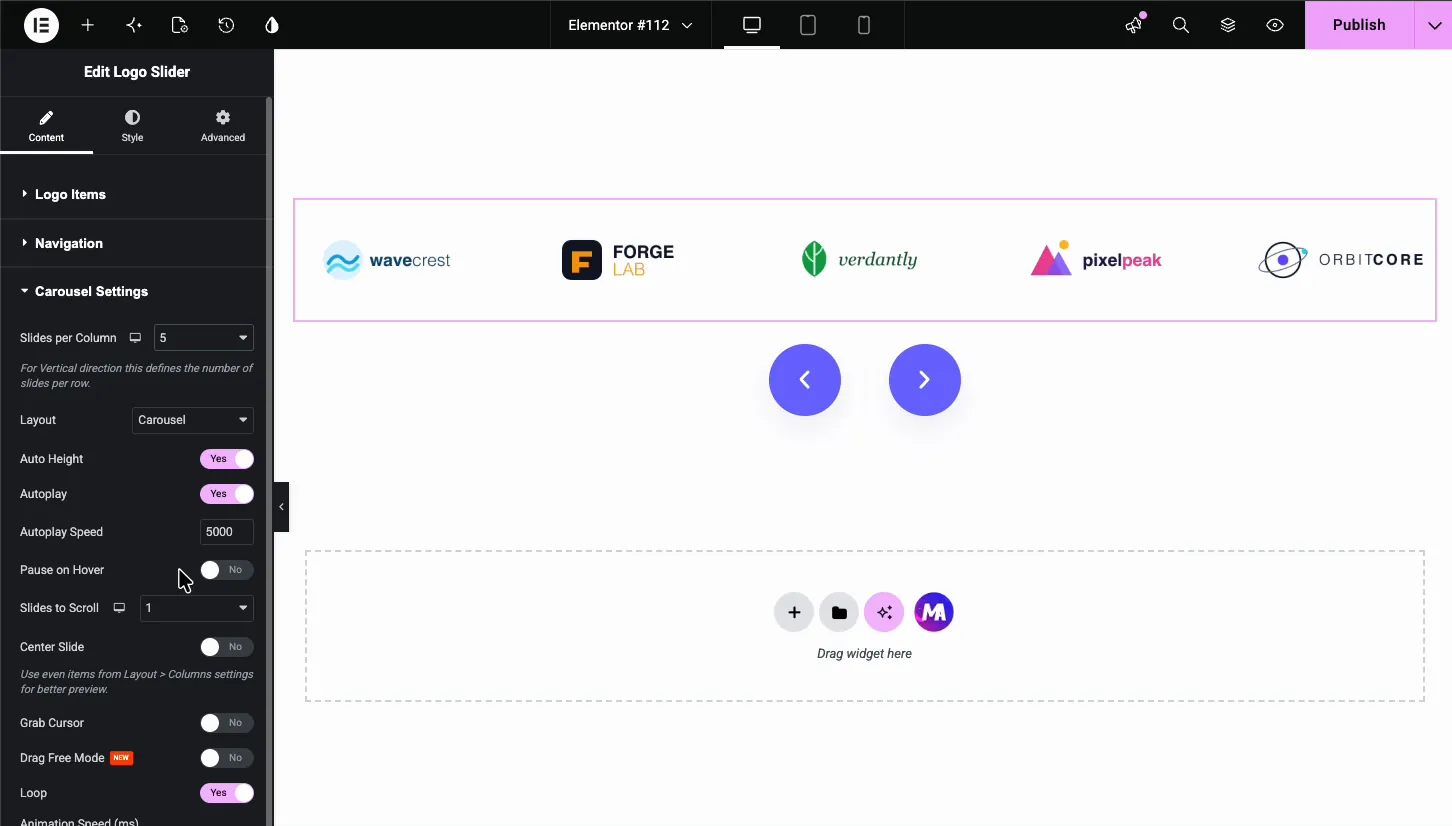
شرائح لكل عرض تتحكم في الكثافة. ستة على سطح المكتب، وثلاثة على الجهاز اللوحي، واثنان على الهاتف المحمول يبقي الشعارات مقروءة. لا تنخفض إلى واحد، لأن الشاشة الاسمية التي تعرض شعارًا واحدًا في كل مرة تتوقف عن القراءة كشريط.
المزيد عن شرائط الشعار التصميمية، بما في ذلك معالجة التحويم ذات التدرج الرمادي وكيفية تسوية أحجام الشعار غير المتطابقة تجول الشعار الدائري. لمعرفة ما يوجد أيضًا في الطبقة الحرة، راجع انهيار القطعة الدائرية المجانية.
الطريقة الثانية: سرادق النص مع شريط الأخبار
لتمرير النص (الإعلانات، والعناوين الرئيسية، وشريط شريط الأسهم)، تعد أداة شريط الأخبار هي الخيار المصمم لهذا الغرض. إنها أداة احترافية.
إنه يتعامل مع الأشياء التي يخطئ فيها سرادق النص الملفوف يدويًا: يمكنه السحب من استعلام منشور بدلاً من قائمة ثابتة، لذلك يقوم شريط “آخر أخبار” بتحديث نفسه، ويحتوي على كتلة تسمية ثابتة على اليسار تظل في مكانها أثناء يتم تمرير المحتوى عبره. هذا التصنيف هو التفاصيل التي تجعل المؤشر يُقرأ كمؤشر وليس كنص منجرف.
اضبط الاتجاه والسرعة وسلوك الإيقاف المؤقت في إعدادات الأداة. شيئين يستحقان القيام بهما:
- توقف مؤقتًا عند التحليق، قيد التشغيل. إذا كانت العناوين الرئيسية عبارة عن روابط، فسيحتاج الأشخاص إلى هدف ثابت.
- إبقاء العناصر قصيرة. يستغرق الشريط الذي يحتوي على عناوين مكونة من 90 حرفًا وقتًا طويلاً حتى لا يرى أحد العنصر الرابع. اقتطاع إلى حوالي 50 حرفًا.
إذا كان ما تريده بالفعل هو نقل النص بدون التمرير، عنوان واحد حيث تدور الكلمات في مكانها، وهو القطعة العناوين المتحركة هو أقرب ملاءمة من أي سرادق.
الطريقة الثالثة: قم ببناء واحدة باستخدام CSS
بالنسبة لأي شيء لا تغطيه عناصر واجهة المستخدم (شريط من اقتباسات الشهادة، صف من الرموز، محتوى مختلط) فإن الشاشة الاسمية عبارة عن اثني عشر سطرًا من CSS. ضع العلامات في عنصر واجهة مستخدم HTML وCSS في حقل CSS المخصص لـ Elementor أو سمة طفلك.
<div class="ma-marquee">
  <div class="ma-marquee__track">
    <span>Item one</span><span>Item two</span><span>Item three</span>
    <span>Item one</span><span>Item two</span><span>Item three</span>
  </div>
</div>
لاحظ أن المحتوى يظهر مرتين. هذا هو المسار المكرر من السابق، وليس خطأ نسخ ولصق.
.ma-marquee {
  overflow: hidden;
}
.ma-marquee__track {
  display: flex;
  gap: 3rem;
  width: max-content;
  animation: ma-scroll 30s linear infinite;
}
.ma-marquee:hover .ma-marquee__track {
  animation-play-state: paused;
}
@keyframes ma-scroll {
  to { transform: translateX(-50%); }
}
@media (prefers-reduced-motion: reduce) {
  .ma-marquee__track { animation: none; }
}
أربعة أشياء في هذا الشأن:
translateX(-50%)يحرك المسار بعرض نسخة واحدة بالضبط، لأن المسار عبارة عن نسختين. وهذا ما يجعل الحلقة غير مرئية.linearلاease. تعمل الشاشة الاسمية المريحة على تسريع وإبطاء كل دورة، وهو ما يبدو وكأنه خطأ.width: max-contentيوقف التفاف المسار المرن.- الاستعلام ذو الحركة المنخفضة ليست اختيارية. الحركة الأفقية المستمرة هي مصدر صداع نصفي موثق ومحفز دهليزي، والسرادق هو الجاني الأكثر شيوعًا على شبكة الإنترنت الحديثة. تكريم الإعداد.
لعكس الاتجاه، قم بالتحريك من translateX(-50%) إلى 0. للعمودي، مبادلة إلى translateY وضبط ارتفاع الحاوية.
ما مدى سرعة تحرك الشاشة الاسمية؟
أبطأ مما تقوله الغريزة. نقطة البداية الجيدة هي 30 ثانية لدورة كاملة من مسار مكون من ستة عناصر، وهو ما يبدو بطيئًا جدًا تقريبًا في المحرر ويُقرأ على أنه واثق على الصفحة المباشرة.
الاختبار: هل يستطيع الزائر قراءة عنصر واحد دون تتبعه بأعينه؟ إذا كان عليهم متابعة الحركة، فهي سريعة جدًا، ويصبح الشريط بأكمله شيئًا يجب النظر بعيدًا عنه.
يمكن أن تسير الشعارات بشكل أسرع من النص، لأنه يتم التعرف على الشعار بدلاً من قراءته. يحتاج النص إلى مضاعفة وقت المكوث تقريبًا. الكاروسيل المتدرج هو الحالة المعاكسة، حيث التشغيل التلقائي عادة ما يكون خطأ لأن العناصر قابلة للنقر.
هل الشاشة الاسمية سيئة لتحسين محركات البحث أو إمكانية الوصول؟
تحسين محركات البحث، لا. المحتوى هو نص حقيقي في DOM، قابل للزحف والفهرسة. تكرار المسار يعني أن النص يظهر مرتين في المصدر، وهو أمر يستحق أن تكون على علم به ولكنه ليس مشكلة محتوى مكرر على هذا المقياس، لأنه عبارة عن عدد قليل من الكلمات داخل عنصر واحد. إذا أزعجك، ضع علامة على النسخة الثانية aria-hidden="true"وهو ما يجب عليك فعله على أي حال.
إمكانية الوصول هي الاعتبار الحقيقي، وهناك ثلاث قضايا حقيقية:
- حساسية الحركة. يتم التعامل معها بواسطة الاستعلام ذو الحركة المنخفضة أعلاه. غير قابل للتفاوض.
- نقل أهداف الارتباط. إذا كانت العناصر قابلة للنقر، فتوقف مؤقتًا عند التمرير والتركيز. الرابط الذي ينزلق بعيدًا عندما يصل إليه شخص ما يفشل في توقعات الحجم المستهدف لـ WCAG 2.2 روحيًا إن لم يكن حرفيًا.
- قارئات الشاشة تقرأه مرتين. يتم الإعلان عن المسار المكرر مرتين ما لم تقم بإخفاء النسخة الثانية من شجرة إمكانية الوصول. سمة واحدة تصلحه.
لا شيء من هذا يجعل الشاشة الاسمية فكرة سيئة. إنها تجعل فكرة غير مكونة فكرة سيئة.
الأسئلة المتداولة
هل يحتوي Elementor على عنصر واجهة مستخدم سرادق؟
ليس في النواة. لا يحتوي Elementor على أداة سرادق أو شريط مخصص في البرنامج الإضافي المجاني أو Pro. يمكنك الحصول على التأثير من ملحق (شريط تمرير الشعار المجاني مع تأخير التشغيل التلقائي مضبوطًا على الصفر، أو شريط الأخبار لتمرير النص) أو عن طريق كتابة CSS بنفسك. لا شيء هنا يُباع كأداة سرادق؛ يعد شريط الأخبار (Pro) أقرب شيء مصمم لهذا الغرض، نظرًا لأن التمرير المستمر هو الغرض منه، ولكنه يتشكل حول شرائط العناوين الرئيسية بدلاً من المحتوى العشوائي.
كيف يمكنني جعل النص يتم تمريره بشكل مستمر في Elementor؟
خياران. تتعامل أداة شريط الأخبار مع الإعدادات، بما في ذلك سحب العناوين الرئيسية من استعلام منشور. أو قم بإضافة عنصر واجهة مستخدم HTML مع مسار محتوى مكرر وتحريك إطار مفتاح CSS translateX إلى -50% على حلقة خطية لا نهائية.
لماذا تقفز الشاشة الاسمية أو تتلعثم عندما تتكرر؟
المسار غير مكرر، أو أن مسافة الرسوم المتحركة لا تتطابق مع عرض نسخة واحدة. تحتاج الشاشة الاسمية إلى نسختين متطابقتين من المحتوى ورسوم متحركة تتحرك بالضبط بنسبة 50% من إجمالي عرض المسار. أي مسافة أخرى وسترى لقطة مرئية في كل دورة.
كيف يمكنني إيقاف سرادق مؤقتًا أثناء التحليق؟
باستخدام أداة Logo Slider، يتم التبديل في إعدادات الكاروسيل. في CSS هو animation-play-state: paused على تحليق الحاوية. يضيف :focus-within بجانب :hover لذلك يحصل مستخدمو لوحة المفاتيح على نفس الإيقاف المؤقت.
هل يمكنني عمل سرادق عمودي في Elementor؟
نعم. تحريك translateY بدلا من translateX، اضبط ارتفاعًا ثابتًا للحاوية، وقم بتكديس المسار المكرر في عمود بدلاً من صف. السرادقات العمودية تناسب شرائط الشهادات وخلاصات الإشعارات بشكل أفضل من الشعارات.
هل لا تزال علامة HTML المميزة مدعومة؟
لا تزال المتصفحات تعرض <marquee>، ولكن تم إهماله لسنوات، وهو ليس في مواصفات HTML، ولا يمنحك أي تحكم في التيسير أو الإيقاف المؤقت أو تقليل الحركة. استخدم الرسوم المتحركة CSS بدلاً من ذلك: نفس التأثير، وسلوك أفضل، ولن تختفي في إصدار المتصفح المستقبلي.
أي طريقة للاستخدام
الشعارات: شريط تمرير الشعار المجاني، تأخير التشغيل التلقائي صفر. يتم تنفيذه خلال دقيقتين ويتعامل مع الكثافة المستجيبة لك.
الصور هي حالة مختلفة. إذا كان يجب على الزوار التوقف عن كل صورة أو فتحها بالحجم الكامل ، فاستخدم صورة دائري القطعة مع الأسهم وصندوق الضوء. لا تتوقف السرادق أبدًا لفترة كافية لإلقاء نظرة مناسبة.
لا شيء من العشرين منشئ القطعة التصميمات عبارة عن سرادق، لذا يظل Logo Slider هو الأداة لهذه المهمة. ال صفحة التسعير يُظهر مكان وجود شريط الأخبار إذا كنت تريد الإصدار المصمم لهذا الغرض.
عناوين التمرير: شريط الأخبار، لأن مصدر الاستعلام والتسمية الثابتة يستحقان الترخيص بمفردهما.
أي شيء آخر: CSS. إنه قصير، إنه ملكك، ولا شيء يمكن أن يستنكره. يمكن لمنشئي أشرطة التمرير المستقلة أيضًا القيام بمسارات مستمرة، و مقارنة البرنامج المساعد المنزلق يغطي ما تكلفه الصفحة.
يتم جمع كافة عناصر واجهة المستخدم الدائرية وشريط التمرير، بما في ذلك تلك التي تقوم بواجب الشاشة الاسمية، على الحاجيات الدائرية العنصر الصفحة، جنبا إلى جنب مع 20 تصميمًا دائريًا ومنزلقًا قابلاً للاستيراد8 منهم مجانا. إذا كانت الشاشة الاسمية الخاصة بك تسيء التصرف بعد تحديث البرنامج المساعد للتخزين المؤقت، فسيتم الإصلاح دليل استكشاف أخطاء شريط التمرير Swiper وإصلاحها تنطبق هنا أيضا.
