

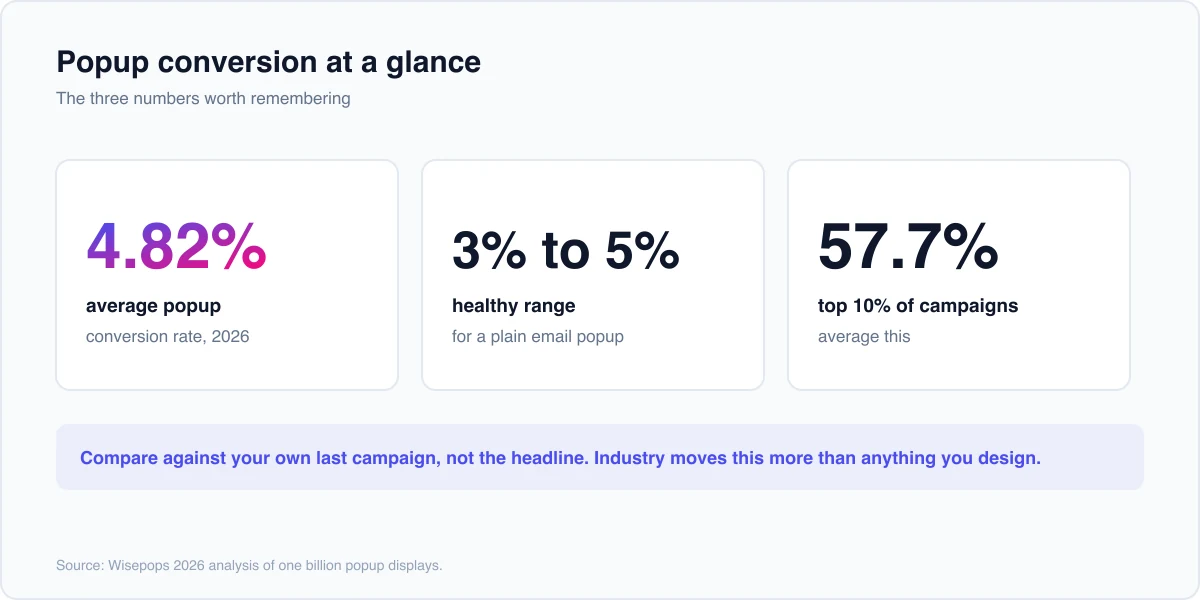
La popup moyenne convertit en 4,82%4, et tout ce qui se situe entre 3 % et 5 % est sain pour une simple fenêtre contextuelle de courrier électronique. Les 10 % des campagnes les plus importantes sont en moyenne de 57,7 %, ce qui vous indique dans quelle mesure le résultat se résume à un déclenchement, une offre et un timing plutôt qu'à la fenêtre contextuelle elle-même.
Chaque chiffre ici provient d'études couvrant plus d'un milliard d'affichages contextuels, et chacun est attribué là où il apparaît. La dernière section mappe les benchmarks sur les paramètres que vous pouvez modifier aujourd'hui avec une fenêtre contextuelle Elementor gratuite.
Les numéros de référence
Le titre est de 4,82 % C'est la moyenne à travers Analyse 2026 de Wisepops d'un milliard d'affichages contextuels4,65 % par rapport à l'année précédente.
Différentes études comptent différentes choses, donc la moyenne bouge en fonction de qui publie Popupsmart rapporte 3,49 % sur plus de 10 000 campagnes OptiMonk met sa moyenne à 11,09 %, car elle mesure une tranche de trafic différente Traitez 3 % à 5 % comme la plage de travail et tout ce qui se trouve au-dessus comme une véritable victoire.
L’industrie change la donne plus que ce à quoi la plupart des gens s’attendent.
| Industrie | Taux de conversion moyen |
|---|---|
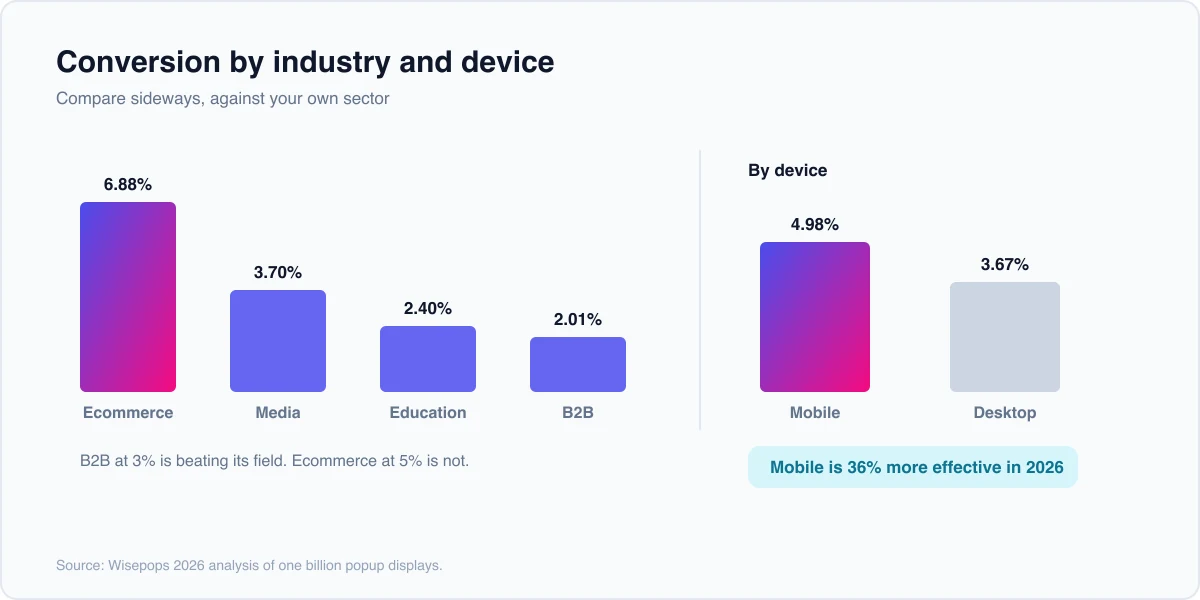
| Commerce électronique | 6,88% |
| Médias | 3,70% |
| Éducation | 2,40% |
| B2B | 2,01% |
Un site B2 B dégageant 3 % se porte mieux par rapport à son propre champ qu'un magasin de commerce électronique bloqué à 5 % Votre propre secteur est la comparaison qui signifie tout.
Combien faire confiance à ces chiffres
Trente secondes de méthodologie avant de mettre tout cela dans un rapport.
Chaque grand ensemble de données contextuelles est publié par une société vendant des logiciels contextuels, et il couvre les propres clients de cette société Ce sont des entreprises qui ont choisi d'installer un outil contextuel et ont continué à payer pour cela, ce qui signifie que les sous-performants ont déjà abandonné l'échantillon Les chiffres sont réels, et ils décrivent des sites qui essayaient.
Deux choses suivent Utilisez-les comme une direction de voyage plutôt que comme une cible que vous devez à quelqu'un, et traitez votre propre dernière campagne comme la référence qui compte réellement Une fenêtre contextuelle de 2 % qui avait l'habitude de convertir à 1,2 % fonctionne.
Ce qui compte comme un bon taux de conversion de popup
Un bon taux est de 3 % à 5 % pour une inscription par e-mail simple, de 8 % ou mieux une fois l'offre ciblée et à deux chiffres lorsque le déclencheur correspond à l'intention. Le plafond est bien plus élevé, puisque le décile supérieur est en moyenne de 57,7 %, soit environ douze fois la moyenne globale.
Ne prenez pas le chiffre du décile supérieur comme objectif de départ Ces campagnes empilent une offre forte, un ciblage serré et un déclencheur éprouvé, et elles y sont arrivées en itérant Battez d'abord votre propre ligne de base, puis poussez vers la bande de 8 % un changement à la fois pour savoir quel changement l'a fait.
Taux de conversion par déclencheur
Le déclencheur décide qui voit la fenêtre contextuelle et quand, donc il déplace le numéro plus que n'importe quelle décision de conception. Le clic déclenche la victoire pour une raison évidente : le visiteur a demandé la fenêtre contextuelle.
| Déclencheur | Taux de conversion moyen (2026) |
|---|---|
| Déclenché | 54,42% |
| Déclencheur alimenté par l'IA | 15,98% |
| Survole | 13,05% |
| Événement personnalisé | 10,35% |
| Sur rouleau | 5,37% |
| En charge de page | 4,72% |
| Exit l'intention | 3,94% |
Source : Wisepops 2026, un milliard d'affichages.
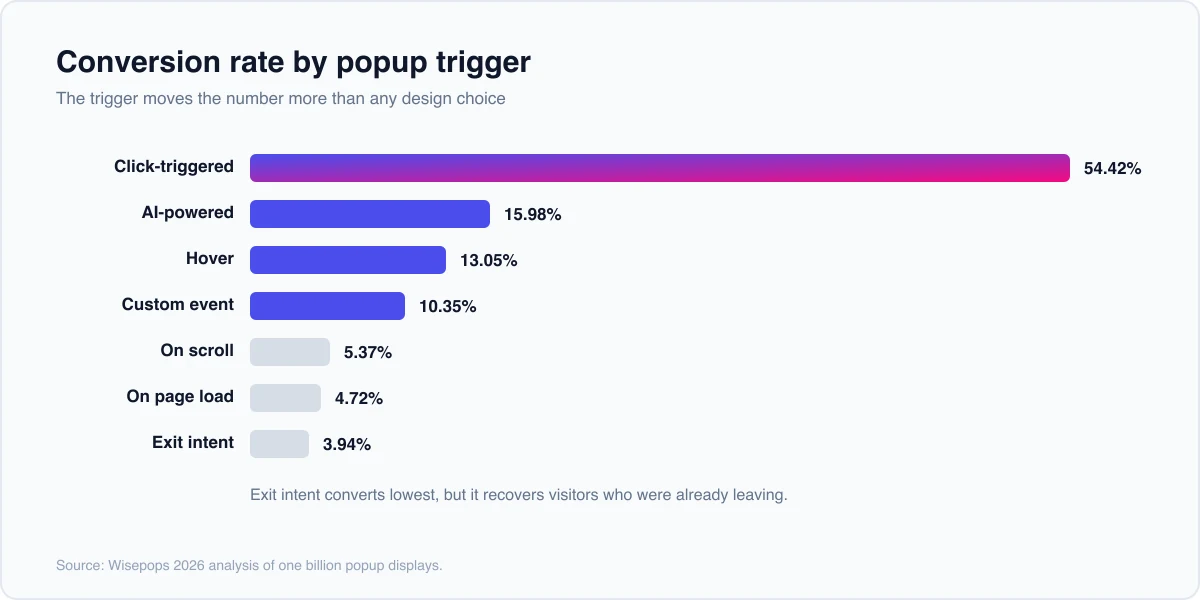
L'intention de sortie assise en bas surprend les gens, et c'est la ligne la plus mal lue du tableau Un déclencheur de clic convertit un visiteur qui a levé la main L'intention de sortie convertit un visiteur qui partait déjà Les 3,94 % sont récupérés du trafic que vous aviez autrement perdu, donc c'est additif d'une manière que les 54,42 % ne sont pas.
Les éléments qui déplacent les chiffres
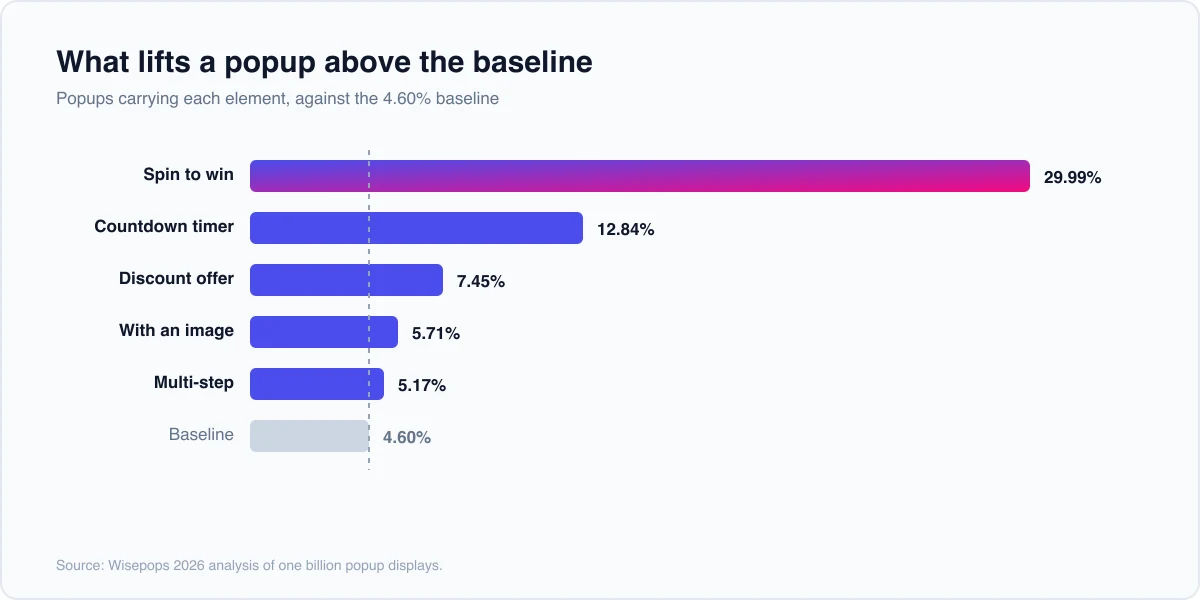
Chaque figure ci-dessous compare les popups transportant cet élément avec les popups sans lui, à partir du même ensemble de données.
- Tournez pour gagner. 29,99 %, le format de conversion le plus élevé après un déclencheur de clics Les formats gamifiés fonctionnent, et ils conviennent bien mieux au commerce électronique que le B2B.
- Minuteurs de compte à rebours. 12,84 % contre 4,73 %, un bond de 171 %, et le plus gros levier unique ici Il ne tient que lorsque le délai est réel Dans Elementor, le Widget Compte à rebours tombe dans une fenêtre contextuelle avec une date de fin fixe.
- Réductions. 7,45 % avec une offre contre la ligne de base de 4,60 %, une augmentation de 62 %.
- images. 5,71 % contre 3,98 %, soit un gain de 43 % par rapport à un visuel pertinent.
- Multi-étapes. 5,17 % contre 4,62 % pour une seule étape, car une petite première demande est plus facile à terminer qu'une grande.
Le timing compose tout cela Les popups affichés après qu'un visiteur a lu deux pages convertis à 9,84 % La fenêtre de retard de 11 à 15 secondes culmine à 6,45 % Le tir vous fait immédiatement tomber à 4,16 %, donc une courte attente se paie deux fois.
Le ciblage est le multiplicateur silencieux Les popups de nouveaux visiteurs atteignent 8,30 %, et l'URL ciblant plus que double la conversion à 5,53 % par rapport à la ligne de base non ciblée Le bon message sur la bonne page bat un titre plus intelligent sur chaque page.
Mobile contre ordinateur
Les popups mobiles convertissent à 4,98 % contre 3,67 % sur ordinateur, rendant le mobile 36 % plus efficace en 2026. Cela inverse l'ancienne hypothèse selon laquelle un petit écran est un mauvais endroit pour une superposition.
Le catch est la conformité plutôt que la conversion Un popup mobile doit être facile à rejeter et ne doit pas couvrir la page au moment où quelqu'un arrive de la recherche Concevez pour un pouce, gardez le bouton de fermeture évident et retardez le déclencheur.
Les popups nuisent au référencement
Dans un cas précis, oui. Un interstitiel intrusif qui bloque le contenu principal sur mobile lorsqu'un visiteur arrive de la recherche est le modèle décrit par les conseils de Google, et le risque est réel plutôt que folklorique.
Tout le reste va bien L'intention de sortie, les popups en défilement et retardés ne déclenchent pas la règle, car ils ne bloquent pas l'expérience d'atterrissage Si une popup est simplement ennuyeuse plutôt que pénalisée, le correctif est le même : un meilleur timing et une offre qui vaut l'interruption.
Il y a aussi des endroits où sauter entièrement des popups Une page de paiement, un flux de connexion ou une disposition mobile exiguë perdra plus que ce que rapporte la superposition Savoir où ne pas tirer fait partie du ciblage.
Comment atteindre ces benchmarks sur Elementor gratuit
Rien de tout cela n'a besoin d'Elementor Pro. Le Créateur de fenêtres contextuelles Master Addons ajoute un système contextuel à Elementor gratuit, tout en précisant clairement quelles parties du niveau libre atteignent ces nombres : les fenêtres contextuelles automatiques s'exécutent en charge de page et le ciblage est une règle unique pour l'ensemble du site. Cliquez, faites défiler, l'intention de sortie et le ciblage au niveau de la page sont Pro. Le gratuit Widget Déclencheur Popup est un bouton fermé à l'intérieur de la popup, et il n'en ouvre pas. Les créations prêtes à l'emploi sont sur le Modèles contextuels d'élémenteur Page.
Cartographie des données sur les paramètres :
- Choisissez cliquer sur charger. Le tableau indique que le clic convertit à 54,42 % et la charge à 4,72 %, et la charge est également celle qui risque la règle interstitielle mobile. En clic et en défilement se trouvent tous deux des déclencheurs Master Addons Pro, celui-ci a donc besoin de Pro.
- Réglez le délai sur 11 à 15 secondes. Cette fenêtre culmine à 6,45 % contre 4,16 % pour un tir immédiat.
- Ajoutez une image et une offre réelle. A eux deux, ce sont les 43 % et 62 % qui soulèvent, et ils se composent.
- Cible par URL et visiteur. C'est celui qui a besoin de Pro. Conditions d'affichage ajoute des règles de page, de périphérique et de rôle, c'est ainsi que vous atteignez les 5,53 % ciblés par l'URL plutôt que la ligne de base non ciblée. Gratuit vous donne une règle de site entière.
Le Documentation Popup Builder couvre chaque déclencheur et règle, et 25 exemples contextuels d'élémenteur a les mises en page si vous préférez partir de quelque chose de construit.
Questions fréquemment posées
Quel est le taux de conversion moyen des popups ?
4,82 % en 2026, à travers l'analyse de Wisepops sur un milliard d'affichages popup, en hausse par rapport à 4,65 % l'année précédente D'autres études atterrissent différemment car elles mesurent un trafic différent : Popupsmart rapporte 3,49 % et OptiMonk 11,09 %. Traitez 3 % à 5 % comme l'honnête plage de travail.
Quel est un bon taux de conversion de popup ?
3 % à 5 % pour une inscription par e-mail simple, 8 % ou plus une fois l'offre ciblée et deux chiffres lorsque le déclencheur correspond à l'intention L'industrie compte autant que le nombre : le commerce électronique est en moyenne de 6,88 % tandis que le B2 B est en moyenne de 2,01 %, donc une fenêtre contextuelle B2 B à 3 % surpasse son champ.
Les popups sont-ils bons pour la conversion ?
Oui, quand le déclencheur s'adapte au moment Les popups déclenchés par clics sont en moyenne de 54,42 % car le visiteur les a demandés Les popups déclenchés par la charge sont en moyenne de 4,72 % car ils interrompent Ce qui change le nombre lorsqu'il se déclenche.
Quelle est l'efficacité des popups ?
Assez efficace pour que les 10 % des campagnes les plus performantes soient en moyenne de 57,7 % L'écart entre celle-ci et la moyenne globale de 4,82 % se résume au ciblage, à l'offre et au déclenchement Les timers Countdown soulèvent à eux seuls la conversion de 171 %, de 4,73 % à 12,84 %.
Les popups affectent-ils le référencement ?
Seulement intrusifs, et seulement sur mobile Les conseils de Google ciblent les interstitiels qui bloquent le contenu principal lorsqu'un visiteur arrive de la recherche L'intention de sortie, le défilement et les déclencheurs retardés se trouvent en dehors de celle-ci, et la pénalité s'applique à la page plutôt qu'à l'ensemble du site.
Pourquoi les popups ont-ils autant de succès ?
Parce qu'un bien chronométré demande une petite chose en ce moment quelqu'un est déjà intéressé C'est pourquoi les popups multi-étapes battent les un-step, 5,17 % contre 4,62 % : une petite première demande est plus facile à dire oui qu'une grande, et les gens finissent ce qu'ils commencent.
Où prendre ça
Choisissez un benchmark sur cette page et battez votre propre version de celle-ci Si votre popup se déclenche en charge, déplacez-le pour faire défiler et donnez-lui un délai de quinze secondes Cela fait deux réglages et les données disent que cela vaut plusieurs points.
Pour un exemple travaillé sur un type de site réel, le procédure pas à pas contextuelle du restaurant crée à la fois un chargement de page et une fenêtre contextuelle déclenchée par clic, et le page de tarification couvre les déclencheurs qui nécessitent une licence.
Si vous n'avez pas encore choisi d'outil, le résumé gratuit du plugin contextuel WordPress couvre neuf avec un niveau libre utilisable, et le résumé du constructeur popup pèse les payants Sur Elementor, le gratuit Créateur Popup a déjà tous les déclencheurs dans le tableau ci-dessus.
