
ফ্রি এলিমেন্টর টেবিল উইজেট
Elementor এর নিজস্ব কোনো টেবিল উইজেট নেই, বিনামূল্যে বা প্রো সংস্করণে। ডায়নামিক টেবিল হল একটি ফ্রি মাস্টার অ্যাডঅন উইজেট যা সেই শূন্যতা পূরণ করে: আপনি এলিমেন্টর প্যানেলে হেডার সেল এবং বডি সেল যোগ করেন এবং এটি একটি বাস্তব HTML টেবিল তৈরি করে যা আপনি কোড ছাড়াই স্টাইল করতে পারেন। সেল টেক্সট, একটি আইকন বা একটি ইমেজ ধারণ করতে পারে, কলাম বা সারি জুড়ে একত্রিত হতে পারে এবং ডায়নামিক ট্যাগ থেকে মান টানতে পারে। এটি প্রায়শই সময়সূচী, স্পেক শীট, মূল্য তালিকা এবং ডিরেক্টরির জন্য ব্যবহৃত হয়। আপনি হাতে প্রবেশ করা সারিগুলির জন্য এটিকে একটি সাধারণ ডেটা টেবিল হিসাবে ভাবুন। এটি ফাইল বাছাই, অনুসন্ধান বা আমদানি করে না।

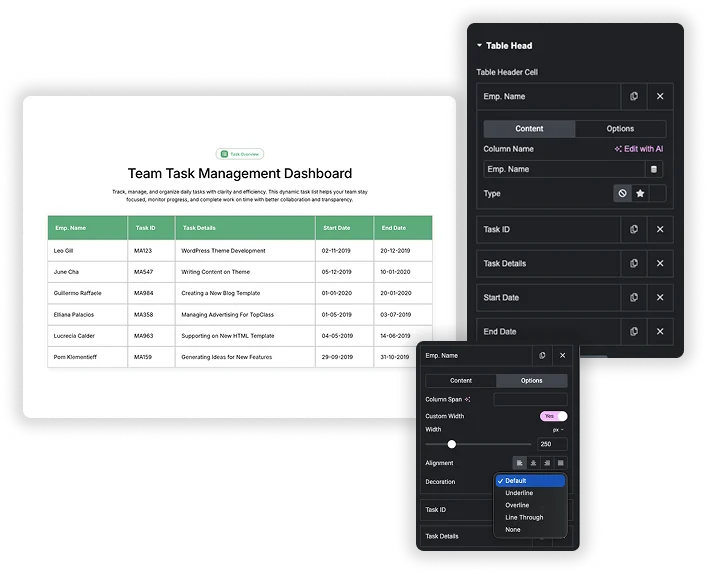
প্যানেলে সারি এবং কলাম তৈরি করুন
টেবিল দুটি পুনরাবৃত্তিকারী থেকে আসে। টেবিল হেডার সেল প্রতি কলামে একটি আইটেম রাখে, এবং টেবিল বডি সেল পড়ার ক্রমে প্রতিটি ঘর ধরে রাখে, a সহ নতুন সারি? সুইচ যা পরবর্তী সারি শুরু করে। আপনি আইটেমগুলিকে পুনরায় সাজাতে টেনে আনতে পারেন, একটি সেল ডুপ্লিকেট করতে পারেন, বা হেডার সারিটি লুকাতে পারেন৷ টেবিল হেড সুইচ।
- একত্রিত কোষ: হেডার এবং বডি সেলের কলাম স্প্যান এবং বডি সেলের রো স্প্যান।
- কলাম প্রস্থ: এর প্রস্থ সেট করতে একটি ঘরের বিকল্প ট্যাবে কাস্টম প্রস্থ চালু করুন।
- প্রতি কক্ষে পাঠ্য বিকল্প: প্রান্তিককরণ (বাম, কেন্দ্র, ডান বা ন্যায়সঙ্গত) এবং সজ্জা (আন্ডারলাইন, ওভারলাইন বা লাইনের মাধ্যমে)।
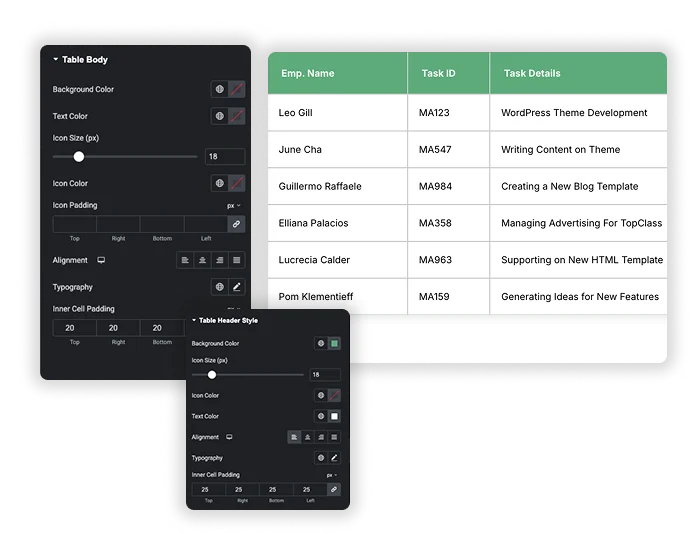
হেডার এবং বডি স্টাইলিং
টেবিল হেডার শৈলী হেডার ব্যাকগ্রাউন্ড (ডিফল্টরূপে ডার্ক নেভি), টেক্সট কালার, আইকনের সাইজ এবং কালার, অ্যালাইনমেন্ট, টাইপোগ্রাফি এবং ইনার সেল প্যাডিং সেট করে। টেবিল বডি ডেটা সেলগুলির জন্য একই নিয়ন্ত্রণ রয়েছে, এছাড়াও আইকনগুলির চারপাশে প্যাডিং রয়েছে৷।
- শিরোনাম: পটভূমি, পাঠ্য এবং আইকনের রঙ, আইকনের আকার, প্রান্তিককরণ, টাইপোগ্রাফি এবং সেল প্যাডিং।
- শরীর: পটভূমি, পাঠ্য এবং আইকনের রঙ, আইকনের আকার এবং প্যাডিং, প্রান্তিককরণ, টাইপোগ্রাফি এবং সেল প্যাডিং।
- ডিভাইস প্রতি প্রান্তিককরণ: ট্যাবলেট এবং মোবাইলে হেডার এবং বডি অ্যালাইনমেন্ট পরিবর্তন হতে পারে।
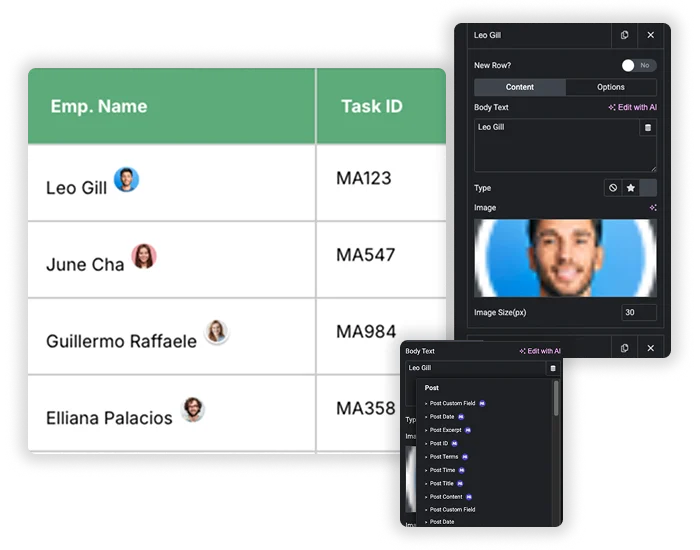
কোষে পাঠ্য, আইকন, চিত্র এবং গতিশীল ট্যাগ
প্রতিটি হেডার এবং বডি সেলের একটি আছে টাইপ করা বিকল্প: কোনটি, আইকন বা চিত্র। আইকনগুলি এলিমেন্টর আইকন লাইব্রেরি থেকে আসে এবং ছবিগুলি পিক্সেলে একটি চিত্রের আকার পায়৷ পাঠ্য ক্ষেত্রগুলি গতিশীল ট্যাগগুলি গ্রহণ করে, যার মধ্যে বিনামূল্যের ট্যাগগুলিও রয়েছে৷ ডায়নামিক ট্যাগ এক্সটেনশন, তাই একটি সেল একটি পোস্ট শিরোনাম, একটি কাস্টম ক্ষেত্র বা লেখকের বিবরণ দেখাতে পারে। প্রতিটি ট্যাগ একটি ঘর পূরণ করে। আপনার জন্য সারি তৈরি করতে উইজেট পোস্টের মাধ্যমে লুপ করে না।
- চেকমার্ক হিসাবে আইকন: পরিকল্পনা বা বৈশিষ্ট্য তুলনা একটি টিক বা ক্রস আইকন ব্যবহার করুন।
- ছোট ছবি: পিক্সেলের আকারের নামের পাশে একটি ছবি বা লোগো যোগ করুন।
- গতিশীল ট্যাগ: পোস্ট শিরোনাম বা একটি কাস্টম ক্ষেত্রের মতো একক মান টানুন।
গ্লোবাল স্টাইল: স্ট্রাইপ, বর্ডার এবং কর্নার
গ্লোবাল স্টাইল পুরো টেবিলে প্রযোজ্য। ডোরাকাটা টেবিল? আপনি পরিবর্তন করতে পারেন এমন একটি হালকা ধূসর (#eee) স্ট্রাইপ রঙের সাথে ডিফল্টরূপে চালু আছে। এছাড়াও আপনি একটি টেবিল পটভূমির রঙ, অভ্যন্তরীণ সেল প্যাডিং, প্রকার, প্রস্থ এবং রঙ সহ একটি সীমানা এবং বৃত্তাকার কোণগুলির জন্য বর্ডার ব্যাসার্ধ সেট করেছেন।
- জেব্রা সারি: লম্বা টেবিলের জন্য স্ট্রাইপিং চালিয়ে যান যাতে সারিগুলি অনুসরণ করা সহজ হয়।
- সীমানা: কোষের চারপাশে কঠিন, ড্যাশড, ডটেড বা ডবল লাইন।
- গোলাকার কোণ: বর্ডার ব্যাসার্ধ টেবিলের প্রান্তকে নরম করে।
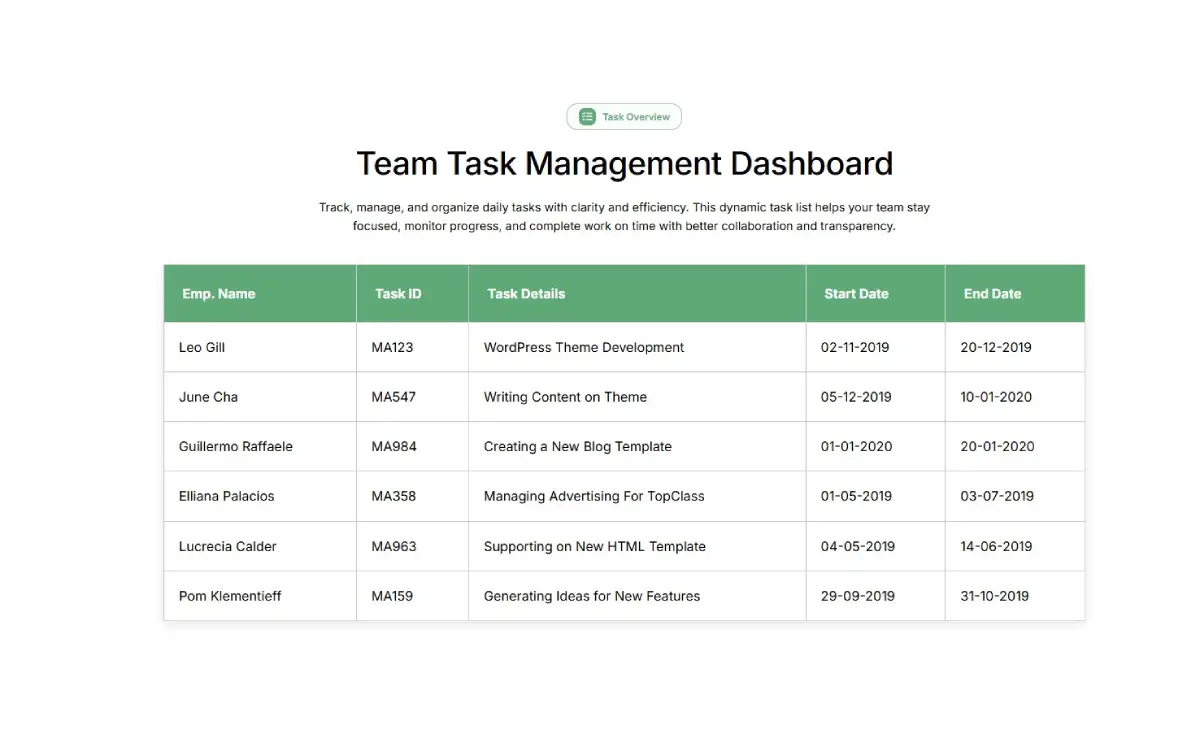
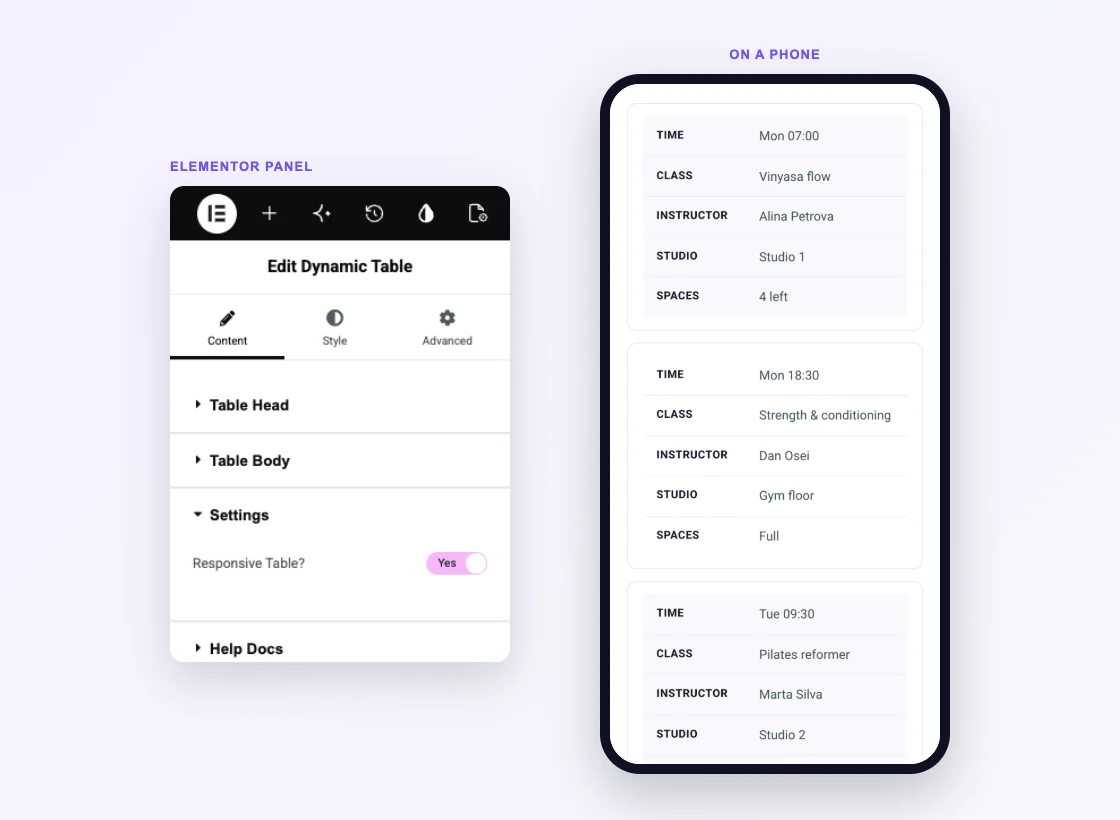
মোবাইলে প্রতিক্রিয়াশীল টেবিল
প্রতিক্রিয়াশীল টেবিল? সেটিংস বিভাগে বসে এবং ডিফল্টরূপে চালু থাকে। 768px চওড়া পর্যন্ত ডিভাইসে হেডার সারি লুকানো থাকে, প্রতিটি সারি একটি কার্ড হয়ে যায় এবং প্রতিটি সেল তার কলামের নাম একটি লেবেল হিসাবে দেখায়। একটি পাঁচ-কলামের সময়সূচী আপনার স্ক্রোল করা কার্ডগুলির একটি তালিকায় পরিণত হয়, তাই কাউকে পাশে স্ক্রোল করতে হবে না।
- স্ট্যাক করা কার্ড: প্রতি সারিতে একটি কার্ড, বাম দিকে কলামের নাম এবং ডানদিকে মান।
- ডিভাইস প্রতি প্রান্তিককরণ: হেডার এবং বডি অ্যালাইনমেন্টের নিজস্ব ট্যাবলেট এবং মোবাইল মান রয়েছে।
- এটি বন্ধ করুন: টেবিল ফোনে তার গ্রিড রাখে। প্রশস্ত টেবিলগুলি তারপরে স্ক্রিনের প্রান্ত অতিক্রম করে, তাই সেগুলিকে তিন বা চারটি কলামে রাখুন।
এইচটিএমএল টেবিল কোড বনাম ডায়নামিক টেবিল উইজেট
একটি টেবিল উইজেট ছাড়া, এলিমেন্টরে একটি টেবিল যোগ করার স্বাভাবিক উপায় হল একটি HTML উইজেটে HTML নিজেই লিখতে হবে। উইজেটের সাথে এটি কীভাবে তুলনা করে তা এখানে।
| বৈশিষ্ট্য | আপনার নিজস্ব কোড সহ HTML উইজেট | মাস্টার অ্যাডনস ডায়নামিক টেবিল |
|---|---|---|
| দাম | বিনামূল্যে (এলিমেন্টর কোর) | বিনামূল্যে |
| বিল্ডিং সারি এবং কলাম | টেবিল, tr এবং td ট্যাগ লিখুন | প্যানেলে আইটেম পুনরাবৃত্তি করুন |
| স্টাইলিং | আপনার নিজের CSS | শৈলী ট্যাব নিয়ন্ত্রণ |
| একত্রিত কোষ | কলস্প্যান এবং রোস্প্যান বৈশিষ্ট্য | কলাম স্প্যান এবং রো স্প্যান ক্ষেত্র |
| কোষে আইকন এবং ছবি | মার্কআপ আটকান | আইকন লাইব্রেরি বা মিডিয়া লাইব্রেরি |
| গতিশীল ট্যাগ | না | হ্যাঁ, প্রতি কক্ষে একটি মান |
| ফোন লেআউট | আপনার নিজের মিডিয়া প্রশ্ন | সারি কার্ডে স্ট্যাক |
| বাছাই, অনুসন্ধান, CSV আমদানি | একটি স্ক্রিপ্ট বা প্লাগইন প্রয়োজন | না |
আপনার যদি বাছাই, অনুসন্ধান, পৃষ্ঠা সংখ্যা বা CSV আমদানির প্রয়োজন হয়, একটি ডেডিকেটেড টেবিল প্লাগইন যেমন টেবিলপ্রেস হল ভালো পছন্দ। একটি স্টাইল করা টেবিলের জন্য যা আপনি এলিমেন্টরের ভিতরে সম্পাদনা করেন, উইজেট আপনাকে HTML এবং CSS লিখতে বাঁচায়।
সম্পর্কিত: মূল্য সারণী (বিনামূল্যে), তুলনা সারণী (প্রো) এবং ডায়নামিক ট্যাগ (বিনামূল্যে)।
এই এলিমেন্টর ডেটা টেবিল উইজেট কী করতে পারে এবং কী করতে পারে না
ডায়নামিক টেবিল হল আপনার টাইপ করা সারিগুলির জন্য একটি ডেটা টেবিল। এটি কি করে এবং কোথায় থামে তা এখানে।
| বৈশিষ্ট্য | ডায়নামিক টেবিল |
|---|---|
| প্যানেলে প্রবেশ করা সারি এবং কলাম | হ্যাঁ |
| মার্জড সেল (কলাম স্প্যান এবং সারি স্প্যান) | হ্যাঁ |
| কোষে আইকন এবং ছবি | হ্যাঁ |
| গতিশীল ট্যাগ | হ্যাঁ, প্রতি কক্ষে একটি মান |
| ডোরাকাটা সারি | হ্যাঁ |
| কাস্টম কলাম প্রস্থ | হ্যাঁ |
| মোবাইল স্ট্যাকিং | হ্যাঁ, 768px এবং নীচে |
| বাছাই | না |
| অনুসন্ধান | না |
| পৃষ্ঠা সংখ্যা | না |
| CSV বা এক্সেল আমদানি | না |
আপনার কোন টেবিল টুল প্রয়োজন?
টেবিল মানে এলিমেন্টর অনুসন্ধানে বিভিন্ন জিনিস। আপনি যা নির্মাণ করছেন তার দ্বারা টুলটি বেছে নিন।
| আপনি কি নির্মাণ করছেন | সেরা টুল |
|---|---|
| একটি সাধারণ টেবিল যেমন একটি সময়সূচী, বিশেষ শীট, মূল্য তালিকা বা সময়সূচী | ডায়নামিক টেবিল |
| বড় ডেটা যা বাছাই, অনুসন্ধান, পৃষ্ঠা সংখ্যা বা একটি CSV আমদানি প্রয়োজন৷ | টেবিলপ্রেস, এলিমেন্টর শর্টকোড উইজেটের সাথে স্থাপন করা হয়েছে |
| পরিকল্পনা এবং দাম পাশাপাশি | মূল্য সারণী |
| পরিকল্পনা বা পণ্য জুড়ে একটি বৈশিষ্ট্য তুলনা | তুলনা সারণী (প্রো) |
| খোলার সময় | ব্যবসার সময় |
সম্পর্কিত: উন্নত অ্যাকর্ডিয়ন দীর্ঘ উত্তরের জন্য যা একটি কক্ষে ফিট হবে না, এবং ডায়নামিক ট্যাগ পোস্ট ডেটা থেকে সেল পূরণের জন্য।
Elementor টেবিল উদাহরণ
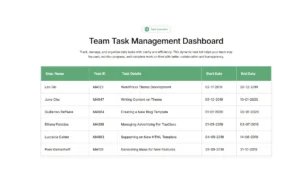
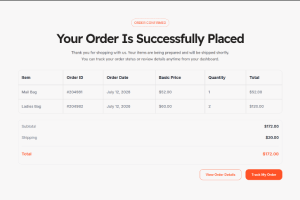
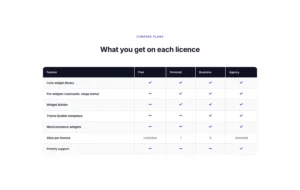
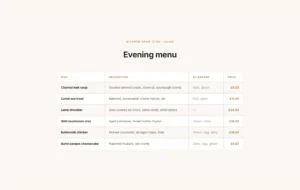
নীচের তিনটি টেবিল লাইভ ডায়নামিক টেবিল উইজেট, স্ক্রিনশট নয়। প্রতিটি কার্ডে স্ট্যাক দেখতে একটি ফোনে এই পৃষ্ঠাটি খুলুন। একটি রেস্তোরাঁর মেনু এবং একটি পরিকল্পনা তুলনা সহ আরও লেআউটগুলি তাদের অধীনে ডেমো ভিউয়ারে রয়েছে৷
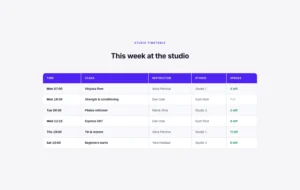
ক্লাসের সময়সূচী
পাঁচটি কলাম সহ একটি সাপ্তাহিক সময়সূচী। একটি ফোনে প্রতিটি ক্লাস তার নিজস্ব কার্ড হয়ে যায়।
| সময় | শ্রেণী | প্রশিক্ষক | স্টুডিও | স্পেস |
|---|---|---|---|---|
| সোম 07:00 | ভিনিয়াসা প্রবাহ | আলিনা পেট্রোভা | স্টুডিও 1 | 4 বাম |
| সোম 18:30 | শক্তি এবং কন্ডিশনার | ড্যান ওসেই | জিম মেঝে | পরিপূর্ণ |
| মঙ্গল 09:30 | Pilates সংস্কারক | মার্টা সিলভা | স্টুডিও 2 | 2 বাম |
| বুধ 12:15 | এক্সপ্রেস HIIT | ড্যান ওসেই | জিম মেঝে | 9 বাম |
| বৃহস্পতি 19:00 | ইয়িন এবং পুনরুদ্ধার করুন | আলিনা পেট্রোভা | স্টুডিও 1 | 11 বাকি |
| শনি 10:00 | বিগিনার ব্যারে | ইয়ারা হাদ্দাদ | স্টুডিও 2 | 6 বাকি |
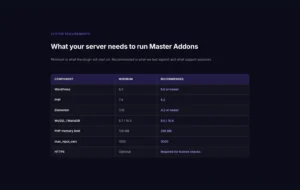
সিস্টেমের প্রয়োজনীয়তা
ন্যূনতম এবং প্রস্তাবিত মানগুলির তুলনা করে তিনটি কলাম, একটি স্পেক শীটের স্বাভাবিক আকৃতি।
| উপাদান | সর্বনিম্ন | প্রস্তাবিত |
|---|---|---|
| ওয়ার্ডপ্রেস | 6.0 | 6.6 বা নতুন |
| পিএইচপি | 7.4 | 8.2 |
| এলিমেন্টর | 3.16 | 4.2 বা নতুন |
| মাইএসকিউএল/মারিয়াডিবি | 5.7 /10.3 | 8.0 /10.6 |
| পিএইচপি মেমরি সীমা | 128 এমবি | 256 এমবি |
| MAX_INPUT_VARS | 1000 | 3000 |
| https | ঐচ্ছিক | লাইসেন্স চেকের জন্য প্রয়োজনীয় |
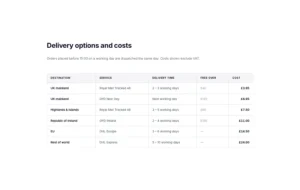
শিপিং হার
গন্তব্য এবং পরিষেবা অনুসারে একটি মূল্য তালিকা, স্ট্রিপিং বন্ধ এবং একটি হালকা শিরোনাম সহ।
| গন্তব্য | সেবা | প্রসবের সময় | বিনামূল্যে ওভার | খরচ |
|---|---|---|---|---|
| যুক্তরাজ্যের মূল ভূখণ্ড | রয়্যাল মেল ট্র্যাক 48 | 2 5 3 কার্যদিবস | £40 | £3.95 |
| যুক্তরাজ্যের মূল ভূখণ্ড | পরের দিন ডিপিডি | পরবর্তী কার্যদিবস | £120 | £6.95 |
| উচ্চভূমি এবং দ্বীপপুঞ্জ | রয়্যাল মেল ট্র্যাক 48 | 3 5 কার্যদিবস | £60 | £7.50 |
| আয়ারল্যান্ড প্রজাতন্ত্র | ডিপিডি আয়ারল্যান্ড | 2 5 4 কার্যদিবস | £150 | £11.00 |
| ইইউ | ডিএইচএল ইউরোপ | 3 5 6 কার্যদিবস | — | £14.50 |
| বিশ্বের বাকি | ডিএইচএল এক্সপ্রেস | 5 5 কার্যদিবস | — | £24.00 |
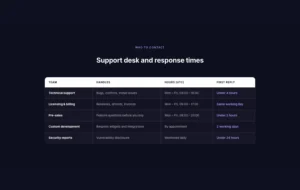
এলিমেন্টরে কীভাবে একটি টেবিল তৈরি করবেন
এলিমেন্টর প্যানেলে উইজেটটিকে ডায়নামিক টেবিল বলা হয়।
- এলিমেন্টরের জন্য মাস্টার অ্যাডঅন ইনস্টল করুন এবং এটি পরীক্ষা করুন ডায়নামিক টেবিল মাস্টার অ্যাডঅন উইজেট সেটিংসে সুইচ অন করা হয়।
- Elementor দিয়ে আপনার পৃষ্ঠা সম্পাদনা করুন, অনুসন্ধান করুন ডায়নামিক টেবিল এবং এটি টেনে আনুন। এটি একটি নমুনা চার-কলাম টেবিল দিয়ে শুরু হয়।
- মধ্যে টেবিল হেড, একটি যোগ করুন টেবিল হেডার সেল প্রতি কলাম এবং প্রতিটি টাইপ করুন কলামের নাম.
- মধ্যে টেবিল বডি, বাম থেকে ডানে প্রতি কক্ষে একটি আইটেম যোগ করুন। চালু কর নতুন সারি? প্রথমটির পরে প্রতিটি সারির প্রথম ঘরে।
- ব্যবহার কলাম স্প্যান বা সারি স্প্যান একটি ঘরের বিকল্প ট্যাবে কোষগুলিকে একত্রিত করতে।
- স্টাইল ট্যাবে টেবিলটি স্টাইল করুন এবং ছেড়ে দিন প্রতিক্রিয়াশীল টেবিল? ফোনে সারি স্ট্যাক, তারপর পৃষ্ঠা আপডেট করুন।
ডায়নামিক টেবিলের জন্য প্রায়শই জিজ্ঞাসিত প্রশ্ন
Elementor এ একটি টেবিল উইজেট আছে?
Elementor নিজেই, বিনামূল্যে বা প্রো না। মাস্টার অ্যাডনস বিনামূল্যে একটি যোগ করে: ডায়নামিক টেবিল উইজেট প্যানেলের হেডার এবং বডি সেল থেকে টেবিল তৈরি করে।
টেবিলটি কি মোবাইল ডিভাইসে প্রতিক্রিয়াশীল?
হ্যাঁ, প্রতিক্রিয়াশীল টেবিলের সাথে? চালু হয়েছে, যা ডিফল্ট। 768px পর্যন্ত প্রশস্ত ডিভাইসগুলিতে প্রতিটি সারি একটি কার্ডে স্ট্যাক করে এবং প্রতিটি সেল একটি লেবেল হিসাবে তার কলামের নাম দেখায়। ফোনে সাধারণ টেবিল লেআউট রাখতে এটি বন্ধ করুন।
আমি কি কোষে গতিশীল ডেটা ব্যবহার করতে পারি?
হ্যাঁ, প্রতি কক্ষে একটি মান। হেডার এবং বডি টেক্সট ডায়নামিক ট্যাগ গ্রহণ করে, যার মধ্যে বিনামূল্যের মাস্টার অ্যাডনস ডায়নামিক ট্যাগ যেমন পোস্টের শিরোনাম, কাস্টম ক্ষেত্র এবং লেখকের তথ্য। উইজেট প্রতিটি পোস্টের জন্য একটি সারি তৈরি করে না, তাই প্রতিটি সারি এখনও হাতে তৈরি করা হয়।
Elementor Pro একটি টেবিল উইজেট আছে?
অ . Elementor Pro প্ল্যানের জন্য একটি মূল্য সারণী উইজেট যোগ করে, কিন্তু মূল প্লাগইন বা প্রো-এর কাছেই ডেটার সারি এবং কলামের জন্য উইজেট নেই। আপনার একটি অ্যাডন উইজেট প্রয়োজন যেমন ডায়নামিক টেবিল, একটি টেবিল প্লাগইন বা আপনার নিজস্ব এইচটিএমএল।
আমি কি প্লাগইন ছাড়াই এলিমেন্টরে একটি টেবিল তৈরি করতে পারি?
হ্যাঁ এইচটিএমএল উইজেটে টেবিল এইচটিএমএল পেস্ট করুন এবং আপনার নিজের সিএসএস দিয়ে স্টাইল করুন, অথবা একটি গ্রিড কন্টেইনার দিয়ে সারিগুলি রাখুন। উভয়ই ছোট টেবিলের জন্য কাজ করে, যদিও প্রতিটি পরিবর্তন মানে কোড সম্পাদনা বা অনেকগুলি পৃথক উইজেট।
আমি একটি কক্ষে খুব দীর্ঘ পাঠ্য যোগ করলে কি হবে?
টেক্সট ঘরের ভিতরে মোড়ানো। কলামের প্রস্থ ঠিক করতে সেলের অপশন ট্যাবে কাস্টম প্রস্থ চালু করুন এবং সারি সঙ্কুচিত মনে হলে ইনার সেল প্যাডিং বাড়ান।
আমি কি একটি জনপ্রিয় পরিকল্পনার মতো একটি কলাম হাইলাইট করতে পারি?
একক সেটিং দিয়ে নয়। রং পুরো হেডার বা পুরো শরীরের জন্য প্রযোজ্য। পরিকল্পনা টেবিলের জন্য, মূল্য সারণী উইজেট (বিনামূল্যে) একটি হাইলাইট বিকল্প আছে, এবং তুলনা সারণী উইজেট (প্রো) পরিকল্পনা তুলনার জন্য নির্মিত।
আমি কি টেবিলে একটি CSV বাছাই, অনুসন্ধান বা আমদানি করতে পারি?
না। উইজেটে কোনো বাছাই, অনুসন্ধান, পৃষ্ঠা সংখ্যা বা CSV আমদানি নেই। তাদের জন্য, টেবিলপ্রেসের মতো একটি ডেটা টেবিল প্লাগইন ব্যবহার করুন এবং পৃষ্ঠায় এর শর্টকোড রাখুন।
আমি কি এলিমেন্টরের ভিতরে টেবিলপ্রেস ব্যবহার করতে পারি?
হ্যাঁ টেবিলপ্রেসে টেবিল তৈরি করুন, উদাহরণস্বরূপ এর শর্টকোড কপি করুন [ টেবিল ID=1 /], এবং এটি Elementor শর্টকোড উইজেটে পেস্ট করুন। সেই রুটটি লম্বা টেবিলের জন্য উপযুক্ত যেগুলির বাছাই, অনুসন্ধান বা পৃষ্ঠা সংখ্যা প্রয়োজন৷
আমি কি এক্সেল বা গুগল শীট থেকে একটি টেবিল পেস্ট করতে পারি?
অ অ প্রতিটি সেল প্যানেলে একটি পৃথক আইটেম, তাই একটি পেস্ট করা ব্লক একটি কক্ষে অবতরণ করে। একবারে একটি সেল লিখুন, অথবা টেবিলপ্রেসে ফাইলটি আমদানি করুন, যা CSV এবং এক্সেল ফাইলগুলি পড়ে।
ট্রেন্ডিং এলিমেন্টর উইজেট এবং এক্সটেনশন
কম সময়ে অত্যাধুনিক ওয়েবসাইট তৈরি করুন।

গ্লাসমরফিজম

ধারক অতিরিক্ত

নিদর্শন
![এলিমেন্টরের জন্য মাস্টার অ্যাডঅন পোস্ট/পেজ ডুপ্লিকেটর এক্সটেনশন: ওয়ার্ডপ্রেস পেজ লিস্টে এমএ ডুপ্লিকেটর সারি লিঙ্ক একটি ল্যান্ডিং পেজ তৈরি করে - [ডুপ্লিকেটেড #128] ড্রাফ্ট](https://d1asvmc6qcowgk.cloudfront.net/wp-content/uploads/2026/09/15102930/post-page-duplicator-768x403.webp)
পোস্ট/পেজ ডুপ্লিকেটর
