

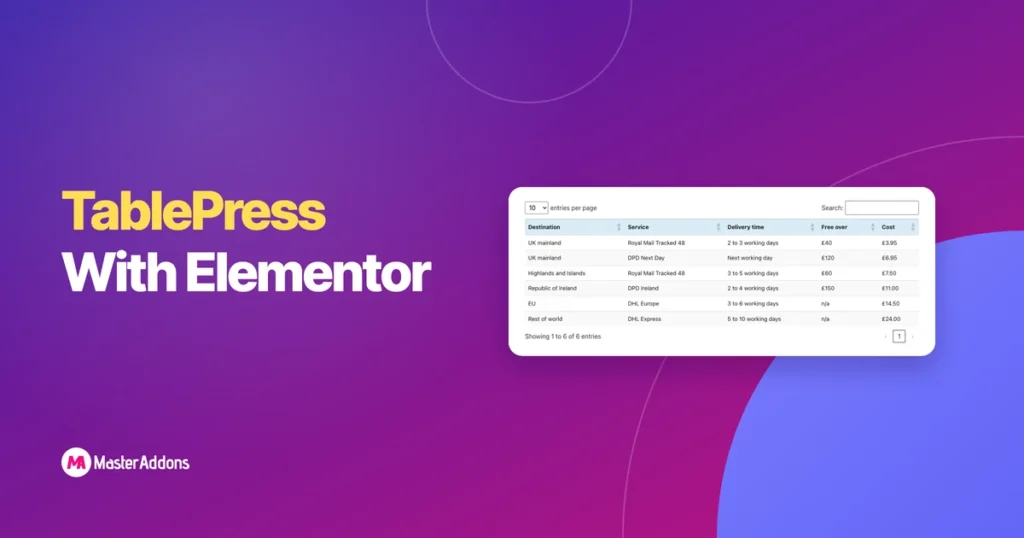
주요 시사점
- TablePress는 Elementor와 두 가지 방식으로 작동합니다: TablePress 3.4가 Elementor 패널에 추가하는 TablePress 테이블이라는 위젯과 Shortcode 위젯에 배치된 단축 코드 [테이블 id=1 /].
- Elementor의 TablePress 테이블 위젯에는 테이블 드롭다운과 구성 매개변수 필드가 있으며 스타일 탭이 없습니다.
- TablePress는 기본적으로 페이지당 10개의 행으로 방문자의 정렬, 검색 및 페이지 매기기를 켭니다.
- TablePress 에서 가로 스크롤은 기본적으로 꺼져 있으므로 테이블의 설정에서 틱할 때까지 390px 휴대폰에서 5 열 테이블이 오버플로됩니다.
- Elementor 내부에서 편집하고 스타일을 지정해야 하는 짧은 테이블의 경우 Master Addons Dynamic Table과 같은 테이블 위젯은 TablePress보다 덜 작동합니다.
TablePress 와 Elementor 는 브리지 플러그인 없이 함께 작동합니다. TablePress 에서 테이블을 빌드한 다음 TablePress 테이블 위젯 또는 단축 코드가 있는 Elementor 페이지에 배치합니다. 테이블은 정렬,검색 및 페이지 매김을 유지합니다.
이 가이드는 방법,스타일링 및 전화기의 넓은 테이블을 수정하는 설정을 모두 다룹니다. 또한 일반 테이블 위젯이 더 나은 선택 일 때를 말합니다. 여기에있는 모든 것은 TablePress 3,4 및 Elementor 4,3 으로 테스트되었습니다.
목차
1 단계: TablePress 에서 테이블을 만들거나 가져옵니다
테이블 자체는 Elementor 외부, WordPress 대시보드의 TablePress 화면에서 만들어집니다.
- 설치 및 활성화 테이블프레스 플러그인에서 새로 추가하세요.
- 오픈 테이블프레스 대시보드 메뉴에서.
- 테이블을 입력하려면 을 클릭합니다 New 추가하기을 하고, 이름을 입력하고 행과 열의 수를 설정하고 셀을 채웁니다.
- 스프레드시트를 가져오려면 을 클릭합니다 가져오기, 선택하다 파일 업로드를 선택하고 파일을 선택하고 유지합니다 새 테이블로 추가 그리고 클릭하세요 가져오기.
- 테이블의 ID 를 참고하세요. 첫 번째 테이블은 ID 1 입니다.
TablePress 는 Excel,CSV, HTML 및 JSON 파일을 가져옵니다. 우리는 6 행 CSV 의 배송료를 가져 왔고 첫 번째 행이 이미 헤더로 설정되어 도착했습니다.
2 단계: TablePress 테이블 위젯으로 추가
TablePress 는 자체 Elementor 위젯을 등록하므로 이 메서드에는 단축 코드가 필요하지 않습니다.
- Elementor로 페이지를 편집하세요.
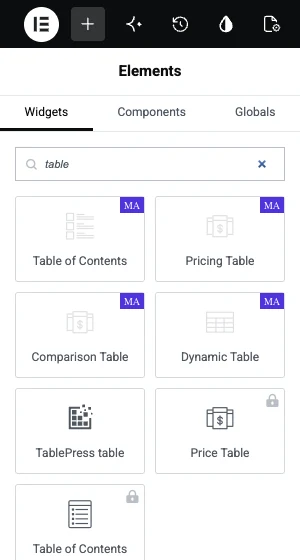
- 위젯 패널을 검색하세요 TablePress 테이블.
- 위젯을 컨테이너로 드래그합니다.
- 열다 테이블 드롭다운하고 테이블을 선택하세요. 테이블은 ID 와 이름으로 나열됩니다.
- 페이지를 게시합니다.
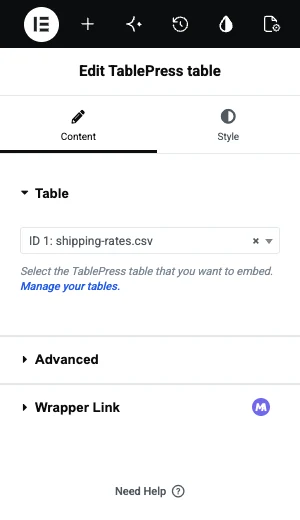
X-1000 X 1000 X 1000 X 1000 X 1000 X 1000 X 1000 X 1000 X 1000 X 1000 X 1000 X 1000 X 1000 X 1000 X 1000 X 1000 X 1000 X 1000 X 1000 X 고급 드롭다운 아래 섹션에는 하나의 필드가 있습니다 구성 매개변수. 그것은 당신이 단축 코드에 넣을 동일한 매개 변수를 받아들입니다, 한 페이지가 다른 옵션으로 테이블을 표시해야하는 경우에 대한.
아니면 단축코드로 추가하세요
단축 코드는 동일한 작업을 수행하며 단축 코드가 수행하는 모든 곳에서 작동합니다.
- 드래그 엘리멘터의 단축 코드 위젯을 컨테이너에 넣습니다.
- 유형
[table id=1 /], 1 을 테이블의 ID로 바꿉니다. - 클릭 적용 미리보기를 로드하려면.
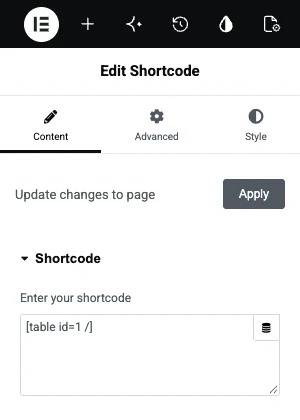
우리의 테스트 페이지에서 위젯과 단축 코드는 같은 테이블을 인쇄했다. 당신이 할 수있는 경우 위젯을 사용하여, 드롭 다운에서 따기 때문에 ID에서 오타를 방지.
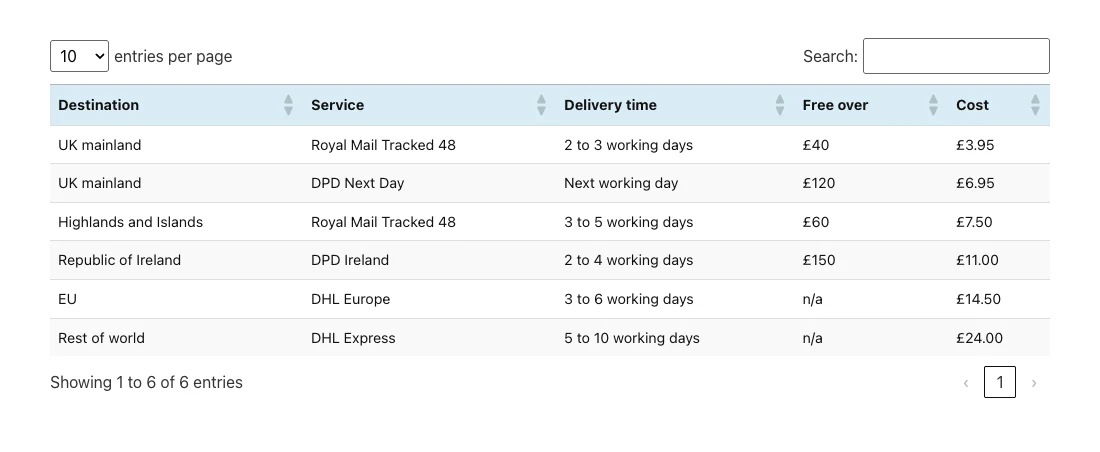
정렬, 검색 및 페이지 매김
이것들은 모든 새로운 테이블마다 켜져 있습니다. 여러분은 테이블마다,이름이 붙은 상자에서 그것들을 바꿉니다 사이트 방문자를 위한 테이블 기능 테이블의 편집 화면에서.
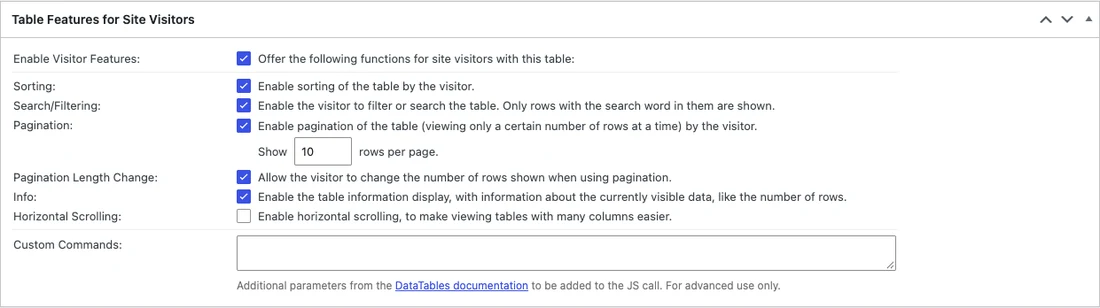
| 설정 | 하는 일 | 기본값 |
|---|---|---|
| 선발 | 방문자는 헤더를 클릭하여 해당 열을 기준으로 정렬합니다 | 에 |
| 검색/필터링 | 행을 필터링하는 검색 상자를 추가합니다 | 에 |
| 페이지 매김 | 페이지당 설정된 행 수를 표시합니다 | 에, 10 의 줄 |
| 페이지 매김 길이 변경 | 방문자가 페이지당 행을 변경할 수 있습니다 | 에 |
| 정보 | “6개 항목 중 1~6개 항목 표시”를 표시합니다 | 에 |
| 수평 스크롤 | 상자 안에 넓은 테이블을 스크롤합니다 | 끄다 |
6 개의 행이 있는 테이블의 경우 검색과 페이지 매김이 어수선합니다. 틱을 해제하면 테이블이 일반 격자로 표시됩니다.
Elementor 에서 TablePress 테이블 스타일 지정하기
TablePress 테이블 위젯에는 Elementor에 테이블 스타일 제어 기능이 없으므로 모양이 다른 세 곳에서 설정됩니다.
- 테이블 옵션 테이블의 편집 화면에서: 어떤 행이 머리글과 바닥글인지, 교대 행 색상, 행 호버 하이라이트, 그리고 an 추가 CSS 클래스 필드.
- 사용자 정의 CSS 색상,글꼴 및 테두리의 경우 TablePress 는 모든 테이블에 ID 를 기반으로 클래스를 제공하므로 하나의 테이블을 대상으로 지정할 수 있습니다.
- 위젯의 고급 탭 테이블 주위의 여백, 패딩 및 너비를 위한 Elementor.
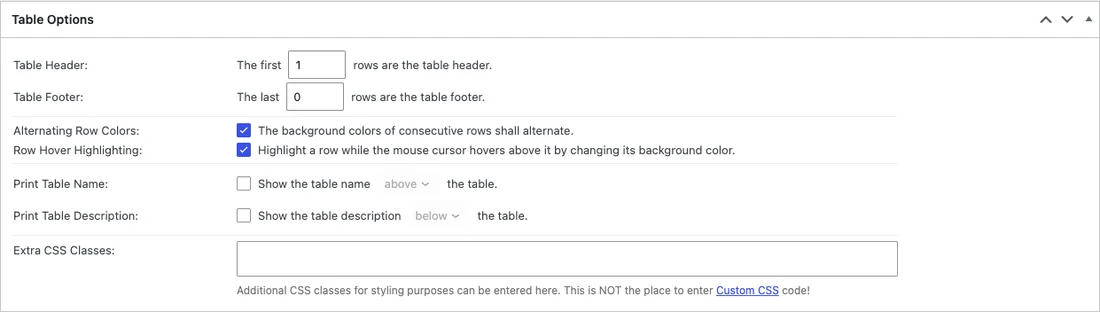
표 1의 헤더를 다시 스타일링하는 짧은 CSS 예:
.tablepress-id-1 thead th {
  background: #101223;
  color: #ffffff;
}
.tablepress-id-1 tbody td {
  padding: 12px 16px;
}
Appearance,Customize, Additional CSS 에 붙여넣거나 설정이 가지고 있는 모든 사용자 지정 CSS 상자에 붙여넣습니다. Elementor Pro 는 요소당 하나씩 있으며,Master Addons 사용자 정의 CSS 확장 하나 추가도 합니다.
전화기의 테이블을 고치세요
390px 너비의 휴대폰에서 5열 테이블이 화면 오른쪽 가장자리를 지나갔고 마지막 열을 읽을 수 없었습니다.
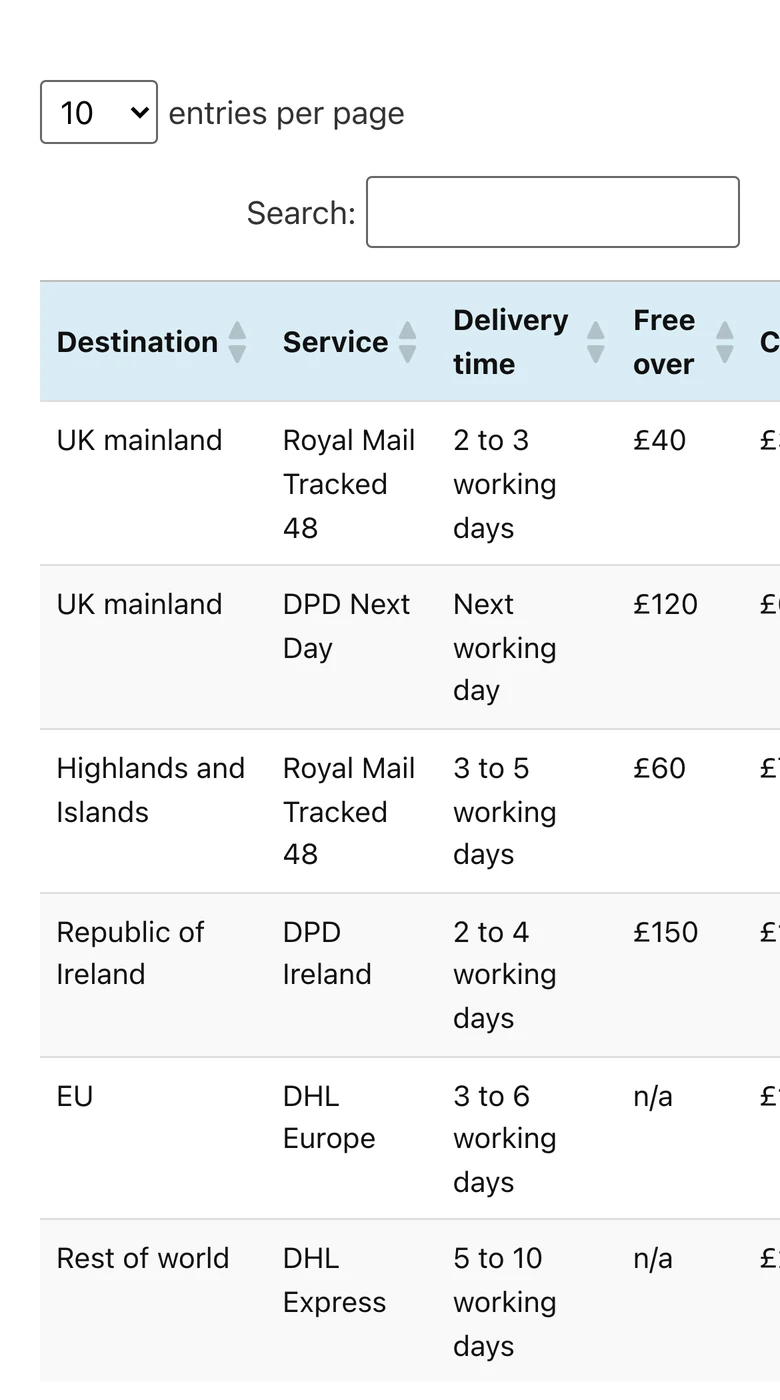
- TablePress 에서 테이블 편집.
- 언더 사이트 방문자를 위한 테이블 기능, 틱 수평 스크롤.
- 클릭 변경 사항 저장 그리고 휴대폰에서 페이지를 다시 로드하세요.
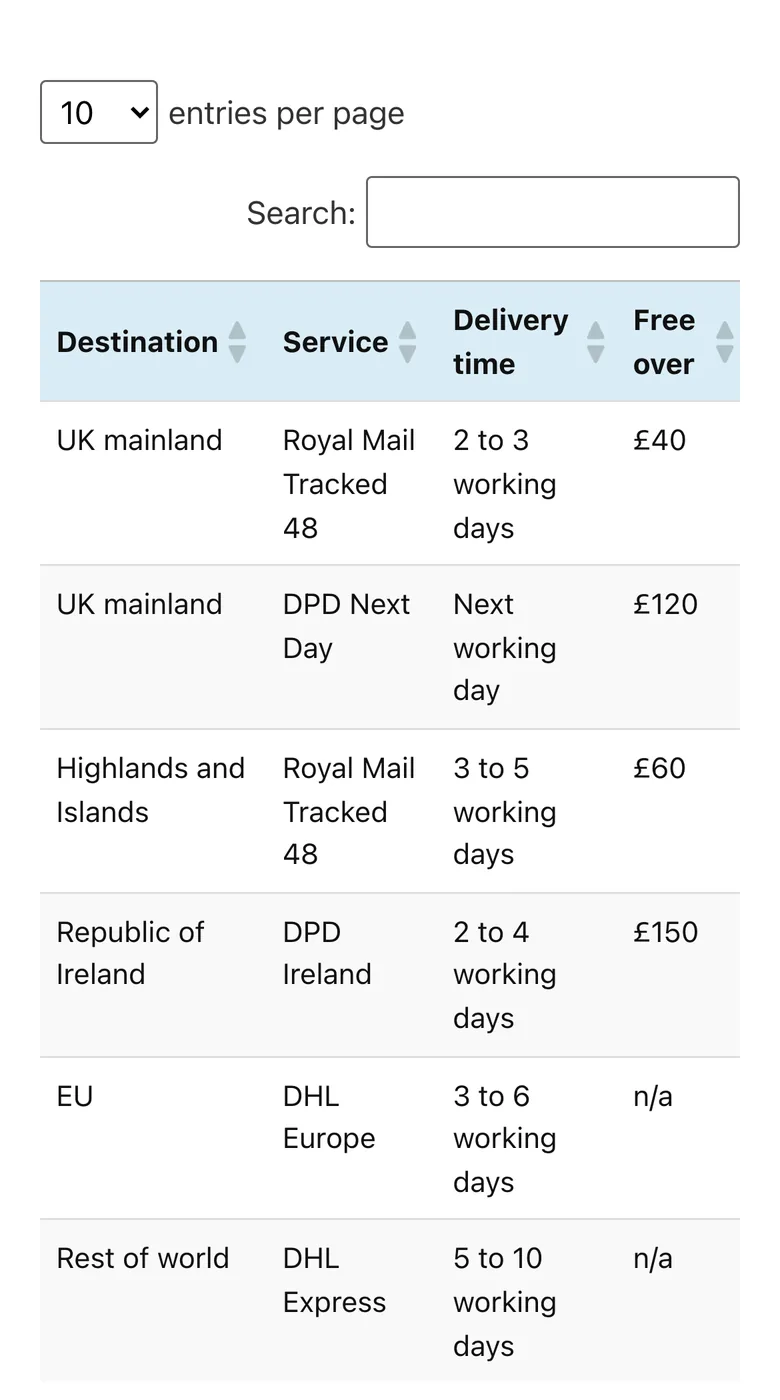
TablePress 는 또한 Pro 플랜 (확인했을 때 연간 $89) 에서 반응형 테이블 기능을 판매하며,작은 화면에서 행을 쌓거나 축소하는 모드가 있습니다. 넓은 테이블을 처리하는 다른 방법은 가이드에 나와 있습니다 elementor의 반응형 테이블.
테이블 위젯이 더 나은 선택일 때
TablePress is built for data. For a small table that is really part of the page design, it adds steps: a second admin screen, CSS in another place, and a plugin to keep updated.
| Your table | Better tool |
|---|---|
| More than about 30 rows, or it comes from Excel or CSV | 테이블프레스 |
| Visitors need to sort, search or page through it | 테이블프레스 |
| Under 30 rows, typed by hand, styled to match the page | A table widget |
| Cells need icons or images, or merged cells | A table widget |
| Rows should stack into cards on phones without a paid plan | A table widget |
Only need a small table? X-1000 X 1000 X 1000 X 1000 X 1000 X 1000 X 1000 X 1000 X 1000 X 1000 X 1000 X 1000 X 1000 X 1000 X 1000 X 1000 X 1000 X 1000 X 1000 X 동적 테이블 위젯 builds it in the Elementor panel, with a Style tab and rows that stack on phones.
Dynamic Table has no sorting, search or import, so use TablePress for data and the widget for layout tables such as a timetable or a spec sheet. The other options are compared in our Elementor table plugins roundup.
자주 묻는 질문
Does TablePress work with Elementor?
Yes. TablePress 3.4 adds a TablePress table widget to the Elementor panel, and its shortcode works in Elementor’s Shortcode widget. No extra plugin is needed to connect them.
How do I add a TablePress table to an Elementor page?
Create the table in TablePress, edit the page with Elementor, search for the TablePress table widget, drag it in and choose your table in the Table dropdown. You can also paste [table id=1 /] into the Shortcode widget, using your table’s ID.
Is TablePress free?
The TablePress plugin on WordPress.org is free and includes import, export, sorting, search and pagination. Paid Pro and Max plans add features such as Responsive Tables, fixed rows and columns, and automatic imports.
How do I style a TablePress table in Elementor?
The Elementor widget has no table styling controls. Set stripes and hover highlighting in the table’s Table Options, and change colors and fonts with custom CSS that targets the table’s class, for example .tablepress-id-1.
Why is my TablePress table cut off on mobile?
Horizontal Scrolling is off by default, so wide tables overflow the screen. Edit the table, tick Horizontal Scrolling under Table Features for Site Visitors and save. The table then scrolls sideways inside its own box.
최종 생각
TablePress and Elementor fit together well for data tables: import the file, drop in the TablePress table widget, and remember to turn on Horizontal Scrolling for phones. Styling takes a little CSS because the widget has no Style tab.
For short tables that should look like part of the page, 동적 테이블 keeps the cells and the styling inside Elementor.
관련 읽기
