

एक ३ डी हिंडोला एक हिंडोला है जिसकी स्लाइड एक सपाट विमान के बजाय गहराई से चलती है: घूर्णन, स्केलिंग या परिक्रमा करना ताकि निष्क्रिय स्लाइड सक्रिय रूप से सक्रिय के पीछे स्पष्ट रूप से बैठें एलिमेंटर में आप इसे या तो से प्राप्त करते हैं छवि हिंडोला विजेट का कवरफ्लो लेआउट, या से एक उद्देश्य-निर्मित डिजाइन.
चार शैलियों आपके समय के लायक हैं वे अलग-अलग काम करते हैं, और उनमें से एक आपके पृष्ठ को बिना किसी लाभ के धीमा कर देगा यदि आप इसे गलत सामग्री के लिए चुनते हैं प्रत्येक के लिए लाइव डेमो, साथ ही सेटिंग्स जो एक चिकनी ३ डी हिंडोला को एक हकलाने से अलग करती हैं।
कवरफ़्लो: सबसे अधिक लोगों का मतलब है
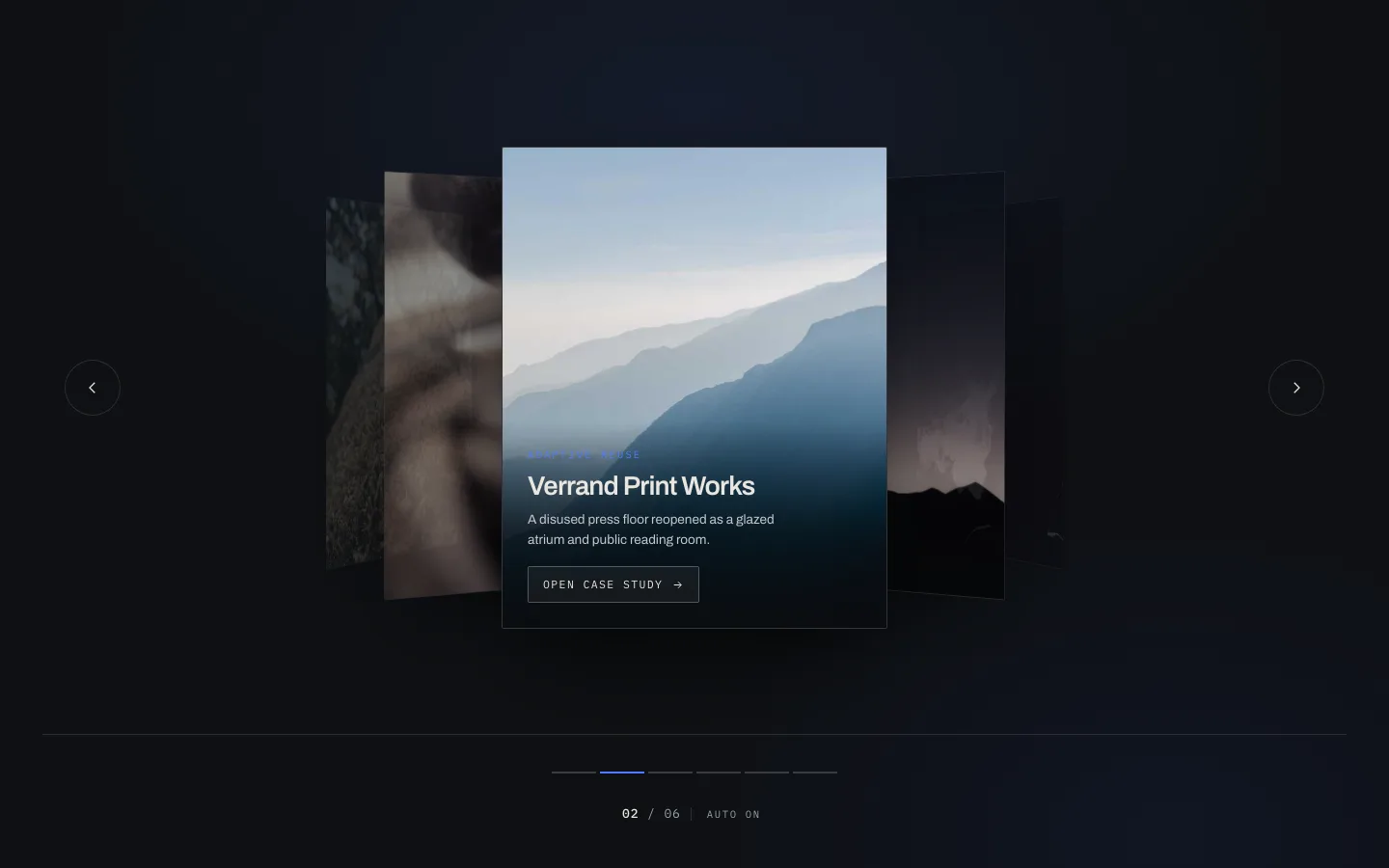
केंद्र स्लाइड आपको स्क्वायर-ऑन का सामना करती है स्लाइड्स दोनों तरफ वाई अक्ष पर दूर घूमती हैं, थोड़ा सिकुड़ती हैं और मंद होती हैं आपकी आंख को बीच के अलावा कहीं नहीं जाना है।
यही कारण है कि पूरी चाल है, और यही कारण है कि कवरफ्लो आईट्यून्स की मौत से बच गया परिधीय स्लाइड्स पर्याप्त रूप से दिखाई दे रहे हैं ताकि यह साबित हो सके कि अधिक है, धुंधला पर्याप्त है कि आप उन्हें नहीं पढ़ सकते हैं लोग तनाव को हल करने के लिए तीर पर क्लिक करें।
तीन सेटिंग्स अधिकांश काम करती हैंः
- घुमाएँ: साइड स्लाइड कितनी दूर मुड़ती है ५०° से कुछ भी पिछले और पड़ोसी अपठनीय स्लिवर्स बन जाते हैं ३० से ४०° वह सीमा है जो विरूपण के बजाय गहराई के रूप में पढ़ती है।
- गहराईः वे कितनी दूर बैठते हैं इसे बहुत दूर धक्का दें और साइड स्लाइड थंबनेल में सिकुड़ जाती है, और रचना अपना संतुलन खो देती है।
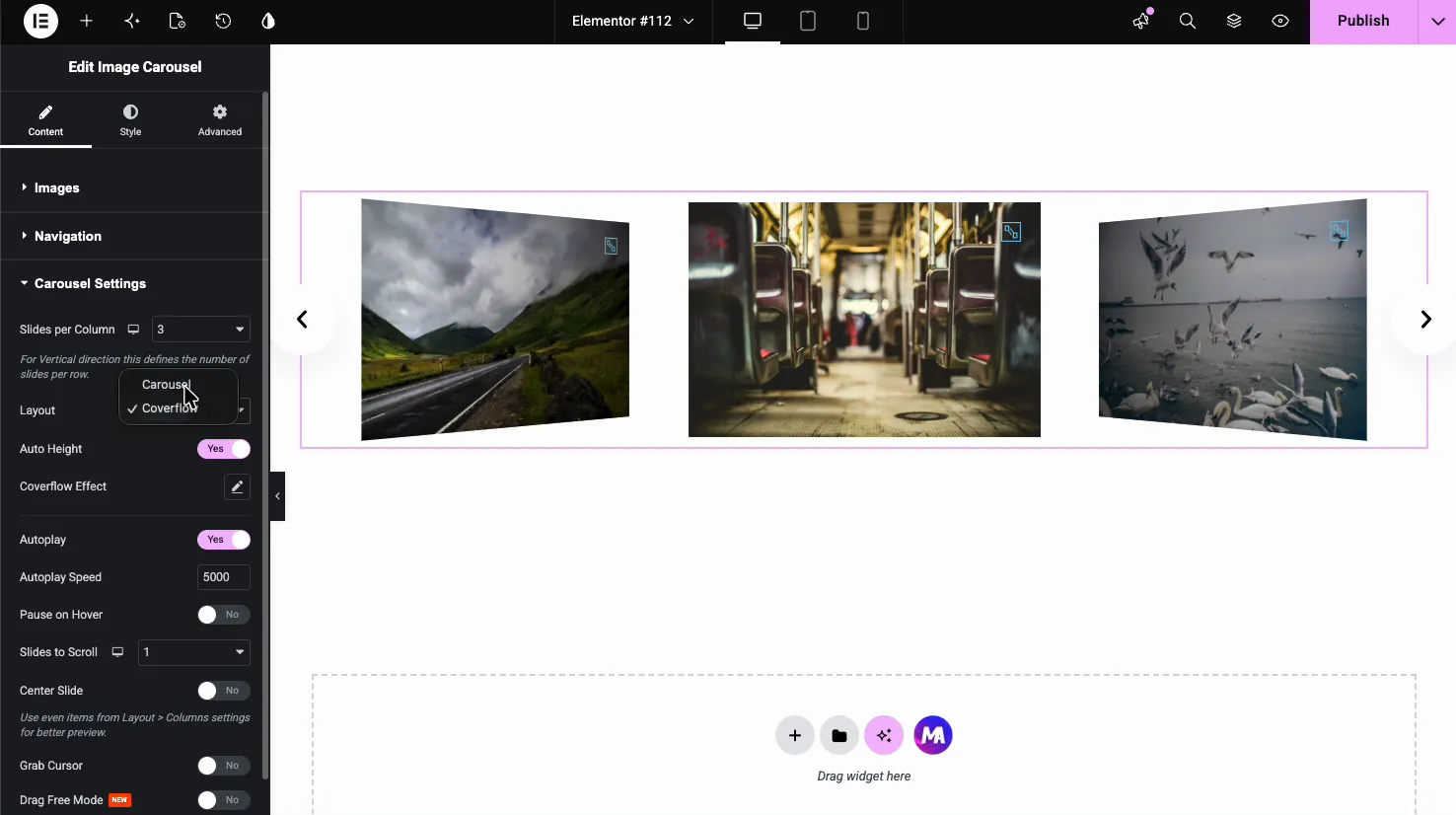
- प्रति दृश्य स्लाइड: कवरफ़्लो को कम से कम तीन दृश्यमान की आवश्यकता है या कोई “flow.” नहीं है, इसे डेस्कटॉप पर 3, मोबाइल पर 1 पर सेट करें और अजीब 2 को छोड़ दें।
इसके लिए आपको प्रो की आवश्यकता नहीं है मुफ्त छवि हिंडोला विजेट में एक कवरफ्लो लेआउट बनाया गया है।
के लिए अच्छाः केस अध्ययन, पोर्टफोलियो टुकड़े, एल्बम-शैली संग्रह।
के लिए बुराः कुछ भी लोगों को तुलना करने की आवश्यकता है कवरफ्लो आपको एक चीज को देखने के लिए बनाया गया है।
फ्लिप: दो तरफा कार्ड
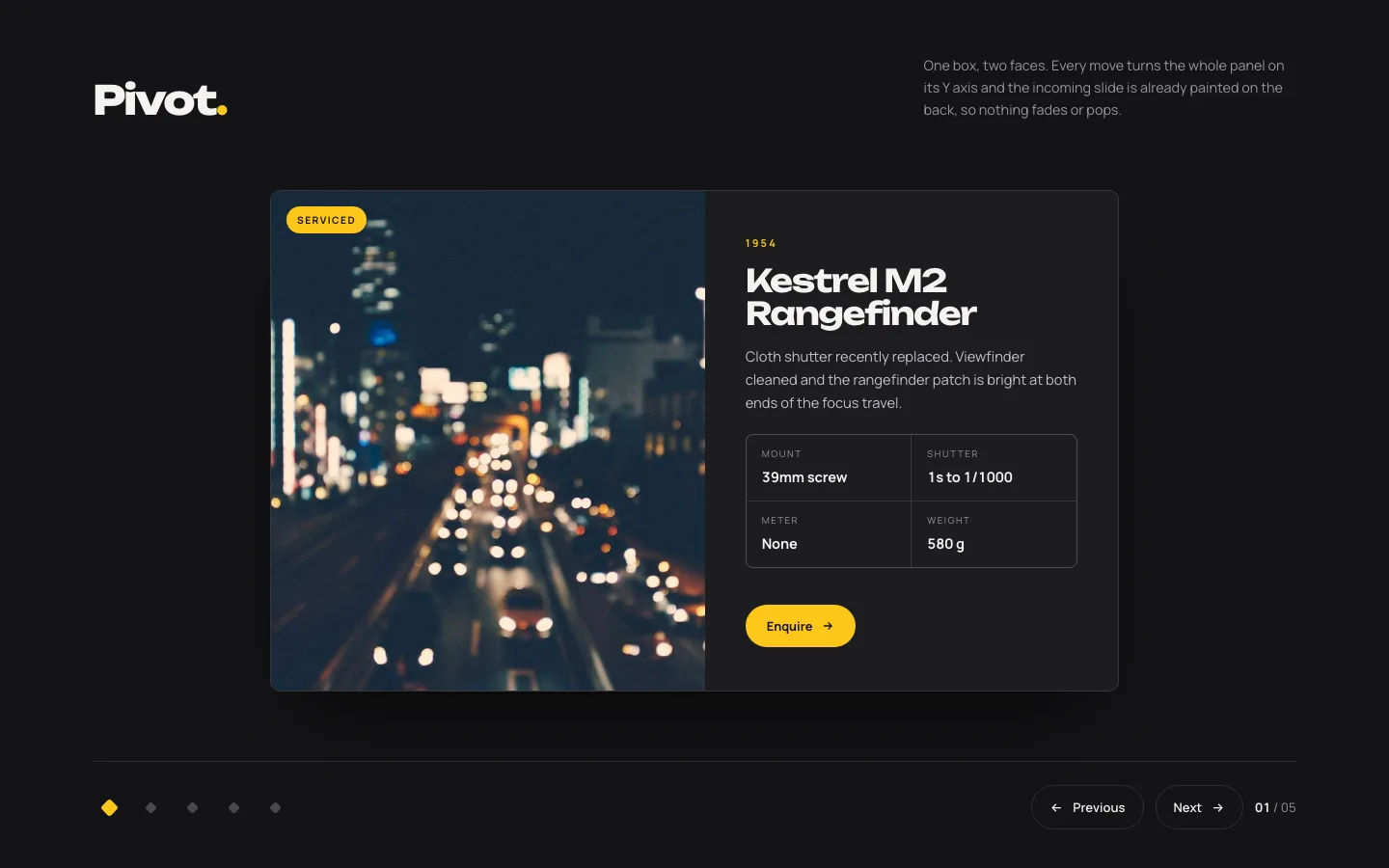
कार्ड अपने ऊर्ध्वाधर अक्ष पर एक पूर्ण १८०° घूमता है सामने का चेहरा बाहर, पीछे का चेहरा अंदर दोनों चेहरे वास्तविक सामग्री रखते हैं।
अधिकांश ३ डी प्रभाव सजावट हैं यह एक नहीं है यह प्रति स्लाइड सामग्री को दोगुना कर देता है, यही कारण है कि यह एक टीम पेज पर अपनी जगह कमाता है सामने की तरफ फोटो और नाम, भूमिका, जैव और पीछे की तरफ लिंक एक ही पदचिह्न, दो बार जानकारी।
सेटिंग करने वाले लोग गलत हो जाते हैं बैकफेस दृश्यताइसे छोड़ दो और आप सामने के चेहरे के एक प्रतिबिंबित भूत को मध्य-रोटेशन के माध्यम से खून बह रहा देखेंगे यह संपादक में याद करने के लिए पर्याप्त सूक्ष्म है और रेटिना स्क्रीन पर स्पष्ट रूप से इसे बंद कर दें।
दूसरी बात: ६०० मीटर के नीचे फ्लिप रखें एक फ्लिप एक प्रकट है, और एक प्रकट जो एक पूर्ण सेकंड लेता है वह उत्तरदायी महसूस करना बंद कर देता है और लोडिंग राज्य की तरह महसूस करना शुरू कर देता है।
के लिए अच्छाः टीम ग्रिड, पहले/बाद में, स्पेक कार्ड, मूल्य निर्धारण एक विवरण रिवर्स के साथ।
के लिए बुराः कुछ भी जहां पीछे का चेहरा खाली होगा इसके पीछे कुछ भी नहीं के साथ एक फ्लिप एक बर्बाद क्लिक है।
हिंडोला स्लाइड के बजाय एक स्थायी कार्ड के रूप में एक ही दो तरफा प्रकट करना चाहते हैं? वह है एलिमेंटर फ्लिपबॉक्स विजेटकी नौकरी।
चाप: एक वक्र पर स्लाइड
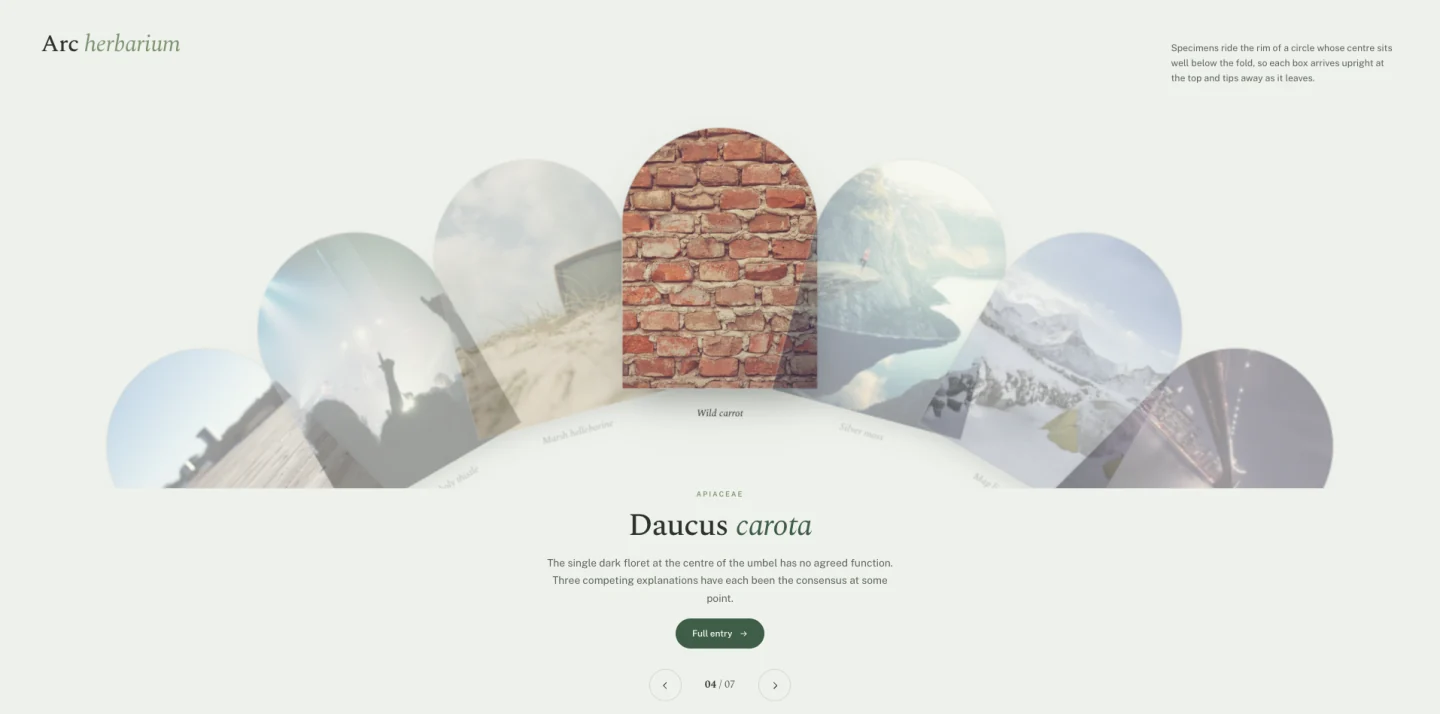
स्लाइड्स एक सर्कल के रिम की सवारी करते हैं जिसका केंद्र तह के नीचे बैठता है प्रत्येक चाप के शीर्ष पर सीधा आता है और यात्रा के रूप में दूर टिप देता है।
आर्क वर्डप्रेस साइटों पर सबसे कम आम ३ डी शैली है, जो इसके मूल्य का सबसे अधिक है एक आगंतुक ने सौ बार कवरफ्लो देखा है उन्होंने यह नहीं देखा है।
यह आपको बदले में कुछ खर्च करता है: टिपिंग गति का मतलब है कि स्लाइड केवल चाप के शीर्ष पर पूरी तरह से पठनीय हैं सामग्री जिसे परिधि में सुपाठ्य होने की आवश्यकता है (कीमतें, तिथियां, चश्मा) डिजाइन से लड़ेंगे छवियां और छोटे शीर्षक नहीं होंगे।
के लिए अच्छाः कैटलॉग, नमूना सूचियाँ, मेनू, समान वस्तुओं का संग्रह।
के लिए बुराः डेटा यदि लोगों को एक बार में तीन स्लाइड पढ़ने की आवश्यकता है, तो ग्रिड का उपयोग करें।
कक्षा: एक केंद्र के चारों ओर गोलाकार गति
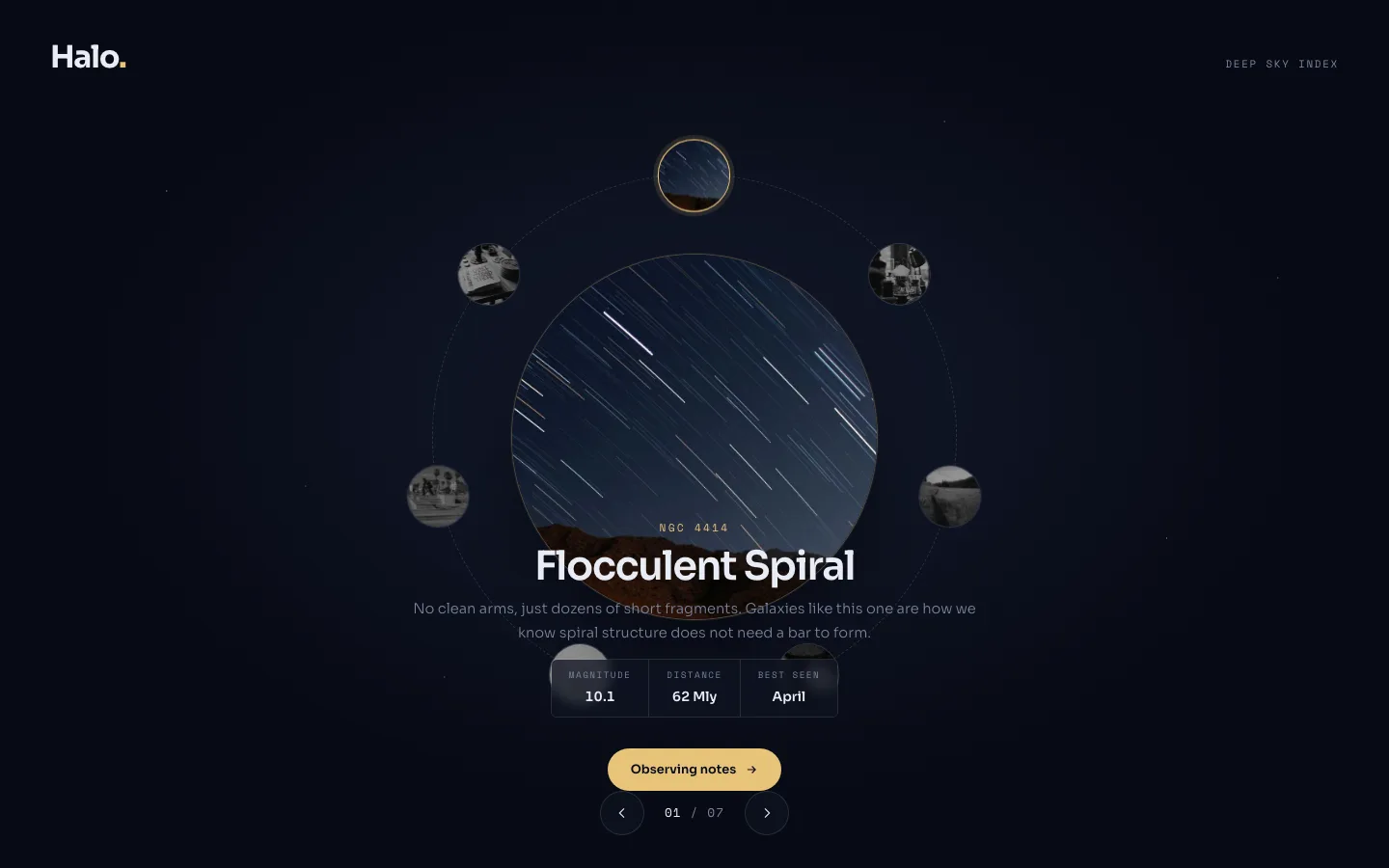
आइटम एक निश्चित केंद्र के चारों ओर एक पूर्ण चक्र यात्रा करते हैं शीर्ष पर आइटम सक्रिय और पूर्ण आकार है; बाकी के रूप में वे पीछे से गुजरते हैं नीचे स्केल करें।
ऑर्बिट कुछ संरचनात्मक कहता है जो कोई अन्य लेआउट नहीं कहता है: यह छोरों एक चार चरण की प्रक्रिया जो वास्तव में अपनी शुरुआत में वापस आती है, पूरी तरह से पढ़ता है पांच-चरण ऑनबोर्डिंग प्रवाह जो समाप्त नहीं होता है एक सर्कल एक वापसी का वादा करता है, और यदि आपकी सामग्री वापस नहीं आती है, तो लोग कुछ ऐसा इंतजार करते हैं जो कभी नहीं आता है।
जब सामग्री एक चक्र है तो कक्षा का उपयोग करें जब यह एक सूची है तो कवरफ्लो का उपयोग करें।
के लिए अच्छाः प्रक्रिया पहिये, पारिस्थितिकी तंत्र आरेख, क्षमता मानचित्र, सेवा चक्र।
के लिए बुराः एक शुरुआत और एक अंत के साथ अनुक्रम।
कैसे एक ३ डी हिंडोला बनाने के लिए जो हकलाना नहीं है
३ डी ट्रांसफॉर्म जीपीयू पर सस्ते होते हैं और यदि आप उन्हें गलत करते हैं तो महंगा होता है चार चीजें एक चिकनी हिंडोला को एक जानकी से अलग करती हैं, जिस क्रम में वे आपको काटेंगेः
- केवल चेतन परिवर्तन और अपारदर्शिता। एनीमेटिंग चौड़ाई, ऊंचाई, शीर्ष या बाएं बल प्रत्येक फ्रेम पर एक लेआउट पुनर्गणना करते हैं परिवर्तन और अस्पष्टता सीधे कंपोजिटर पर जाते हैं यहां हर डिजाइन उन दो से चिपक जाता है।
- छवि आकार कैप करें। एक ३ डी हिंडोला एक बार में स्मृति में कई स्लाइड रखता है क्योंकि वे सभी दिखाई दे रहे हैं ४०० केबी पर छह स्लाइड प्रत्येक २.४ एमबी है इससे पहले कि कुछ भी चलता है उन्हें २०० केबी के तहत प्राप्त करें और वेबपी की सेवा करें।
- ३ डी के अंदर ३ डी स्टैक न करें। एक कवरफ्लो ट्रैक के अंदर एक फ्लिप कार्ड नेस्टेड ३ डी संदर्भों को बनाता है, और ब्राउज़र असंगत रूप से संभालते हैं सफारी विशेष रूप से अप्रत्याशित क्षणों में आंतरिक परिवर्तन को समतल करता है एक उठाओ।
- कम गति का सम्मान करें. कुछ लोगों को वेस्टिबुलर विकार होते हैं, और गहराई एनीमेशन एक आम ट्रिगर है यहां हर डिजाइन एक सादे फीका में गिरता है जब
prefers-reduced-motionसेट है यदि आप अपना खुद का निर्माण करते हैं, तो ऐसा ही करें।
एक मध्य-श्रेणी के एंड्रॉइड फोन पर परीक्षण करें, ब्राउज़र के डिवाइस एमुलेटर में नहीं एमुलेटर व्यूपोर्ट का आकार बदलता है लेकिन आपके डेस्कटॉप के जीपीयू को रखता है यही वह जगह है जहां से मेरे मशीनंबाल पर “िट ठीक था।
क्या ३ डी हिंडोला पृष्ठ गति को चोट पहुंचाता है?
अपने आप से नहीं कंपोजिटर थ्रेड पर ट्रांसफॉर्म-आधारित एनीमेशन चलता है और मुख्य थ्रेड को ब्लॉक नहीं करता है, इसलिए यह आपके इंटरेक्शन को नेक्स्ट पेंट में ज्यादा नहीं ले जाएगा।
क्या चोट लगी है: छवियां छह पूर्ण आकार स्लाइड के साथ गुना के ऊपर एक हिंडोला छह रेंडर-अवरुद्ध छवि अनुरोध है जो आपके सबसे बड़े सामग्री पेंट के साथ प्रतिस्पर्धा कर रहा है आलसी-लोड सब कुछ पहले स्लाइड से पहले, स्पष्ट चौड़ाई और ऊंचाई सेट करें ताकि कुछ भी बदलाव न हो, और पहली स्लाइड की छवि १५० केबी के तहत रखें।
३ डी आपकी समस्या नहीं है पेलोड है।
यदि हिंडोला बुरी तरह से एनिमेट करने के बजाय बिल्कुल भी एनिमेट नहीं कर रहा है, तो आमतौर पर स्विपर एक परिवर्तन समस्या के बजाय आरंभ करने में विफल रहता है। स्विपर समस्या निवारण मार्गदर्शिका कवर करता है कि इसे लोड करना क्या रोकता है।
अक्सर पूछे जाने वाले प्रश्न
क्या एलिमेंटर के पास ३ डी हिंडोला है?
मूल रूप से नहीं एलिमेंट के मीडिया कैरोसेल (प्रो) में एक कवरफ्लो त्वचा है जो हल्के ३ डी प्रभाव देता है, लेकिन कोई फ्लिप, आर्क या ऑर्बिट विकल्प नहीं है उन लोगों के लिए जिन्हें आपको एक ऐडऑन की आवश्यकता है मास्टर एडॉन्स 'मुक्त छवि हिंडोला इसमें एक कवरफ़्लो लेआउट शामिल है, और इस पृष्ठ पर चार प्रो डिज़ाइन बाकी को कवर करते हैं।
मैं एलिमेंट में कवरफ्लो हिंडोला कैसे बना सकता हूं?
ड्रॉप द छवि हिंडोला विजेट पृष्ठ पर, अपनी छवियों को जोड़ें, फिर कैरोसेल सेटिंग्स स्विच लेआउट के तहत मानक से कवरफ्लो तक स्लाइड-प्रति-दृश्य ३ पर सेट करें, लगभग ३५° पर घुमाएं, और केंद्रित स्लाइड को चालू करें ताकि सक्रिय छवि फ्लश बाएं के बजाय बीच में बैठे।
कवरफ्लो और ३ डी हिंडोला के बीच क्या अंतर है?
कवरफ्लो एक प्रकार का ३ डी हिंडोला है: वह जहां साइड स्लाइड वाई अक्ष पर घूमती है और पीछे हटती है फ्लिप, चाप और कक्षा भी ३ डी हिंडोला हैं, वे सिर्फ अलग-अलग अक्ष और पथ का उपयोग करते हैं सभी चार एक फ्लैट विमान के बजाय गहराई के माध्यम से स्लाइड को स्थानांतरित करते हैं।
क्या ३ डी हिंडोला मोबाइल पर काम करते हैं?
हां, समायोजन के साथ कवरफ्लो को ७६८ पीएक्स से नीचे प्रति दृश्य एक स्लाइड तक गिर जाना चाहिए या साइड पैनल अनुपयोगी स्लिवर्स बन जाते हैं फ्लिप अपरिवर्तित काम करता है आर्क और ऑर्बिट को ठीक से पढ़ने के लिए एक व्यापक व्यूपोर्ट की आवश्यकता होती है, इसलिए दोनों फोन पर एक मानक क्षैतिज स्लाइड पर वापस आते हैं।
सफारी में मेरा ३ डी हिंडोला झिलमिलाहट क्यों करता है?
लगभग हमेशा बैकफेस दृश्यता सफारी एक घुमाए गए तत्व के रिवर्स को प्रस्तुत करता है जब तक कि आप इसे स्पष्ट रूप से छिपाते नहीं हैं, जो एक झिलमिलाहट या भूत दर्पण छवि के रूप में मध्य-रोटेशन के रूप में सेट करता है backface-visibility: hidden घूमने वाले तत्व पर और यह रुक जाता है।
कौन सा लेने के लिए
कवरफ्लो यदि आप सुनिश्चित नहीं हैं यह शैली लोग पहले से ही समझते हैं, और मुफ्त छवि हिंडोला विजेट आपको बिना लाइसेंस के देता है फ्लिप यदि आपकी सामग्री वास्तव में दो पक्ष हैं आर्क यदि आप कुछ चाहते हैं तो आपके आला के पहले पृष्ठ पर कोई और नहीं है केवल तभी कक्षा यदि आप जो चीज दिखा रहे हैं वह वास्तव में लूप्स है यदि अनुभाग को हिंडोला बिल्कुल नहीं चाहिए, तो हिंडोला बनाम स्लाइडर गति शैली के मामलों से पहले इसे सुलझाता है।
यदि आप जिस चीज़ को घुमाना चाहते हैं वह आपकी नवीनतम पोस्ट है, तो हमारे मार्की लेआउट में एलिमेंटर ब्लॉग टेम्पलेट्स ब्लॉग पेज के शीर्ष पर एक विशेष पोस्ट हिंडोला डालता है।
सेट में बीस डिज़ाइनों में से आठ मुक्त प्लगइन पर आयात करेंमुक्त आठ में से कोई भी ३ डी नहीं है, हालांकि कीस्टोन फ़ीचर स्लाइडर करीब आता है: किसी आइटम को बढ़ावा देने से गहराई परिवर्तन के बजाय फ्लिप स्थिति एनीमेशन चलता है।
सभी बीस डिज़ाइन के साथ बनाए गए हैं विजेट बिल्डर, जो वह उपकरण भी है जिसका उपयोग आप अपना खुद का निर्माण करने के लिए करेंगे। यदि आप लाइसेंस का वजन कर रहे हैं, तो मूल्य निर्धारण पृष्ठ सूचीबद्ध करता है कि प्रत्येक स्तर क्या अनलॉक करता है।
इन चारों का लाइव डेमो है एलिमेंटर हिंडोला विजेट पृष्ठ, अन्य सोलह डिजाइनों के साथ यदि आप पहले पक्ष द्वारा पूर्ण सेट को देखना चाहते हैं, तो सभी बीस स्लाइडर टेम्पलेट्स एक ही उपचार के साथ एक ही स्थान पर एकत्र किए जाते हैं।
बीस में से हर एक एक है मास्टर ऐडऑन विजेट या एक्सटेंशनू ी है, तो वे उसी तरह से संस्थापित करते हैं जैसे स्टॉक विजेट करते हैं एक के लिए थंबनेल-पट्टी गैलरी 3डी ट्रैक के बजाय, गैलरी स्लाइडर विजेट तैयार विकल्प है।
