


Key Takeaways
- An Elementor filterable gallery needs either the Gallery widget in Elementor Pro or an addon, because the Basic Gallery and Image Carousel widgets in Elementor’s free version have no filter bar.
- The Master Addons Filterable Image Gallery widget adds category tabs with an All button, comma-separated labels so one image can sit in several categories, masonry columns, a lightbox and two buttons per card.
- Visual Portfolio is the standalone plugin with the most included for filtering: AJAX category filters, masonry, justified and tiles layouts, three pagination types and an Elementor widget, on 60,000+ sites.
- FooGallery, Modula and Photo Gallery by Supsystic all put front-end filtering in their Pro tiers, while their masonry layouts and basic lightboxes ship in the base plugin.
- NextGEN Gallery reports 300,000+ active installs on WordPress.org in October 2026, down from the 900,000 figure older roundups still quote, and its masonry, mosaic and filtered layouts are Pro.
The best Elementor filterable gallery plugin depends on whether you want the filter bar inside the Elementor editor or inside a separate gallery plugin. Elementor Pro’s Gallery widget can put several galleries behind a filter bar, but it needs a Pro license. Without it, the Master Addons Filterable Image Gallery widget does the job on the Elementor canvas, and standalone plugins such as Visual Portfolio or FooGallery bring their own gallery editor plus a shortcode or widget.
This list covers 10 gallery plugins that work with Elementor, re-checked against WordPress.org on 26 October 2026 for installs, ratings and last update, with a feature table showing where filtering, masonry, lightbox and load more sit in each plugin’s base or paid tier. If you want the build steps instead, the guide on how to create a filterable gallery in Elementor walks through two methods, and the Elementor masonry gallery guide covers the staggered layout.
Table of Contents
What Is an Elementor Filterable Gallery?
An Elementor filterable gallery is an image grid with a row of category buttons above it. Visitors click a category and the grid hides every item that does not carry that label, usually with an animation, so a portfolio of 40 projects becomes browsable without pagination. Each image carries one or more labels, and an All button restores the full grid.
Elementor’s free version ships a Basic Gallery and an Image Carousel, neither of which has a filter bar. The Gallery widget with filters sits in Elementor Pro. That leaves two routes for a filterable gallery without Pro: an addon widget that builds the grid and filter inside the Elementor editor, which is what Master Addons does, or a standalone gallery plugin that you place on the page with its own widget or a shortcode. The guide to Elementor’s gallery widgets, free vs Pro vs addons compares the three routes in detail.
Want the filter bar inside Elementor? The Master Addons Filterable Image Gallery widget builds the grid, the category tabs, the lightbox and the hover buttons from one panel, with a live demo on its page.
Quick Comparison: Elementor Filterable Gallery Plugins
Ten plugins, ordered by how much filtering you get without paying, then by install base. Install counts, ratings and update dates are from the WordPress.org plugin directory on 26 October 2026.
| Plugin | Active Installs | Rating | Last Update | Best For |
|---|---|---|---|---|
| Master Addons | 30,000+ | 4.5 ★ (212) | Sep 2026, v3.2.3 | Filterable grid built inside the Elementor editor |
| Visual Portfolio | 60,000+ | 4.8 ★ (340) | Oct 2026, v3.9.0 | Standalone plugin with filters, layouts and pagination included |
| FooGallery | 100,000+ | 4.8 ★ (994) | Oct 2026, v3.3.17 | Masonry and lightbox in the base plugin, filters in Pro |
| Modula Image Gallery | 100,000+ | 4.7 ★ (616) | Oct 2026, v3.0.16 | Fast, good-looking grids; filters in Pro |
| Envira Gallery | 100,000+ | 4.7 ★ (1,596) | Oct 2026, v1.16.3 | Albums, video galleries and a native Elementor addon |
| NextGEN Gallery | 300,000+ | 4.3 ★ (4,341) | Oct 2026, v4.5.4 | Photographers who need proofing and selling |
| Photo Gallery by 10Web | 100,000+ | 4.5 ★ (1,581) | Oct 2026, v1.8.48 | Tag filters and an Elementor widget |
| Photo Gallery by Supsystic | 20,000+ | 4.6 ★ (498) | Oct 2026, v1.21.4 | Masonry and lightbox templates; category tabs in Pro |
| Robo Gallery | 40,000+ | 4.3 ★ (406) | Oct 2026, v5.2.6 | Grid, masonry and polaroid layouts with load more |
| MetaSlider | 500,000+ | 4.6 ★ (742) | Sep 2026, v3.113.1 | Sliders and carousels; no filter bar |
Feature Comparison: Filters, Masonry, Lightbox, Load More
Filtering is the feature most of these plugins charge for. Masonry and a basic lightbox are usually included, load more and infinite scroll are split, and only some plugins give you an actual Elementor widget rather than a shortcode you paste into a Text widget. Where a plugin page does not state the tier, the table says so instead of guessing.
| Plugin | Front-end Filter | Masonry | Lightbox | Load More / Pagination | Elementor Widget |
|---|---|---|---|---|---|
| Master Addons | Yes, category tabs | Yes | Yes | No | Yes, native |
| Visual Portfolio | Yes, AJAX by category | Yes | Yes (Fancybox, PhotoSwipe) | Yes, 3 types | Yes |
| FooGallery | Pro Expert | Yes | Yes, built in | Basic pagination; Load More and Infinite Scroll in Pro | No, page builder compatible |
| Modula Image Gallery | Pro | Yes | Yes | Not listed | No, works via block or shortcode |
| Envira Gallery | Tag filtering listed, tier not stated | Listed | Yes, built in | Not listed | Elementor Gallery addon |
| NextGEN Gallery | Pro | Pro | Yes | Not listed | No, block and shortcode |
| Photo Gallery by 10Web | Tag filters, tier not stated | Premium | Yes | Not listed | Yes |
| Photo Gallery by Supsystic | Pro | Yes | Yes | Pro | Yes, native |
| Robo Gallery | Tag filtering listed, tier not stated | Yes | Yes | Load More and paged | Yes |
| MetaSlider | No | No | Separate MetaSlider Gallery plugin | No | No, page builder compatible |
1. Master Addons Filterable Image Gallery

The Filterable Image Gallery widget in Master Addons adds a category filter bar to an Elementor image grid, and you set it up inside the Elementor editor, so there is no separate gallery plugin to manage. Every gallery item is a row in a repeater with its own Filter Label, images, title, subtitle, optional ribbon and two buttons, and it can open in a lightbox or link to a page.
For portfolios and product showcases, the hover effects do a lot of the work: hover scale, a 3D tilt with glare, and a choice of overlay animations. If you need a hover effect on one image and no filter bar, the Image Hover Effects widget is the simpler choice. For a step-by-step build, see how to build a filterable portfolio in Elementor.
Key features
- Category filter tabs with an optional All tab and your own labels, aligned left, center or right
- One item can sit in several categories: comma-separate the Filter Label
- Masonry or fixed-ratio grid with adjustable columns, gutter and image resolution
- Hover scale and a 3D tilt effect with adjustable perspective, speed and glare
- Ribbons, lightbox or link per item, and two buttons on every card with separate Normal and Hover styles
- Separate style sections for the filter bar, active tab, title, subtitle, category label and overlay
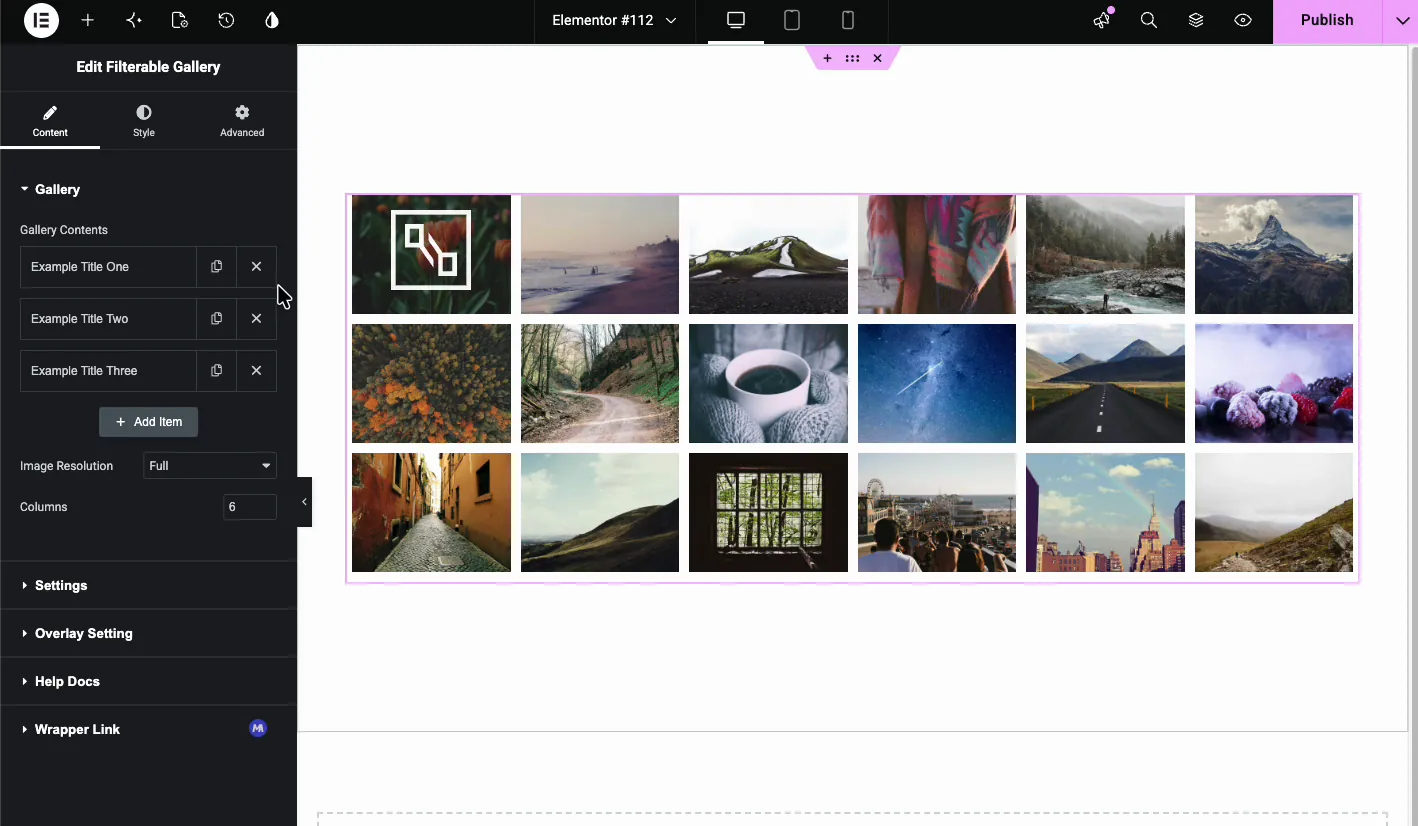
Every control is listed in the Filterable Image Gallery widget documentation. The widget ships with the rest of the Master Addons widgets and extensions; current plans are on the pricing page.
2. Visual Portfolio

Visual Portfolio is the standalone plugin that gives you the most filtering without an upgrade. AJAX filters by category, Masonry, Justified, Tiles, Grid and Slider layouts, Fancybox and PhotoSwipe lightboxes, and three pagination types (infinite scroll, load more button, paged) are all listed as core features, and there is an Elementor widget. It runs on 60,000+ sites with a 4.8 rating from 340 reviews, and version 3.9.0 shipped on 24 October 2026.
Key features
- Filter galleries and portfolios by taxonomy, loaded with AJAX so the page does not reload
- Masonry, Justified, Tiles, Grid, Slider and Carousel layouts
- Infinite scroll, load more button or paged pagination
- Post grids as well as image galleries, so one plugin covers portfolio posts and photo sets
- Pro adds watermarks, proofing galleries, social feeds, extra hover effects and deep-linked popups
3. FooGallery

FooGallery is on 100,000+ sites with a 4.8 rating from 994 reviews, and version 3.3.17 shipped on 19 October 2026. Two things have changed since older roundups: the lightbox is now built in, so you no longer need the separate FooBox plugin, and the Masonry layout is part of the base plugin. Filtering by media tags or categories, with multi-level filters, sits in the Pro Expert plan, alongside Load More, Infinite Scroll and numbered pagination.
Key features
- Masonry, responsive grid and other gallery templates in the base plugin
- Built-in lightbox and lazy loading
- Basic pagination included; Load More, Infinite Scroll and numbered pagination in Pro
- Pro Expert adds filtering by media tags or categories, video galleries and hover effect presets
- Works with Elementor and Divi through shortcodes; there is no dedicated Elementor widget
4. Modula Image Gallery

Modula is the plugin whose galleries look good with default settings. Install it, add images, and the custom grid or masonry layout is ready in a minute. It runs on 100,000+ sites with a 4.7 rating from 616 reviews, and version 3.0.16 shipped on 22 October 2026. The lightbox is enabled by default, and the plugin page lists Elementor, Beaver Builder and Divi as supported builders, though placement is via the Modula block or a shortcode rather than a dedicated widget.
The catch for this list: Gallery Filters is a Pro extension. If filtering is the reason you are here, budget for Modula Pro or pick one of the plugins above.
Key features
- Custom grid and masonry layouts with drag-to-resize tiles
- Lightbox on by default, captions, loading and hover effects
- Video galleries
- Pro adds Gallery Filters, lightbox slideshow, image protection and speed optimizations
5. Envira Gallery

Envira Gallery sits between Modula’s simplicity and NextGEN’s feature depth. It is on 100,000+ sites with a 4.7 rating from 1,596 reviews, and version 1.16.3 shipped on 23 October 2026. The plugin page lists a built-in responsive lightbox, a Masonry layout, albums, video galleries and a native Elementor gallery addon. Image tagging with a filterable tag bar is listed too, without a Lite or Pro label, so check the tier before you rely on it.
Key features
- Drag-and-drop gallery builder with a built-in responsive lightbox
- Masonry layout and albums
- Native Elementor gallery addon
- Paid tiers add WooCommerce selling, client proofing, watermarking, social sharing and deep linking
6. NextGEN Gallery

NextGEN Gallery is the heavy-duty option for photographers who need image management, proofing and selling in the same plugin. It reports 300,000+ active installs and a 4.3 rating from 4,341 reviews, with version 4.5.4 released on 22 October 2026. Older roundups still quote 900,000 installs; that figure is out of date.
The base plugin gives you three gallery styles (slideshow, thumbnail and image browser), two album styles and a lightbox. Masonry, mosaic, tile and filmstrip layouts, plus front-end search and filtering, are in NextGEN Pro, which also adds client proofing, print and digital download sales. Placement on Elementor pages is via the block or shortcode.
Key features
- Batch uploads, FTP import and gallery management for large libraries
- Slideshow, thumbnail and image browser galleries with a lightbox
- Pro adds masonry, mosaic, filmstrip and tile layouts, filtering and search
- Pro adds client proofing and ecommerce for selling prints and downloads
7. Photo Gallery by 10Web

Photo Gallery by 10Web runs on 100,000+ sites with a 4.5 rating from 1,581 reviews. Version 1.8.48 shipped on 15 October 2026, though the plugin lists WordPress 6.6 as its tested version, so it trails the current release. It has a dedicated Elementor widget, tag filters on the front end, and a lightbox with a long settings list. Masonry and mosaic views and the tag cloud are premium.
Key features
- Thumbnails, image browser, slideshow and blog style views
- Tag filters with an AND operator option
- Lightbox, lazy loading, watermarks and image preloading
- Elementor widget with shortcode options
- Premium adds masonry and mosaic views, Instagram import, video galleries and ecommerce
8. Photo Gallery by Supsystic

Photo Gallery by Supsystic is the smallest plugin on the list at 20,000+ installs, with a 4.6 rating from 498 reviews and version 1.21.4 released on 16 October 2026. The base plugin includes masonry, rounded and standard grid templates, a responsive lightbox, lazy loading, social share buttons, TinyPNG compression and a native Elementor widget. Category tabs, filters and in-gallery search are Pro, as are pagination, Load More and infinite scroll.
Key features
- Masonry, rounded and grid templates with a lightbox
- Lazy loading and TinyPNG integration
- Native Elementor widget
- Pro adds category tabs, filters, search, pagination, video and imports from Facebook, Flickr, Tumblr, Google Drive and FTP
9. Robo Gallery

Robo Gallery runs on 40,000+ sites with a 4.3 rating from 406 reviews, and version 5.2.6 shipped on 6 October 2026. It covers grid, masonry, polaroid, mosaic and YouTube gallery layouts, offers Load More and paged pagination with lazy loading, and has an Elementor gallery widget. Tag-based filtering is listed as a navigation feature, but the plugin page does not say which tier it belongs to.
Key features
- Grid, masonry, polaroid, mosaic and YouTube video gallery layouts
- Load More and multi-page pagination with lazy loading
- Bulk image upload and right-click image protection
- Elementor gallery widget
10. MetaSlider

MetaSlider is the most installed plugin here at 500,000+ sites, with a 4.6 rating from 742 reviews and version 3.113.1 from 30 September 2026. It earns its place for a different job: sliders and carousels rather than a filterable grid. There is no filter bar, the photo gallery feature is described as still in development, and the lightbox comes from a separate MetaSlider Gallery plugin. Pick it when the images should rotate instead of filter, for example a hero slider above a filterable portfolio built with one of the plugins above. Our guide to creating an image carousel in Elementor covers the slider side.
Key features
- Drag-and-drop slide ordering, captions and multiple slider types
- Works with the block editor and Elementor pages through its shortcode and block
- Pro adds layer slides with text and buttons, thumbnail navigation, post feed slides, YouTube and Vimeo slides and WooCommerce product sliders
How to Choose an Elementor Gallery Plugin
Start from where the filter bar has to live and what you refuse to pay for.
| If you… | Start with |
|---|---|
| Build the page in Elementor and want the filter grid styled in the same panel | Master Addons Filterable Image Gallery |
| Want a standalone plugin with filters and pagination included | Visual Portfolio |
| Want masonry and a lightbox now and may pay for filters later | FooGallery or Modula |
| Need albums, video galleries or selling photos | Envira Gallery or NextGEN Gallery |
| Want tag filters plus an Elementor widget in one plugin | Photo Gallery by 10Web |
| Need the images to rotate, not filter | MetaSlider |
Whichever you choose, a gallery page lives or dies on image weight. The roundup of the best WordPress image optimizer plugins covers compression, and the best Elementor themes list helps if the theme itself is slowing the grid down. For single images with text, see 25 Elementor text over image examples, and for before and after shots the image comparison slider guide.
Frequently Asked Questions
Does free Elementor have a filterable gallery?
No. Elementor’s free version ships a Basic Gallery and an Image Carousel, neither with a filter bar. The Gallery widget with filters is in Elementor Pro. Without Pro, use an addon such as the Master Addons Filterable Image Gallery widget inside the editor, or a standalone plugin such as Visual Portfolio placed with its widget or shortcode.
What is the best gallery plugin for Elementor?
For a filterable grid built inside the Elementor editor, the Master Addons Filterable Image Gallery widget, which adds category tabs, masonry, a lightbox and two buttons per card. For a standalone plugin, Visual Portfolio includes AJAX filters, several layouts, three pagination types and an Elementor widget. FooGallery and Modula are strong if you do not need filtering yet.
Which WordPress gallery plugin has filters without paying?
Visual Portfolio lists AJAX category filters among its core features, and Master Addons builds category tabs into its Filterable Image Gallery widget. FooGallery, Modula and Photo Gallery by Supsystic put front-end filtering in their Pro tiers. Envira, 10Web and Robo Gallery list tag filtering without stating the tier on their plugin pages.
Is FooGallery free?
FooGallery has a free plugin on WordPress.org with masonry and other gallery templates, a built-in lightbox and basic pagination. Filtering by tags or categories, Load More, Infinite Scroll, video galleries and hover effect presets are in the paid Pro plans.
How do I add a filter to an Elementor gallery?
Drag the Master Addons Filterable Image Gallery widget onto the page, add a repeater item per image and type a category in its Filter Label field, comma-separating labels if an image belongs to more than one. Turn on Show Filter Nav and the All tab in Settings. The tabs appear above the grid and filter it on click.
How do I create a gallery in WordPress without Elementor?
Install a gallery plugin such as Visual Portfolio, FooGallery or Modula, create a gallery from the Media Library in its settings screen, choose a layout such as masonry, then place it in a post with the plugin’s block or shortcode. Most plugins add a lightbox automatically.
Final Thoughts
Of the 10 plugins, two give you a filter bar without an upgrade: Master Addons inside the Elementor editor and Visual Portfolio as a standalone plugin, while Photo Gallery by 10Web lists tag filters without saying which tier they belong to. FooGallery, Modula and Supsystic are good galleries whose filtering costs extra, NextGEN and Envira earn their place on proofing, albums and selling, Robo Gallery covers layouts and load more, and MetaSlider is for images that rotate rather than filter.
If the page is already an Elementor page, the shortest route is the widget: drop in the Filterable Image Gallery, label the items, switch on the filter nav, and style everything in the panel you already have open.
Related Reading
