
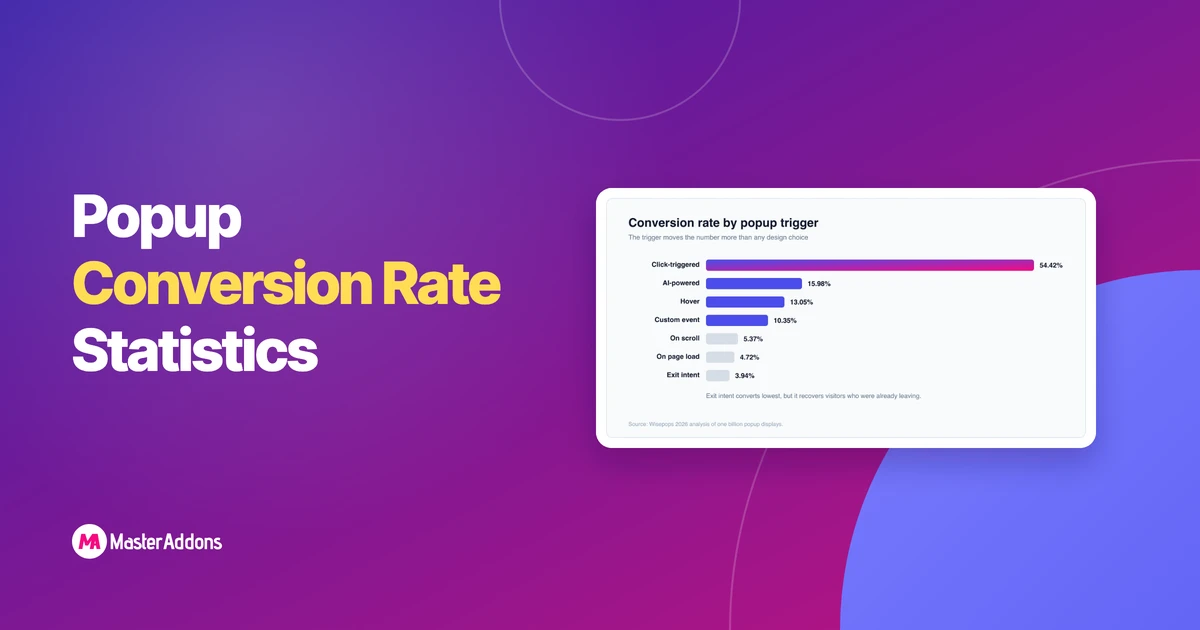
The average popup converts at 4.82%, and anything between 3% and 5% is healthy for a plain email popup. The top 10% of campaigns average 57.7%, which tells you how much of the result comes down to trigger, offer and timing rather than the popup itself.Every figure here comes from studies covering more than a …

Most affiliate systems work fine when there are only a handful of affiliates involved.But once the numbers grow, things start getting tangled around missing commissions,
Read More
Can you make a timeline in Elementor without a plugin?Install the pluginHow to add a timeline in Elementor, step by stepWhy the cards look blank
Read More
Key TakeawaysThe WordPress Halloween deals in this roundup cover 70 plugins, themes and services, and every discount, coupon code and end date on the page
Read More
By Roy, Master Addons for Elementor · Updated July 2026The WordPress admin dashboard has barely changed in fifteen years. It still greets every new user
Read More
Key TakeawaysElementor's Icon Library popup shows only Font Awesome by default, in Regular, Solid and Brands sets, and every widget with an icon field opens
Read More




The average popup converts at 4.82%, and anything between 3%
Read More